
DOWNLOAD THE APP


Customer Services
Copyright © 2025 Desertcart Holdings Limited
DOWNLOAD THE APP

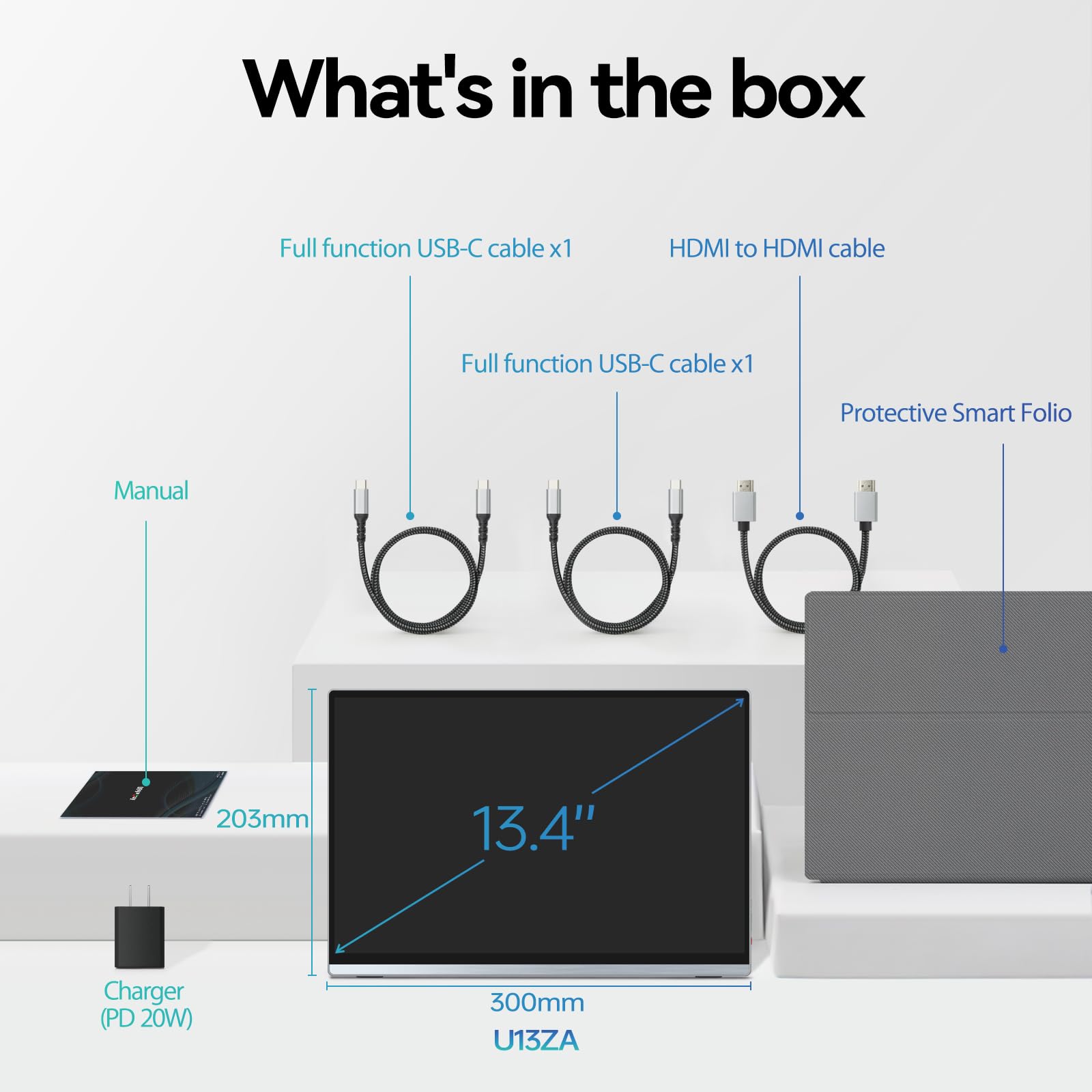


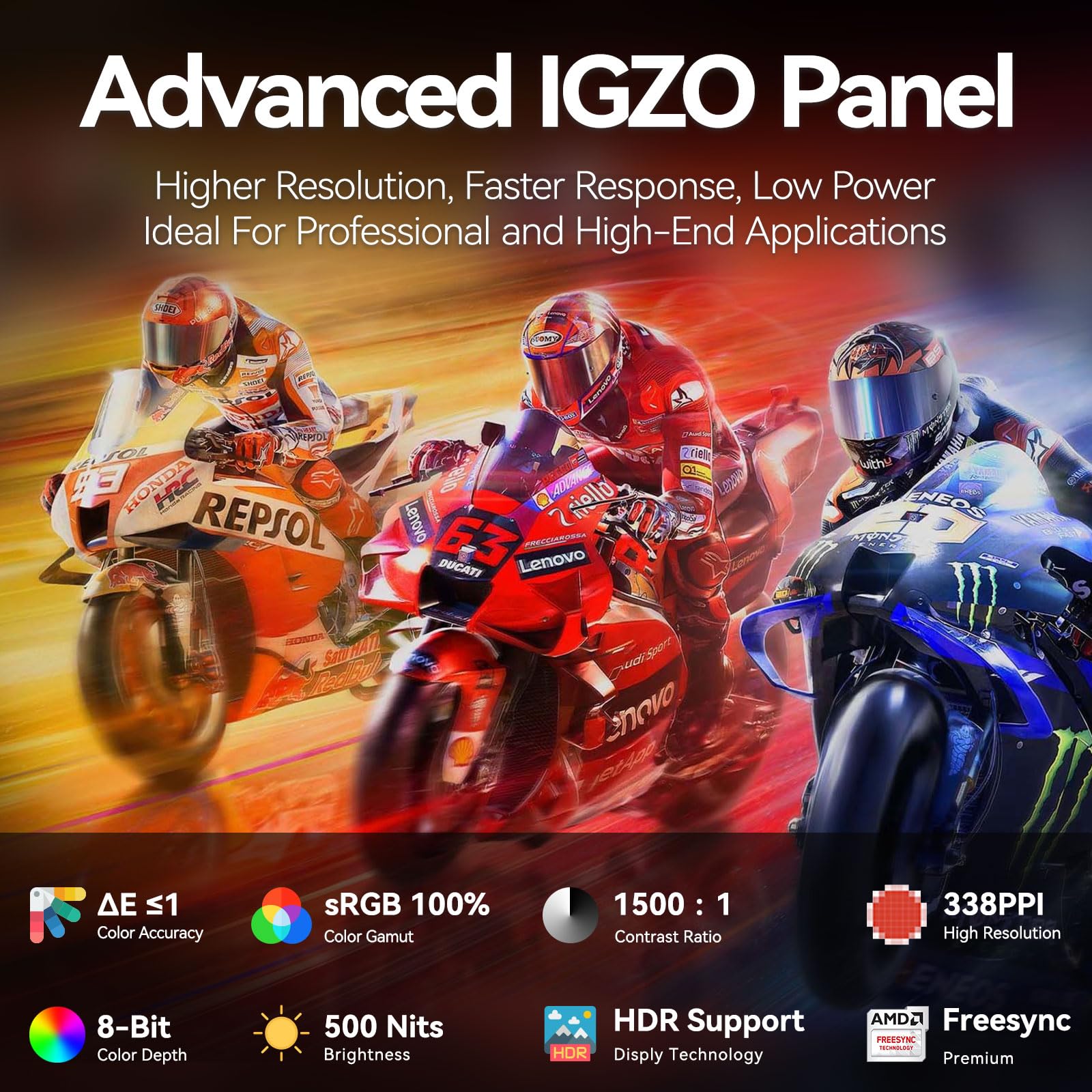
🚀 Elevate your workspace anywhere with crystal-clear 4K brilliance!
The Intehill Portable Monitor 4K features a 13.4-inch 3840x2400 IGZO display delivering sharper images and superior color accuracy with 100% sRGB. Its anti-glare, 500 nits brightness screen ensures comfortable viewing in any lighting. Equipped with dual USB-C and HDMI ports, it offers versatile connectivity for laptops, phones, Macs, and gaming consoles like PS5. The monitor supports a 16:10 golden ratio and includes an E-Ink mode to reduce eye strain. Built with a CNC anodized aluminum body, built-in speakers, and VESA mount support, it combines portability with premium design. Comes with a 3-year warranty and lifetime technical support.





| ASIN | B0D6YPHS97 |
| Aspect Ratio | 16:10 |
| Best Sellers Rank | #23,475 in Electronics ( See Top 100 in Electronics ) #606 in Computer Monitors |
| Customer Reviews | 4.4 4.4 out of 5 stars (556) |
| Date First Available | July 9, 2024 |
| Image brightness | 500 Candela |
| Item Weight | 1.42 pounds |
| Item model number | U13ZA |
| Manufacturer | Intehill |
| Product Dimensions | 0.35 x 11.85 x 7.8 inches |
| Resolution | 3840 x 2400 Pixels |
| Standing screen display size | 13.4 Inches |
| Total Usb Ports | 2 |
M**I
So Good I Got Two
Intehill is my go to for portable monitors. After buying from them before I was excited to see this monitor get released. It's a perfect size for me. I needed a 16:10 that worked well with my Asus G14 (2022) laptop. I also wanted something light enough that I could use a tablet stand with it. This one ticked all those boxes and more. The display is really bright and it's hard to find good portable monitors with such high brightness. The glossy screen would only really cause a problem in very bright areas with light directly pointed at it. The color on the screen is amazing. I can't see any issues with it and everything pops. I've tested this with my Switch and my Steam Deck. Both work great with it. Being able to plug the Switch in and the Switch changes to docked mode is superb. I take my monitors with when I travel. The kids can then use the Switch without needing to bring the dock or a bunch of other accessories to make it work. They C-adapters and power brick included really do make a difference for older laptops. I didn't have to buy anything extra in order for my wife to use this on her work laptop. Since I've bought Intehill in the past I can say they've made a lot of improvements on this model. The biggest would be the speaker placement. On my other monitors the speakers are on the bottom so when you try to use them the sound gets muffled. With this model the speakers are on the sides. They sound really good for the size. They aren't top tier quality but better than expected. The cover works much better as a stand than the other models I have. You also can't really put the cover on wrong. The magnets repel when putting it on wrong. I discovered this by mistake but I'm glad it works that way. The only other Intehill monitor I have that can beat the display quality would be the QLED model. But I don't think you can fit a QLED into a screen size this small with 4k+ resolution. I would say this is probably 90%-95% of the quality the QLED I have. I haven't had any issues with viewing angles. The headphone jack wasn't something I expected to use but I have found it handy. I can use my Switch and headphones with it at the same time. It also makes it easier when my laptop is further away and my headphone cable isn't long enough. The emulated e-ink mode wasn't something I've been able to fully test. It is nice as it puts it into a grayscale mode. It can really help when reading and dealing with pages that have lots of high contrast items. I believe if you could find an anti-glare screen cover you could come very close to feeling like e-ink. It is a mode I'm glad they offer. It'll be very handy when I'm coding. The only thing I would change would be related to the C shaped mini-HDMI adapter. It goes from mini-HDMI to HDMI but the included HDMI cable is mini to regular. So you can't use the C shaped adapter with the included HDMI cable. It would have bee nice to either have a regular HDMI cable included or an adapter so I could use the included cable. Not a deal breaker as they didn't have to include these accessories and didn't on the previous models I bought.
D**U
Fantastic, small, portable 4K monitor for USB-C connection
This monitor feels solidly built and works wonderfully over a single USB-C connection providing both power and the video signal. It looks great in 4K 60fps or 1080p 60fps when connected either directly to my MacBook Pro M1 or through an OWC thunderbolt dock. I like to work in with fairly low ambient lighting, so I keep the brightness dialed down to 45 or so, to match my other monitors, and it looks great. All the cables you're likely to need are included, along with 180 degree adapters so that you can keep cables need and tidy. I've taken the monitor on plane trips with me, and it makes working remotely much, much easier than if I had to function with just my laptop's screen. That said, it's a very small screen to try to use at 4K resolution, and I often find myself using it in 1080p instead. If you don't have great vision, the high resolution may go to waste, but I'm very happy to have the flexibility that a 4K monitor allows. I did have trouble getting ordinary USB-C cables to work without the 180 degree adapters. I don't think I ever actually figured that out. I just use the adapters all the time. Having two of them lets me keep one attached to a cable and tablet mount on my desk while the other goes with me in my laptop bag. The 180 degree mini HDMI to normal HDMI adapter has come in handy, too, for using the monitor with an older laptop. Lastly, the inclusion of a USB-C power adapter means that you get everything you need to be functional right out of the box. I didn't have to go buy any accessories other than the aforementioned tablet mounting arm for my desk.
S**R
I was searching for an external screen to use on holiday and for work. When I was
I recently purchased the Intehill 13.4 Inch, an external monitor, after coming across glowing reviews on a Dutch forum. Having explored various options in the market, this one stood out for its exceptional specifications and unbeatable price, leaving its competitors far behind. While the Intehill 13.4 Inch has surpassed my expectations in many ways, it does have a couple of minor drawbacks worth mentioning. One of the key highlights of the Intehill 13.4 Inch is its build quality. Unlike other options that felt flimsy and cheap, this monitor exudes a sense of sturdiness and durability. The materials used are of high quality, giving it a premium feel that adds to its overall appeal. I appreciate the attention to detail that went into designing the Intehill 13.4 Inch. Moreover, the specifications of the Intehill 13.4 Inch are truly remarkable. The display quality is outstanding, boasting vibrant colors and excellent resolution. Whether I'm working on graphic design projects or enjoying multimedia content, the visuals are crisp and immersive. The monitor's performance is smooth and responsive, making it a delight to use for both work and leisure purposes. The price of the Intehill 13.4 Inch is its most compelling feature. Comparable monitors with similar specifications and build quality were significantly more expensive. This made the purchase a no-brainer for me, as I received top-tier performance without breaking the bank. However, I do have one minor gripe with the monitor. The display is somewhat reflective, which can be distracting in well-lit environments or when working with dark content. I would have preferred a matte finish to minimize glare and reflections, especially during extended work sessions. Nevertheless, considering the excellent performance and affordability of the Intehill 13.4 Inch, this is a compromise I am willing to make. In conclusion, the Intehill 13.4 Inch is an outstanding external monitor that ticks most of the boxes for me. Its solid build, impressive display quality, and unbeatable price make it a worthy investment. While the reflective display may not be ideal, it does not overshadow the overall positive experience this monitor offers. If you're looking for a high-performance external monitor on a budget, I highly recommend giving the Intehill 13.4 Inch serious consideration. to make this an perfect solution touch would be nice ;) Pros: Sturdy and durable build Excellent display quality with vibrant colors and resolution Unbeatable price compared to competitors Smooth and responsive performance Cons: Slightly reflective display surface Overall Rating: 4/5 - A fantastic monitor with a few minor caveats.
G**N
I bought it as a second monitor for my Surface Pro8. I like it because it is very clear and easy to see.
C**N
Nice screen. Good quality. Match my dell laptop screen ratio, size and resolution. Comes with all cables.
J**S
After seeing really good reviews, I bought Intehill's 13.4" 4k portable display, and I'm thus far very happy. The display is sharp, bright and has nice colours. It's also well calibrated right off the bat. Physically, the size and weight of the display are perfect for me. I'm using a Framework laptop, which has a 13.5", so the display sizes are fairly comparable but of different aspect ratios. One of the things I'd like to improve on the display are the buttons. They're usable, but they don't offer a very good feel in terms of feedback and snappiness, especially the clickable wheel. I find the depth at which a press is registered pretty inconsistent, and when using USB OTG, it's not easy to access, either. Don't get me wrong, it works. But it's a pain to use. The other thing that bothers me is the brightness adjustments. They're very slow to access, and it goes from 0 to 100 in increments of 1. It would be nice to have options to access it and adjust it faster. For the reasons above, I'd actually give this product 4.5/5 rather than 5, but it's not an option, and I think that it is more deserving of a 5 than a 4. One more thing to consider when getting a display such as this one to use as a second monitor: have the software to support it. There are not very many 13" displays with a 4K resolution out there. Odds are, you will have to use different scaling between this screen and your main screen. Not all OSes handle the differences in pixel density as well. Myself, I've been using Linux Mint for years, and I love it. But sadly, Cinnamon does not handle the second display well at all. I tried to fix it. I wrote bash scripts to automatically adjust the display settings when it gets connected and disconnected, by creating a custom resolution and setting it. The problem is that everytime I plugged it and unplugged it, Cinnamon would switch to 200% scaling. I'm using 100% scaling on my laptop. I'd want to use 150% scaling on the external display. But a bug is a bug. I actually downloaded Cinnamon's source code to see if I could correct the behaviour. Most of it is scriptable with Javascript or Python. But it's a big codebase, and I don't have the time to understand it well enough to do it myself. In the end, I decided to dual boot Fedora 37 with KDE Plasma. That combination handles multiple monitors admirably well, and I have no qualms with it. I still have Mint installed on a partition, but unless the multiple monitors situation improves, I'll keep shifting fully to Fedora to reclaim disk space. I know that last bit wasn't directly about the display. But it's important for people to realize.
S**A
Impresionante calidad y resolución. Lo uso en mi MacBook Pro M2 y no le pide nada al display de la mac. No pesa nada super ligero. Eso si, se siente un poco frágil y delicado. Pero espero que me dure mucho tiempo.
R**N
It came early way ahead of its scheduled delivery. When it arrived i was worried cause the box was hot, probably been in the delivery van for the whole day. When i unbox nothing unusual but i thought to cool it off first just to be sure. So far the monitor is good and looks sturdy. Performance wise, the monitor is pretty straight forward connect to pc use.
Trustpilot
1 month ago
3 weeks ago