We remain fully operational. Our teams are working around the clock to ensure your deliveries continue safely.

DOWNLOAD THE APP


Customer Services
Copyright © 2025 Desertcart Holdings Limited
DOWNLOAD THE APP
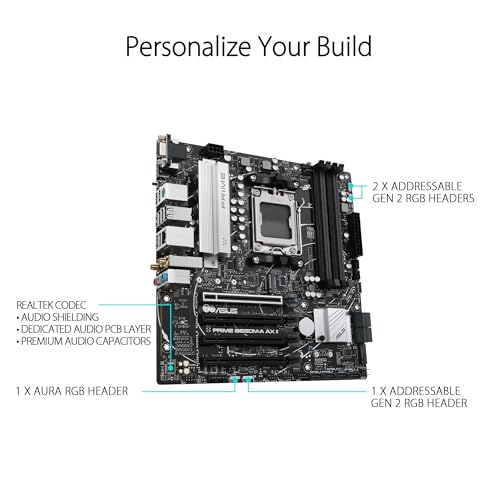
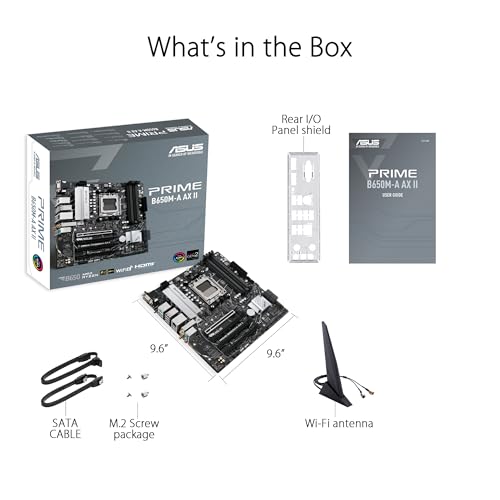
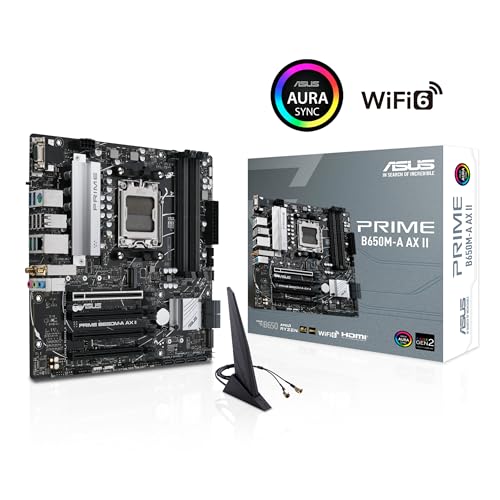
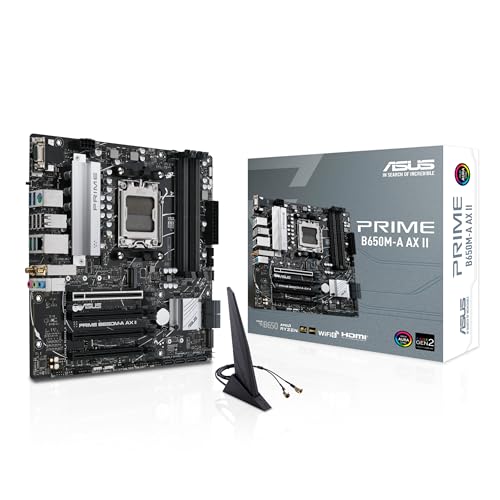
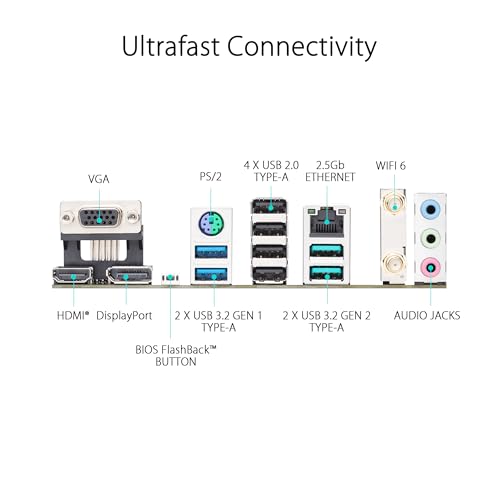
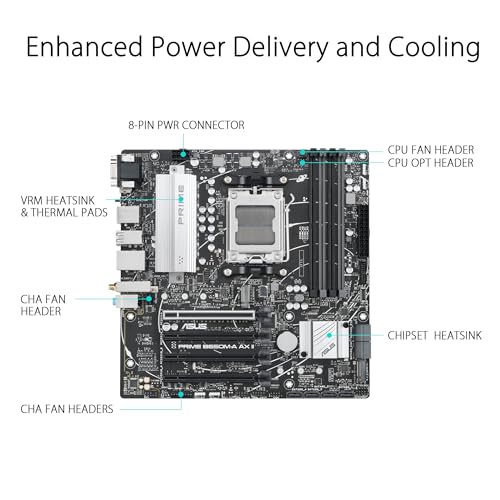
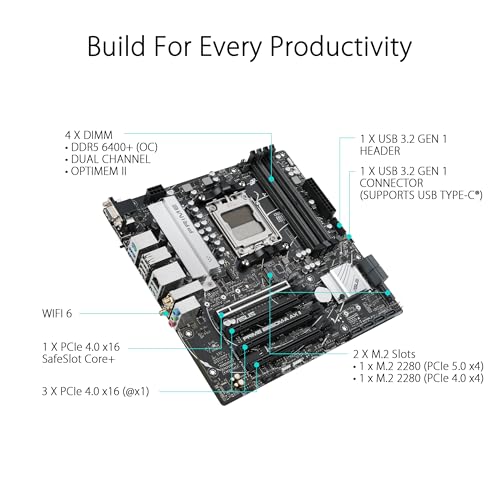

⚡ Power Your Ambition with ASUS Prime B650M-A AX II – Where Speed Meets Style
The ASUS Prime B650M-A AX II is a Micro-ATX motherboard designed for AMD Ryzen 7000 series processors, featuring ultra-fast DDR5 6400+ (OC) memory support, PCIe 5.0 M.2 slots for next-gen storage, and robust 2.5Gb LAN alongside Wi-Fi 6 connectivity. It offers comprehensive cooling solutions, Aura Sync RGB lighting, and a versatile port selection including USB 3.2 Gen 2 and front Type-C, making it an ideal choice for professionals and creators seeking high performance and future-ready expandability.





| ASIN | B0BSP52VJC |
| Batteries Included | No |
| Batteries Required | No |
| Best Sellers Rank | #596,219 in Electronics ( See Top 100 in Electronics ) #1,039 in Motherboards |
| Brand | ASUS |
| Chipset Type | AMD B650 |
| Compatible Devices | Personal Computer |
| Compatible Processor Types | AMD Ryzen 7000 series |
| Country of Origin | China |
| Customer Reviews | 4.2 4.2 out of 5 stars (563) |
| Date First Available | 30 January 2023 |
| Does it contain liquid? | No |
| Form Factor | Micro ATX |
| Generic Name | computer motherbaord |
| Graphics Card Interface | PCI Express |
| Importer | Rashi Peripherals Pvt.Ltd. Rashi Complex,"A" Building, Survey 186, Dongaripada, PomanVillage, Vasai Bhiwandi Road, Dist. Thane, Maharashtra - 401208 India |
| Item Dimensions LxWxH | 27.9 x 27.7 x 7.1 Centimeters |
| Item Weight | 1 kg 320 g |
| Item model number | PRIME B650M-A AX II |
| Manufacturer | asus |
| Memory Slots Available | 4 |
| Memory Storage Capacity | 128 GB |
| Model | PRIME B650M-A AX II |
| Model Name | PRIME B650M-A AX II |
| Net Quantity | 1 Count |
| Number of Ports | 18 |
| Number of items | 1 |
| Packer | Asus Technology |
| Processor Socket | Socket AM5 |
| Product Dimensions | 27.94 x 27.69 x 7.11 cm; 1.32 kg |
| RAM memory maximum size | 128 GB |
| Ram Memory Technology | DDR5 |
| Total USB ports | 3 |
| Voltage | 12 Volts |
B**S
Let’s start with the positives – somewhat of a mixed bag this time around: Data Processing – Being a ProArt, it’s a motherboard attuned to different software meant for artwork – Photoshop, Blender, Krita, Procreate, Corel Painter, GIMP, Fresco, and so on. Despite its purpose, you could probably settle with it pretty comfortably for gaming and basic editing as well. It’s a bit confusing, the way it’s advertised. 7000 MHz is perhaps a little higher than my 32GB RAM, so I don’t quite get all that I can out of it – being that my RAM can take about 6000 MHz at full capacity. Regardless, it’s advertised as PCIe 5.0, and that’s correct – I get about 192 GB out of the 24 lanes it has. Yet, it’s incorrectly labelled PCIe 4.0 in the specifications of the product – a small error, but hopefully this clears things up for people. Artificial Intelligence – This motherboard has two features based on artificial intelligence: AI Noise Cancellation and AI Overclocking – one that works well, and the other that works too well. So far as AI Overclocking, it’s pretty measured as to when it feels is necessary to overclock the PC for the sake of performance, so it’s not likely to overheat your PC because you lost a couple of frames – certainly no complaints there. My issues arise concerning the AI Noise Cancellation features, which – for the most part – tend to be pretty accurate. However, it’s quite sensitive at times and often cuts me off mid-sentence, regardless of how average or quiet the volume – it just seems to get confused more often than not, and it makes conversation sometimes a bit difficult. Support – There’s a wide variety of handy support options with regards to this motherboard. It’s fitted with both a 1GB and a 2.5GB Ethernet port – though admittedly, either only averages about 400MB – three medium PCIe 5.0 ports – which are interlinked, so if you plan to use more than one port, the lanes will be split – one small PCIe 5.0 port, USB 3.0, USB 4.0, Display Port, and USB C. All pretty useful for different devices and extra bits, but with the way in which the motherboard acts, adding devices means separating its processing power evenly – so if you’re planning to push what you can out of multiple devices, you’ll only ever get a fraction of what you’d expect. Overall, the motherboard can support a variety of devices but lacks the ability to hold them all. For the negatives, I’ve only really had one issue thus far: Dispersion – It’s only ever happened twice so far, but this motherboard isn’t very good at dispersing electricity. During busy periods, it can get gridlocked and retain energy. Not enough to cause sparks or anything, but what it will do is put pressure on the display and cause the monitor to black out. It doesn’t cut the audio – so I know it's still on – but while things happen in the background, nothing feeds to display, and you’ll have to shut it off. The best method I’ve found so far is: Shutting off the monitor, pushing the power button, flipping the PSU, and then turning everything off at the wall. Give it a while and repeat everything in the reverse order. It should fix the issue without bricking or burning your PC. Overall, pretty decent motherboard for the money with a lot of value in the PCIe ports - you'd be hard pressed to find one that isn't as practical as this one. Though I'd wait for it to go on sale again - I saved about £80 and kept my budget under £1,500.
B**N
I purchased the B650M-CT-CSM to run Proxmox, with ECC memory, in my home lab. I'm happy to say everything works fine using two Kingston Ksm48e40bd8ki-32ha 32GB UDIMMs w/ ECC. The BIOS isn't graphical but I found it very complete. ECC controls were in the DRAM menu and they include both ECC enable/auto/disable *and* it included an option to enable ECC error *injection*. (I've not tested the latter because I don't have a copy of the 'Pro' version of memtest86+). One of the Asus docs online said the board supports x4/x4/x4/x4 PCIe bifurcation on the x16 slot and I'm happy to report that this option does exist in the BIOS. (Note, I've not tested it). And, to Asus credit, the BIOS *also* has options to enable PCIe x8/x8 bifurcation on the x16 slot with an appropriate riser card. This board doesn't include a BMC (Baseboard Management Controller) with IPMI so some may say it isn't a "real" server motherboard. But, for the price, it's surprisingly good. 5 Stars!
A**R
I used to run high end MB but decided to go lower this time since the new Ryzen chips are so efficient and the power delivery so overkill on everything. I like the value proposition of this board, it looks great without the RGB gamer aesthetic. you get the boot status LEDs which is not as handy as 7-segment but it looks a lot better and sufficient for daily use. I wish it was B650E chipset instead, but PCIE 4.0 16x should still be plenty for the lifetime of this board, even for top end graphics. It's a shame they don't give you a third heatsink for the third M.2 slot There's also some usual AMD jank, this time I have a problem where my system cannot reboot only, it can boot, everything rock stable all normal, but if I reboot it just gets stuck in post. AMD is just not as polished and stable as Intel.
B**N
Have to say works like a charm. Likes the black on the steel color plates good nice with each other. Got the with a ryzen 5 7600 with 32gb 6000mhz ram paired with my rtx 3060 ti founder and a MSI MAG A750GL PCIE 5 power supply have to say what a computer. Pop on on first boot but give it time for the motherboard to do her thing. The board fits my Corsair Carbide Series SPEC-DELTA RGB is a tempered glass mid-tower ATX case and was easy to install. Lot of people had problems with wifi and Bluetooth but the fix for that is the drivers is in the armory crate program that comes with the board once into windows it would as to install Armory Crate, install it and once it done u can get the drivers right off that but make sure your Internet connection is wired to get the drivers, once that's installed you should have wifi and Bluetooth working. I would recommend this motherboard
H**R
No soy una persona muy conocedora de placas base, esta es mi primera vez que armo una computadora. Les puedo dar, desde mi punto de vista debido a esta experiencia que tuve, los pro's y contras que veo, quiza haya más pero tampoco soy un experto jeje Pro's: * Actualizar la BIOS de la placa base es relativamente sencillo, únicamente necesitan un USB vacío, dirigirse a la pagina de soporte de ASUS, descargar el archivo y ejecutar un script que viene incluido para meter únicamente ese archivo en el USB y finalmente conectarlo como lo indica el manual y seguir los pasos para la actualización de BIOS. * En la página de soporte vienen los drivers necesarios, pero incluso al momento de iniciar windows se instala Armoury Crate que igualmente te deja descargar los drivers desde ahi. * Viene con todo lo necesario para instalar1 SSD NVME, pero tiene otra ranura para instalar otra. Contra's: * No tiene LED's de Indicadores o Buzzers, eso si, es compatible con Q-Led Core, que es un sistema que te indica mediante LED's posibles problemas con tu instalación, instale mal la RAM, simplemente no la inserte del todo (como mencione anteriormente es mi primera build y como escuche un clic), bien este sistema solo esta disponible si tu gabinete tiene algún LED de ese tipo, en la placa base no hay ningún LED más que el de actualización de la BIOS y el Ethernet, por lo que recomendaría que si compran esta placa, busquen un gabinete con ese tipo de tecnología o busquen una versión que si tenga estos indicadores, creanme que estuve horas desconectando y reconectando cables pensando que conecte algo mal, hasta que quite las RAM y las volvi a insertar. * La antena de WiFi requiere si o si, el driver, por lo que al instalar Windows tendrás que estar conectado al Ethernet para proceder con la instalación. Finalmente veo que que es una buena Motherboard, obviamente le veo que estara dentro del gabinete un buen tiempo y me dara chance de actualizar en futuros años tanto con los procesadores AMD y con las GPU's que vayan saliendo (Por ahi leí que a pesar que ya hay puertos PCIE Gen 5 y esta los tiene, aun las GPU de Nvidia y AMD siguen con PCIE Gen 4), la recomiendo si sabes armar computadoras y estas completamente seguro que las armas a la primera, si eres alguien novato como yo... la recomiendo a medias, es buena, pero sin indicadores no puedes saber que instalaste mal y para descubrirlo te puedes tomar demasiado tiempo y arriesgarte a dañar algo que estaba bien. Les comparto mi build, para que sepan que es compatible jeje * Ryzen 5 7600X (Investigando dicen que de fabrica es compatible, pero por mi mala instalación de RAM actualice la BIOS, asi que no les sabria garantizar) * 32 GB RAM 5200 Mhz Kingston Fury * 1 TB SSD NVME M.2 Crucial P3 (5000Mbs lectura 4000mbs escritura) * Corsair Nautilus 360 RS (Refrigeración líquida) (Quiza un poco mucho overkill para este procesador pero jeje, me gano el gusto de probar una) * PSU Corsair RM1000e Gold Plus (Lo encontre en oferta y si en algun momento futuro quisiera actualizar el PC, se que voy a andar sobrado) * Gabinete NZXT H6 Flow (Esto es otro de mis gustos culposo) * No me ha llegado todavia, por lo que no la he podido instalar, pero la GPU es una RX 7800 XT de 16 GB
Trustpilot
2 weeks ago
1 month ago