

Desert Online General Trading LLC
Dubai, United Arab Emirates
Desert Online General Trading LLC
Dubai, United Arab Emirates

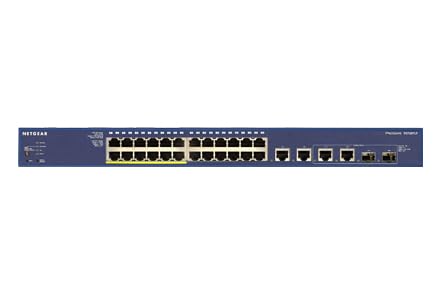
⚡ Power your network like a pro—fast, flexible, and future-ready!
The NETGEAR FS728TLP-100NAS is a 24-port Fast Ethernet smart managed switch featuring 4 Gigabit ports, 12 PoE ports with a 100W power budget, and 2 shared 1G SFP uplink ports. Designed for professional environments, it offers advanced management via an intuitive GUI, whisper-quiet operation, versatile mounting options, and is backed by NETGEAR’s ProSAFE lifetime warranty with next-day replacement and 24/7 expert support.

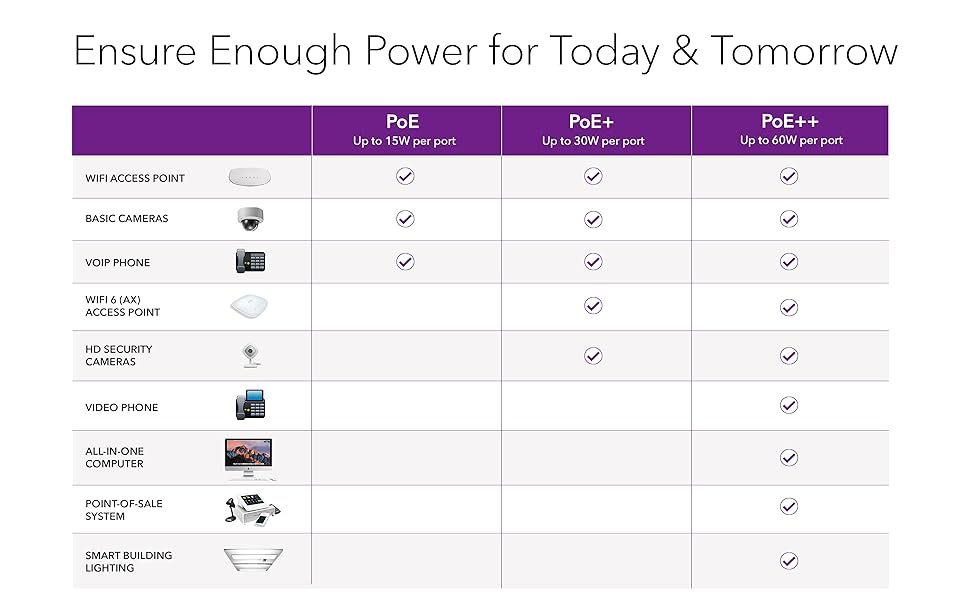
| Interface Type | PoE, SFP |
| Data Transfer Rate | 100 Megabits Per Second |
| Global Trade Identification Number | 00606449097528, 10606449097525 |
| Manufacturer | Netgear |
| UPC | 044111228915 606449097528 012303052662 754262033275 809392593677 |
| Wireless Type | 802.11ab |
| Item model number | FS728TLP-100NAS |
| Item Weight | 8.42 pounds |
| Product Dimensions | 20.47 x 12.48 x 4.29 inches |
| Item Dimensions LxWxH | 20.47 x 12.48 x 4.29 inches |
| ASIN | B00GSQ7IPU |
| Is Discontinued By Manufacturer | No |
| Date First Available | November 20, 2013 |
G**R
FS728TLP: This Switch Does Everything It Claims to Do
Fan noise was a big concern to me in purchasing this switch vs. other brands. So far I've been pleased. The fan LED has yet to come on, probably because I'm using only maybe 15 watts, consisting of 4 IP cams. However there is one fan that has been on all the time, yet it is fairly quiet, making a little less noise than a typical PC. This fan came on immediately when I plugged the unit in, with NO devices connected to it. Since per the spec. sheet it has a "Variable Speed Fan," I'm guessing that if I used a bit more wattage, the fan speed might ramp up, and maybe at that point the Fan LED on the front panel might come on. Or else maybe there's a 2nd fan that comes on?? In any case, at low wattage usage, the fan noise is very reasonable.Note that this is a "Fast Ethernet" switch, not Gigabit. However, it does have 4 Gigabit ports, nos. 25 thru 28. I really only need Gigabit for a couple of devices, so I have those devices connected to those ports, and so for my purposes, I'm getting Gigabit on all the devices I need it for.The one thing I had to learn was that Netgear does not use the Cisco term "trunk," but instead uses something called a "LAG" to trunk between smart devices. Once you learn that, it's easy to trunk. Just add a LAG, and indicate which of the 28 ports you want it to use as the "trunk" port. Then add that LAG as a member of each VLAN you want using it. And then of course set up the identical settings on the device at the other end of the "trunk"/LAG line.The manual is good. It offers quite a bit of explanation, better than some of the other brands that seem to write their manuals assuming we're all full-time IT pros.I can't rate tech support, since I haven't tried it.
R**D
finally we look like we might have some consistent service
I am going to say 2 1/2, with a bit of TBD as well. While there are 12 PoE switches, they do not have enough strength to power 12 devices and retain fully networking. We could not figure out what was going on, all the devices had power (so primarily I am referring to a VOIP system and the PoE was being used for the phones) but some randomly PC's could not find the internet (the phones always worked), they could access the server but that was it, the firewall didn't even recognize them. When we moved a few off, including 3 chromebooks (which weren't even using the PoE, they were plugged in), finally we look like we might have some consistent service. Still deciding if we are keeping this box or not.
A**R
My Go to Switch for Data or POE Manageability
This switch it quiet. Sits right near a staff desk, mounted on a wall. This switch extends my work network (an all Dell N3048P switches) seamlessly. I am using the SPF port and fiber to connect the switch to the network, about 250 foot run. I run VOIP phones on port 1-4, POE Security Cameras on Ports 5-7, POE Access Control device on port 8, and POE wifi access point. I'm using under 20 Watts of the 93 available. Ports 13-24 are 3/4 full with data connections to PCs. I had an issue with getting proper throughput for WiFi but realized most ports are only 100 Mbps capable (which isn't an issue for most devices), but, simply plugging it into the combo port 25, I get the 1000Mbps (you give up two 100 to get the two 1000, 23/24 for 25/26) for my Unifi Wifi AP. I have various VLANs enabled for the various POE ports and data network and easily and quickly made all my ports talk to the Dell Network (I did need to manually set the PID as the final hurdle there). Solid device and CHEAP! I can have three of these for the price of my one Dell N3048P.
B**N
Good - Quiet - but only 12 ports POE
This model switch (FS728TLP) has only 12 POE ports. I found this out when plugging in new Toshiba IP phone #13 and no power.The next model up is 24 port POE (FS728TP).
G**N
Quiet, feature packed, easily configurable with just a web browser.
I got mine to be a backup for some EOL cisco gear. All the features are there! SNMP, Span ports (mirroring), trunking, ganging, POE, etc. And it's very quiet! Note that in spite of documentation to the contrary, you can fully manage/configure this dude without a windows box running anything custom. The Web GUI allows full access. This is a no compromise gadget. Everything you could want in a managed switch (including ACLs) is available. My only issue has been that it doesn't seem to be able to connect to the Netgear registration servers. (Probably has some outdated URL in the firmware.)
J**X
If you need PoE, avoid this device.
I bought this item because it had PoE. I was installing a vast wireless network, which included 12 WAP's that needed PoE. The item arrived in great packaging (as always with Amazon), but the PoE did not work. Since there is no app for a Mac, I had to do everything via browser, which meant that I could not configure the switch while the devices were connected. Only a minor pain, really. Once the device was set up, I hooked everything in, and there was no PoE.I opened a trouble ticket, which resulted in the technician telling me that the product was defective. I was installing this item at a friends business in another country, and could not bring it home with me to return the item, so I was forced to use it without PoE, defeating the entire purpose of this switch. Now, I have a surge protector with 12 power injectors plugged into it so that I can run my network...sad, I know.
S**R
Great features, easy to manage
product received in committed timeframe. installed and working perfectly. Great features, easy to manage.
J**N
Nice POE switch minus the speed drop I received.
Used this to start up my home security system. Had to add an extra router for an access point and am in the process of adding POE cameras. This is just what I was looking for.Internet speed did suffer by about a 10% loss overall in download. Still not sure why, but it could be a downfall for some users if thinking of purchasing this.
Trustpilot
3 weeks ago
3 days ago