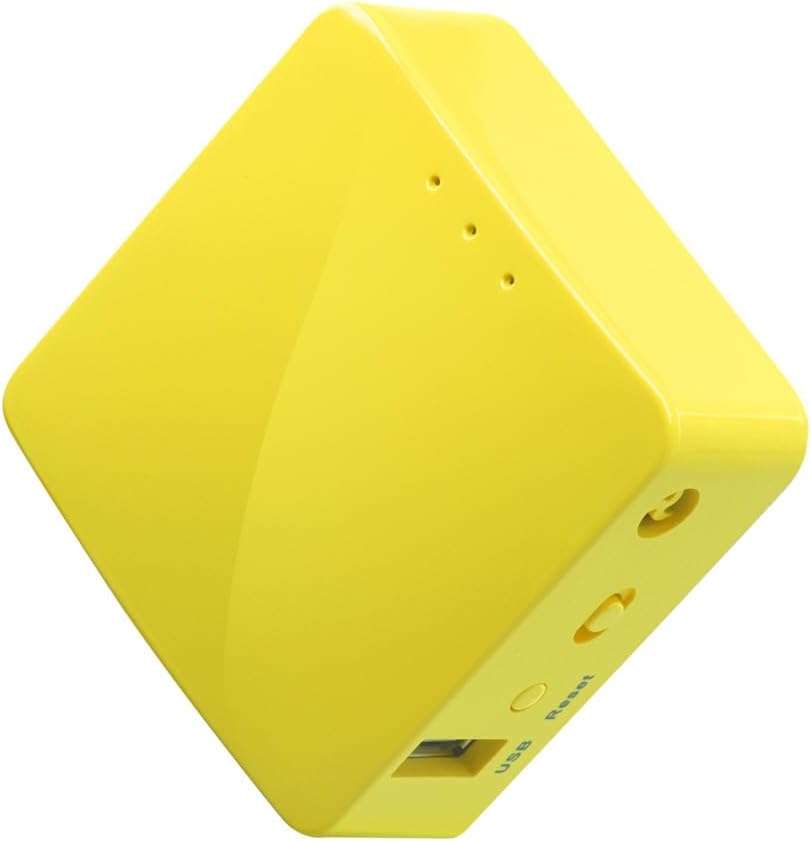
🚀 Secure your digital life in a matchbox — privacy that travels with you!
The GL-MT300N-V2 is a compact, ultra-portable travel router featuring OpenWrt OS and a pre-installed OpenVPN client compatible with over 30 VPN providers. Equipped with 128MB RAM, 16MB Flash ROM, dual Ethernet ports, and USB power, it delivers secure, high-performance internet connectivity ideal for professionals needing reliable VPN access on the move or in small office setups.


| ASIN | B073TSK26W |
| Best Sellers Rank | 6,933 in Computers & Accessories ( See Top 100 in Computers & Accessories ) 58 in Routers |
| Guaranteed software updates until | unknown |
| Item model number | GL-MT300N-V2 |
| Manufacturer | GL Technologies |
| Product Dimensions | 5.84 x 5.84 x 2.54 cm; 40 g |
Z**N
EXCELLENT DEVICE - Incredible value for you money and easy to use!!
OK, so this was a quick buy for me as my VPN router at home got config corrupted and I was stuck without VPN. I had read some of the reviews regarding the OpenVPN option on this device being easy to set up and I can honestly say I was sceptical that this tiny little box could delivery what I needed while my VPN router is out for repairs. I was not disappointed, the reviews are 100% correct and VPN setup on this tiny kit was seamless to setup and working perfectly. Packaging: The product packaging was good and everything you need to get started is in the box. What I got in the box: 1 x GL-MT300N-V2 Mini Travel Router 1 x 1 USB Power Cable 1 x RJ-45 Flat Ethernet Cable 1 x User Manual Setup: The tiny router is connected via the its WAN port directly to a LAN port on my BT Hub5 router. The cool thing is that it takes its power via USB so its gets it power directly from the USB port on the back of my BT Hub5 this makes it a very clean and tidy setup. The software is nice and simple and is easy to use and play around with. I downloaded the VyprVPN openvpn config file and uploaded it to the router. Selected my preferred location and connected pretty quickly. The only thing that is missing from this device for me is to be able to disable the VPN to specific devices on the network. At this stage I have to use my BT Hub5 for all my devices that don’t need connecting to the VPN on that network while are other devices that require VPN access now connect to the tiny router. It’s not that much of a big deal over all but it’s nice to be able to manage all network devices on one single router than having devices connected to 2 separate routers which doesn’t helps with network management and network security over all. Performance: I have been using the router for a few weeks now and honestly I have not seen any disconnections or network latency. I have done several network tests after setting it up and I was get accurate speeds that reflect the same speeds I get from my BT Hub5. I actually cant believe this tiny router has such great performance. Once switched over to VyprVPN the speeds test reflect a solid 12Mbps download speed and 7Mbps upload speed needless to say I was very impressed. The VPN speeds are slightly faster that my damaged VPN router which cost me around 150 pounds. If you are using this device just for VPN, this is a all or nothing router, either all devices connected to the tiny router are connected to the VPN or none are connected if the VPN is turned off. Pros: * Good Quality * Easy Setup * Cheap * Fast * Multipurpose * Tiny * Supports OpenVPN Cons: I personally haven’t had any issues with this device. I would have like to be able to manage all my devices on one network, but this more a personal want and not any fault the software or the device. Conclusion: This is an awesome device and I can’t believe what you get for the price. I am not using this router as a travel companion but as temporary VPN router while my router is getting repaired. It’s been a life saver for me and I would highly recommend this router if you are looking for a travel router or a static VPN router at home or even in a small office environments.
R**B
Streaming privacy in a matchbox!
This item is SMALL - it's about half the size of a cased Raspberry PI, and a bit wider than a box of matches. It has 4 modes, but the default "Router" mode is what I needed. In this mode, this little box creates it's own private WiFi network for my devices. At the same time the box itself is connected to another (public) WiFi network AND an OpenVPN server - giving all of my devices internet access in a really secure way. But the really neat thing is this: because it creates a private WiFi network (instead of just repeating one) nobody else on the public network can stream to my Chromecast. They can't interrupt my programs, or even spy on my YouTube playlist. They aren't on my network at all, this little box just passes my data through their network and that's it. Really cool. I've been running this thing a couple of days and it's working fine. The speed takes a hit of course, since my data is now being passed over two WiFi networks and a VPN server, but it's still very usable and even streaming HD video works. The WiFi signal is rock solid, though it is closer than the public router, my devices stay connected to it happily. It also has an Ethernet port, so my computer can use that instead of a USB WiFi adaptor! So far, very very good. I did have a couple of minor issues to start though... Firstly, the device wouldn't reboot after I first logged in and changed some settings - it just sat on the "rebooting" screen without actually doing anything. I cut the power eventually, and it started up again and has worked perfectly ever since (including rebooting when asked). A little worrying but it worked out fine. Secondly, it wouldn't gain internet access when I first connected it to the external WiFi network. I read a little, and I think it might have been a captive portal problem. I turned off the "DNS Rebinding Attack Protection" and voila it started working. I have since turned that option back on and it's still working. Finally, I noticed that my computer appeared to be leaking DNS requests outside of the VPN, when connected to this device via Ethernet. This problem didn't occur for WiFi devices (including the same computer when connected over WiFi instead!). I poked around and tried the "Override DNS Settings for All Clients" option which instantly fixed the problem. That's about it I think. Oh.. and it's definitely worth mentioning that this device allows you to change it's MAC address, hostname, and SSID all from within the admin panel (though I did have to dig quite deep for some). So if you really need to go the "security through obscurity" route, you can fly pretty far below the radar with this little yellow friend. In conclusion, it's truly a great little device, and for the price it's absolutely unbeatable. Yellow Mango FTW!
G**S
Highly compact 2.4GHz WiFi travel router.
The stock firmware looked quite slick with an integrated DDNS service & VPN support but as I immediately replaced it with OpenWrt 21.02.2 I can't comment more on that. The unit itself is very nicely put together and tiny. I was quickly able to connect it as a client via the LAN port to a hotel WiFi network and simultaneously run both my secure & DMZ WiFi access point SSIDs through via WireGuard to both of my home & office gateways. The only slight issue I had was it spontaneously rebooting under load but when I stopped using the charger that came with my Samsung A52 phone to power it in favour of a U-Green PD one that seems to be solved. Excellent little gadget and I suspect I'll be buying one of GL-iNet's more powerful dual-band offerings soon. Update: Having obtained a USB power monitor it appears that even with a USB thumb-drive connected and both wifi WAN client & LAN access point active it draws no more that 250mA at 5V. With a Samsung A52 plugged into the USB being charged & acting as the WAN interface this goes up to around 700mA. Updated 2023-03-27 I've been using this router on my travels for a while now and continued to upgrade it to the latest OpenWrt (22.03.3 at present). Even with a GaN USB PSU it still exhibits some instabilities when used as both an access point and a client onto hotel wifi, especially where that wifi is a little sub-par, crashing when changing settings sometimes for example. The wifi phy only supports four simultaneous AP and client configurations which is a little constrained for my purposes but at the price it's still a good device. However I'm planning to upgrade to one of GL.iNet's dual-band devices with uSD & more powerful CPU as soon as I get home.
L**K
I set one up as a wifi repeater to extend wifi range on a second floor of a house. Note that it is a repeater and not an extender, so it appears as a new wifi network rather than just extending the range of an existing network, but the effect is otherwise the same once you connect devices on the second storey to the new wifi network. This is actually how you might use it in a hotel or public wifi area to add an extra layer of security (connect to the wifi firewall router which is then protecting you before passing the connection through to public wifi, especially if you use the VPN feature). Interface made sense. Not 100% perfect but intuitive enough to figure out. No Ethernet connection required for setup. Very good device for the money.
B**R
Compact et pratique, le GL.iNet GL-MT300N-V2 Mango est un mini routeur de voyage très utile. Facile à configurer, il fonctionne parfaitement comme point d’accès, répéteur ou pour partager une connexion en déplacement. La compatibilité avec OpenVPN et Wireguard est un vrai plus pour sécuriser sa navigation. Petit mais puissant, il est idéal pour voyager léger tout en gardant une connexion stable et protégée
S**Y
Small and perfect for streaming devices to get past Geo-restrictions to watch content from other countries. The downside is that it's powered through micro USB instead of USB-C. It does not come with a USB charger so you need one. Works with surf shark wire guard VPN. You can connect your cell phone as an Internet provider in a pinch if necessary. Surf Shark doesn't have a VPN client for Apple TV. This solved the problem. Additional Info. The router runs OpenWRT and supports multiple VPN profiles in memory which can come in handy to access streaming content from across the globe. It supports multiple protocols such as Open VPN, L2TP, IPsec, WireGuard, & IKE2. The company also provides cloud management apps for Android and perhaps Apple. So once you set up your various VPN profiles, switching between them can be done easily with the phone app. Several popular VPN providers are already listed but you can manually set your VPN profiles using your provider vpn.conf from their website or enter it manually with a cell or PC. Here is another plus, if you add an inexpensive ethernet switch to the LAN port, you can connect multiple streaming devices. I use an Apple 4K Gen 3 and a Nvidia Shield TV 2019. My Roku can connect to this router using the built-in 2.4Ghz wifi hotspot this router provides. This won't replace a full home main router unless your needs are very modest. But given its small size, the modest needs of streaming devices, and how small streaming devices like Amazon Sticks, Roku, and Walmart streaming devices are, it is a no-brainer for travel as you can put them inside a case and pack it with your luggage. Just a reminder, this does not come with a USB dongle/charger. But most people have many lying around in draws from old phones.
J**G
Super transportable. Excelente opción para armar una pequeña red y se puede alimentar hasta con una powerbank.
M**M
Biraz tuzlu bir fiyatı var fakat harika cihaz. Biraz daha büyük olmasını beklemiştim
Trustpilot
1 week ago
1 month ago