

🎶 Unlock your inner hitmaker with Roland VERSELAB – where pro sound meets instant creativity!
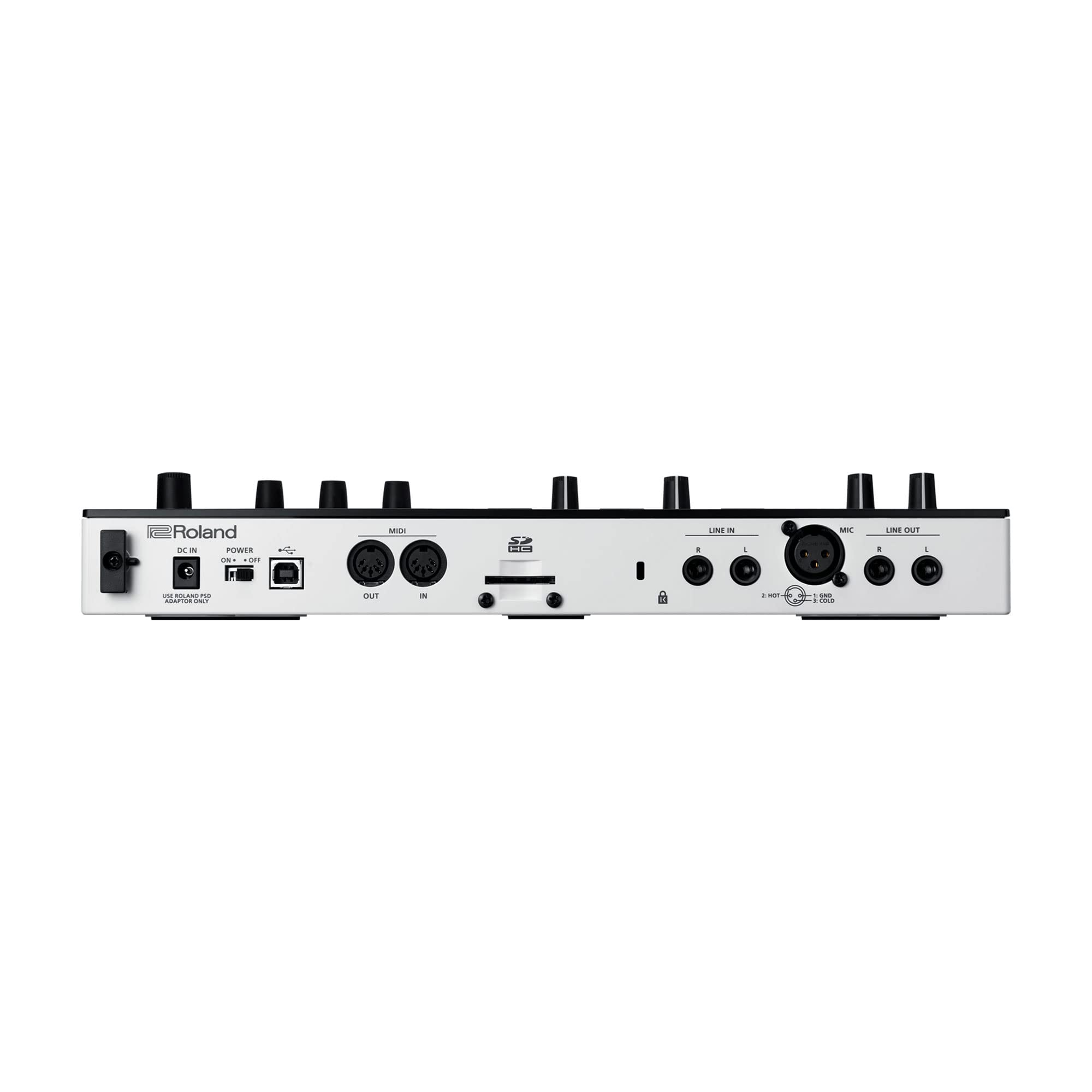
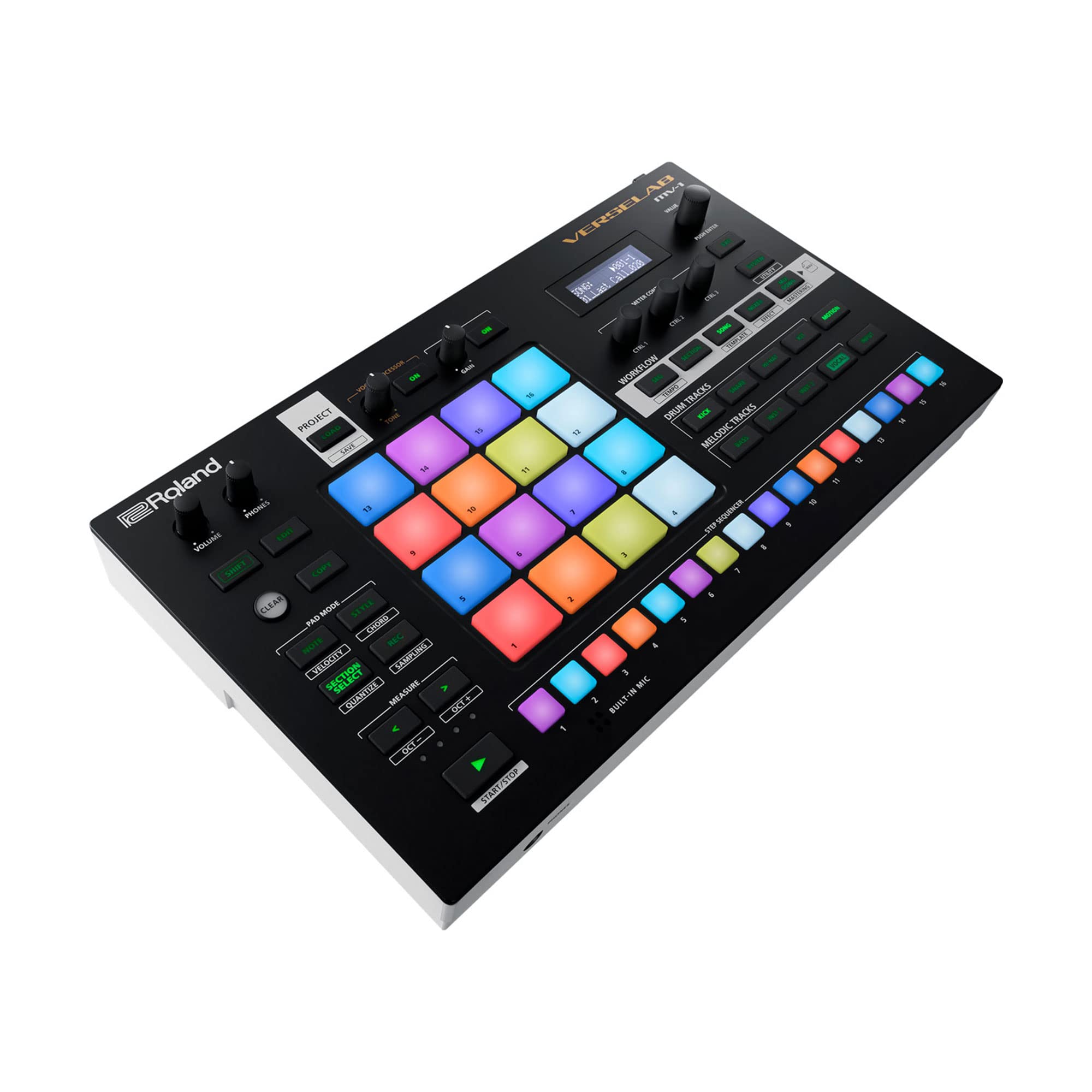
Roland VERSELAB MV-1 is an all-in-one professional song production studio designed for songwriters and singers. Featuring the advanced ZEN-Core synthesis system with over 3000 sounds, a 4x4 RGB-lit pad matrix, and a TR-REC step sequencer, it enables fast, hands-on beatmaking and melodic creation. The unit includes a high-quality XLR mic input with built-in vocal effects like Auto-Pitch and Harmonizer, plus seamless integration with Roland’s Zenbeats app for expanded production capabilities. Compact and portable with battery power support, VERSELAB streamlines the music creation process from initial idea to mastered track, making it ideal for modern music makers at any skill level.


| ASIN | B08SJ98GL2 |
| Best Sellers Rank | #33,936 in Musical Instruments ( See Top 100 in Musical Instruments ) #68 in Synthesizer & Workstation Keyboards |
| Body Material | Plastic |
| Brand | Roland |
| Brand Name | Roland |
| Color | Black |
| Connector Type | VERSELAB MV-1 |
| Customer Reviews | 3.9 out of 5 stars 73 Reviews |
| Included Components | AC adaptor, Leaflet "Read Me First", SD card (installed in the product when shipped from the factory), SD card protector |
| Item Dimensions | 4.96 x 20.67 x 11.22 inches |
| Item Height | 28.5 centimeters |
| Item Type Name | Production studio |
| Item Weight | 454 Grams |
| Item dimensions L x W x H | 4.96 x 20.67 x 11.22 inches |
| Manufacturer | Roland |
| Material | Alloy Steel |
| Model Name | VERSELAB MV-1 |
| Model Number | MV-1 |
| UPC | 761294516898 |
| Unit Count | 1 Count |
| Warranty Description | 1 year manufacturer. |
M**K
Fabulous for making music…
The Roland Versalab is the most useful, and one of the easiest to use, music production equipment I have has used. I have had many “DAW in a box” type machines and this is the best for me because it has so many available sounds and the user can quickly make all kinds of music, not just beats. I sold my MPC Live to purchase this. The MPC was great, but the user has to use lots of steps to, for example, to get a good piano sound that could be used across octaves. I now spend more time making music versus manipulating samples with the Versalab (but you can use samples with it too!). I highly recommend the Versalab for anyone who wants to make a variety of types of music.
M**R
Dream Machine
I have had my Verselab for about three years now. I think of myself as something of a power user. That said, I still haven't utilized all of its functionality, because there is so much in the box. 3000 sounds come inside. While you can get more, I haven't been super tempted to because the sounds are so great. There's also a random tone generator. Contrary to what another review has said, there is extensive sound editing capability even inside the box as a stand-alone unit. The workflow is based on Clips and Sections. You do have to learn its jargon. A Clip is a track within a Section. A Section is a building block of the Song (like a chorus or verse). In Song mode, you put the Sections in the order you want them to play. Clips can be, but don't have to be the same across Sections, so you can change sounds as you go if you want to. Clips each have their own volume control, and you can set reverb and delay per clip without affecting anything universally (this is also separate from the effects you can add, which often have a send to reverb and delay as well). You can copy and paste in multiple ways as well. There is an extensive selection of effects you can use. Often, when you go into the multi effects place, you find that your sound is already using an effect, but you can still change the effect and try different things. You can easily edit notes and aspects of the drum sounds. You can ratchet. There are hundreds of arpeggios on board. There is also a chord mode. You can sample or import samples. You can do 16 tracks of vocals. You can connect outside instruments like a guitar to either sample or play over the entire song. I don't connect it with any other MIDI devices, but you can. I have used it as a sort of karaoke device, where I programmed the music, and then sang live over it using a microphone plugged into the unit. You can do that without recording the vocals if you like. It does have vocal effects, which brings to mind that you can also resample yourself, whether it's vocals or a musical part. This instrument isn't designed for live play. Live jammers do often have a very big problem with this. Roland does have other instruments for live performance. This is primarily a DAW in a box that is also much more immediate than a DAW. It is convoluted, but not as convoluted as a DAW. Many things just work really well. For instance, you can EQ anything, but I've never had a muddy mix on this. It's like the sounds have already been EQ'd. It has a small Mastering suite on board. Thus far for me, I just turn on the three things in the Mastering suite and the default settings do a good job of getting the sound right. (Of course it doesn't correct you if you've mixed poorly. Turn down those hats already!) There is really SO much to say about this box. The workflow is loop based. It's quite easy to record while the music is looping. Also, super easy to preview sounds during loop playback. You only get eight musically distinct bars to compose per Section, though you can have a Section play for up to 16 bars. There can be 16 Sections in a song. I think this unit is under-valued for what you get. However, I do see in the Facebook group that some people have had to get theirs serviced. Indeed, my own could use a light servicing as well. My parameter knobs sometimes jump around even after I stop turning. This issue seems to improve as I get deeper into a session, but it is a little annoying. I find it very fun and immediate to use. My hyperfocus always get engaged and I end up playing for hours. I always have something to show for that time as well. I always find I've made significant progress. I use to have a different Roland Workstation in the 90's, the Roland XP-80. This is head and shoulders above that in terms of what it can do and the speed at which it can be done.
J**R
Great machine for hip hop beats, synthwave, electronic instrumentals
Great multifaceted music production machine by Roland, with tons of high quality classic Roland synth sounds built in and all the classic drum machines trimmings you would want for electronic music, you can also record vocals, good vocal effects but the T Rec sequencing is what makes this thing great
M**W
It's easy enough to grasp, but overly limited
It's full of limitations and compromises including the following. - Audio over USB doesn't appear to work with Android. - Midi over USB didn't seem to play nice with free version of Zenbeats and full version isn't included. - Parameter value control is lacking in various regions and often limited to really sad value ranges. - Lacks ARP/Chord user presets. - Lacks user voice patch presets. - Lacks a included dedicated sound editor. - Lacks very heavily with sampling both in terms of sampling time, multi layer sampling, sample rate options, and sample loading operation being a nightmare in terms of browsing samples. - Lacks in multi timbrality and to make matters worse you can't clear the vocal track and reassign it to be used for tone voice track in place of it. - Multi effects parameter depth pretty mixed and lacking in places for example the compression ratio's aren't as broad as a MMP-2 that's like full decade older. Also limited to a single MFX though in some cases a few presets were passed off as combination effects of two that were run in series in same manner you can do on older Roland synths like Fantom X with 2 to 3 assignable MFX to do the same way or more extensively. - The screen is worse than a MC-307 like seriously come on now this might be the worst screen I've ever seen on a synth. It's definitely the worst screen I've had the displeasure of using on a synth however. - The workflow is full of area's where it could be much better and more intuitive and quicker with less menu diving and inexplicably isn't and we're stuck with situations like the sample loading being a absolute horrific tragedy and making you lose your train of thought entirely on top of being overtly tedious. - Master tuning less broad a range and flexible than earlier Roland hardware. The MV-1 suffers from a lot extreme corner cutting in various regions or locked away features from other software not included to do much of what one expect with the underlying hardware. It's impossible to recommend this hardware as such over the competition that has less of these ridiculous shortcomings and faults. They might not do as many things in entirety relative to Roland in regard to the MV-1, but I'd say do a more proper job and better one at what they do on the other hand. Roland themselves has done much better with other products. These are and feel compromised in many elements and locked down or limited in other area's where they shouldn't have been. I wouldn't recommend the MV-1 on value. There are area's it does fine and don't really need to cover the pads for example I'd say are hard to find fault with overall their pretty nice when you configure them. They could probably be a little more sensitive at triggering to be more subtle, but are good overall and can be pretty subtle it's just the lowest %5 to 2.5% velocity curve levels need more sensitivity and tapering control. Their adaptable enough, but could probably use a bit finer control on the lower end of the curve. The pads, vocal processing, and portability are probably it's most redeeming aspects overall. Though I still would be find it difficult to recommend in general. If those are all you're main concerns and priorities and can live with a lot of the criticisms highlight it might suit your needs fine. Personally the critical area's of it that I've found faults with it irritate me enough to point looking at it semi pisses me off and makes me want to box it up and put in the damn closet. It's frustrating given I want to like it, but I'm finding myself very reluctant to do so outside of the redeeming aspects mentioned.
N**K
used
was sent an open box and used device that was listedas new
E**N
Legitimate studio in one box
I'd watched a lot of videos before picking this up, but they didn't delve into just how deep you can get with this unit. You can make BANGERS, from beat to complete. Vocals sound good with a halfway decent mic, workflow is simple. Took me a couple days to get the hang of it. Definitely a great groovebox for someone that wants to make full tracks in one machine. No going to the studio or hooking up tons of gear and cables. No computers and DAWS. Highly recommended.
M**S
Quirky, Complex, and Deceptively Powerful
Many will complain about the tiny screen and strange interface, but if you’re patient and enjoy learning new things, it’s a very rewarding instrument. Think of it as a greatest hits of roland sounds strapped to an elektron-level sequencer with a song mode and some bonus vocal/looping/sampling capabilities. The Zen Core engine used in modern Roland devices is as good as any digital synth out there today. Their analog emulations are convincing, the PCM style ROMpler samples are perfectly cheesy, and it’s overall warm and punchy. There are a lot of free sound packs available through Roland Cloud and you can even export your own custom patches via Roland’s Zenology Pro VST plugin. The song mode and advanced sequencing features give most grooveboxes a run for their money. Actually, outside of the Akai MPC One, it doesn’t really have a rival. The Akai has a larger screen and has less limitations when it comes to memory and flexibility, but it’s synths don’t come close to what Roland is offering. It’s very “Elektron” in it’s approach to interface and sequencing. The shift and edit functions are crucial to getting the most out of it. That said, it won’t take you that long to start laying down sequences from the get-go. The MV-1 might not work as a satisfying replacement for a computer DAW setup, but it does make a very compelling option as a sketchpad and songwriting tool.
J**S
Too complicated for someone new - Returned due to complexity, not quality
TL;DR - It's not as simple as it looks and if you watch the Roland Video Manual for the MV-1, they skip over the basic operations on how to actually use the device and jump right into look at what this MV-1 can do and the size of the pre-loaded sound library with the Zencore engine. The reviewers on YouTube make this look like it's somewhat easy and that there's a learning curve and some familiarization needed, but what they fail to explain is they've had many years working with devices like this. If they have a learning curve with the MV-1 and have prior experience with similar devices, someone new might struggle a lot more. I was hoping my teenage daughter would be able to use this device, but the learning curve is just too steep and the time required to get muscle memory is just too much without prior knowledge of how these work. The sound quality is top notch and the number of samples are great. Pads are really responsive. Build quality is really good, for being plastic. Enough in/our ports Vocal Mic input is really good too. The complicated part is there's no printed manual and the downloadable PDF manual provides all the information you need, but you're always looking at a computer screen manual trying to learn how to use it. The manual digs deep into each control and the manual doesn't flow first into the workflow and then dig deeper into more of the sub controls. So you're bouncing all around the manual trying to work with the workflow in the MV-1. There should be a basic how to guide at the very beginning or a quick start here and work throughout the workflow step by step for beginners. Perhaps this device simply isn't for new users? It should be. Because of this lack of manual in hand and the two line menu, someone with no knowledge how these devices work will ultimately struggle for hours a day trying to become familiar with the hidden controls that require keypresses that are not on the device. Shift + or Edit + and there are many others. Undo and Redo is now available while in SEQ mode, but you have to remember which keypresses they are or refer to the updated manual. Zenbeats app for smarphone, tablet or computer helps and is probably the way to go, but this is supposed to be stand-alone and should be intuitive. There's no reason Roland couldn't have put a much larger screen because there's plenty of room for one.
Trustpilot
3 weeks ago
1 week ago