We remain fully operational. Our teams are working around the clock to ensure your deliveries continue safely.

DOWNLOAD THE APP


Customer Services
Copyright © 2025 Desertcart Holdings Limited
DOWNLOAD THE APP


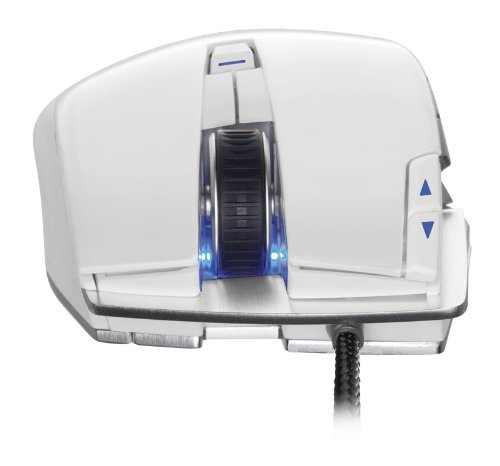
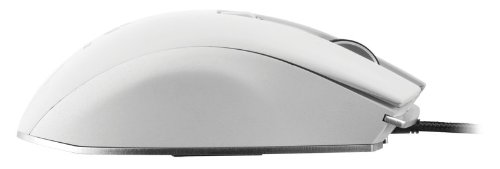

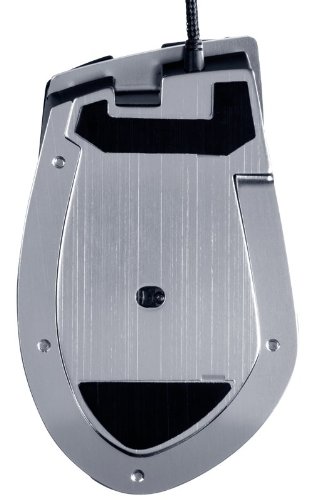
🎯 Dominate every battle with precision and power in Arctic White.
The Corsair Vengeance M95 Arctic White is a high-performance MMO/RTS laser gaming mouse featuring an 8200 DPI sensor, 15 programmable buttons, onboard profile storage, and selectable response times from 1ms to 8ms. Its lightweight aluminum unibody design with soft-touch surfaces ensures comfort during extended gaming sessions, while durable switches rated for 20 million clicks guarantee long-lasting reliability. Perfect for serious gamers seeking precision, customization, and portability.
| Brand | Corsair |
| Item model number | CH-9000026-NA |
| Hardware Platform | PC |
| Operating System | Windows 7, Windows Vista, Windows XP |
| Item Weight | 11.2 ounces |
| Product Dimensions | 11 x 7.9 x 2.7 inches |
| Item Dimensions LxWxH | 11 x 7.9 x 2.7 inches |
| Color | Arctic white |
| Department | mouse |
| Manufacturer | Corsair |
| ASIN | B00B5QLS2C |
| Is Discontinued By Manufacturer | No |
| Date First Available | January 24, 2013 |
N**K
Superb Quality But There Are Some Issues
Before I start here is a list of mice I currently own (should give perspective on my opinion):Razer Naga 2013Razer Naga 2014Razer DeathAdderSteelSeries Sensei RawAnd now, the Corsair Veneance M95I am also an avid MMORPG player. I play LoTRO on a daily basis. Okay, so that's me in a nutshell as it pertains to gaming and mice.1) Mouse Build Quality: OutstandingI love the way that this mouse feels both in weight and glide. I pair it with the Corsair Vengeance MM600 and honestly will never go back (unless something even more awesome pops up). There are a lot of mice out there that I have tried that include weights. I love the idea of being able to customize the weight of a mouse. I like a heavier feel than I do something light. For some reason a heavy feel translates to "substantial" in my mind. The M95 does not need any weights, its perfect. I bought the black because I don't like the feel of glossy mousing surfaces particularly after a few hours of gaming. The more matte finish in the black is comfortable and I've yet to have an issue with my fingers feeling like they are sliding around the surface of the mouse. For my hand size the grip is perfect. Everything is where it should be aside from the center button which I'm not exactly sure what it is there for. Its much too awkward to press as it is almost beneath the top part of my palm. It's odd but doesn't distract from the mouse in anyway.2) All those buttons: :D YAY!If you've owned the Naga or similar mice (Logitech G600) with the number grid on the thumb side of the mouse you know that the far back buttons are hard to press. You've really got to bend your thumb to get to them. At least that is my experience. There is a similar situation here with the M95. However, you can use the middle knuckle of your thumb to get to them fairly easily, just takes some practice. And, honestly, I think its fairly hard for a company to make a mouse like this and please everyone while having a ton of programmable buttons perfectly placed where anyone can get to all of them. So, my perspective is a little bit different. I care more about button placement in the sense of placement for my hand type/size and how easy it is to get that muscle memory working. Trying the M95 from using a Naga for the past year or so was as easy as pie. The buttons are very well placed. The transition away from the number grid made sense. I had zero difficulty switching. However, though in my opinion the 2014 Naga is a disgrace to the Razer brand they indeed improved on the way the side buttons "clicked". The Naga 2014 side buttons have a better "click" to them than the M95 but this is not to say the M95 is bad, quite the contrary, they are fabulous. The 2014 Naga is just more "clicky" and less soft where the M95 has a soft feel to them. If you like the soft feel more than a "clicky" feel akin to a mechanical keyboard feel then you will adore the M95 side buttons. If you don't like the soft feel you will not hate the M95 side buttons but you might hope that the next iteration updates the buttons to a "click" instead of a "smoosh". One other thing to note is that both the Naga 2014 and the G600 alter the side buttons just a little bit in such a way each feels different than the next. The idea here is that you will more easily know which button you are pressing by the feel of it. The M95 deals with this in a different and more natural way.3) Software: Both Meh and GrrrrrI also own the Corsair Vengeance K90 (which I totally adore). Yes, I am a fan of Corsair things but only because each time I buy something from Corsair the build quality has been remarkable. But I'm sorry Corsair, your software is crappy. And if I weren't a geek I could see how a lot of individuals complain that the software is confusing. Also, there is no way for a person to know that you have to update the firmware before installing the configuration software. If you are reading this and are considering buying an M95 (which I recommend you do) know that before you install the configuration software PLEASE update your firmware. Not doing so could have some pretty negative results. I do like that you can choose between hardware and software playback. And I do like that the mouse includes configurable DPI profiles that you can switch on the fly. But the software is just plain bad. Because this mouse is a software/hardware package this is where the 1 star has been removed. The device alone is a 5. The software paired with it makes it a 4. The software is serviceable but its not even close to being intuitive.Overall: Fantastic, but I hope the issues are addressedPlease don't let the software distract you from buying this product. It is worth the trouble of figuring out how to configure it and Corsair does provide an online guide. If you are looking for a mouse with a ton of configuration options and are comparing between the Naga, M95, and G600, go with the M95 (it's incredible). I'll never go back to keypads again. I just hope that soon in the future Corsair updates their horrific software.
J**S
Best mouse I have used in awhile.
Backstory and ComfortI was coming from a UtechSmart 8200 which uses the Avago 9800 sensor. The m95 does as well. However, the M95 has been updated to the latest firmware, so the acceleration issues that have plagued this sensor are not present on the M95 like they are on the UtechSmart.The M95 is also a very comfortable mouse. It fits my hand well and I have medium-large sized man hands, but your mileage may vary. Someone with an extremely large hand may not like this mouse due to it's size. However, it will fit well with people of "normal" sized hands. I also play with a hybrid grip, so to find a mouse that fits me so well is very, very appealing. I actually plan on buying another one for my second system.The side buttons take a bit of getting used to because they are fairly hard to press at first, but that's coming from a mouse that used very sensitive switches for the side buttons as well as the left and right. So, it really just depends on what you are coming from as to how it will feel for you.The Button LayoutThere are 9 ergonomically placed buttons on the side. Unlike a lot of the competition,these are placed where you don't have to adjust to hit them. They just feel natural. Sure, some competition out there has 12 or even 15 buttons on the side, but with that many buttons the size has to be compromised and it basically just being a grid of buttons. You will probably end up hitting the wrong key, and in the middle of a battle or reloading, that's life and death! I rarely hit the wrong button. The buttons are that well placedOne thing that I do miss from my UtechSmart was that it had one button where you would normally place your pinky or ring finger depending on the style of grip you have. It's not that big of a deal though. I mean, how often do you find yourself pressing four different buttons your mouse? For me, that would mean crouching, ADSing, shoot, and some other function at the same time. Obviously that's not going to happen, so while I do miss it as my grenade button, I've adjusted to using just a different side button easily.There are two more buttons near the left click that are, by default, a profile switcher. This makes it much easier to switch in between games and have everything set up the way you like it per game. You can have up to 6 active profiles. Which should always be enough. I don't know anyone who plays more than 6 games actively. There is also an LED indicator so that you know which profile you are on.ConsI've already gone over the pros of this mouse, so what are my cons?At this price point, I would have liked to see the option to have RGB colors. I've spent a lot of time and effort into making my build match, and it would be nice if my mouse matched as well. However, this is a small concern and isn't worth thinking about getting another mouse for.It would have been nice to see a weight system so the user can customize the weight of the mouse to their liking. I personally prefer a fairly heavy mouse, so it would have been nice to make the mouse a little more hefty. Some people prefer a light and fast mouse, and this mouse is by no means sluggish, but it has an aluminum plate on the bottom, so it's not the lightest mouse out there. However, the mouse is a good in between for someone who doesn't have to have the lightest mouse in the world, but doesn't want something overly heavy.Another thing I would have liked to see is an extra set of feet included with the mouse. Eventually, the mouse feet are going to wear. Whether that is in 1 year or 10 years from now depends on use, but they definitely do use a high quality material for their pads, and I definitely appreciate that.ConclusionSo, is this the 'be-all and end-all" mouse? No. Is this the best mouse in the world for everyone? Probably not. Is this the best mouse for me? Honestly, I'm going to have to say yes as of today. Why? Well, because it's side buttons are so well placed, it's got a great weight to it, I don't have any issues with comfort, and it's made by a company I know will fix any problem that I could ever have with it. Do I expect it to break? Heck no! This thing is built like a tank. It's definitely well constructed, but let's face it, things break. At least I know Corsair will have my back if anything ever does happen.
A**S
Great mouse for you money
I have used about 6 other gaming mice along with countless amounts of cheep and expensive mice non gaming mice. in everyday home use, for gaming and for production work aswell. I would say dollor for dollar it is the best mouse for you money, its shaped in a way that any hand size will find it comfy witch is super important to consider for people like myself with huge hands and also small handed people ( that will find it great to use for hours without becoming uncomfortable but might not be able to reach some of the bottom buttons) it has a ton of buttons, high dpi (for the price point atleast) with on the fly dpi customization.The scroll wheel is ooth and the right amount of lights to make the mouse look cool and yet clean enough this it dose not start to look unprofessional or only for gaming. great for gamer in this price range or someone looking for a great all purpose mouse that can game at the same quality as other gaming mice while still being able to be used in the office.( lights on or off). So many buttons for 70 bucks. ill take its 15 buttons over razors or steel series 70 dollar options any day. by the way the most you can get for them at this price is 8 bottoms unless ur willing to for out 15 more bucks to match the 15 buttons with the razer Naga. So if your looking for lots of hot keys for gaming or work it has you covered. The only tiny negitive is the botton layout is a little hard to get used to coming from a more traditional gaming mouse, and also makes it hard to change back too and the mouse is getting harder and harder to find.
N**X
Best mouse ever, nuff said
I used to own a Logitech G5 for many years, but finally decided to upgrade. I have friends that had Razer's (3 out of 3 broke) and Logitech (not anywhere near as good) equivalent. This mouse blows them out of the water. The weight is spot on, the mouse glides very well, the accuracy is as good or even better than my trusty G5. So much better than the G500 too! I honestly have nothing bad to say about the hardware.The software, on the other hand, isn't good, but once it's set-up, you don't have to deal with it afterwards.Best mouse I've ever used.
M**O
El mejor mouse que he tenido.
Siempre he tenido problemas con los mice porque ninguno se ajustaba a mis manos grandes, pero el M95 me queda perfecto.Algo a tomar en cuenta es que el botón de click derecho es un poco más corto que el izquierdo, haciendo que el dedo índice descance perfectamente sobre el botón, mientras que el dedo medio se sale un poco del mouse. Difícilmente es un problema, pero es algo que puede causar un click accidental de vez en cuando.En cuanto a los botones de la izquierda, todos son fácilmente presionables después de unos minutos de práctica, porque todos tienen una forma, posición y presión distintiva.No puedo recomendar suficientemente que se lean el manual de configuración, pues hay un pequeño inconveniente: Windows. Windows solo detecta 5 botones en un mouse (dos clicks, botón del scroll wheel, y dos a un lado). Si deseas que los juegos utilicen los otros 10 botones, tienes que entrar al software de configuración y crear un perfil para el juego que quieras, asignarle las teclas del teclado que usa el juego y guardar el perfil. De verdad, suena más complicado de lo que realmente es.Otra cosa que hay que mencionar es que el Corsair M95 funciona perfectamente para FPS (juegos en primera persona) aunque esté diseñado para ser usado principalmente en juegos MMO o RTS.Pros:- 15 botones que puedes configurar a tu gusto o dejar desactivados si así lo deseas.- Tamaño cómodo para manos grandes.- La versión negra de este mouse tiene una textura muy suave al tacto (la versión blanca es más pegajosa).- Puedes almacenar hasta 6 perfiles en la memoria del mouse para no tener que configurarlo siempre que cambias de computadora.- El cable no se enreda.- Tiene el logo anterior de Corsair. <3- Puedes asignar macros a cada botón.- Cambio de DPI instantáneo con un botón.Cons:- Si usas el Hardware Playback (que se lean los perfiles desde la memoria del mouse), estás limitado a 6 perfiles. El Software Playback tiene perfiles ilimitados.- El botón de click derecho es ligeramente más corto que el izquierdo.- No puedes simplemente conectarlo y usar todos los botones en los juegos (problema de Windows, no el mouse).
W**E
Not the performance I was looking for.
Why is this not a 5/5 mouse?- Well first of all the placement of the buttons can make them fairly awkward to use, especially if you're intending to use this for any sort of competitive gaming. You can probably learn some way to adapt to the awkwardness, but even if you do it's less than ideal. -1 Star- Like everyone mentions, the software is pretty lacklustre. -1 star- There seems to be a very serious issue with the scroll wheels on Corsair mice. The scroll wheels are metal, but the axles are plastic. I'm not sure what logic is behind making the most important part of the scroll wheel the most easily breakable, but whatever the reason is you should beware that many people experience the scroll wheel breaking on these mice. If it doesn't happen to you, then great you got a fairly decent gaming mouse with a few small but annoying issues. But if it does happen to you, then you have a crippled mouse that makes even web browsing a chore. -1 star
W**?
Was hoping for cyborg animal, got quality peripherals instead.
This is an awesome looking mouse with a really nice weight to it. The grips feel awesome in my hand and I find myself sensually caressing it every so often (Counselling for such attractions will be sought). I just wish Corsair had done more in the way of spreading out the number of buttons to other parts of the mouse so that my thumb isn't the only one pushing the macros. Since I have big hands, I wouldn't personally recommend it to anyone else who has bratwurst coming out of their palms unless you're cool using a mouse like you're about to throw a knuckle ball.
Trustpilot
2 weeks ago
1 week ago