
DOWNLOAD THE APP


Customer Services
Copyright © 2025 Desertcart Holdings Limited
DOWNLOAD THE APP
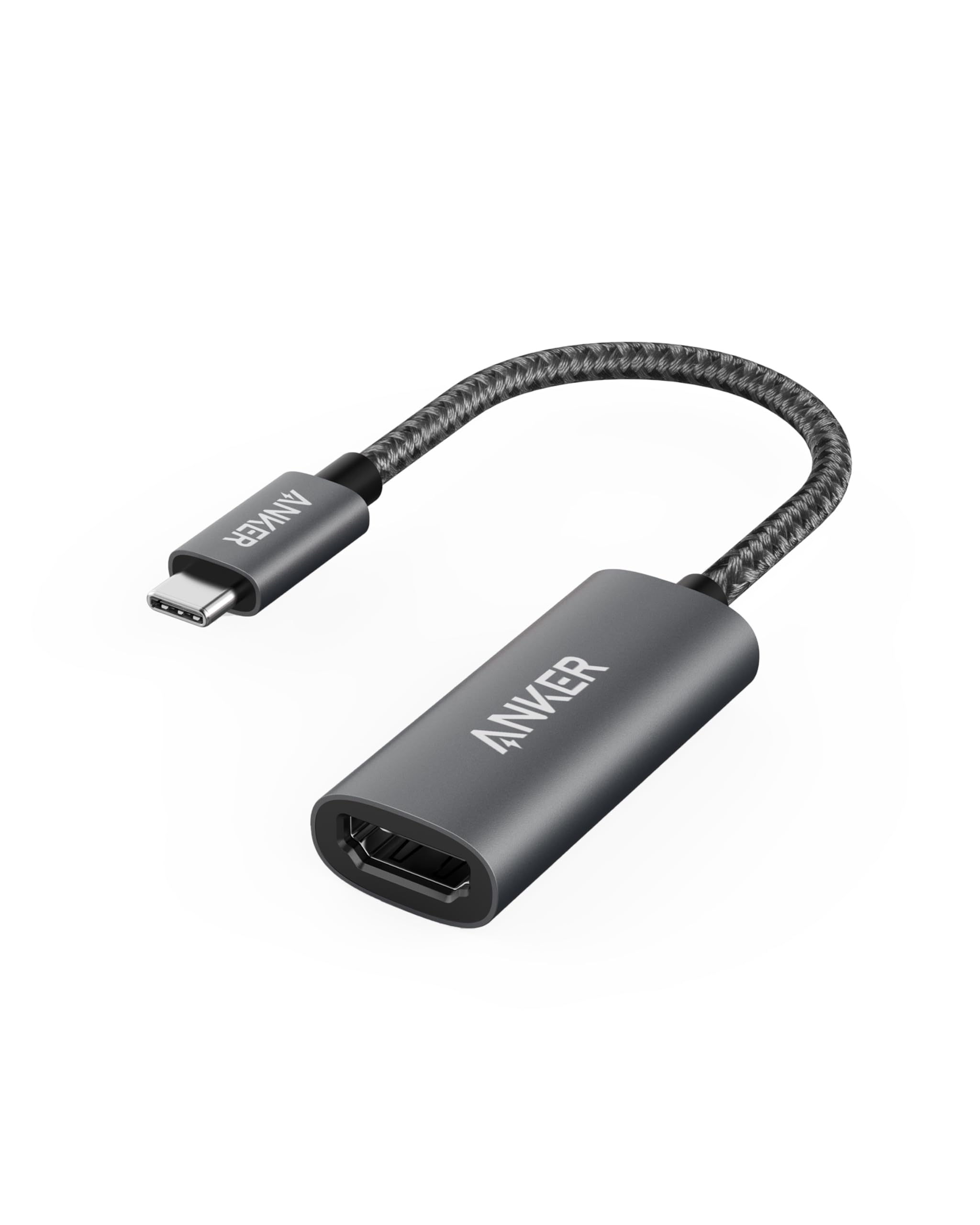
⚡ Plug in. Power up. Own your screen.
The Anker USB C to HDMI Adapter delivers ultra HD 4K@60Hz video output with effortless plug-and-play functionality. Its robust aluminum build and braided nylon cable provide long-lasting durability, while broad compatibility with USB-C and Thunderbolt 3 devices makes it the go-to adapter for professionals and creatives seeking reliable, crystal-clear display connections backed by an 18-month warranty.






| ASIN | B07THJGZ9Z |
| Best Sellers Rank | #5 in Computer Cable Adapters #54 in Computer Cables & Interconnects |
| Customer Reviews | 4.6 4.6 out of 5 stars (36,360) |
| Date First Available | June 25, 2019 |
| Item Weight | 0.64 ounces |
| Item model number | A8312 |
| Manufacturer | Anker |
| Product Dimensions | 1.97 x 0.85 x 0.45 inches |
F**A
Anker USB-C to HDMI Adapter – Small dongle, big hero energy
This adapter does exactly what it promises, which in tech terms already makes it elite. Plugged it in, and boom connectivity is perfect and what is in my phone screen showed up on the TV instantly. No lag, no flicker, no “have you tried restarting?” moments. Just smooth, crystal-clear HDMI magic. It’s compact enough to live in my bag full-time and sturdy enough that I’m not afraid it’ll give up after a few uses. Typical Anker quality—solid, reliable, and clearly built by people who understand how annoying cheap adapters can be. Perfect for work presentations, movie nights, or pretending you’re productive while actually streaming something. If you need USB-C to HDMI and want it to just work, this is the one. Highly recommend.
G**Q
Anker USB C to HDMI Adapter (4K@60Hz), 310 USB-C Adapter (4K HDMI) Great Product
Picked this up for my Mac Mini and honestly couldn't be happier. The build quality is solid the braided cable feels durable and isn't too short or too long. Setup was literally plug and play - no drivers needed, just connected it and boom, my external monitor was working instantly. I've tested it with both 4K streaming and regular work stuff, and the picture quality is crisp with no lag or flickering. Audio passes through perfectly too, which was a nice surprise since some cheaper adapters don't handle that well. What I really appreciate is how stable the connection is - I can switch between mirrored and extended displays without any hiccups. Been using it for a few weeks now for presentations and working from home, and it's been rock solid. For the price point, this thing punches above its weight. Anker's build quality really shows, and having the 18-month warranty gives me peace of mind. Small enough to toss in my laptop bag without adding bulk. Would definitely recommend if you need a reliable USB-C to HDMI solution that just works without fuss!
C**G
Does it's job, regardless of hardware, no installations
It came, I saw, it conquered. Has worked flawlessly so far, Chromebook to OLED. Janky Chromebook, OLED is nice but it's Vizio so there some Jank involved but no.... This device handled both without hiccups so it'll work on your devices for sure. I put that on my maw my pa and my Grand daddy too.
Y**N
Reliable and High-Quality
I purchased the Anker USB C to HDMI Adapter and it works exactly as expected. The build quality feels solid and durable, which is something I always appreciate from Anker products.
S**S
Sort of works to get 4k hdr out of an iPad Air 4th gen (not DV and not ATMOS from iTunes)
This works pretty good for playing downloaded content from places like Disney+ off an iPad Air 4th gen onto an hdr tv (UHD). Note that ATMOS output doesn't work, and from iTunes even on surround content you'll only get stereo sound...but that in some apps (like HBO MAX) you can get discrete 5.1 PCM output. But let's back up. Why would you want to download content? Well, if your internet connection is not reliable (google "digital divide" or similar concepts; it impacts tens of millions of people in the USA, and hundreds of millions more around the world) downloading versus streaming is critical. This isn't just a "poor people" problem. Plenty of affluent rural communities are underserved, in addition to other demographics. And, of course, if you are traveling and want to watch content on the hotel's TV, or your friend's TV or the TV at the airbnb, this is useful. So, what does this dongle do and what are the limitations? This device enables the iPad settings screen (to adjust video output) with both my LG OLED (2017 model) and my second display (Sony UHD) connected to the other end of it. This settings screen is another section of the settings menus on the iPad itself that shows up ONLY when a compatible dongle is connected to the iPad and that dongle is connected to a compatible display. That settings screen means: I could force everything to be Dolby Vision, or HDR10, or SDR and I could also do the iOS equivalent of TVOS’ features called "match dynamic range" and "match frame rate". BUT Note that the iPad makes you choose BOTH frame rate AND dynamic range for matching. You cannot choose just one like on an Apple TV. Why does that limitation matter? Well, 24p output is super nice with film based content. It gives one more fidelity and fewer artifacts for film based content. And, perhaps even more important, with the iPad Air 4th gen, and possibly some other bandwidth limited devices, 4k output is capped at 30fps.....so this is the only way to get 4k. In other words, this feature is particularly useful because this dongle on the iPad air CANNOT output 4k 60p (60hz). That sound like a big issue at first, but then remember that moves are 4k 24p (24hz)! So as long as the TV accepts that kind of content, you can choose to "match output" and be okay......mostly. What's the problem? Well, the way the dongle and or the ipad handle HDR output is the problem. Read below to understand more, but in short it would be REALLY HELPFUL to be able to "match frame rate" and NOT also have to "match dynamic range". TVOS lets you choose one or both. Unfortunately, ipad OS (iOS) does not allow for that separation. So, in my testing, I could output 4k hdr at 24p to both displays. 60hz output was limited to 1080p but hdr would still work with the content I tried. So if you really want HDR (which is a little wonky, see below) and can use 24p ouput for whatever reason, that's something of an option. HOWEVER: The Dolby Vision output is wonky or somehow otherwise non standard. The OLED didn’t recognize it as hdr 2020. It tried to use sdr gamma, and the colors were completely wrong, such as black was displayed as red. Solution? Forcing DV content to be output as hdr10 solved it......sort of. The problem (you have already guess this?) is that to force DV content to output at HDR10 content, you have to TURN OFF the "match content" setting......and that means that you are turning off the 24p frame rate......and now the ipad and dongle are outputting 60p.......and that means you cannot output 4k any longer, just 1080p! So, you can get HDR10 output onto a 2017 LG OLED but only at 60hz, and 1080p. HOWEVER: Another DV capable display (SONY) didn’t mind the DV content but perhaps not all profiles of DV work on the iPad output because it automatically output DV as hdr10 even with match content enabled and a Sony DV display. This is important to note. Apparently either the ipad air 4th gen or the dongle do NOT support the so called player led Dolby Vision profile (which is required by my Sony)...... The good news? Since you have selected match content, even though the ipad and dongle decide to output DV as HDR10, you have the 24p output still......so you get the full 4k resolution of the downloaded content. Not a perfect solution but workable. VERY BIG CAVEAT: This dongle (or the ipad based on this dongle) forced Atmos audio in downloaded iTunes content to be 2 channel audio output from the iPad Air 4th gen. This is a big caveat if you are wanting to hear surround sound. However these appears to be support for 5.1 content in some apps like HBO now. So YMMV. In summary, this is a well priced dongle. It appears to offer the key features that the overpriced Apple branded dongle offers. I'm giving it four stars because it would have been nice for Anker to provide more details about what is and is not supported, rather than users have to experiment themselves.
S**S
Smooth 4K Connection Every Time!
“This Anker USB-C to HDMI adapter works perfectly! Setup was effortless, and it delivers crisp 4K@60Hz video with no lag or flickering. I use it with my MacBook Pro and it’s been flawless for presentations and streaming. Compact, sturdy, and reliable—highly recommend for anyone needing a high-quality USB-C to HDMI connection!”
C**M
Great adapter from Anker!
Anker USB to HDMI adapter works great! Thank you Anker for this great adapter! We tested it out by watching part of a movie on a computer, played on an external device connected by the adapter, and it was perfect. No lags, no skips, no problems. The movie had music as well as dialogue, and the sound and the video were perfect. Great adapter, so glad to have it, and at such a reasonable price. Thank you Anker😀
J**G
Great converter
Worked as it should. Helps laptop connect to internet.
A**F
Another quality product from Anker, bought this to hook up a phone via HDMI to a large TV and it works a treat. Like most anker cables/ adpaters the cable is quality and braided, fairly firm cable so you dont expect it to break at the connectors. The USB and HDMI heads are both nice and tight fitting with no play/slack in them when connecting cables
C**E
Necesitaba conectar un ChromeBook de Lenovo a un monitor a través de HDMI y este adaptador cumplió perfectamente con lo que necesitaba.Ademas pudo conectarlo también a una TV de 40 pulgadas sin ningún inconveniente.
K**G
built like a tank. reliable. overpriced, but if you need reliability i would probably buy this over the $5 ones at shopee.
B**O
Funciona bien para lo que se necesitaba.
P**O
Ottimo. Piccolo e funzionale.
Trustpilot
1 week ago
1 month ago