We remain fully operational. Our teams are working around the clock to ensure your deliveries continue safely.

DOWNLOAD THE APP


Copyright © 2025 Desertcart Holdings Limited
DOWNLOAD THE APP



Buy anything from 5,000+ international stores. One checkout price. No surprise fees. Join 2M+ shoppers on Desertcart.
Desertcart purchases this item on your behalf and handles shipping, customs, and support to Hungary.
🔀 Effortless USB sharing for the multitasking pro
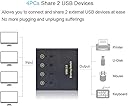
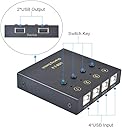
The eKL USB Switch Selector is a sleek, polycarbonate 4-port USB 2.0 switch that lets professionals share 2 USB devices across 4 computers with a single button press. Compatible with all major OS platforms and delivering stable 480 Mbps data transfer, it eliminates cable swapping and complex setups, making multi-device management seamless and efficient.


| ASIN | B07L6VSFC8 |
| Additional Features | LED Indication |
| Best Sellers Rank | #1,100 in KVM Switches |
| Brand | eKL |
| Color | Black |
| Compatible Devices | Card Readers, Keyboards, Mouse, Printers, Scanners |
| Customer Reviews | 4.1 4.1 out of 5 stars (302) |
| Data Transfer Rate | 480 Megabits Per Second |
| Enclosure Material | Polycarbonate |
| Hardware Interface | USB |
| Item Weight | 0.55 Kilograms |
| Manufacturer | xudongtai |
| Mfr Part Number | EKL-04U |
| Minimum Required Operating System Version | Windows NT 4.0 Workstation |
| Model Number | 8541609970 |
| Number of Ports | 4 |
| Operating System | 8 . 1,Chrome Os,Linux,Mac Os,Vista,Windows 10 |
| Total Usb Ports | 4 |
D**O
Nice tech tool
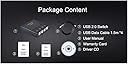
Allows me you use my keyboard & mouse plus my printer shared between 4 computers. Sets up quickly and no problems after a couple of weeks. Lights easily show which computer is selected. They supply 4 cables ... a nice touch.
J**E
Direct switching between multiple
You can directly switch to each of the 4 computers with a SINGLE button press. Most other switches require you cycle through the other hosts pressing the button one at a time until you get to the one you want. This one has 4 buttons, press the button for the host you want and you are done. No cycling through. I'm only using 3 hosts. Any other device I'd have to push the button 3 times to get to the previous host. I tend to switch between only 2 hosts. So being able to switch between them quickly is helpfpul. Came with 4 good sized USB cables to connect to your hosts. Only downside is that from an angle the blue light bleeds and makes it look like the nearby hosts are also active. So the first few days you have to look directly from above to figure out which one is active. But I quickly memorize which buttons map to which computers and if the mouse doesn't work on the computer I want it to - I just tap the button for the one I want - having memorized my 3 locations I no longer refer to the lights at all. Might even be useful to just have no lights.
J**N
Works fine, cost cutting on stupid stuff
I have this switching a keyboard and a mouse among 4 computers. It works fine, although the 1 button being on the right takes a little getting used to. Two things you need to know: the 1 port is the default and if the device doesn't detect traffic for a few minutes, it will swap back to the default port. This is a minor annoyance with no clear way to adjust it. The other thing is the LEDs that light just above the buttons are blue, which might be difficult to see, especially in bright areas. They also shine through the other holes, e.g. LED 1 will shine through the hole for LED 2, etc. This is also a minor annoyance and can be fixed by taking off the cover and putting in 3 small strips of cardboard and two pieces of tape. This took all of 5 minutes, and 1 minute of that was spent finding my small screwdriver. A piece of scrap cardboard, some clear tape, and a pair of scissors to cut the cardboard to size. Pure cost-cutting and for dumb reasons that make the device more difficult to use than it needs to be. All told, I'm pretty happy with this so far, especially now that I've fixed the LED "problem". Edit to add: after using this for 6+ months now, mine has started "randomly" dropping and then immediately re-adding connections. So I'll be typing along on and get the Windows "lost device" tweedle. wait a second, and then the Windows "added device" tweedle sounds from my PC and I can type again (I'm sharing a keyboard and a wireless mouse among 4 PCs). This is getting progressively more annoying, but then what do you expect for this inexpensive a device?! It also seems to be related to mouse activity, but I can't prove that yet. Buyer beware.
B**G
Perfect. Quality Build & Works as Advertised.
Works exactly as advertised. I use it to switch my Keyboard and Mouse input between two computers. I have separate monitors for each computer and did not want two sets of mouse and keyboard. This KVM does the job. Solid heavy construction and very tactile clicky buttons. Only complaint is that the eKL sticker is peeling off. That does not matter to me though. There is about a 1 second switch time. By this I mean it takes about 1 second from pressing the button to the time that the inputs are changed and usable. This is very standard and works like a charm.
J**N
Only works for a month
This product worked well for a month for my wireless keyboard/mouse setup between three computers. Everything simply worked at the click of the button. In the past few days, this has not been the case. The mouse stutters and freezes movement across the screen, making it very frustrating to control. While typing, letters will "hang" and begin typing out words like thiiiiiiiissssss. Not only would the letters freeze like that, then it would simply stop functioning for a few seconds, before starting to sporadically work again. Once I removed the switch from the equation, everything worked perfectly again - This was not due to signal interference. Coincidentally enough, it is now outside my return window, so I can't even return this now useless hunk of metal. At least it will make a decent paperweight.
D**Y
Works flawlessly for sharing keyboard+mouse among 4 computers
I've been using this little box for 4 months with no problems at all. I have 4 computers (pc, mac mini, mac laptop, linux) and switch among them with the pushbuttons (I don't care about hotkeys). The box does not switch a display, so I simultaneously use a pushbutton on my single display (which has 4 video inputs). It's quick, unless one of the computers is in sleep mode, in which case I have to tap the keyboard and wait a few seconds while it wakes up (just as you must do anyway). I don't seem to have any problems with computers losing track of the keyboard or mouse when switched away. Nice little product, good price.
J**Y
My everyday PC set-up used to be two computers: 1 x Windows 10 Home, 1 x Windows 11 Home, with a switch to share mouse and keyboard and, a separate switch to share the monitor. Cheaper than a KVM. Thanks to Amazon Vine, I've just added a mini-PC running Windows 11 Pro, so it was time to change the switch sharing the mouse and keyboard. I was initially wary of this switch as it has USB-B connections to the computers. However, it comes with four USB-B to USB-A cables, each 1.5 metres long and, it's self-powered. It's working perfectly and changing between the computers is as easy as pressing a button on the switch and, a remote switching the video to the monitor. I have a separate switch for the audio feed, but it really gets changed. Value for money, small footprint, easy to install and operate = 5 stars. three computers: 1 x Windows 10 Home, 1 x Windows 11 Home, and 1 x Windows 11 Pro. I didn't want
C**E
I can't express how strongly I like this product. It resolves a lot of issues that I had in the past. My situation is that I'm a professional technology worker. I have several computers, servers in my laboratory. This product allows me to have only one keyboard and one mouse and allows switch over these two over four (4) computers. First, that's a huge space saving for my lab and also the switch over is very quick (less than half a second). In the past, I tried many other solution. This solution is definitely my best! Bravo!
A**X
I like that it has two usb ports for wired keyboard and mouse, It would be better if they were in the back with the other 4 usb connections to the PC. The switch works, simply push the button attached to the device you want. For Canadian market it would be nice if the buttons were numbered left to right, 1,2,3,4 rather than the way they are 4,3,2,1. It is small, it works with wired keyboard and mouse, and also Wireless keyboard and mouse. Supports up to 4 PCs. Over all really good if all you need is a KM switch and not KVM. I use it with a Quad view monitor so it works perfect for switching between the 4 screens.
D**K
Works perfectly outside the box. Easy to connect and go. Real lifesaver when sharing screen between multiple laptops but one external keyboard mouse. Keep in mind that you can share between 4 laptops, but only two USB inputs. I got a USB hub (non powered) to be able to share more than 2 devices (eg keyboard, mouse, usb webcam, etc)
P**T
Excellent little USB switch box. Exactly what I needed to switch my keyboard/mouse between several computers. I also just switch the video inputs on my monitor. This combo enables the same functionality as a very expensive 4K KVM switch but at a hugely lesser cost. The only thing that I didn't like was the bleed through of the bright LEDs that are supposed to tell you which port was active. This bleed through made it difficult to determine the status of the box. Luckily, this was solved by opening the switch box (voiding the warranty sticker - didn't care as the switch was cheap enough not to worry about it) and using black card to construct isolating light cells. Once this modification was made it works perfectly.
Trustpilot
2 months ago
2 weeks ago