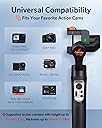
🎬 Elevate Every Shot, Own Every Moment
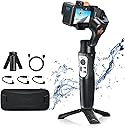
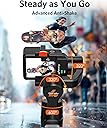
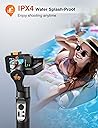
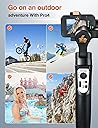
The Hohem iSteady Pro4 is a versatile 3-axis handheld gimbal stabilizer engineered for GoPro Hero 13/12/11/10/9 and other popular action cameras. Featuring advanced 5.0 iSteady stabilization technology, it ensures ultra-smooth video capture even during intense activities like running or skating. Its IPX4 water resistance and 14-hour battery life empower creators to shoot longer in diverse environments. Bluetooth and app controls provide effortless mode switching and remote operation, while broad compatibility and quick-release mounting make it the ultimate tool for professional-grade mobile videography.


| ASIN | B07JC9KNHS |
| Batteries | 1 Lithium Ion batteries required. |
| Best Sellers Rank | #44 in Professional Video Stabilizers #51 in Video Camera Supports & Stabilizers |
| Customer Reviews | 4.2 4.2 out of 5 stars (2,557) |
| Date First Available | November 5, 2018 |
| Is Discontinued By Manufacturer | No |
| Item Weight | 12.3 ounces |
| Item model number | Hohem iSteady Pro4 |
| Manufacturer | Hohem |
| Product Dimensions | 9.61 x 3.23 x 2.99 inches |
D**L
Value, quality built and options for the money
I’m impressed with the quality of materials and functions of the gimbal. This is the first one I am trying out based on meeting someone who had the same one and she stated it worked really well and was easy to use. I can not speak on the ease of use as I have not tested it out on trail yet but it is lighter than I expected. I like that it is rechargeable
E**N
Excellent Gimbel for my iPhone
Before I purchase a Gimbel for my Canon 80D, I wanted to try one for my iPhone because of the cost. This has an adapter that allows me to stand the Gimbel on the floor when doing Instagram or YouTube videos. This is accompanied with an app that allows for control of the iPhone and the Gimbel. The handle is comfortable and access to the buttons is ergonomic. There is a feature that allows your phone to track the subject. As for the the Gimbel, it is very stable and does help minimize camera shake as designed. The battery life is great, lasting about 12 hours. It uses an integrated rechargeable battery. The system comes with a hard shell protective case. Overall it is an excellent value for doing videos with your smart phone. Now I just have to decide which Gimbel to use for an SLR.
A**R
It's as good as the starts say it is!
I have used a Gopro Karma Grip and it worked well so I was skeptical to try this one. With the price on the Karma, it was worth the try. I have several friends in video production that use the Karma and lately they have started to fall away from it as the battery life tanks after about a year of use. For $200, that's theft if you ask me. The grip is obviously made for its starship product so it does work well. Now... the Hohem iSteady Pro. Out of the box you get a nicely packed case. I was stoked about the case except you cant use the case if you have a GoPro mounted on the iSteady Pro. That sucks! So now I am in search of a case I can use for transport. Mounting it is a little quirky, but it is somewhat universal so it come with it. Once you power it up I kept wanting the red recode button to work with the GoPro but it does not. So that is a downfall to the usability. There is also no way to plug the device in and use the battery backup while in use. It has to be detached to do that. So those are the challenges upfront. What is good? The gimbal is super simple to learn and understand. It is so stinking easy, unless you want to MAKE it complicated, don't download the app. The app has so many things you can fine adjust that you get yourself in trouble quick. If you think you need to adjust it, I am sure you are correct. I do like the option the app offers to make pre recorded paths and I look forward to creating something that uses that! It is super smooth to use and the gimbal is awesome. The only knock I would give on functionality is that if you start to relax your hand and tilt forward you begin to loose the ability to turn the camera left and right so when you pick your hand back up it quickly jumps to that direction. All in all... I definitely get the full battery life out of it, maybe more. I think it is a great product!
S**O
You cannot beat this item for $100USD
I will first start off by saying, this is my first powered gimbal experience. I am a professional still photographer getting more into the world of motion photography (Cinema). I have the pro SLR's that shoot video, but for intuitiveness I purchased a GoPro Hero 7 Black. Really easy to use, great quality camera for $350. I know the GPH Blk 7 has HyperSmooth - which is great! But to keep my shots level with the horizon, I was looking for something that would help with that aspect. Enter the Hohem iSteady Pro 2 action camera stabilizer. Out of the box it is rather intuitive. There were actual instructions (quick start guide) in the package. An aside, the packaging was rather impressive for a $100 Amazon purchase. Very nice case and all of the equipment needed to go. The instructions walk you through step by step how to get going. First step is charging the battery - which you should give it a few hours to complete. Mine came with 4 bars of power on it, but it still took a couple hours to peak it out. Once I had it charged, I was off to the races! Learning the 4 modes for a gimbal beginner is interesting - but it is nice that this gimbal is organized by these 4 separate modes of operation. I found use for the first 3, but the fourth is more for artistic movements... Maybe? The panning of the gimbal with the thumb operated joystick is rather fluid. With the app, you can adjust how fluid it pans, and really customize the heck out of this item. I really like the timelapse movement feature in the app. This allows you to have the gimbal automatically pan a shot over a specified timeframe. Cannot wait to play with that feature more. Calibrating it is pretty easy with the app. It runs you through gymnastics of calibrating it on a table. Quick tip - you can fine tune this in the app - i.e. roll, pitch, or yaw. The app is recommended highly because it allows you to do so much. This is a great gimbal for someone wanting to create video with an action camera on a low budget. I imagine you can use this with one of the $50 action cameras as well as a $400 GoPro model. As a matter of fact, it might even be the way to go with a lower cost action camera that does not have HyperSmooth. Basically you are building a DJI OSMO equal for around $150. Another positive to mention is the ability to charge your camera through the gimbal. It does add weight to the rig, so you may have to make some small in-app tweaks to roll and tilt, but otherwise it is great! The negatives... Every product has them... The first negative is how this gimbal is positioned realtive to my on-button of my GoPro 7. The way the camera sits on the Gimbal puts the power button against one of the pivot points. That makes powering my GoPro more difficult. I have to use my GoPro app or I have to power down the Gimbal, then remove it from the mount to power down. That is a great segway into the next negative... The mount... It is somewhat awkward to push your camera in and out of a friction mounting system. It does hold onto the camera really well - but it is just so awkward mounting and dismounting my camera. I wish there was a 'quick release' or something available for attaching various camera models - even as an accessory. The only other thing I have to mention is that the gimbal has the ability to control the stop and start of certain cameras. it is a bluetooth item and I was hoping it would connect to my GoPro to act as a stop/start remote - but I cannot figure out how this would work. I will do some googling to see if someone has figured this out yet through the bluetooth of the camera and the gimbal. Not a deal killer, but it would be a nice add-on is WiFi to setup as a WiFi remote for the GoPro. All in all, this is a pretty nice accessory for my GoPro for a very approachable price point. I hope to get some use out of this item moving forward and maybe upgrade to a Gimbal for my pro DSLR cameras once I get the hang of this action gimbal! I would definitely recommend this - especially to those just starting out!
C**E
Desde el primer mentó inicié con grabar en zonas difícil de acceder y caminar incluso con mucho polvo y funcionó muy muy bien lo recomiendo mucho
Trustpilot
1 week ago
2 months ago