Desertcart purchases this item on your behalf and handles shipping, customs, and support to Hungary.
❄️ Cool your beast, keep your edge — silence and power in perfect harmony.
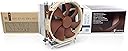
The Noctua NH-U14S TR4-SP3 is a high-end, quiet tower CPU cooler specifically engineered for AMD’s Threadripper and Epyc platforms. Featuring a 140mm premium NF-A15 fan with PWM speed control, it delivers exceptional airflow of 140.2 m³/h at a whisper-quiet 24.6 dB noise level. Built with copper heat pipes and aluminum fins, this cooler ensures superior thermal performance and durability, backed by a 6-year warranty. Ideal for professionals demanding reliable, silent cooling for their high-performance workstations.


| ASIN | B074DX2SX7 |
| Air Flow Capacity | 140.2 cubic meter per hour |
| Best Sellers Rank | #183 in Computer CPU Cooling Fans |
| Brand | Noctua |
| Brand Name | Noctua |
| Compatible Devices | Desktop |
| Cooling Method | Air |
| Customer Reviews | 4.8 out of 5 stars 954 Reviews |
| Global Trade Identification Number | 09010018000108 |
| Item Dimensions L x W x H | 5.9"L x 3.1"W x 6.5"H |
| Item Highlight | 165mm Height, High-End Low-Noise Cooling, For AMD Threadripper/Epyc TR4/sTRX4/SP3/sWRX8, 140mm Fan, Rich Accessory Kit |
| Item Type Name | CPU cooler |
| Item Weight | 1030 g |
| Manufacturer | Noctua |
| Material Type | Copper (base and heat-pipes), aluminium (cooling fins), soldered joints & nickel plating |
| Maximum Rotational Speed | 1500 rpm |
| Model | NH-U14S TR4-SP3 |
| Noise Level | 24.6 db |
| Number of Items | 1 |
| Number of Packs | 1 |
| Part Number | NH-U14S TR4-SP3 |
| Power Connector Type | 4-Pin |
| Product Dimensions | 5.9"L x 3.1"W x 6.5"H |
| UPC | 841501100109 |
| Unit Count | 1 Count |
| Voltage | 12 volts |
| Warranty Description | 6 year manufacturer’s warranty |
T**T
Great Air Cooling solution - Noise was a big concern, definitely not as bad as what I saw online.
I have a high-end Workstation (purchased in 2020) that has a Threadripper 3960x, 3080 FE GPU, m.2 SSD expander and 1600W power supply. When I bought the system, I really didn't consider the fans/ cooling because the cooling for the CPU was a ENERMAX solution which came with fans as well as the case a Lian Li Mesh Cool II and used those. This was the first desktop I've had since early 2000's and had been using laptops (workstations) for the past 8 years +/- since I graduated college/ grad school. Last week the ENERMAX cooler gave signs it was dying, had the pump ramped up to max and all fans to max and my CPU was still hot at 70-90C... Because I remember the attendant at Micro Center saying ENERMAX AIO had issues, but it was the only cooling solution in store that would be adequate with the CPU, I rolled the dice. It lasted me 3 yrs, I honesty thought it would have died earlier, so I wasn't caught off guard completely. So I decided to go all out with air coolers and found that the best was a Noctua NH-U14S TR4-SP3, Premium-Grade CPU Cooler for AMD sTRX4/TR4/SP3 (140mm, Brown) which brought me to research the Noctua NF-F12 iPPC 3000 PWM, Heavy Duty Cooling Fan, 4-Pin, 3000 RPM (120mm, Black) for the case as I wanted new and better ones that had no RGB. I considered the NF-F12 over the other Noctua alternatives for the sheer power, 3000 RPM and the volume of air it pushed just was un matched. I rather have the power and not needed than need it and not have it. So my biggest concern was that to keep all this hot hardware cool, all fans would have to run at high speeds and this would mean noise. To my delight after installing them, the entire system runs at 40C and below and the noise is not an issue as I can run these at 1k RPM and no real noise. I have 6 of these fans, 3 at the front (push-config - 800-1200 RPM +-300), 2 on top (push-config- 800-1200 RPM +-300) and 1 at the back (pull-config - 700-1000 RPM +-300) as well as having the NH-U14S with a 2x fans push-pull config 1500/1200 RPM. I probably get temps even further down if I tweak it further. But as it is... I'm very happy with the results in terms of both performance and noise levels. Yes if you run these at full 3000 RPM they are loud (not as bad as I feared either, but obviously loud) but the volume of air is also incredible. One little difference is because these are "industrial" the fans only come with 4 screws and that's it. I believe it was a good investment, specially because this machine is my daily driver for work (I'm a Data Scientist & Developer for SAS solutions). I got reliability and simplicity of air cooling as well as the brute power of massive air-flow if I need. I will definitely consider using Noctua cooling solutions on my next build when I decide to upgrade this machine sometime in the next couple of years.
M**N
Capable cooler, front-to-back airflow
I really like the NH-U14S. It's very capable, but I'm not an overclocker and didn't expect it to cool beyond stock settings which are somewhere around 330W or so at the wall. That would put the CPU socket probably around 250W. I do NOT suggest the smaller version of this cooler. If you are going to air-cool a threadripper and choose Noctua, you want to get the U14S. A couple of notes on this cooler: The cooler partially blocks one DIMM slot, but its above the slot. Simply removing the fan (which takes 2 seconds) clears the slot for putting a DIMM in or taking it out, then the fan can be put back on and will be above the DIMM. This is a major plus. The cooler includes one fan, but also includes a strap for a second fan so you can boost heat extraction (and noise) by adding a second 140mm fan if you like. The fan is fairly quiet considering what its being asked to do. A lower-noise setup is possible if you use XFR2 + PPT settings to reduce the power envelope below stock. The cooler is designed for front-to-back airflow. Front-of-case fan-in, cooler pulls the air through to the back of the case, and a rear case fan to pull the air out. I recommend a front AND rear fan at a minimum, inline with the CPU socket. The cooler is fairly hefty and I do not recommend a vertical motherboard. Keep the motherboard flat if you use this cooler (and this is true for any bulky air cooler). If you need more cooling, intend to mount sideways (vertical motherboard), or need to fit the threadripper into a lower-profile case, consider a liquid cooling setup such as an Enermax. The advantage of using a liquid cooling setup is that you don't really have to worry about case airflow so much, whereas with an air-cooled setup you have to make sure that the front-to-back path is clear. The advantage of air-cooling is that it is extremely robust (no liquid to leak, no AIO pump, the fan is the only moving part). The disadvantage is that you will have non-uniform heat distribution on the motherboard. For example, the DIMMs on the exhaust side of the fan run considerably hotter than the DIMMs on the front-side, and same for the VRMs. So air-cooling is best when you aren't pushing the limits of the system, whereas liquid cooling is best if you are (or for the other reasons iterated). -Matt
C**E
It works great at stock speeds and perhaps a mild overclock.
Very easy to install. I didn't know until I got it that you can get one with a second fan. I'm ordering that for my computer as the Threadrippers runs even warmer than I thought it would. Make sure you have good airflow in the case! It works very well at stock speeds and maybe a mild overclock, but beyond that, unless you have a way to keep your computer room very cool, it will get warm. I tried the 3960x with a liquid cooler at first, but although it kept it below the throttling speed, it was getting quite warm. The standard water coolers just don't cover enough of the cpu to keep it cool. Putting it in was very easy. Cleared the memory on my Gigabyte Aorus Wifi Pro MB with no problem, but I only have four sticks of ram. If I had more, it would have hit the top of the sticks closest to the cpu and wouldn't fit. If you are planning on using more than four sticks, they had better be very low profile. Your MB may be different and have more spacing though. It cleared my video card which is in the first slot by at least 6 mm, although there is an adjustment to move it up to 6 mm higher up in the case if needed. Heatsink seems to be solid and very well made. It's tall, so check your clearance with the side of the case. I've got an old Cooler Master HAF 932 case and have four fans mounted on the side, and it still cleared with plenty of room. Even though it came with only one fan, it includes clips for a second one and a tube of thermal paste. It also comes with a short cable you can attach to the second fan to keep it at about 1200 RPM for quietness. I don't think the second fan will add that much extra noise as they are rather quiet fans and are 140 mm. They come with extra rubber isolation pads to keep the fan from vibrating against the cooler. All in all, a good product for a fair price, (considering what everything costs these days). Amazon shipping is also very quick, even without paying extra for faster shipping. I ordered it on a Wednesday evening, and it arrived on Friday about noon. I live near a large city, so your mileage may vary!
T**Y
Great option when my Liquid cooler died
I have an AMD 2950x CPU and was having a great time with it. Had a well known liquid cooler that has the words "TR4 II 240" in it. It was ultra quiet and worked great. Great that is, until the pump failed at about 15 months in. It's under warranty, but, my PC was only useable for about 5 minutes at a time with no working cooler, and it left me stranded and so far they aren't being quick with my warranty ticket. So, I needed something to get me back in action and this was not only one of the more affordable options but also well-reviewed. I threw the Noctua cooler on and its been doing a fine job keeping my CPU in the ~40C range for a few hours. I haven't pushed the PC to its limits, but I think it will suffice. And, it's really not that noisy and should actually be a great cooler. Not sure what I'll do once the other one is replaced. It's tempting to just keep using this one, since it works so well. At least its an easy swap. It came with the mounts, some thermal grease, a wrench, parts for adding a 2nd fan if you wish, and everything needed to get it going. The ONLY downside I found so far was that if you leave the fan mounted in the default location, it hits my DRAM because it needs to be maybe 1/8" higher or so. So I was forced to attach the fan just slightly higher by 1/8" to 1/4" than centered on the cooler. Otherwise, it's great.
S**D
Great cooler for AMD TR4 1900x
I needed another cooler while my Enermax AIO is in route to RMA department and will hopefully get replaced. I picked this up because the reviews (outside of Amazon) said it gets the job done even though it's an air cooler. I also have other Nactua fans in this rig and my other appliances around the house. They perform really well in general. Well, they were right. I'm getting lower temps with with this air cooler than I ever did with the enermax liquid AIO. Granted, the Enermax was apparently defective (thanks for not telling me via email, Enermax) and manufacture was replacing them for anyone who opened a case (Reddit for details). That said, even when the AIO was brand new, I never reached below 32 C. With this air cooler, I'm getting 29 at idle and it is very quite. I applied some load and even then, it never went over 43 C. Ambient temp in the room is around 73 - 74 but overall, I really do see a very significant difference in cooling performance. It's only running with the fan that came with it too. This cooler can be configured in a push/pull setup to improve performance but at the moment, I don't think that's necessary. So it's very likely that even if I get a replacement AIO from enermax that I will continue to use this air cooler. It's quite, performs really well, easy to install, price is good and Nactua will throw in a spiffy case badge too. I highly recommend it if you are running AMD 1900x.
H**I
Product is as advertised
Order was as expected / advertised and received promptly especially given where it was shipped from. Well priced compared to others offering same item given it's been discontinued by the manufacturer.
G**L
Almost perfect
Pros: - Excellent performance compared to other coolers (including industry leading water coolers) - Great quality parts and packaging (no shortage of high quality pipes and great quality fan) - Includes extra fan mounting braces for extra fan & includes thermal fluid. - Quiet Cons: - Does not fit in many cases - Restricts access to the top PCI-E port (was unable to fit my GPU in the top port, I had to move it down to the next port wich now prevents me from being able to run NV-Link/SLI) Pro tip: You can upgrade the performance of this unit by ordering 2x 'Noctua NF-P14r' fans which operate at higher speeds (at the cost of more noise). This push-pull setup will make a considerable difference, especially for AMD CPUs with high core counts (which will 'always' throttle down after prolonged loads). Previously, my R7 2990wx would throttle down to base clock (3ghz) after 10 minutes of 100% load during renders. After this upgrade, the temps go from 3.6ghz to 3.4ghz for the first 10 minutes, and never goes below 3.2ghz even after hours of renders. Relevant System specs: ASUS Zenith Extreme AMD R7 2990wx (32-cores) Level-3 Turbo MX-3 Thermal Paste Corsair 2666mhz DDR4 (Quad-Channel 64gb) Thermaltake 1200w Gold PSU
O**N
Massive size; massive cooling!
The pictures do NOT do justice to how HUGE this thing is. I've installed it in an enormous full-tower case, and even so, I was worried about it having enough room. It barely fits! Installed with the optional second fan in push-pull configuration. Installed thermal paste exactly according to Noctua's instructions, which is nine small dots in a grid of three rows, then four larger dots in the gaps between those. Its performance may be helped by the fact that I'm running 6 case fans, providing plenty of airflow and plenty of cool air for this CPU cooler to work with. Top, front, and bottom of the case are all intake, with the rear of the case for exhaust. The CPU cooler blows front to rear, which plays very nicely with that airflow arrangement. But that massive size gets you extremely impressive cooling. People told me that my Threadripper 3970x had to have water cooling, that no air cooler could keep it from thermal throttling. People were wrong. I've done benchmarks, games, rendering, CPU crypto mining ... nothing I've thrown at it can get the CPU temps above 65C, even with this massive 250W CPU churning at 100% all night, the CPU temp usually hovers around 53-56C well below the thermal throttling cutoff of 90C. When at idle or doing non-intensive tasks, it's usually down at 31-46C. I never overclock anything, of course. Not worth it. But if I wanted to, I'd definitely have plenty of thermal headroom to play around with given this incredible heatsink! The size does have drawbacks, though. I did have RAM clearance issues, which forced me to relocate the two fans higher on the heatsink than they were intended to go. Thankfully, this doesn't seem to have hampered thermal performance much, as temps are still extremely good. I didn't have to adjust it for GPU clearance. It comes very close to the nearest pcie slot, but still stays far enough away that there's a couple millimeters of clearance. Overall, HIGHLY recommended to anyone looking to keep one of these Threadripper monsters cool. Not for small cases, though, and be prepared to deal with some RAM interference. I wish now that I'd gone with fewer modules of a larger size each, rather than mostly filling the banks. Then I wouldn't have had to relocate the fans.
D**N
Supereinfach zu montieren mit wirklich guter Anleitung
Sowas ist man gar nicht mehr gewohnt bei Computerteilen. Eine in lesbarer Grösse gedruckte und perfekt illustriert Anleitung in der der Einbau genau erklärt wird. Mir war die Wasserkühlung meines PCs kaputt gegangen und ich wollte wieder mit Luft kühlen. Und das tut es jetzt auch, und zwar leiser (!) als die Wasserkühlung war. Der Lüfter ist zwar nicht billig aber definitiv oberste Qualität. Die Laufruhe ist grossartig. Der Einbau war wirklich supereinfach und toll erklärt und alles was man braucht (inklusive Wärmeleitpaste und Imbus für die Schrauben)) ist beim Produkt dabei. Die Kühlleistung auf dem Threadripper 2950X ist Ok. Im idle ca. 41 Grad. Unter Vollast wenn alle 16 Kerne dauerhaft 100% rechnen ist die Temperatur allerdings auf 62 Grad, so dass ich mir noch den Zusatzlüfter NF-A15 dazu bestelle, der laut Rezension nochmal -5 Grad bringt. Nach ausgiebigem Gebrauch: die Laufruhe ist immer noch sensationell (wobei mein gesamter Tower auf leise getrimmt ist). Das System ist definitiv viel angenehmer als mit der vorher eingebauten Enermax Wasserkühlung (die ich leider niemandem empfehlen kann, die war nach noch nicht mal 3 Jahren defekt.) Update: gerade den Zusatzlüfter verbaut. Tipp: darauf achten in welche Richtung der Luftstrom im rechner fliessen muss und den Lüfter entsprechend der Richtung konfigurieren und einsetzen. Hatte ihn zuerst falsch rum eingesetzt weil kein Hinweis in der Anleitung dazu ist. Wenn alles richtig ist gibt es ungefähr die versprochene Kühlung um zusätzliche 5 Grad, bei mir sind es 4 Grad-- und das flüsterleise. Unter Vollast bleibt das System jetzt immer deutlich unter 60 Grad trotz Übertaktung. Im idle ist die Temperatur unter 40 Grad . Perfekt.
C**A
One of the best options for TR4 socket cpus
I did not want to deal with water cooling anymore and found the Noctua NH-U14S TR4-SP3 to be one of the best options available for TR4 sockets. One month of usage and had no troubles with my 1920x.
R**R
Was able to use my threadripper without underclocking
I live in a hot place and so far using water cooling, I had to underclock my threadripper 3960x so as not to overheat it. Not anymore. The inbuilt thermal paste is also good enough. Really silent, great product 10/10. Note: Wear a glove while mounting, the fins are sharp, I nicked my hand on it.
A**R
Silent and coool
As expected from Noctua products
A**X
Antes de comprar
Estuve revisando diferentes comparativas de aircooler y este era el que mejor enfriaba. Efectivamente, incluso con Render en Arnold las temperaturas se mantienen en los 67 C y de ahí no sube. Creo que hasta es mejor enfiramento que un water 360mm. Tiene la opción de comprar otro ventilador. Espero sirva para los nuevos threadripper 3970
Trustpilot
1 month ago
3 days ago