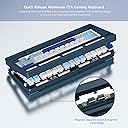
โจ๏ธ Elevate your desk game with the RD75 Pro โ where speed, style, and customization collide!
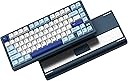
The Womier RD75 Pro is a premium 75% wireless mechanical keyboard featuring a quick-release CNC aluminum frame, hot-swappable POM linear switches, and full QMK/VIA programmability. It supports tri-mode connectivity (wired, 2.4GHz, Bluetooth) with ultra-low latency and boasts an impressive 8000mAh battery for up to 900 hours of use. Designed for both Windows and Mac, it includes a hidden dongle storage slot and dynamic RGB lighting with 40+ effects, making it the ultimate tool for professionals and gamers seeking high performance and sleek aesthetics.


| ASIN | B0DG841S4H |
| Additional Features | 75% Keyboard, Full Aluminum CNC, VIA Programmable Macro |
| Brand | Womier |
| Built-In Media | USB Cable, Hidden Dongle Storage Slot, Decorative Magnetic Metal Badge |
| Button Quantity | 82 |
| Color | blue |
| Colour | blue |
| Compatible Devices | Laptop, PC, Tablet, Smartphone, Mac Devices |
| Compatible devices | Laptop, PC, Tablet, Smartphone, Mac Devices |
| Connectivity Technology | BT5.0/USB-C Wireless 2.4GHz |
| Connectivity technology | BT5.0/USB-C Wireless 2.4GHz |
| Customer Reviews | 3.9 out of 5 stars 35 Reviews |
| Enclosure Material | Aluminum |
| Hand Orientation | Ambidextrous |
| Keyboard Description | Gaming |
| Keyboard Layout | QWERTY |
| Keyboard description | Gaming |
| Manufacturer | Womier |
| Model Number | Womier RD75 Pro |
| Number of Keys | 82 |
| Number of Sections | 3 |
| Power Source | Wireless Power |
| Special features | 75% Keyboard, Full Aluminum CNC, VIA Programmable Macro |
| Switch Type | Linear |
| Unit Count | 1.0 Count |
| Water Resistance Level | Not Water Resistant |
A**.
Fast Disassembly and Fantastic (Minus some QC problems, read)
Overall I love this board, for the price and features it is worth it. RGB isn't really the strong suit of this board but it is bright enough for south facing sockets. Furthermore going between wireless, bluetooth, and wired mode have been smooth so you really shouldn't have a problem there. The main reason I got this keyboard was for the fast disassembly and the metal case along with ball mechanism are flawless for the most part. Tying angle is high but nothing a wrist rest can't fix and battery life so far hasn't drained for the few days I have had it. Now the reason I am giving this 4 stars compared to 5 is the troubleshooting I had to do when I first initally received the keyboard which I will list out. 1: Connecting to VIA isn't plug and play, you have to go to wormier's website and download the .json file. Otherwise this is really minor, but it would have been better to have be a plug and play to remap keys. Though perk I don't need any downloaded software for this keyboard. 2: The gasket that holds the plate to the pcb on the bottom right of the board came loose, making the switches in that area not make contact. Easy fix getting it back into place, but this should not be something one has to do when they receive the board. Another section also had the same problem albeit with some switches so really annoying. 3: Both gasket mounting options virtually feel the same so pick one and leave it alone. 4: The pogo pin connection between the usb-c port pcb and main pcb sometimes needs to be wiggled into place when reassembling the keyboard fpr proper contact. Otherwise the keyboard feels good to type on, is easy to maintaince and disassembly, zero downloaded software (all web base), and budget wise decent for a starter keyboard.
T**Y
Overhyped
I purchased this keyboard after watching some YouTube reviews touting it as one of the best 75% keyboards of 2024. I do not game, so I bought this for typing only. I am returning it because it has two major flaws: 1. The typing experience is miserable. It randomly produces a string of repeating letters, spaces, backspaces, and enters (see attached image of a test transcription of The Raven by Edgar Allan Poe). It also randomly fails to recognize keystrokes. I have no idea what is causing it, but when I switched back to my old Corsair K70 LUX, I didn't have any of these issues. 2. The wireless connection is unstable. I tried switching to 2.4 GHz to see if the wired connection was causing the strings of repeating letters. First, removing the "caps lock" key to access the wireless on/off switch is incredibly annoying (this alone would be a deal-breaker if I intended to use primarily as a wireless keyboard). Second, once connected to 2.4 GHz (you have to press Fn+4 to establish the connection), it dropped out after less than a minute and would not reconnect. Eventually, after turning wireless on/off, unplugging and reinserting the dongle, and trying Fn+4 a few times, I got it to reconnect again - only to have the connection drop in minutes. Then I could not get it to reconnect and stopped trying. Assuming it did not have these two major flaws, I would still be on the fence about it because the typing experience isn't satisfying. Perhaps my preference is not for linear switches (my current keyboard has Cherry Browns), but it just wasn't satisfying to type on. I would probably try a different keyboard with different switches before I spent $50 on different switches to swap out. In conclusion, this didn't live up to the hype for me. I will continue searching for a more reliable and better feeling keyboard.
D**.
The Womier RD75 Pro keyboard is a great 75% keyboard with amazing customer service.
The Womier RD75 Pro keyboard is a great 75% keyboard with amazing customer service. I had issues with the PCB acting up and customer support sent me a new one. Pros: -The build quality is amazing. It features a full aluminum build with double shot PBT keycaps and different color options to choose from. -The keyboard features tri-mode connectivity with support for wired, wireless, and Bluetooth. -Typing feels great since it features n-key rollover and mechanical switches. -Functionality is top notch with amazing battery life, QMK support, and no need to download 3rd party software. -Keyboard is plug and play and doesn't require additional drivers. -Sounds great out of the box with no mods (very thocky). -Response time is really fast. -Great for gaming and productivity. -Very easy to disassemble and re-assemble. -Keycap font is fantastic and extremely legible. Cons: -Features linear keyboard switches (not a con for everyone, but I personally prefer tactile switches). -Connectivity mode switch is hidden under the Caps Lock key. -Stabilizers rattle a bit, might require some lube. -Included USB C to USB A cable feels a bit cheap. -The stock keycaps could be slightly better quality. -Some keys aren't south facing so RGB looks dull for some keys. In conclusion, I highly recommend this keyboard for anyone looking to get into the custom keyboards, and for people who want a great keyboard that offers plenty of features and an amazing typing experience straight out of the box.
K**N
If you upgrade the switches in this keyboard I would definitely Recommend this keyboard
My very first Mechanical Analog Keyboard and I'm quite impressed with the keyboard the feel of it is spectacular I'm coming from a Wooting 60HE and a Melgeek 68HE and I've got to say the feeling with typing with non-magnetic switch is something you can't recreate i mean responsiveness of both hall effects keyboard is Magnificent but the feel, the feel i something i can understand now with the Gateroen Sea Salt Smoothies I mean man! it's a different being gaming wise id definitely choose the HE keyboards although I don't like the feel but for typing i would choose RD75 over them any day a few things to note when i changed the switches the stock switches were so easy to pull of that it made me kind of understand some of the reviews about dead spots in the keyboard or stutters in typing whether you like tactile, linear, etc. replacing the switches (as in putting the new ones are difficult) MAKE SURE YOUR SWITCHES ARE SITTING FLUSH WITH THE BOARD. I was looking at the ones that were not sitting all the way after putting them in stressed me out. I had to double check if they were sitting flush with the board but overall i like this keyboard.
R**D
Good keyboard but coulda been a great keyboard.
Keyboard is okay, its like a cheaper Rainy 75 sibling. though i like it, i would have bought the rainy if they had the colorway and version i liked. LED isnt bright as other keyboards. i personally dont mind cuz i dont use the RGB that much on a keyboard, but if youre the type that enjoys bright RGB, this isnt the keyboard for you. The keyboard uses VIA so you dont have to download proprietary programs. also one weird thing, the keyboard is in a 3 tone colorway (White, dark blue, light blue). they send you extra keycaps to make it 2 tone (white and light blue). only problem is the 'enter' and 'esc' keys is a different shade of light blue, so if i replace the keys, its still 3 tone. it seems like they took the keys from a different set, and just threw it in and said "close enough shade of blue, whatever, its fine". sloppy work on their part. as someone who is gonna replace all the keycaps, its a bummer but not a big deal. but for someone who might not want to replace all the keycaps, this could be an issue. Top row in picture: extra keycaps Womier gives you to make it 2 tone Bottom row: rest of the light blue keycaps on keyboard. so in the end, its a pretty okay keyboard, it, at least, sounds good when i type and typing feels good on it too. only if womier paid attention to the small details, it could have been a great keyboard. if mismatch keycaps dont bother you, and you dont want to spend upwards of $150 or more on a keyboard, or you plan on switching keycaps/ switches anyway, this can be a good keyboard for you. if you want to use a keyboard without modding it whatsoever, id look elsewhere. in this price range, there are other great options out there.
Trustpilot
1 month ago
5 days ago