Desertcart purchases this item on your behalf and handles shipping, customs, and support to Hungary.
🖌️ Elevate your creativity anywhere, anytime — don’t just draw, dominate your digital canvas!
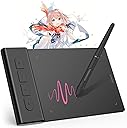
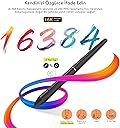
The VEIKK VK430 is a compact, ultra-thin 4x3 inch drawing tablet featuring 8192 levels of pressure sensitivity and a rapid 290 PPS report rate. Designed for professionals and students alike, it offers 4 customizable express keys and broad OS compatibility including Windows, Mac, Linux, Android, and Chromebook. Weighing just 82.5g, it’s perfect for portable digital art, e-signatures, and remote work, backed by a 1-year warranty and lifetime driver updates.


| Active Surface Area | 4x3inch |
| Asin | B09TZS1F4Q |
| Best Sellers Rank | #18,824 in Computers & Accessories (See Top 100 in Computers & Accessories) #80 in Graphic Tablets |
| Box Contents | Digital Pen, Pen Nib Clip, Replacement Nib |
| Brand Name | VEIKK |
| Colour | Grey |
| Compatible Devices | Windows 11/10/8/7, MAC OS 10.10 or above, Windows 10 Android 6.0 -13.0,Linux |
| Country Of Origin | China |
| Customer Reviews | 4.2 4.2 out of 5 stars (553) 4.2 out of 5 stars |
| Display Type | LCD |
| Importer Contact Information | TIGER PUG COMMERCE PRIVATE LIMITED A-302, Dipiti Classic, 32-34,Suren Road, Andheri-east,Mumbai Suburban Maharashtra 400093 Tel:022-6879 5151 Email:[email protected] |
| Item Dimensions L X W | 6.3L x 3.9W Centimeters |
| Item Type Name | pen tablet |
| Item Weight Unit Of Measure | 84 Grams |
| Manufacturer | VEIKK |
| Manufacturer Part Number | VEIKKVK430 |
| Model Name | Creator Pop VK430 |
| Model Number | VK430 |
| Native Resolution | 1920x1080 |
| Network Connectivity Technology | USB |
| Number Of Items | 10 |
| Operating System | Chrome OS 88 or later, Windows 7 or later , Mac OS 10.12 or later, Android 6.0 or later and Linux |
| Packer Contact Information | Shenzhen Hezon Lito Technology Co.,Ltd. C3,No.45ShasanRoad,ShasanCommunity,ShajingStreet,BaoanDistrict,Shenzhen,China Email:[email protected] Tel:022-6879 5151 |
| Pressure Sensitivity | 8192 Levels |
| Product Features | Extra-Slim |
| Screen Size Unit Of Measure | 19.05 Centimetres |
| Specific Uses For Product | Designing, Painting, Animation, 3D Modelling, E-signature, Online-Education, Drawing, Editing |
| Target Audience | Student |
| Unit Count | 1 Piece |
| Warranty Description | 1 year |
User
Veikk pen teblet
Bese to sahi kaam kar rha hai, is par likhne k liye apko practice ki jarurat padegi nhi to writing skill bigner k liye bahut kharab ayegi.Android me iske button kaam nhi karte hai pc k liye perfect h
User
Tablette
Cadeau pour mon fils il est ravi pour l’instant le produit fonctionne très bien à voir dans le temps
User
A lot better than expected for it's size
Drawing tablet for Mac/Chromebook/windows/androidThis is a fab little drawing tablet and better than I thought it would be for it's little size. This is roughly 16cm x 10cm x 0.5cm, with a drawing area of 10cm x 8cm and 4 shortcut key buttons. These buttons as well as the pen, allow you to customise the drawing tablet to suit you and your style, you can even set it to left or right handed too.It feels well made, sturdy and durable. You have a 155cm USB cable to power it with, this will not work with an extender USB, you need to plug it in directly if you're using a Pc. You can use it with laptops, tablets and your phone too, the phone needs a USB adapter.You have the drawing tablet pen, which has two buttons on, this is roughly 15cm long, this comes with 8 replacement nibs, a nib remover tool and it doesn't need batteries to work, so that's good.The set up is really easy, you need to download the software, which is quick to install and simple to follow. Once you've installed this you have a little app as such, to customise the drawing tablet. In the app you can change the button functions on the pen, you have many options for what you want this to do, I kept one as an eraser, as it's easy to remove small areas. You can change the pressure and sensitivity you want it to have, to suit your own drawing style.You can customise the shortcut keys, I kept one as an 'undo' button, which makes it really easy to erase larger parts you want rid of. Also I kept two as zoom in and out, which helps draw in those tiny areas when necessary.You can map your work area, so you can set it to use all or part of the drawing area, set it to size scale with your screen, use right handed or left handed style and a few more.Using the tablet itself is fantastic. Whilst you're hovering over the tablet, you can see on screen where you are exactly, it won't start drawing until you put that pen to it. It won't pick up your hand leaning on it or anything like that. Drawing away is easily done. You can use other areas of the monitor screen with your pen, so you can change colours, pen line widths, open new pages etc with the pen itself.I would recommend this. I think it's brilliant for a starter drawing tablet, definitely better than I expected it to be. Good quality, works well and easy to use.
User
Great
Seems to be working well.
User
Excelente desempeño!
Fue regalo de cumpleaños para mi nieta de 12 años. Hasta ahorita esta funcionando muy bien y ella está muy contenta con ella.
User
Gran Tableta gráfica
Trabajo con Linux y la configuración fue sencilla. Dicto conferencia virtuales y su facilidad de utilizar es Sencillamente espectacular . La programación de los botones es sencilla y facilita mucho el trabajo. No puedo decir nada sobre su durabilidad , pero por el resto la recomiendo
Trustpilot
1 week ago
2 months ago