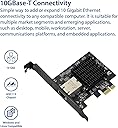
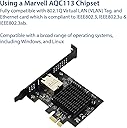
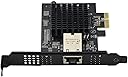
This product does not support even basic PCIe power management technologies, such as PCIe ASPM L1. As such it can easily triple the power consumption of the computer it's installed in, by preventing the entire computer from entering lower sleep states.With this card installed my computer cannot go any lower than the C3 package cstate. Without the card installed it can stay in the C10 package cstate, which is the lowest power state.The chipset used in this card (ACQ113) can support PCIe ASPM L1 and the lower power PCIe L1.1 and L1.2 substates, but the card advertisers it cannot support them.As such this adapter is not functional for low power use cases. Suggest looking elsewhere if you need a low power 10 Gbps ethernet adapter.Firmware versions reported by the card in lspci:Bundle Version: 1.5.38Fw Version: 1.2.122Output of "lspci --vv" on Linux:Ethernet controller: Aquantia Corp. AQtion AQC113 NBase-T/IEEE 802.3an Ethernet Controller [Antigua 10G] (rev 03)Subsystem: Aquantia Corp. AQtion AQC113 NBase-T/IEEE 802.3an Ethernet Controller [Antigua 10G]Control: I/O- Mem+ BusMaster+ SpecCycle- MemWINV- VGASnoop- ParErr- Stepping- SERR- FastB2B- DisINTx+Status: Cap+ 66MHz- UDF- FastB2B- ParErr- DEVSEL=fast >TAbort- <TAbort- <MAbort- >SERR- <PERR- INTx-Latency: 0, Cache Line Size: 64 bytesInterrupt: pin A routed to IRQ 17IOMMU group: 14Region 0: Memory at 80c00000 (64-bit, non-prefetchable) [size=512K]Region 2: Memory at 80ca0000 (64-bit, non-prefetchable) [size=4K]Region 4: Memory at 80800000 (64-bit, non-prefetchable) [size=4M]Expansion ROM at 80c80000 [disabled] [size=128K]Capabilities: [40] Power Management version 3Flags: PMEClk- DSI- D1+ D2+ AuxCurrent=375mA PME(D0+,D1+,D2-,D3hot+,D3cold+)Status: D0 NoSoftRst+ PME-Enable- DSel=0 DScale=0 PME-Capabilities: [50] MSI: Enable- Count=1/32 Maskable+ 64bit+Address: 0000000000000000 Data: 0000Masking: 00000000 Pending: 00000000Capabilities: [70] Express (v2) Endpoint, MSI 00DevCap: MaxPayload 512 bytes, PhantFunc 0, Latency L0s unlimited, L1 unlimitedExtTag+ AttnBtn- AttnInd- PwrInd- RBE+ FLReset+ SlotPowerLimit 10WDevCtl: CorrErr+ NonFatalErr+ FatalErr+ UnsupReq+RlxdOrd+ ExtTag+ PhantFunc- AuxPwr- NoSnoop+ FLReset-MaxPayload 256 bytes, MaxReadReq 512 bytesDevSta: CorrErr- NonFatalErr- FatalErr- UnsupReq- AuxPwr+ TransPend-LnkCap: Port #0, Speed 16GT/s, Width x4, ASPM not supportedClockPM+ Surprise- LLActRep- BwNot- ASPMOptComp+LnkCtl: ASPM Disabled; RCB 64 bytes, Disabled- CommClk+ExtSynch- ClockPM+ AutWidDis- BWInt- AutBWInt-LnkSta: Speed 16GT/s, Width x1 (downgraded)TrErr- Train- SlotClk+ DLActive- BWMgmt- ABWMgmt-DevCap2: Completion Timeout: Not Supported, TimeoutDis+ NROPrPrP- LTR+10BitTagComp+ 10BitTagReq- OBFF Via message/WAKE#, ExtFmt- EETLPPrefix-EmergencyPowerReduction Not Supported, EmergencyPowerReductionInit-FRS- TPHComp- ExtTPHComp-AtomicOpsCap: 32bit- 64bit- 128bitCAS-DevCtl2: Completion Timeout: 50us to 50ms, TimeoutDis- LTR+ 10BitTagReq- OBFF Disabled,AtomicOpsCtl: ReqEn-LnkCap2: Supported Link Speeds: 2.5-16GT/s, Crosslink- Retimer+ 2Retimers+ DRS-LnkCtl2: Target Link Speed: 16GT/s, EnterCompliance- SpeedDis-Transmit Margin: Normal Operating Range, EnterModifiedCompliance- ComplianceSOS-Compliance Preset/De-emphasis: -6dB de-emphasis, 0dB preshootLnkSta2: Current De-emphasis Level: -6dB, EqualizationComplete+ EqualizationPhase1+EqualizationPhase2+ EqualizationPhase3+ LinkEqualizationRequest-Retimer- 2Retimers- CrosslinkRes: Upstream PortCapabilities: [b0] MSI-X: Enable+ Count=32 Masked-Vector table: BAR=2 offset=00000000PBA: BAR=2 offset=00000200Capabilities: [d0] Vital Product DataProduct Name: Marvell AQtion Network AdapterRead-only fields:[PN] Part number: 00B1E113[V1] Vendor specific: Bundle Version: 1.5.38[V2] Vendor specific: Fw Version: 1.2.122[RV] Reserved: checksum good, 0 byte(s) reservedEndCapabilities: [100 v2] Advanced Error ReportingUESta: DLP- SDES- TLP- FCP- CmpltTO- CmpltAbrt- UnxCmplt- RxOF- MalfTLP- ECRC- UnsupReq- ACSViol-UEMsk: DLP- SDES- TLP- FCP- CmpltTO- CmpltAbrt- UnxCmplt- RxOF- MalfTLP- ECRC- UnsupReq- ACSViol-UESvrt: DLP+ SDES+ TLP- FCP+ CmpltTO- CmpltAbrt- UnxCmplt- RxOF+ MalfTLP+ ECRC- UnsupReq- ACSViol-CESta: RxErr- BadTLP- BadDLLP- Rollover- Timeout- AdvNonFatalErr-CEMsk: RxErr- BadTLP- BadDLLP- Rollover- Timeout- AdvNonFatalErr+AERCap: First Error Pointer: 00, ECRCGenCap+ ECRCGenEn- ECRCChkCap+ ECRCChkEn-MultHdrRecCap- MultHdrRecEn- TLPPfxPres- HdrLogCap-HeaderLog: 00000000 00000000 00000000 00000000Capabilities: [148 v1] Virtual ChannelCaps: LPEVC=0 RefClk=100ns PATEntryBits=1Arb: Fixed+ WRR32- WRR64- WRR128-Ctrl: ArbSelect=FixedStatus: InProgress-VC0: Caps: PATOffset=00 MaxTimeSlots=1 RejSnoopTrans-Arb: Fixed- WRR32- WRR64- WRR128- TWRR128- WRR256-Ctrl: Enable+ ID=0 ArbSelect=Fixed TC/VC=ffStatus: NegoPending- InProgress-Capabilities: [168 v1] Device Serial Number 00-00-00-00-00-00-00-00Capabilities: [178 v1] Secondary PCI ExpressLnkCtl3: LnkEquIntrruptEn- PerformEqu-LaneErrStat: 0Capabilities: [198 v1] Physical Layer 16.0 GT/s <?>Capabilities: [1bc v1] Lane Margining at the Receiver <?>Capabilities: [1d4 v1] Latency Tolerance ReportingMax snoop latency: 3145728nsMax no snoop latency: 3145728nsCapabilities: [1dc v1] L1 PM SubstatesL1SubCap: PCI-PM_L1.2+ PCI-PM_L1.1+ ASPM_L1.2+ ASPM_L1.1+ L1_PM_Substates+PortCommonModeRestoreTime=10us PortTPowerOnTime=14usL1SubCtl1: PCI-PM_L1.2+ PCI-PM_L1.1+ ASPM_L1.2+ ASPM_L1.1+T_CommonMode=0us LTR1.2_Threshold=114688nsL1SubCtl2: T_PwrOn=42usCapabilities: [1ec v1] Vendor Specific Information: ID=0002 Rev=4 Len=100 <?>Capabilities: [2ec v1] Data Link Feature <?>Capabilities: [2f8 v1] Precision Time MeasurementPTMCap: Requester:+ Responder:- Root:-PTMClockGranularity: UnimplementedPTMControl: Enabled:+ RootSelected:-PTMEffectiveGranularity: 4nsCapabilities: [304 v1] Vendor Specific Information: ID=0003 Rev=1 Len=054 <?>Kernel driver in use: atlanticKernel modules: atlantic