Desertcart purchases this item on your behalf and handles shipping, customs, and support to Hungary.
🎬 Elevate your storytelling with pro-grade stabilization and smart tracking — never miss the moment!
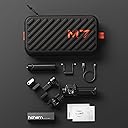
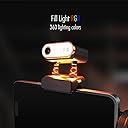
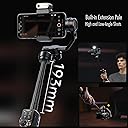
The Hohem iSteady M7 is a professional 3-axis gimbal stabilizer designed for iPhones and major smartphones, featuring AI tracking, a detachable touchscreen remote, an extendable pole for versatile shooting angles, and an integrated RGB fill light. With 12 hours of battery life and reverse charging, it supports all-day creative filming with smooth, cinematic movements.


| ASIN | B0DLWKGBP9 |
| Best Sellers Rank | #21,979 in Cell Phones & Accessories ( See Top 100 in Cell Phones & Accessories ) #41 in Cell Phone Handheld Gimbals & Stabilizers |
| Brand | Hohem |
| Color | Black |
| Compatible Devices | iPhone 16 15 14 13 12 11 Pro Max Mini XS Max XR X, Huawei P50 P40 P30 P20 Pro Mate 60 50 40 30 20 Pro, Samsung Galaxy S22 S21 S20 Plus Ultra Note20 Ultra |
| Customer Reviews | 4.3 4.3 out of 5 stars (503) |
| Exposure Control Type | Automatic |
| File Format | MP4, JPG |
| Folded Size | 335×57×159mm |
| Image stabilization | 3-axis image stabilization |
| Item Dimensions D x W x H | 8.26"D x 14.7"W x 3.1"H |
| Item Highlight | Detachable Remote,Extendable Pole,Magnetic Light,Phone Stabilizer for Video Recording - Hohem M6 Kit Upgrade |
| Item Weight | 629 g |
| Manufacturer | hohem |
| Manufacturer Part Number | RDJP-HO-00000 |
| Maximum Weight Recommendation | 500 g |
| Media Type | Video, Image |
| Model Name | iSteady M7 |
| Model Number | M7 |
| Model Series | iSteady M7 |
| Number of Items | 1 |
| Number of Packs | 1 |
| Screen Size | 1.4 inches |
| Shooting Modes | AI Tracking, Unknown Modes |
| Video Capture Format | MP4 |
| Video Capture Resolution | 1080p |
| Viewfinder Type | LCD screen |
| Water Resistance Level | Not Water Resistant |
T**Y
Feature filled gimbal for newbies and pros!
I've been a hobby photographer for many years but never really got into cellphone photography/videography until recently. Though I still prefer proper cameras for photography, videography on cellphones have greatly improved and I've been exploring it. To do proper videography a gimbal is an essential tool as it helps in stabilizing the camera, specially when using wide angle lenses as they do not have built-in stabilization. Looking at available options there are so many choices that it is impossible for a newbie to make decision but after watching many videos and reading reviews I picked up Hohem iSteady M7. Even though it was more than I would have spent on first gimbal the features were outstanding to justify the cost. Starting with the built quality, gimbal is built with high quality plastics with hard rubberized grips. All corners and sides are perfectly tapered to not have any sharp edges. Gimbal feature locks on all three motors and they click with a satisfying click. All buttons, rotary dial and joystick for controlling functions are all very high quality and are a joy to use. The detachable LCD remote is lightweight but also same high quality. The included stand is also well made and make it simple to setup gimbal on a table or flat surface. Gimbal also feature three connection points that can be used to mount accessories like mics or lights. Functionality wise, M7 is extremely feature rich and overwhelmed me at first but after going through the included quick start guide does a good job at providing details about the basic functionality to get you started. That plus few YT videos were enough to get me going. I use a foldable OnePlus Open and I also have issue with stands or phone holders because the phone is heavy and thick and does not work well with accessories made for bar phone but I'm happy to report that M7 works well with my phone and after some fiddling, I was easily able to stabilize it on the gimbal. Gimbal is paired with the phone using Bluetooth and it is a straight forward process. Once paired, either the built-in camera app or Homen Joy app can be used. I personally prefer the Hohem job app as it has a lot more feature that my camera app does not. Other than basic photo and video options, it has TimeLapse, TimeWarp, SlowMo, Pano and my favorite "Moment" option, which is like a template with predefined movements of gimbal to achieve pro level shots with ease. The ability to track subjects (not just people) and remotely trigger the camera and change settings view the remote are game changer for me as I usually make videos with camera at one location and don't usually carry it around. Just by selecting a subject on the LCD, Ai tracking can be enabled and it works amazingly well. Built-in RGB light is another great addition as helps in making videos in lowlight and I am sure Vloggers (which I am not) will make good use of it. Another feature that I really like is that gimbal features power out, so you can use it to charge the phone, which will result in decreased battery life for gimbal but at least there is an option for emergencies. I could write a lot more about why I like M7 but if I were to pick the main feature that stand out of me are the AI tracking, remote with built-in LCD and built-in light. All these features make it an amazing gimbal for newbies and pros alike.
D**Y
Amazing Technology
It's rare I use the term amazing about any product but I truly think the M7 deserves the title. Out of the box I was pleasantly suprised by the inclusion of a very nice carry case. Everything fits well and it keeps the M7 protected as you travel. I love when companies include a case that feels quality. The M7 itself feels premium and sturdy for daily use and I like that it extends out for wider shots without the need to add an additional accessory. You should download the Home Joy app, as it delivers extra functionality that using your standard camera app will not. After all you will want to get all the features of this wonder of technology. Set up was straight forward and was near plug and play after the app was installed. Simply place your camera in the M7 and balance your phone. I didn't need to balance my phone but you may need to. You'll be ready to go. The two things I find amazing are the AI tracker and the remote. The AI tracker can be used or removed. It can be used with simple hand gestures to frame and track a subject. Not just a person, but any moving subject. How awesome is that? It has worked flawlessly for me. The remote is where I really thought the M7 stood out. Being a solo creator it can be a real pain to have to run back and forth to your camera to adjust angles and framing let alone stop and start recording. Now you can do it all from the included remote. Even cooler is that the remote lives in the handle of the M7 so you're not searching in your pockets or bags for it. Simply detach when you're ready to use and mount back when done. It will charge and be ready for use when you need it again. The remote has a monitoring function as well. You can actually see what your phone sees as well as pick what subject you would like the AI tracker to follow. in conclusion the Hohem Steady M7 is a great gimbal that provides smooth video and all the functionality you would expect from a gimbal, but then goes above and beyond to provide solo creators a wonderfully useful tool to keep you creating and not distracted with adjusting your gear. The technology that's packed into the M7 is amazing. Who's it for: Everyone from the person making home video to the solo content creator...but especially for the solo content creator who will find tremendous value and quality in the M7. Should you buy: Most definitely! Amazing product. Great build quality. Does what it says it will. Lot's of possibilities for use. Most important of all I never thought " I wish it did..." while using it. Buy and enjoy.
J**Y
If you love photography and video!
Love this gimbal, there is a certain learning curve to using this. In my opinion, I believe it's well Worth the money depending on what you're going to be using it for.
W**Y
Just wow! I cant get over how much this does.
Lets start with this, out of the box this gimbal did something I have never need a gimbal do before. You do NOT need a phone on it for it to balance. I set it up, turned it on and expected the typical gimbal shake because nothing was in it. Nope, he went right into the perfect balance. That was within the first 2 minutes of using this. The weight itself is decently light, nothing crazy. The app is great for control and whatnot. But lets talk about the elephant in the room that made me pull the trigger on it. The REMOTE! This is hands down the coolest feature of any gimbal I've used over the years. For those who record themselves. You always have that point where you still have to have the gimbal closely. And you cant use the app, because the app is on your phone thats on the gimbal. Hohem did a perfect job to solve this issue we never knew needed fixing. This was not just innovation, this was well thought out. Not only is it a remote for the gimbal, but the screen itself shows me what my phone sees. Which another hidden benefit is I can use my rear camera (better quality) and still see where i am in the frame. Job well done! Onto the AI, it works seemless and a great feature. I still have to dive deeper into its full use, but so far on the surface its great. The balancing of the unit itself is very simple and easy to use. Battery life so far is absolutely amazing, and its nice it tells you the battery of the mini remote also so you know if you are about to lose it. But even if you do you can still reconnect it and it powers off the gimbal battery. So even on a bad day, you still have a gimbal that outperforms most. Hands down my favorite gimbal and goes with me everywhere. If you are on the fence of upgrading or getting a gimbal. This one is leaps above anything else on the market today.
R**S
Easy to Setup and Use.... Detachable Control Screen and Subject Tracking
I am using the M7 Gimbal with my Samsung S23 Ultra. The S23 fits securely in the bracket even with the medium sized case on. I've had other phone mounts that didn't fully hold the S23 with the attached case, but I do not have that issue with the M7. The gimbal works well in vertical and horizontal orientation. Balancing the gimbal was very easy as it only requires one axis adjustment to make. It took me a little while to realize that the tracking sensor can be mounted in a different orientation depending on your use case. Pairing the gimbal to my phone via bluetooth was quick and easy. I was surprised by how well the detachable screen operations and the lack of lag when viewing the screen. The controls work well using the detachable module which includes the joystick and the ability to remotely operate the camera. Another feature that I liked was the ability to manually focus my phone camera via bluetooth using the side wheel on the gimbal. The gimbal feels sturdy and of high quality. There are features on this gimbal I wish I had on the MT2 gimbal which I also have. The gimbal works well in various gimbal modes. Its responsive and the motor appears to be stronger than needed to manage the weight of my S23 and Urban Armor Gear case. Charging the gimbal with the screen attached also charges to detachable control module. Overall, I would say this gimbal is better than I expected and the detachable screen/control module and subject tracking features make it worth strongly considering if someone needs a phone gimbal.
P**L
Great Gimbal... Maybe...
Great Gimbal... Maybe... Got this gimbal a couple weeks ago, finally got around to using it and encountered a significant issue. Before first use I charged the unit until it was full and then proceeded to have a great time trying it out. After the battery hit 15% I put it back on the charger to get ready for round 2. And this is where the trouble arises, the display showed full battery the night before, now it won't turn on. If I hold the button on the display, the display turns on not the gimbal. If I press the gimbal power button I get nothing. After removing the display and plugging into a charger I see no indicators in the area behind the display. This could be an amazing gimbal if not for the battery failure. This really brings up a concern, if the battery fails after 1 use, maybe this is a wider problem lurking in Hohems design. I'd like to try another unit, but am now hesitant about long term ownership in regards to this issue arising on day 1. I hope everyone else is having a better time than me, at this point I'm very hesitant to let hohem back into my gear bag. Update: Seller is now requesting that I pay return shipping costs for the defective item
I**H
Game changer for anyone who creates content!
As an amateur photographer, web designer, and video creator I have been looking for an item like this for a while. I frequently present and teach, and this gimble tracks me even with my back turned. It was easy to use out of the box, but I would recommend using the QR code provided to watch the videos so that you can get an idea of the capabilities of the device. After watching the videos, it was easy to figure out how everything works. I love the ai camera/fill light. The light is good for close subjects and can be adjusted the temperature that you need. The ai camera allows you to see what your camera will see so that you can make adjustments without having to touch the device. To do this you need to use the remote which is awesome. Lots of adjustments that are easy to make. You can also start and stop your recordings with the remote using the Bluetooth connection. I had no issues connecting to the Bluetooth with my Pixel 8 Pro. The size of the device is easy to hold, and the removeable tripod comes in really handy. Both are sturdy for the price and comfortable to use. I tried to make the moving head glitch and it kept up just fine. I have yet to deplete the battery after the initial charge and it has been 3 days, so that battery life is good, and you can charge your phone from it as well. This was a great purchase and I anticipate getting a lot of use out of the M7.
A**R
Decent but no
They claim it’s compatible with the Samsung S25 Ultra, but honestly, you have to fiddle with it quite a bit. It’s a very tight fit, and if it’s not perfectly balanced, you’re going to have problems — it overheats and shuts down frequently. That happened to me multiple times, and I eventually stopped using it because it became too frustrating, especially when I needed it most. For the price, I wouldn’t buy it again. In terms of technology and features like the built-in tripod and extendable selfie pole, it could be great. But there are better options for your money. If it had a magnetic base to attach the phone instead of using clips, it would’ve been an excellent gimbal, no question. The included remote control is a nice touch, though.
T**T
安定感があります
スマホ用ジンバルとして非常に頼もしい製品。 一番感じたのはモーターパワーの強さとブレ補正の圧倒的な安定感ですスマートフォンを装着して動きながら撮影しても、ガタつくことなく非常に滑らかでクオリティの高い映像が撮れます。 AIトラッキング機能も非常に優秀で、専用アプリに頼らず直感的に被写体を追従してくれるため、自撮りやVlog撮影でも手軽に活躍してくれます。360°回転などの多彩な撮影モードや操作性も良好で、スマホでの動画制作の幅が大きく広がりました。 安定した映像をしっかり残したい方おすすめできるスタビライザーです。
C**Y
Good quality, great tool
I find this stabilizer to be a very useful tool, especially for someone in blogging or content creation. It has been such a great upgrade for my video creations. It’s easy to set up, very lightweight, and the stabilization makes every shot look smooth and professional. The AI tracking is a lifesaver when filming alone — it follows me flawlessly without needing an extra person. I also really like the detachable remote with screen, which makes framing shots simple, and the built-in light is perfect for low-light conditions. Overall, it’s a reliable, portable gimbal that’s perfect for content creators, vloggers, or anyone who wants steady, high-quality videos.
I**E
Perfect Gimbal for iPhone
I recently purchased the Hohem M7 Gimbal, and I’ve been thoroughly impressed with its performance. Here’s a breakdown of my experience, including the pros and cons **Pros: 1. **Excellent Stabilization:** The M7 provides incredibly smooth footage, even when running or walking. It really helps to eliminate jitters and shakes, which is essential for creating professional-looking videos 2. **User-Friendly Design:** The setup was straightforward, and I was able to get started right away. The controls are intuitive, making it easy to switch between different modes 3. **Lightweight and Portable:** The gimbal is lightweight, which makes it convenient to carry around for extended periods. It fits easily into my backpack, making it perfect for outdoor adventures 4. **Versatile Features:** The Hohem app is a great addition, offering creative modes like motion timelapse and object tracking. These features have allowed me to experiment with my filming in new ways 5. **Long Battery Life:** I’ve used it for several hours on a single charge without any issues. It’s great not having to worry about the battery dying mid-shoot **Cons: 1. **Initial Calibration:** While the setup is easy, I found that I had to spend a little time calibrating the gimbal for optimal performance, especially with heavier smartphones 2. **Learning Curve for Advanced Features:** Some of the advanced features in the app took a bit of time to figure out, but once I got the hang of it, they were very helpful 3. **Limited Payload Capacity:** While it works well with most smartphones, it might not be suitable for heavier cameras or accessories, so keep that in mind if you plan to use it with more substantial gear Overall, I highly recommend the Hohem M7 Gimbal for anyone looking to up their video game. The pros definitely outweigh the cons, and it’s a fantastic tool for both beginners and experienced videographers alike!
R**N
Ottimo prodotto
Utilissimo e soprattutto soddisfacente per chi vuole il controllo del filmato… ottimo qualità e prezzo 🔝🔝🔝🔝
ふ**み
コンパクトで使いやすい!
📸 Hohem V3 Ultra を実際に使って感じたこと 「予想以上に 撮影がラクでキレイに仕上がる! AIトラッキングが思ったより正確で、人やペット、動く対象を自動で追ってくれるから、一人でもプロっぽい映像が撮れるのが最高。タッチスクリーン付きのリモコンで離れた場所から操作できるのも便利で、構図や明るさも直感的に調整できたよ。360°回転と3軸スタビライザーで動きながらでもブレの少ない滑らかな映像に仕上がるから、旅行や日常のVlogにはピッタリ!🎥✨  特に気に入ったポイント👇 ✔ AIトラッキングが 初めてでも扱いやすい ✔ リモコンのライブ映像プレビューが便利 ✔ 3色ライトで暗い場所でも使いやすい ✔ ジェスチャー操作も意外と反応良い 軽くて折りたためるので、持ち運びもラクなのも日常使いに嬉しいポイント。まだ使いこなせてない機能もあるけど、初心者〜中級者まで満足できる完成度だと思う!📷💡
Trustpilot
3 weeks ago
1 day ago