๐ก๏ธ Kid-tested, parent-approved iPad armor for the mini adventurer!
The KAYSCASE KidBox Cover Case is a rugged, lightweight protective case designed specifically for the Apple iPad Mini series (including Retina and iPad Mini 3). Constructed from non-toxic EVA foam and impact-resistant polycarbonate with double-thick silicone corners, it offers superior shock absorption, water resistance, and corrosion protection. Its innovative convertible design features a handle that doubles as a stand, making it easy for kids to carry and use the iPad hands-free. With a lifetime warranty, this case ensures durable, long-term protection tailored for young users.
| ASIN | B07D7N8Y8D |
| Additional Features | Kickstand, Lightweight |
| Age Range Description | Kid |
| Brand | Manve |
| Color | Bluey |
| Compatible Devices | Tablets |
| Compatible Tablet Computer Models | Apple iPad mini 2, Apple iPad mini 3 |
| Customer Reviews | 4.2 out of 5 stars 414 Reviews |
| Enclosure Material | Ethylene Vinyl Acetate, Polycarbonate, Silicone |
| Form Factor | Case |
| Item Dimensions | 8.8 x 6.8 x 2.5 inches |
| Item Weight | 9.6 ounces |
| Manufacturer | KAYSCASE |
| Material | Ethylene Vinyl Acetate, Polycarbonate, Silicone |
| Mfr Part Number | 700621093039 |
| Model Number | Manve-0098 |
| Pattern | Solid |
| Special Feature | Kickstand, Lightweight |
| UPC | 734678122220 889787857096 734678122251 782301595231 709202488707 737590737718 734678122244 709202488318 700621093039 709202488684 717080621611 603338194511 709202488660 689227540454 604753891351 |
| Unit Count | 1 Count |
K**L
Great case for kids
Pros: very sturdy, very easy for little hands to grab and hold. Handle doubles as a stand. Design of case protects against most typical drops. Has ports/openings to allow full functionality of the iPad Mini. Cons: Flap that covers the lightning charger is flimsy. I expect it to break off (or get ripped off) after a while. Even if that happens, however, the case will still protect the Mini just fine. The case is definitely bulky, so don't expect "sleek and sexy". Bottom line: if you have a little one, this is the case to get to protect your iPad Mini. We have no concerns giving it to our 3 year old and letting him carry it around. Great case! ***Feb 16 2014 UPDATE: I was just cleaning this case today and realized how long we've had it. It has been beaten, dropped, scratched, spilled and generally abused by our son since the day we bought it and it has held up remarkably well. The charging flap that I wrote about above has NOT fallen off. In fact, the case hasn't torn at all, anywhere, which is remarkable considering the abuse it's been subjected to. The one thing I have noticed: grit can get in the nooks and crannies and sit between the case and the iPad. Over time, this will scratch the finish around the iPad, especially around the edges. There's really nothing you can do about this -- kids are dirty and some of that dirt will inevitably get in to the cracks. But, I would much rather have light scratches around the edge than a cracked, non-functioning iPad. I have been very happy and impressed with this case and whole-heartedly recommend it.
L**S
Great case for kids
Got this case for my 3 year old and we love it. I have a regular leather book style case on my mini and I wince and hold my breath every time he drops it, which is pretty often. I put this case on his iPad mini though and never bat an eye at the many tumbles it takes. Fits the mini perfectly and everything is properly accessible. Really like the installation of the mini. We had a case made of similar material for a regular iPad but you just popped the iPad in from the front and every now and then it would start to wiggle it's way back out, not an issue with this case. There is no cutout for the power button but that's because the material of the case is so flexible that it is very simple to just press down on the case to turn the iPad off and on. Stand works great and the case is very easy for my 3 year old to hold onto. Love all the colors they offer it in also. Would definitely recommend.
L**T
Great Product - really enjoying it.
I bought this using a client gift - I had heard that these 3D pens are fun. I did a little comparison pricing and looked at the reviews but ultimately chose this one based on price and the fact that it wasn't for children per se. I received my pen quickly and while the instructions are pretty minimal (and in broken english) I was able to figure out how to use it after watching a few YouTube videos. So far, I just love it! Its a lot of fun, there's a bit of a learning curve but it mostly has to do with picking up skills and figuring out how to achieve a certain look and also experimenting. Just like any other art tool - you get better with practice. I have definitely burnt my fingers a bit - mostly trying to pinch off the excess filament, I'm now using a bit of fabric to minimize the burnt fingers. Also, the stand is not great - it filled up with extra bits of PLA and now the pen just falls over every time I try to rest it in the cradle. It needs to be weighted better and made out of something the plastic won't stick to. Also, its easy to mix up the go button with the reverse (to eject a color and load with a new one) as they are right next to each other. Again, I'm hoping that with practice I will avoid accidentally ejecting my filament. Over all, I really like this pen and I'm looking forward to creating many cool things. Here's my first project.
R**R
It destroyed itself when loading the filament
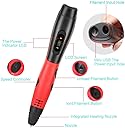
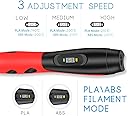
I gave this to the kid for Christmas. Today, when I asked why she wasn't using it, she said she couldn't figure out how to make it work. I had purchased this particular 3D pen because our other pen (the 3Doodler) uses 3 mm filament, but I had lots of 1.75 mm ABS filament I wanted to use. This particular pen indicated that it used 1.75 mm ABS filament, was highly rated by more than 500 reviewers, and except for a few pens with a limited number of reviewers, was the most highly rated of all of Amazon's 1.75 mm 3D pens. I am now ready to use this 3D Pen for the first time, and the Amazon description said, "Please refer the User Manual before use," but unlike any other manual I've ever received, this manual has such fine print that I simply cannot read it. So, I searched for an online manual, because a browser's "zoom" feature can make even micro print readable. Surprisingly, I cannot find an online presence for this product. To be clear, I can find this product on resale web sites such as Amazon, but I cannot find the original site of the maker of this product in the first several Google results pages. I finally decided to use a cell phone camera to magnify the micro manual, and now I can read it, but I cannot clearly understand it. Here is a sampling, provided under the fair use clause of the copyright act: <1. Initial use of DC5V-2A access power. Show "3D PEN" enter material selection mode in about two seconds. About two seconds into the "PCL" consumables model> [is it possible that the picture completes this sentence fragment? it's a picture of the "L" button] <2. According to a "L" to confirm. Confirm the supplies selection, the indicator light is red; the automatic start-up, about ten seconds, the light turns green to working temperature can operate and use.> <3. When the indicator light is green, press the feed button "triangle" motor to start the automatic feeding function. The prepared material is cut flat and one end is inserted into the feed port. It can be drawn automatically from the> [is it possible the picture completes this sentence fragment? it's a picture of the back end of the pen] <4. In use, according to individual habits, press "L" button to adjust the speed of discharge; (5-1 75C / 5-2 85C / 5-3 95C)> <5. Withdrawal: press one "blank" automatic return. In 5-10 seconds, the motor will stop. The product will not be used for 3 minutes, automatic power failure> These instructions are followed by a picture with labelled buttons and indicators. Tellingly, the down arrow is labelled as the "Lord filament button." Such typos imply an immature quality assurance process. So, I gather that I am to connect power, then observe the LED display for the words "3D PEN" and then "PCL." Then it should display the type of plastic to use. Mine says, "PLA." I understood the instructions to mean, press "L" to confirm, but since I wanted to use ABS, I pressed the down arrow key in order to cycle through the different material selections. This was the wrong thing to do, because that caused it to go into pre-heat mode for the PLA filament material. To try to get back to material selection, I punched a bunch of buttons, but it never returned to material selection no matter which button I pushed, so I finally disconnected and reconnected power in order to start over. I experimented like this for several more times until I learned that you must press the "L" button multiple times until it displays the material you wish to use. Then you press the down arrow button (the one pointing toward the nozzle) to begin preheating. Subsequently, I noticed a second set of instructions which had provided this information: <Long press the "L" button. "PLA" and "ABS" switch between, click once to confirm the selection. Confirmation of supplies selection, the indicator light is red; the automatic start-up, about ten seconds. The light turns green to working temperature can operate and use.> Once the light turned green, I experimented with loading by pressing the down arrow button while holding filament in the hole in the back end of the pen. As it pulled the filament in, I heard several quite sharp snapping sounds, as you might expect if you were unsnapping a part from a plastic device. At this point, the pen extruded about a quarter inch of clear plastic, which was unexpected since I was loading day-glow orange filament. I presumed the clear extrusion was some kind of material placed in the nozzle for shipping and storage. Now everything is loaded and ready and the green light is on, but I can't get it to extrude. It seemed reasonable to press and hold the down arrow, but that didn't work. So, I pressed and released the down arrow. No effect. Then, guessing from instruction number 4, I pressed the "L" button. No effect, except to momentarily update the LED to reflect selection of a different speed (e.g. 5-1, 5-2, 5-3), just as indicated in the instructions. Next, I held the "L" button down. No effect. I'll try the "back" button. As advertised, it makes sustained noise as if unloading the pen, but the filament isn't moving. So, I'm totally out of ideas. I can't find anything, anywhere, that extrudes. OK, I noticed most of the pen is red, but a bottom part is black, and it has a screw in one end as if it were a battery compartment cover. I removed the screw and discovered it is not a battery compartment. Instead, it provide access to the interior of the pen. I'll try to attach a photograph. It seems that the sharp popping noises heard while loading the filament must have occurred because the filament loading path was somehow misaligned. It doesn't seem like this problem can be fixed by the consumer -- this pen must be returned or replaced. Summary: When using a product for the first time, I hope for a few simple things: (-1) I hope for an intuitive, human-friendly product that I can pick up and use without a lot of thought. This pen has the appearance of such a product, but that promise hasn't been fulfilled. (-1) If I can't figure it out without instructions, then I expect the manual to use a font that is visible. (-1) Next, I hope that the instructions are at least minimally understandable. (+1) I expect good packaging that protects the product and displays it attractively. The Manve Pro 3D Pen was superbly packed. It stood head and shoulders above the industry-standard plastic form-fitting frustration packaging, and was well presented as a high-end product. (+1) I expect a clean attractive product with no obvious glitches or strange rough spots. In this area, the product also excelled, with a comfortable grip and buttons placed in areas that seem reasonably accessible. (-2) I expect it to work as advertised. In my opinion, breaking during inital loading deeply disappoints. (-1) Finally, I expect the company to stand behind their product. Does the company address these issues? Because of the micro text, it's certainly possible that I could have missed it, but I cannot find any company contact information on the instruction manual, which is the only documentation provided with the product. (1 star) Final rating Amazon is a huge global company. Success on Amazon drives huge revenues. Large numbers of favorable Amazon reviews have been a reliable indicator of product maturity, quality, and usability. Any process, no matter how good, yields a few rejects. Based on the many positive reviews of this product, let's hope that my experience is the one rare exception among the many happy users.
R**.
Must have!
This is a must have for the Mini Nintendo Classic console recently released by Nintendo! Our son bought me one for Christmas and absolutely love it. The only real down side is the short cable for the controller. I haven't measured it and can't recall the product info but I'm guessing it's about 3' long. So this means you have to be sitting pretty close to the unit and TV in order to play. So I got on Amazon and started looking for another controller with a longer cord. Thats when i ran across this extension cord for the Nintendo Classic controller! It's plug and play, no modding needed and it works great! Now I can sit back in our gaming chairs and play my favorite Classic Nintendo games in comfort! Highly recommend!
M**C
Pretty Fantastic
My parents bough my 4 and 2 year old iPad minis for Christmas. When I heard that was to be their gift, I panicked and did a ton of research on the best case - my kids are fairly good with their things, but they're 4 and 2. :) I bought one of these cases in different colors for each. Pros: *The case is very, very sturdy and durable. The minis have been dropped several times and they nearly bounce. *The handle is key - It makes it a lot easier for the kids to carry them around from place to place. *The case is such that the ridge protecting the screen is fairly high, and keeps most large things off the face in the event it's not put someplace super safe. *The little stand works perfectly for letting them sit at a table and watch something or play a game. Cons: *The case is so deep, we had a hard time plugging in headphones. My husband drilled the headphone hole a tad wider so we could get the head phone plug in and out. *There isn't really anything protecting the screen itself. We did purchase Zag screen protectors - which we would have done regardless, but in my perfect world, this case would have some sort of door or cover that flipped around it from the back and fully protected the screen. I couldn't find that kind of case that also had the kind of bulk and protection to it that this case did. *The button for the on/off switch is hard for little fingers to manipulate. This hasn't been an issue for us since we make the kids bring them to us when they're done and they're placed up high where they have to ask for them again. It helps us control usage. In another year or two, my 4 year old will be able to do it herself. All in all - I love this case and am ordering two for my sisters kids.
D**G
Great protection for your kids mini
We saw our friend's have this for their son and it was a great cover for a mini so when we our son one, we had to get the KidBox. Its a very lightweight foamlike material that covers the ipad as pictures illustrate. Its padded enough to provide good protection for when its dropped and it will be! The case has a nice handle that makes it easy to carry. That can fold down to create a stand so you can prop it up. The opening to the charger (Lightning) is covered by a closeable flap so you have to open that each time to charge. The headphone port is accessible though a hole on the side. The volume buttons are exposed and I think that was a good idea as it would have been hard to press through the foam. You can still take pictures as the camera lens is not blocked. The only slightly awkward thing is that the sleep/wake button is pressed through the foam so it take a couple of tries (for me) to get the hang of finding the spot but once you do, its pretty easy. The back has 1/3" slit that is always there. That is where you put the ipad through the first time but its fine as there is no chance it will slip out. I just thought to mention it for aesthetics in case people thought it was solid all around.
J**N
Kid proofs your iPad mini
I bought my wife an iPad Mini for Christmas. As she is a stay at home mom for a 3 year old and 9 month old, I figured she would use the tablet to pacify one of both of the kids while in the van, or when she needs one kid distracted to give the other her full attention. Since I hate seeing my pretty toys get destroyed by rampaging toddlers, I figured something like this would be in order. Three months later it is the case that stays on her iPad more often then her smart cover. We give it to our 3 year old without a worry, and though he takes reasonable care of the iPad for being a three year old, he still drops it and bangs it about. This thing is a life saver. Our house is ALL tile, so I don't doubt this thing has paid for itself ten times over already. The one improvement I would make would be some sort of integrated plastic screen cover to keep spit fluids or cup spills from potentially harming the device, but even as is, this thing is a must buy if you have kids.
Trustpilot
2 weeks ago
3 weeks ago