Desertcart purchases this item on your behalf and handles shipping, customs, and support to Hungary.
🔒 Elevate Your Security Game with AI-Powered Clarity & NightVision Brilliance
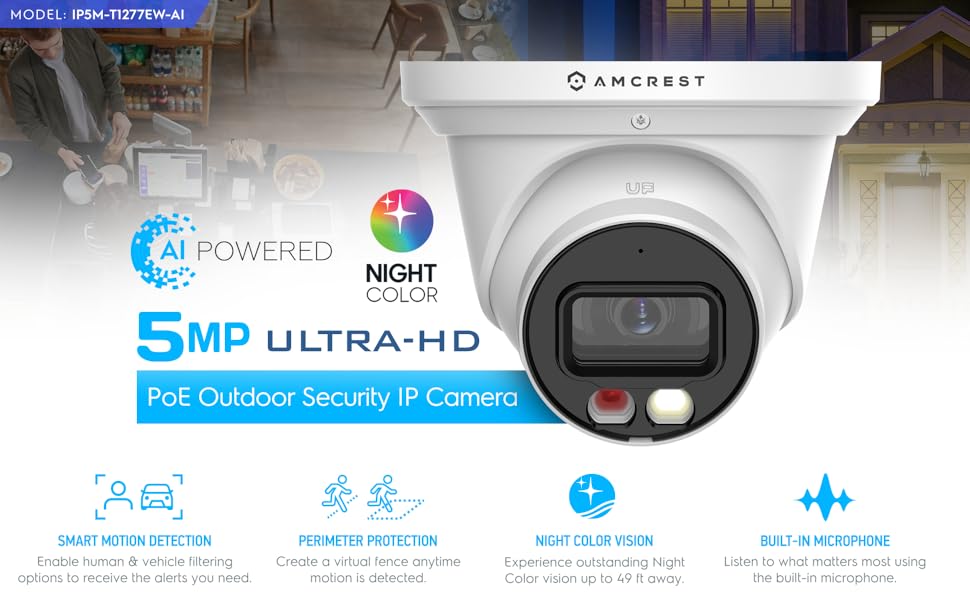
The Amcrest 5MP AI Turret IP PoE Camera combines cutting-edge AI human and vehicle detection with a super-wide 129° field of view and dual-illumination night vision up to 49 feet. Designed for outdoor durability with IP67 weatherproofing, it supports seamless Power over Ethernet installation and offers versatile storage options including MicroSD, PC, NVR, and secure cloud backup. With built-in microphone, active deterrence lighting, and compatibility with major platforms, it’s a professional-grade security solution tailored for modern smart homes and businesses.


| ASIN | B0BNM2SGPS |
| Alert Type | Motion Only |
| Antenna Location | Outdoor Security |
| Batteries are Required | No |
| Best Sellers Rank | 85,904 in Electronics & Photo ( See Top 100 in Electronics & Photo ) 949 in Dome Cameras |
| Brand | Amcrest |
| Colour | White |
| Compatible Devices | Smartphone |
| Compatible devices | Smartphone |
| Connectivity Protocol | Power Over Ethernet |
| Connectivity technology | Wireless |
| Controller Type | Amazon Alexa |
| Customer Reviews | 4.3 out of 5 stars 394 Reviews |
| Effective Still Resolution | 5 MP |
| Focus Type | Fixed Focus |
| Form Factor | Turret |
| Frame Rate | 20 fps |
| Global Trade Identification Number | 00850040391053 |
| Included Components | Main Camera Unit |
| Indoor Outdoor Usage | Outdoor |
| Indoor/Outdoor usage | Outdoor |
| Item Weight | 1.1 Pounds |
| Light Source | White Led |
| Manufacturer | Amcrest |
| Material | Metal |
| Model Number | IP5M-T1277EW-AI |
| Mount Type | Wall Mount |
| Network Connectivity Technology | Wireless |
| Night Vision | Night Color |
| Night Vision Range | 164 Feet |
| Number of Channels | 1 |
| Number of IR LEDs | 1 |
| Number of Items | 1 |
| Other Special Features of the Product | Image, Motion Sensor, Night Vision, Portable |
| Photo Sensor Technology | CMOS |
| Power source | Power over Ethernet (PoE) |
| Recommended uses for product | Outdoor Security |
| Room Type | Living Room |
| Shape | Rectangular |
| Special feature | Image, Motion Sensor, Night Vision, Portable |
| UPC | 850040391053 |
| Unit Count | 1.0 count |
| Usage | Security & Surveillance |
| Video Capture Format | MPEG H |
| Video Capture Resolution | 5 MP |
| Viewing Angle | 129 Degrees |
| Water Resistance Level | Water Resistant |
| Waterproof Rating | IP67 |
| Wattage | 6 watts |
| Wireless Technology Type | Power Over Ethernet |
C**E
Great camera.
Great camera. The features are awesome, the quality of the picture is great, and the night vision is leaps and bounds better than the more expensive cameras I own. Many people will say that the camera is not easy to set up. That is correct but I am going to tell you the secret of connecting this camera to your network if you are having issues. My router assigned this camera an IP address just fine. I could see the camera in the Amcrest IP Config Tool no problem, but it would not connect. The problem is that the camera will accept an IP address from your router, but WILL NOT accept the subnet mask (usually 255.255.255.xxx) form the router. If you have a lap top this is a very easy fix. A desktop might require a long ethernet cable to the router lol. -Plug the camera and the laptop into the same PoE switch. -MANUALLY change YOUR COMPUTERS subnet mask to match what the camera shows it has in the IP config tool. -If the camera shows a different IP scheme as well, for example 192.168, and your network is 192.101 or something, change that as well on your computer. -Once you have changed your computers IP and subnet mask, you can log into the camera in the IP config tool and change the camera to match your network. -Change your computer back to normal, and everything will work! Tips: When you go to change your subnet mask on the computer, it might list a "subnet length" instead of the actual number. This camera for me shipped with 255.255.255.0 which is a subnet length of 24. My network uses 255.255.255.192 which is 26. Just google it, it is super simple. I will update on longevity after the winter. (currently 6-3-26)
A**R
Son muy buenas
Funcionan de maravilla
S**D
Exceptional Intelligence Meets Security
Harnessing the power of artificial intelligence, the Amcrest Night Color AI Turret IP PoE Camera redefines the boundaries of security systems. The 5-Megapixel @20fps video and a super-wide 98° viewing angle ensure you miss nothing, while the Human & Vehicle Detection and IVS features, such as Tripwire and Intrusion, add another layer of security to your property. This innovative camera leverages the Amcrest View app, enabling you to receive motion alerts and review footage conveniently from your smartphone. The ability to playback and record professionally using the Amcrest Surveillance Pro software further enhances the flexibility and security this camera offers. Designed to endure the harshest of environments, the outdoor POE IP Turret Camera guarantees superior performance under any weather conditions. With its heavy-duty metal IP67 weatherproof housing and nightcolor vision of up to 98 feet, this camera is built to last. Plus, it supports Alexa through AmcrestCloud for a seamless integration into your smart home system. The Amcrest Cloud remote video storage subscription service is a unique offering that ensures your videos are automatically stored off-site in a location hosted and secured by Amazon AWS. It's a safety net for your data if local storage is compromised, assuring accessibility via a web-based Flash interface and the AmcrestCloud smartphone app. At its core, the Amcrest Night Color AI Turret IP PoE Camera is simple, reliable, and secure, underlined by secure SSL/HTTPS connection, FCC, and CE certificates. It supports storage to a MicroSD Card (up to 256GB), PC, or Amcrest Cloud, and is compatible with a variety of Amcrest AI NVR's. With Amcrest's commitment to safety, you receive regular firmware updates and world-class support. Truly, this camera takes security to a whole new level of excellence.
M**L
Well rounded camera for a good price
I have quite a few different camera’s at home but I am looking to move away from having so many cloud based and moved to a more locally controlled camera. The pricing on the Amcrest was great considering the features it includes. Though it isn’t 4K, at this price point, the resolution with a 5MP sensor is sufficient. I was excited to have IR + NightColor at this price point as well. The camera itself feels sturdy. It comes with a nice wrench to open it up. If I had to make a comment on the wrench, would be nice if one side of it had a Phillips head so you could get into the microSD slot. I was able to get my camera connected via PoE on my switch really quickly and was able to easily find the assigned IP on the Amcrest App. I also liked how it included a break away so if I didn’t not have PoE I could run it on a 12V AC Adapter (which I tried on another switch and worked fine). From there I was then able to get on the webpage for it and get it setup. I appreciate that they force you to change the default password from admin. I know this has been an issue with another camera’s so it’s great that this is being looked at. Day images look fine on the camera. Looks better than a few of my Ring camera’s and honestly very similar to a 4K 8MP security camera I own. IR night vision looked great at the distances I have been testing. Images are clear within a reasonable distance ~20Ft. I do like how there is the spotlight with the Smart Illumination option activated. This turns on the white bright light to get a better view of what is happening. Again this is hidden under a few menus (Setup > Config > Night Vision) and I think it would serve everyone a bit better if it was part of the general setup. TripWire has also been a nice addition to be able to set it up. I do wish this was better described in the manual as I had to go to the Amcrest page to get more information on how to get to the setup page, it’s Setup > Event > Smart Plan to turn it on, and then the IVS tab. I wish this was a bit clearer or even brought up as an option during the initial setup process as I think it’s a feature many users are looking to use. With that said, I am happy with the camera. Just a few end-user experiences to make it better with the popular features being turned on during setup.
M**N
Excellent AI detection algorithm
I did something a bit different with my IP5M-T1273EW-AI. I set this up on my porch as a standalone camera to monitor package arrivals. I installed a 128GB micro-SD card in the unit. I ran POE from a crawl space in my basement to the unit. Once I connected it to my network, I went into my router to see what DHCP reservation the camera was assigned. I went through my normal settings and adjusted the camera and sub streams for the proper resolution and bitrate. I set up the AI detection for human and then went outside to adjust the camera. I ended up setting the camera up to send my phone trigger alerts anytime a human was in the FOV. This worked great due to the angle I set the camera up at. Anytime I get a package delivered or someone walks into the FOV I get an alert on my phone and it records to the SD card. My next step is to set this up with Blue Iris and use my normal AI detection program running on my server. This camera offers excellent performance for the price. The smart codec running at H265 is great for local storage. The one thing I did disable was the color night view. I found the light to be extremely bright, but in my case I did not want that shining on my front porch. The cameras native IR light is perfect for what I need at night. Overall, I give this camera a 10/10. Stay tuned for a follow up once I get this setup with Blue Iris. UPDATE 6-22-2023 I have added this camera to my Blue Iris setup running code project AI. I have the camera set for 10 frames and 10 keyframes (i-frames) motion detection is running on the substream and is working perfect!
Trustpilot
3 weeks ago
5 days ago