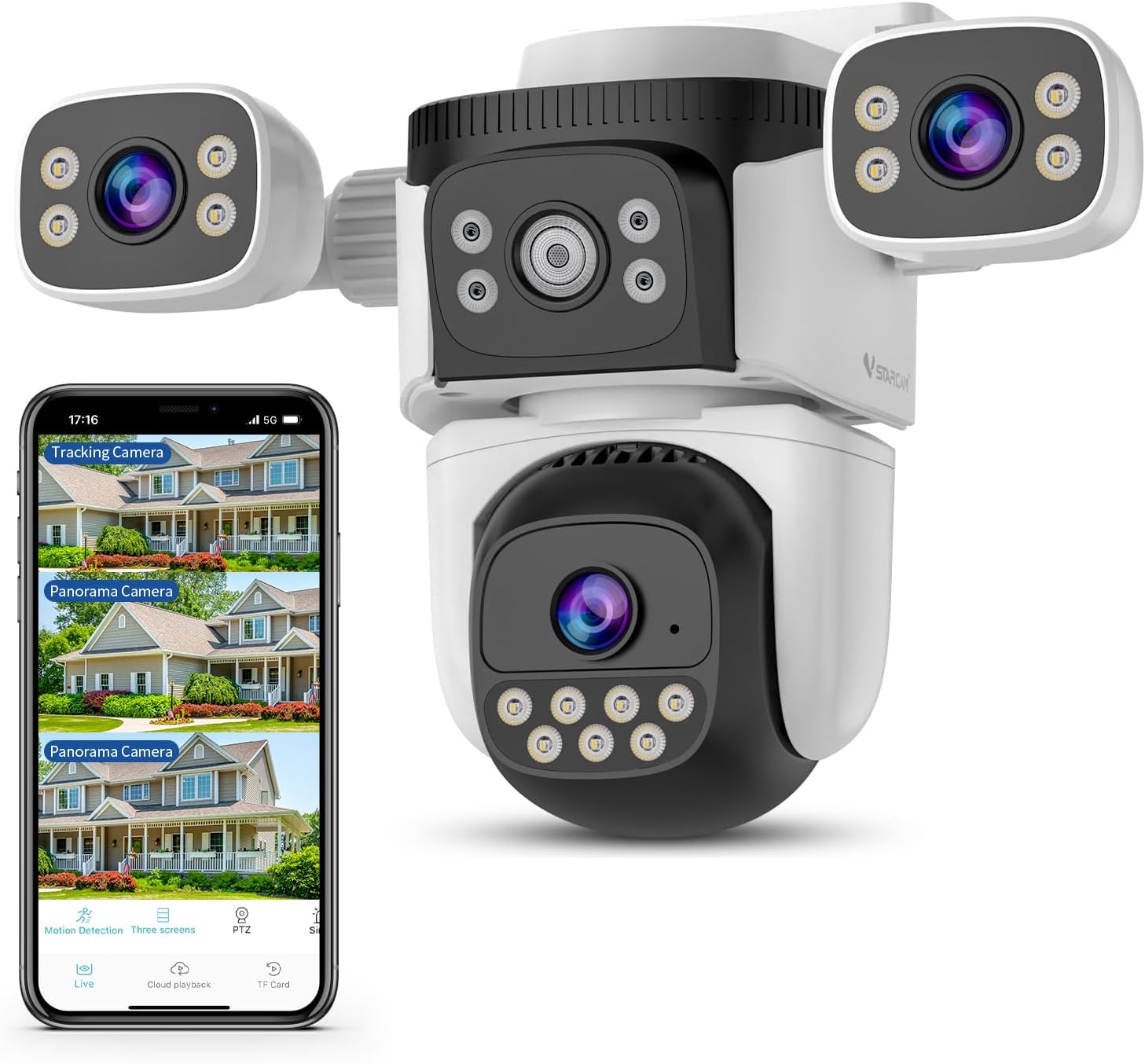
Just received this item and wasn't expecting it to be nearly as good and offer so much. Now let's get to it...It's the typical configuration using "0-Kam Pro" from the app store. It installs the same as all others, turn on devices, turn on your bluetooth, wifi (then connect to a "2.4Ghz" wifi), turn on "location", scan QR code and it connected the 1st time thru! Made me suspicious right then! Documentations are sketchy, but if you've done 1 or 2 cams in the past, it's the same. Create a USER & Password. Now, the 2 cams on the "side" is why I was interested in this device. The ones that have the "fixed" angles aren't really suitable, because once you mount the camea, you can't adjust the angle or anything after because they are FIXED! HOWEVER, on this "Vstarcam" YOU CAN! YOU CAN even have the cams pointing in different directions, angles and such! THE WING CAMS ARE ADJUSTABLE, BUT "FIXED" AND NOT REMOTE...ONLY THE "BULB" CAMERA IS REMOTE CONTROLLABLE. THE WING CAMS ARE MANUALLY FIXED CAMERAS! BUT YOU CAN AIM THEM ANYWAY YOU WANT WHICH ALLOW YOU TO COVER MORE AREA! Or you can "manual" merge them into a single wide angle shot...but it not a "seamless". At this price I really didn't care. Content is the important thing. The cam in the center between the WING-CAM on the side...IS NOT A CAMERA...JUST PART OF THE SECURITY LIGHT SYSTEM...although they made it LOOK like a 4th came...it is not! Perhaps to deter people, if the bulb cam is rotated away, ppl would think the center cam is still on them...or whatever! The DOME cam is naturally controllable via a smart phone. It house the micro SD for "24/7" recording... and you DO NOT HAVE TO SIGN UP FOR A PAY SERVICE" and so far, NO intrusive "pop-ups". JUST IGNORE THE SCROLLING TEXT asking to sign-up for the pay service. It goes away after about 5 minutes and only appears every 3-4 days! The app stays connected very well when watching LIVE Streams, the notification you will have to turn off, and there are features in the software to limit down the notification, but I live on a busy street and just turned it off since ppl walk pass my house every 20-30 minutes! There are options to "draw a monitoring zone" if you choose to help limit false detection if you choose as well. I didn't bother. You can turn on/off "tracking" and Human "framing" (the red square around ppl). You can set 24/7 or enter individual hours , days if you want. At night, even in pretty low light it still was recording in CLEAR "color"...but can auto switch to b/w if light level gets too low for VERY CLEAR capture! Clarity of the picture is outstanding! It has SD, HD and UHD for recording. MAKE SURE you use a CLASS 10 or better SD card! You can switch wifi NETWORKS, as there's an option to scan for a NEW wifi and don't have to totally reset the device like it which was required on some of my older security cams. The one thing that could be better is how the "recording blocks" (recorded events) are presented. They are at the BOTTOM of the screen taking up only ONE line. So you have to "scroll" up but only get "2 time blocks " at a time. Hard to see if you're going far back. But, if you use the "time line" instead, you can EASILY scroll to any event in no time at all! The playback is smooth! It doesn't (so far) drop out, the color is nice, the picture quality is great! The DOME has a "cruise" option which I wouldn't keep on all the time. The "cruise" option pans the Dome back and forth or Left and Right repeatedly, non stop. Couldn't figure out how to stop it at first (expect no documentations) but it works like any other gizmo, and you figure it out in about 2-3 minutes. To stop the "cruise" function, just manually tap the "button" on app control the panning. Just like if you want to turn the Dome to the left you press, LEFT, or Right, or UP or Down...ANY INTERRUPTION STOPS the "auto cruise" immediately. You would think just by pressing "cruise" again would to it...didn't work for me...but the interruption manually works every time. Certainly, "auto cruise" for hours on end will ruin the device in quick order, anyway...MAYBE after 10-15 auto cruise stops by itself...don't know, don't care! Keeping in mind, I've only had the device for just over 5 days, I have NOT had to reset it, touch it or anything is. It has been responsive, have strong wifi connection, pictures are clear. It does offer 3 display options...since with 3 camera you get 3 pictures. Display 1 is a live picture of cam1 on top, then below that the DOME cam view), then at the bottom cam 3 on the opposite wing of cam 1. Display 2 mode is "SPLIT SCREEN" where the DOME cam is shown much larger on top, then WING cameras (1 and 3) are shown beneath the Dome cam...you can toggle between the WING cams for larger views. Then they have what they call the "original" view, which is a Large DOME view and side by side of the wing cams 1 and 3! All cameras can go to FULL screen for viewing as well.! And again, the LIVE view via the app is STEADY, Doesn't time out. So, again, at this point, I will wait...and if all things remain the same, I will buy a 2nd/3rd camera (I love spares and also to cover the other side of my house). The device is light, doesn't take up a lot of room. And with the two "independent" wing cam, it saves my money as well as time mounting another cam that the corner of my house. I have one wing cam pointing at my backyard and the other at the side of me house. I can use the DOME to view either direction. The fixed 3-Lens Cameras by other vendors doesn't give one the option to point the cameras as you choose. Even if you want both pointed in the same direction, the FIX LENS of other cameras aren't adjustable so depending on how high you mount the camera or the area you're trying to cover, you can't do anything about it. This Vstarcam with independent moving side cam allows you to manually adjust to your particular situation. But like I said, even if pointed in the same direction it doesn't offer the seamless or non-stitch view...but I don't care. But just so you know in case that was what you were looking for. So far, extremely happy with this unit! Especially the color night view & the picture quality. Sound is a little poor, but for me, the picture is the most important thing! Sound isn't going to convicts ppl, but their actions will. UPDATE 6 MONTHS LATER!!! Still works perfectly. Went thru winter storms without a hitch. Had several area power failures and camera comes back on and connects 9 out 10 times. NOTE --> If the "router" takes TOO LONG to come all the way back up, the camera sometimes doesn't connect and show "off line" on app. Just unplug and re-plug the "camera" (with the router already powered on and connected to the internet) and the camera will connect properly again...don't have to do anything else. Like I said, happens 1 out of 10 times that the router takes too long before coming online. Outside of that, NOTHING TO COMPLAIN ABOUT!!! Even buying this camera again for a spare! The pictures are still sharp, HAVE NOT BEEN PESTERED TO SIGN UP FOR PAID SERVICE. And just by using the "playback" features of the "stored SD CARD" in the dome camera, I'm able to watch any activities remotely without any problems. The camera is very good about ignoring "cars, dogs", but does catch people, guys riding or skateboarding human detection. Just look at time stamp of thumbnail from notifications and go to that time-marker to view the complete activity...and it's spot on. This is a great unit! And the O-Kam app is non-intrusive, responsive, and reliable. The remote stream last 15-20 minutes without interruptions. My phone usually goes into screensaver mode before the live video stream stops...lol! Don't think anyone will complain about this unit...It IS a GOOD device! I've ordered another one to cover the other side of my house and another as for a spare...it's just that good!