
Desertcart purchases this item on your behalf and handles shipping, customs, and support to Hungary.
🎮 Zoom in, game closer, play together—no space left behind!
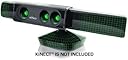
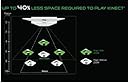
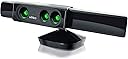
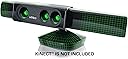
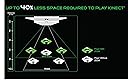
Nyko's Zoom for Kinect is a clip-on wide angle lens accessory that reduces the Kinect's required play space by up to 40%, enabling 1 or 2 players to enjoy Kinect games comfortably in smaller rooms. It requires no software or calibration, blends seamlessly with the Kinect sensor, and is perfect for gamers in apartments or dorms seeking a hassle-free setup.
| ASIN | B0050SYS5A |
| Best Sellers Rank | #18,959 in Video Games ( See Top 100 in Video Games ) #27 in Xbox 360 Accessory Kits |
| Customer Reviews | 4.1 4.1 out of 5 stars (1,938) |
| Date First Available | June 17, 2011 |
| Is Discontinued By Manufacturer | No |
| Item Weight | 5.9 ounces |
| Item model number | 86085 |
| Manufacturer | Nyko |
| Product Dimensions | 8 x 7.75 x 2 inches; 5.89 ounces |
| Rated | Rating Pending |
| Release date | September 13, 2011 |
| Type of item | Accessory |
M**O
It Works!!
After reading many of the negative reviews, I thought it's best to write my experience with the product. I had this pre-ordered for a while now, and since it was only $24, I was willing to give it a shot , just so I can stop moving furniture around every time I needed to use the KINECT. So far it worked out. It is true that it's probably not that accurate, but I use it with Fitness Evolved, and it tracks things really well, I am surprised how much more closer to the sensor I can stand now. Some people have mentioned that KINECT needs to see the floor or it re-calibrates, this is true, but there are instruction to fix that issue in the manual of the product. My KINECT is placed under the TV, so many that helped my situation. Overall, for $24 it was worth it, I take this over having to move my furniture around (ie. heavy couch) every time i felt like playing a game. Which caused me to not use the KINECT as much. It does create issues for gestures when watching HULU or Netflix because the "playing area" is now much closer to the TV, so the KINECT can't recognize you from your couch 8 feet away. But that's a given considering the wide-angle lens they use as a solution. For the money, the unit feels very solid and well made, I would have paid $75 for it, because for me the convenience this provides is just un-parralled. However, I always thought MS had a reason for not doing this, so I have feeling, the new and more advanced games that are coming out for the KINECT might not work so well with a wide-angle lens in front of it. But for $24 , who cares!
R**E
So happy to have a functioning Kinect
So happy to have found this. Mine had quit working. Took awhile to find. This one works great. Great price.
J**O
Works Perfectly!
Despite many negative reviews, we bought the Zoom based on some of the positive reviews. Glad we did! I bought the Xbox 360 w/Kinect & the Zoom on the same day from different vendors and by chance, they were delivered on the same day, so we have never...not...used our Xbox w/o the Zoom. It was easy to set up/calibrate - very easy...Since we have a 72" TV in a smaller room, the Zoom made the difference between being able to use our new Kinect or not. We would never move couches and rearrange our room every day in order to do our daily workouts - ain't happen'in, crisis averted...Btw, our Kinect camera is about 26" off the ground. The Zoom will always be on the Kinect, although it only takes a split second to remove it, slightly longer to attach it - lining it up left to right - SIMPLE!!! Fyi, the Zoom is just a series of magnifying lens(one unit...) that snap on the Xbox Kinect camera. Not much too it, but it is a great idea and vital for situations like ours...I'm not sure why so many people are having problems with this. My guess is that some of these reviewers have problems with many of the things they buy...(draw your own conclusions...). My advice: if you think you need this, get it. The price is right. Btw, the aftermarket "privacy" covers for Kinect cameras will not fit if you have a Zoom on your camera - this should be obvious...A PHD isn't required to improvise. Maybe some genius will make one for Zoom owners, while others will just use a black sock or hankie...Whatever it is, we are feeling sort of creepy w/ this camera pointing at us while watch TV, Netflix, ect. so we are currently turning it to the side while not in use. If we can find a cover, we may just pony up another $20 for a piece of black plastic...What's another $20? (sarcasm)
P**S
Overall: I'm happy I bought it.
BEFORE THE ZOOM I had the kinect mounted on top of a 60'' big screen TV. The room has 9' of space from the TV to the couch with nothing obstructing. It worked well for one player, hand-tracking games like Child of Eden or fruit ninja. It worked horribly for me when I played Dance Central. It always thought my knees were my feet. I think part of the reason it couldn't see me is that I am such a big guy (6'4", 350 lbs). For two player games it didn't work well because when we backed up our legs blended into the couch. I don't think it was seeing the floor clearly. WITH THE ZOOM Dance central worked perfectly. My large frame no looked like a normal sized player. Single-player fruit ninja worked well, although the player was noticeably smaller on the screen so you had to move more. The bonus was it seemed more responsive and you could use your feet much better to kick the fruit (super fun). Fruit Ninja with two players was a disaster. Our player shadows kept popping in and out and it was incredibly annoying. I tried Kinect sports with the zoom, 2 player. I had never played it before without the zoom so have no comparison point. It seemed accurate enough, although in volleyball it would make my player jump whenever I took a step. I can confirm what has been said in other review that the Zoom makes hand tracking worse. I experienced this when navigating through menus and using the kinect hub on the dashboard. Also with the zoom I had to turn off one of the lamps in the room because of back lighting. This wasn't an issue without the kinect OVERALL: I'm happy I bought it, if for no other reason than to play dance central. I will be taking my zoom on and off depending on which game I play.
M**O
Kinect must be BELOW TV
It’s somewhere in the fine print that this isn’t effective if your Kinect is above the TV; upon relocating my Kinect to just under the bottom of the screen, it passed all of the self calibrations and worked well to enable dance games in a much smaller area than would be possible without. The distortion isn’t too extreme when pictures are taken, too.
M**S
Doesn't work for me, regardless of placement or TV stand (even with the NEW one, the Zoom doesn't work)!
*Update* I just got a Fulton Espresso Corner Media Stand last night, assembled it, and decided to try moving my Kinect to the edge of it with the Zoom attached to see if it would fix the issue my Kinect kept reporting about it being "unable to see the floor"... Nothing. Even after getting a new TV stand and placing the Kinect with Zoom RIGHT at the edge of it, it made no difference. So, for me, that was the last possible thing I could've tried to get the Zoom to work for me, and it still doesn't. I've already initiated my return of the Zoom to Amazon. Nyko's Zoom does NOT work for me. * ~ * Okay, so, like most everyone else out there that had preordered the Zoom, I couldn't wait to receive mine. It's simple to set up: cut tape tabs on box. Remove Zoom-containing green box inside of protective, informative product sleeve. Remove instruction guide & insert. Remove Zoom from casing & plastic bag. Remove antistatic film from Zoom. Slide Zoom... wait, turn on Xbox, go to Kinect settings, adjust tilt of Kinect. Turn Xbox off. NOW tilt Zoom over Kinect camera/lenses. Turn Xbox on. Grab calibration card. Stand 4' from Kinect. Calibrate Kinect. Yay! It worked! Choose game. Start game. Wait, what the Hell?!? Why the Hell does it look like I'm halfway sunk into the floor?!? Crap for crap! Ugh! *Sigh*. Fiddle with TV mount on which Kinect is seated. Remove Kinect from TV mount. Separate plastic frame piece from stand. Use Dremel & flex shaft to cut away plastic from front of frame against which Kinect is bumping when Kinect tries to find the floor in normal game calibration. Reassemble stand & replace Kinect into stand. Put back on top of TV. What?!? What the Hell do you MEAN the Kinect STILL can't see the floor?!?... THIS was my Zoom experience, and it only got worse. And no, before you start asking, I'm not a total and complete idiot, technologically speaking or otherwise. I simply found that the Zoom shortened "distance" enough that the Kinect now couldn't see the floor, because, now that the camera's "view" was perpetually zoomed in, the floor was blocked by the edge/lip of my entertainment center, REGARDLESS of whether I placed the Kinect below my TV, or in the mount that I have attached to the top of my TV. Neither position made any difference. And I found that placing my Kinect (with the Zoom attached) below my TV, on the edge of my entertainment center, only served to move the Kinect's focal point further down. My Kinect focused on my knees as the center of the screen when placed below the TV, so adjusting positioning with the Zoom attached didn't help at all. After trying everything that I could think of for an hour and a half, I gave up on trying to "tweak" it. SUPER disappointing, because I was just CERTAIN that the Nyko Zoom was going to fix ALL of my limited apartment space issues with the Kinect. Thankfully, the only game that I'd played pre-Zoom that seemed truly affected by the distance was/is Your Shape: Fitness Evolved. That was the game that, with the Zoom in place, now showed me as halfway submerged in the floor... Interesting, but not fun for workout purposes. Long story short, if you happen to have your Kinect mounted to the top of your TV via one of those clips, and you want to use the Zoom, you'll need to ensure that your TV is flush with the front edge of your entertainment center/TV stand. I have a stand upon a stand, and my TV is set further back from the edge of my entertainment center in order to ensure the safety of the equipment beneath it. Therefore, in my case, the Zoom doesn't work. Great as it may be for others, Nyko's Zoom just might not work for everyone out there. Case in point: me. *Sigh*. Bummer.
Q**T
It works flawlessly for me and my set-up.
I can only attest to my personal experience with this product and the one I received. I only purchased one so my review is limited to that one zoom accessory. The space I have in front of my 60 inch TV is limited. My TV is mounted on the wall, under my TV is a free floating shelving unit and that is where my Kinect is. The zoom accessory snaps right on. I did not have any issues at all installing. The Kinect is probably 3ft from the ground and we are probably standing 5ft to 6ft from the Kinect. I am 5 feet and 3 inches tall and have had people 6ft tall using the Kinect. For me and what I just described the zoom accessory works flawlessly. I have never had an issue with the Kinect not recognizing me or several others (kids and adults) who have use it, all the while the zoom accessory has been on the Kinect. I have not taken the zoom accessory off of the Kinect from the first day I purchased it. Successful use of the Kinect prior to the zoom accessory was an issue for me and after putting on the zoom accessory I have had no issues with using my Kinect. We have done various games with the Kinect...yahoo star, sports, wipeout, just dance, etc. with no issues. I have had my zoom accessory on my Kinect for about six years now.
P**K
Decent, could be better, but does work for us in Dance Central 2
I had high-hopes for the Zoom before it was even released; I wanted to make better use of the kinect, since I didn't have a large room, even rearranging furniture still didn't give me the 6x6 (I'd say more like 7x7) necessary for games. So essentially, the Kinect just collected dust, like I've heard several others say. Anyways, bought the Zoom, and I have to say its not as awesome as I hoped, but its not quite as terrible (at least the one I got) as others say. First, you do need to be careful when putting on the Zoom, the Xbox must also be off before snapping it on. It comes with a "protective screen" which I didn't put on (wasn't sure if I'd keep the thing with all the bad reviews). The first few times the Kinect acted wonky about it, rotating up and down trying to find me. Finally, it just started working as it should, didn't really mess with anything, and it works somewhat like it says it should. It does allow the Kinect to have a wider/taller view, and works pretty well for the two games we have (Adventures and Dance Central 2). However, you do have to be actually fairly close to the Kinect, and it doesn't seem to be accurate enough to do 2 players. However, with one player, I only have to stand about 4ft back, and its great for playing and taking turns on Dance Central 2. Also, the Kinect couldn't identify who I was for the first few times, but finally seemed to learn who I was with the Zoom attached. Keep in mind, just like for the Kinect itself, you need to have the "right setup". We have a lamp in the background which now, thanks to the wide view of Zoom, and it shines right into the Kinect so we have to turn it off. The tracking seems almost as good as the Kinect by itself, but it randomly decides to pickup other objects as well while using the Zoom, such as the floor being highlighted in Dance Central 2, no idea why its picking that up. But, overall, since I really only use it for the one game, its been worth the low cost. Microsoft will probably release their improved Kinect next year with the next console, so we have something to look forward to, lets hope they have wider-angle lens on the thing next time, and we'll try not to cry over spending $150 on a dust-collector. The Zoom works, somewhat, but it doesn't completely solve the Kinect's limitations.
Á**O
Muy buen producto
Reduce considerablemente el espacio necesario para jugar y no altera el funcionamiento del kinect, el reconocimiento de voz sigue funcionando perfectamente y el reconocimiento del jugador. Igual la única pega, es que las "fotos" que sacan algunos de los juegos de Kinect saldrán un poco pixeladas, pero , si como a mi no te interesan, te parecerá el producto perfecto.
G**.
Ajusta perfecto
Hay que seguir bien las instrucciones para colocarlo en el kinet, pero queda muy bien. Sí disminuye un poco el espacio que se necesita para jugar, pero hacia atras, el ajuste es hacia los lados el espacio. En la visión del kinet hace que se vean un poco oscuro los bordes, pero si funciona bien.
A**R
個体差でしょうか。私は大丈夫です。
センサー認識についてここにいろいろ記述があったのですが、値段も値段ですからダメ元でまあいいかということで購入しました。 171センチの私が使うだけからかもしれませんが、認識に全く問題はありません。 手の形の、マウスで言うところのポインターの移動、固定も、アダプターをつけないで動かすのと全く変わりなく思い通りに動きます。 設置はレンズ中心で床上134センチ。 製造番号は1130085015です。 画面に映るキネクトが読み込んでいる自分の姿も、他の方が書くほど小さくはなっていません。 まあちょうど良い大きさというのかもしれませんが。製品的にもしかしたら改良されているのかも。 時々、スターウォーズなどでしゃがむのを読み取ってくれないと思うことがあったので、このアダプターを外して同じシーンをくり返してみると、 全く同じに反応しなかったりして、これはアダプターの要因ではなくもともと認識しづらい動きであったりすることがわかります。 作り的には、レンズの部分がちゃんとサスペンション仕様になっていたり、裏からのぞくと、レンズの歪みもこの価格ならこんな物だろうという品質の物で、決して粗悪な屈折率の悪そうなガラスがはまっているわけではありません。 レンズ周りにはるシートも入っていましたが、一筋の傷もつけたくないタイプの方は気になるのでしょうが、普通に使うぶんには気にならない程度の傷ですからそんなには目立つ痛み方をするわけではありません。 もしかしたら製品的な個体差が大きいのかもしれませんが、私的にはネガティブ要因は、ほとんど感じる物ではありません。
F**O
Funziona!
Il Nyko Zoom fa esattamente ciò che promette di fare: diminuire lo spazio utile di utilizzo del kinect del 40%. Facilissimo da montare, consente da subito di giocare in spazi ridotti, anche più di una persona. La semplicità dell'idea e l'estrema funzionalita fanno però sorgere una domanda: come è possibile che il kinect non sia nato già con queste lenti? PRO: di facile utilizzo, estermamente efficace, sensibilità invariata. CON: nessuno.
G**H
Fait son boulot avec une efficacité raisonnable
Je l'ai pris avec une certaine appréhension vu les mauvais commentaires, mais il ne semble pas poser de problème particulier à mon fils, installation simple et marche raisonnablement bien - en prenant une petite marge de tolérance vu que c'est du bricolage. La distance demandée par la kinect est ridiculement élevée - alors que sur les vidéos de présentation les gens sont juste devant la télé - no comment. Le Zoom demande un peu de travail - essentiellement des calibrages plus fréquents et quelques réactions bizarres, mais il libère des contraintes de dégagement d'espace et le rapprochement de la télé fait visiblement gagner en immersion. Faudrait voir si les problèmes rencontrés par tant de monde viennent de modèles défectueux ou s'il faut un peu d'huile de coude - mais produit à essayer si on en a marre de faire des concessions à la kinect.
Trustpilot
1 day ago
1 month ago