Desertcart purchases this item on your behalf and handles shipping, customs, and support to Hungary.
โก Print smarter, faster, greener โ your officeโs productivity powerhouse!
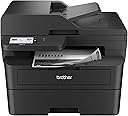
The Brother MFC-L2900DW is a compact, professional-grade monochrome laser all-in-one printer designed for small businesses and busy professionals. Delivering crisp black-and-white prints at up to 36 pages per minute, it features automatic duplex printing and scanning, a 50-page auto document feeder, and versatile connectivity options including dual-band Wi-Fi, Ethernet, and USB. Its 3.5-inch touchscreen offers direct cloud integration with Google Drive, Dropbox, and OneNote, while an energy-efficient fuser reduces electricity consumption by 22%. Backed by Brotherโs reliability and a 1-year warranty, this printer streamlines high-volume workflows with speed, precision, and eco-conscious innovation.


| ASIN | B0D9ZMLK67 |
| Additional Printer Functions | All In One, Copy, Scan |
| B&W Pages per Minute | 36 ppm |
| Best Sellers Rank | #8,616 in Office Products ( See Top 100 in Office Products ) #123 in Computer Printers |
| Brand | Brother |
| Built-In Media | AC Power Cord and Telephone Line Cord, DR830 Drum Unit (15,000 pages), MFC-L2900DW Printer, Product Safety Guide, Reference Guide, Warranty Card, Quick Setup Guide, Starter Black Toner Cartridge (700 pages) |
| Color | Black |
| Color Depth | 1 bpp |
| Color Pages per Minute | 1 ppm |
| Compatible Cartridge | TN830, TN830XL, TN830V |
| Compatible Devices | IPhone, Laptops, PC, Smartphones, Tablets |
| Connectivity Technology | Ethernet, USB, Wi-Fi |
| Control Method | Touch |
| Controller Type | Android |
| Customer Reviews | 4.3 out of 5 stars 371 Reviews |
| Display Type | LCD |
| Dual-sided printing | Yes |
| Duplex | Automatic |
| Global Trade Identification Number | 00012502674085 |
| Hardware Interface | Ethernet, USB 2.0 |
| Initial Page Print Time | 6.9 Seconds |
| Ink Color | Black |
| Item Dimensions D x W x H | 16.1"D x 12.5"W x 16.6"H |
| Item Type Name | Multifunction Printer |
| Item Weight | 11.8 Kilograms |
| Manufacturer | Brother |
| Maximum Copies Per Run | 250 |
| Maximum Copy Resolution Black and White | 600 x 600 dpi |
| Maximum Copy Resolution Color | 600 x 600 dpi |
| Maximum Media Size | 8.5 x 14 inch |
| Maximum Print Resolution Black and White | 1200 x 1200 dpi Dots Per Inch |
| Maximum Sheet Capacity | 250 |
| Maximum print Resolution Color | 1200 x 1200 dpi Dots Per Inch |
| Model Name | MFCL2900DW |
| Model Number | MFCL2900DW |
| Model Series | MFC-L |
| Number of Ethernet Ports | 1 |
| Number of Trays | 1 |
| Other Special Features of the Product | Auto Document Feeder, Energy Star, Epeat Qualified, Single Pass Duplex Copy and Scan, Touch Screen |
| Paper Size | 8.5X14 Inches |
| Print media | Paper (plain) |
| Printer Connectivity Type | Ethernet, USB, Wi-Fi |
| Printer Output Type | Monochrome |
| Printer Type | Laser |
| Printing Technology | Laser |
| Processor Count | 1 |
| Resolution | 1200 x 1200 |
| Scanner Type | Flatbed |
| Series Number | 2900 |
| Special Feature | Auto Document Feeder , Energy Star, Epeat Qualified, Single Pass Duplex Copy and Scan, Touch Screen |
| Specific Uses For Product | Office |
| Total USB 2.0 Ports | 1 |
| Total Usb Ports | 1 |
| UPC | 012502674085 |
| Unit Count | 1.0 Count |
| Warranty Description | 1 Year Limited Warranty |
| Warranty Type | Limited |
J**.
Best printer I've owned
Best printer I ever owned. Easy to set up & link to my home's wireless router. I've always owned ink jet printers in the past, but whenever I go to use them the ink head would be dried out. This laser jet claims to solve that. I "love" the fact I can do everything ftom the printer itself from the large easy to read screen if needed, especially scan a sheet, create pdf, and e-mail it to someone, right from the printer... no PC needed. This Brother MFC-L2900DW is SO fast, and super crisp printing! The large sturdy box even makes a great printer stand where I keep it in the basement!
J**W
Amazing Laser Printer, Flawless Wireless Setup
An amazingly simple, flawless installation. I hate installing my printers because they usually require a lot of time and effort to get the wireless printer recognized by all devices , to get the scan feature properly set up and all the other things that most people are tortured with when setting up a new printer. The Air Print feature works flawlessly with my Windows notebook, my iPhone and my iPad. This is a quality made, durable printer that Brother is known for but this models particularly effortless setup , sharp printing quality with crisp, clear B&W copies is the best that I have seen in laser printers at this affordable price. I spent hours researching the different Brother printers and decided this model was the best based on ratings, reviews and online professionals. I love this printer and itโs so quiet when printing or scanning that I canโt even hear it printing out the document. I strongly recommend this model for those who are looking for a quality laser printer, scanner, fax, all in one machine. This model works better than more expensive laser machines and you will enjoy the simplicity of its wireless setup and never need to think about having quality printer performance ever again. There is no mandatory toner subscription plan which is a plus as you can buy Brother OEM toner or off brand compatible toner whenever you want to purchase them. It comes with a starter OEM toner that does 700 pages and there are high performance 3000 page tonerโs that are available to buy once the starter cartridge is used up. Great high quality product in a world of other manufacturers garbage printers.
P**Y
Love this printer, wish I bought it earlier
Wonderful printer, so easy to config and set up. It runs smoothly and error free. Compare to the previous Samsung printer each time it gave me heart burn when I had to connect and use it, this one is a dream. I wish I bought this printer earlier.
J**S
Absolute Garbage. Not worth the price.
Absolute Garbage. Once I received the product, I put it to use doing double-sided copies. In less than 30 sets printed, the product started to jam up. The rear jam was so bad that I had to get an external provider to clear it, so that was some extra money spent unnecessarily. Then, once they cleared it, I started to use it again but noticed that there was a smudge on the prints. I tried manually cleaning the drum, per Brother instructions - the marks wouldn't go away. I took it back to the 3rd party figuring they had caused that damage. They told me that the damage was caused by the previously mentioned paper jam. I'm in the medical field, I can't have copies with errors/smudges/information lost. This was supposed to be an upgrade for the previous Brother MFC 2900 unit that I had purchased previously and was very satisfied with, but that the wireless eventually went out after a few years of service. Anyway - for the nearly $200 extra that I paid for this device, I am beyond dissatisfied. The worst part - I can't even return it because I chose to have it fixed rather than just sending it back to Amazon... Thus - this device is.. absolute garbage.
K**R
Perfect for legal and medical forms at home
In the past, I took papers to the local library to scan and send to my home computer but was never comfortable taking personal pages to a public place or realizing that I had missed something and had to make another trip. I ordered this Brother all-in-one printer to take care of things at home, just in case. Within a week something happened and I needed to scan medical and legal papers to email or take a copy to the hospital, etc. This machine scanned perfect copies for me. It has options for scanning in Black and white and color. It will only print black and white, but that is perfect for over 90% of my needs. Speed is good. Quality of scanning and printing is excellent. There is no more feeling that a page was left behind, or that another trip was needed, which is extremely relaxing. I am very happy to have this quality laser printer to use at home.
M**P
Hardware is great. Operation is OK. Support is great, if you can get a good person.
The hardware is solid, but there are some quirks. Like there at 3 buttons that operate the display touch screen that are buttons and not part of the screen and are not lit. The NIC does NOT have a physical light to know if it is operational... Quirky, but solid printing and scanning. The still is still too complicated in 2026. Brother spends more time marketing products during the install than focusing on what you really need. This is a network printer and yet I still had to manually install the Ethernet drivers and reinstall the WiFi drivers. in 2026, the printer should be able to easily change from WiFi to Ethernet. But alas, NO. This is a budget network printer so there is that. You get what you pay for. Solid printing and scanning. Spotty setup and support. Good luck.
R**3
Great Connectivity, Print Quality and Ease of Use without Requiring Extra Drivers
Saw complaints about connectivity with the occasional complaint of print quality. My unit has a problem with neither. In fact, it was the easiest thing to add to workflow. I connected it to my Wi-Fi without any issues. I then went on my Windows 11 PC and went to the "Add a printer or scanner" in the Printers & scanners settings. After that, it started appearing as a selectable device. The print quality is exactly what you'd expect quality-wise; clean and clear. I also have an Macbook Pro M3. Once again, all I did was go to the Printers and Scanners menu in Settings and click "Add Printer, Scanner, or Fax...". I used the scanner on MBP, which is great because you can select the feed tray or glass bed, and that was all it took. So there you have it. No extra drivers are necessary. There is zero hassle with connectivity (my girlfriend even prints from her iPhone though I haven't bothered to try from my Android device). You just get an amazingly convenient product. I know we all have varying levels of tech savviness and my experience won't necessarily be the same as others, but the setup process seemed relatively bulletproof to me as far as places to go off the rails. I don't think I could have messed it up if I tried.
S**G
Very user friendly!
Just set this printer up, a little concerned as reviewers had some issues, plus I have only had HP printers my entire life! But I will no longer tolerate the HP ink bullying! My 25 yo hp laser just wouldn't do wifi printing so I chose this Bro...$50 more for the 3.5" display but the generic toner cartridge covered it. Had no connection issues at all, didn't download any apps, I just hooked it to my wifi and it showed up on my phone printer list and printed fine without any new apps . Used a USB to the HP Windows 11 computer for the registration etc, opted out of all the marketing and sharing bs, which they weren't happy about..just added new device, made it default and away we went, printing fine. It is a really big footprint but worth it, very pleased with this first run, seems like a workhorse and so happy I won't have to worry about dried up cartridges and the HP ink police looking over my shoulder. Hopefully no future connection etc issues but will update.
R**S
Use it mostly for faxing and wireless printing
The Brother MFC-L2900DW has exceeded my expectations! Itโs a compact, yet powerful all-in-one printer that handles printing, scanning, copying, and faxing effortlessly. The print quality is sharp and professional, and the speed is perfect for my home office needs. I really appreciate the wireless connectivityโit works flawlessly with both my laptop and phone. Setting it up on Wi-Fi was simple and quick. The automatic duplex printing is a nice bonus and saves paper without extra effort. Overall, this printer is fast, quiet, and very reliable. If youโre looking for a cost-effective all-in-one laser printer with dependable performance, the MFC-L2900DW is a great choice. Highly recommended!
L**N
Great printer
Great printer. Works well. Easy setup
D**Z
Excellent printer with great options (if you need them)
Really good printer. Print quality is excellent and printer is very quiet compared to what I'm used to. My main reason for getting this printer was the fact it has duplex scanning from the feeder. Also scanning in color could come in handy for any scans I need to keep in digital format. Setup of the printer was fairly straight forward although was a little confusing when setting the app on a 2nd phone. You just need an option to register printer rather than install it again. Printing from the phone is great as well.. very quick.
T**N
Seamless set up and performance
I paired this printer with my Apple Mac Studio. The set up was seamless and the instructions were easy to follow. Unboxing to printing took approximately 10 minutes. I was hesitant about purchasing a brother printer for some reason but I am impressed with the quality, the intuitive setup and functionality. Iโm a fan!
B**.
Sleeps & won't wake up or print, reset & updates don't work. This printer is USELESS. AVOID!
What should be a great printer is, in fact, useless most of the time. I have been trying to resolve this issue for months, which is: the printer goes to sleep, and will NOT wake up when it is pinged or signaled by the Print functions from my Windows 11 PC, iphone or other devices. I have restarted, reset and flashed (to update the firmware) this printer a few times now and it works for a day (sometimes) then goes back into permanent sleep. I have also adjusted various settings to disable sleep, but it still goes into its printer asleep/unconscious state and so it is useless as a printer. This item was very expensive, and frankly I expected it to be "great" given a long history of buying and trusting Brother - a company I normally strongly recommend to friends, clients, etc.. But this printer stinks and if there was any way possible I would return it. I am unfortunately too far out of the return window and was very ill when this started. So, instead, I have to look for a new printer (which I can't afford) because someone didn't test/debug this thing properly. I strongly recommend that you DON'T buy this printer unless you want to fight with it...every single day and still get only about 1 of 20 print jobs completed...if that. STAY AWAY!
Trustpilot
2 weeks ago
1 month ago