Desertcart purchases this item on your behalf and handles shipping, customs, and support to Hungary.
🚀 Unlock your laptop’s full potential with the ultimate 6-in-1 USB-C hub!
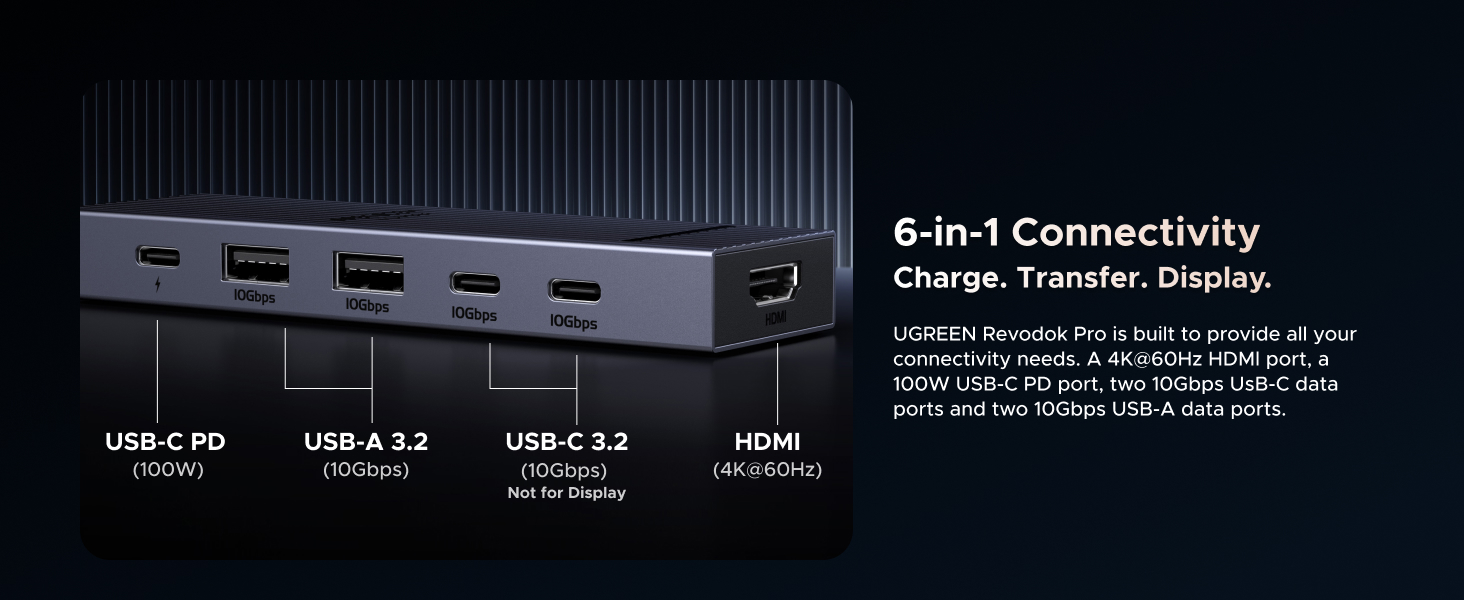
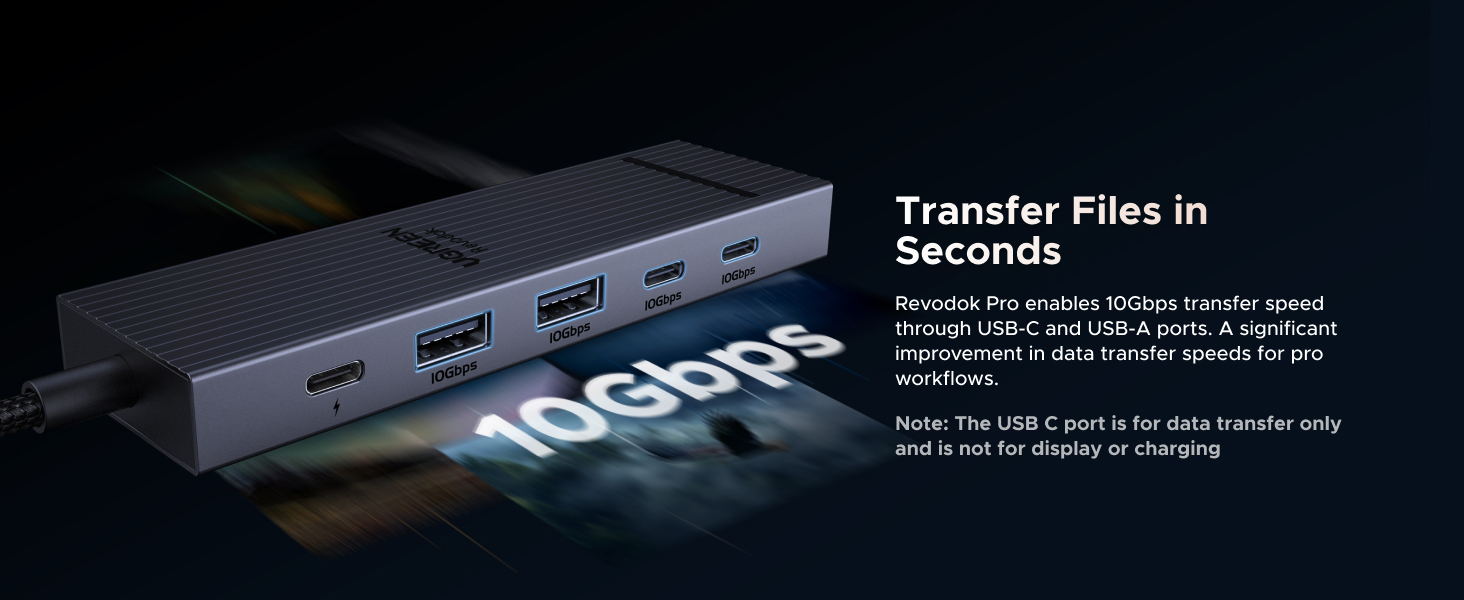
The UGREEN Revodok Pro is a versatile 6-in-1 USB-C hub featuring dual 10Gbps USB-C and USB-A ports, 4K 60Hz HDMI output, and 100W power delivery. Compatible with a wide range of devices including MacBook, iPad Pro, and gaming consoles, it offers high-speed data transfer, crisp video output, and reliable charging in a compact, durable design—perfect for professionals on the move.


| ASIN | B0D1XLNWP2 |
| Additional Features | Portable |
| Best Sellers Rank | #14 in USB Hubs |
| Brand | UGREEN |
| Color | silver |
| Compatible Devices | MacBook Neo,MacBook Pro, MacBook Air, MacBook M1, M2,M3,M4,M5, iMac, iPad Pro, iPhone, Chromebook, Surface, Steam deck, Rog Ally Compatible Devices MacBook Neo,MacBook Pro, MacBook Air, MacBook M1, M2,M3,M4,M5, iMac, iPad Pro, iPhone, Chromebook, Surface, Steam deck, Rog Ally See more |
| Customer Reviews | 4.4 out of 5 stars 6,865 Reviews |
| Data Transfer Rate | 10 gigabits_per_second |
| Enclosure Material | Aluminum, Plastic |
| Global Trade Identification Number | 06941876243631 |
| Hardware Interface | HDMI , USB, USB Type C |
| Item Weight | 180 g |
| Manufacturer | Ugreen Group Limited |
| Mfr Part Number | AMUH12H |
| Minimum Required Operating System Version | Windows 7 |
| Model Number | AMUH12H |
| Number of Items | 1 |
| Number of Ports | 6 |
| Operating System | Mac OS 9, Windows 10, Windows 7 |
| Special Feature | Portable |
| Total USB Ports | 4 |
| Total Usb Ports | 4 |
| Unit Count | 1 Count |
| Warranty Description | 2 Year Manufacturer |
P**O
Amazing affordable USB-C Hub, works with M1 Pro 14, Windows 11 Laptop, and Nintendo Switch 1.
Due to just one problem, I would rate this more of a 4.5/5. Very rarely, I'll have issues with power draw, and the hub won't work while connected. However, after just unplugging and plugging things back in, it fixes the problem fast. Of all USB-C hubs I've looked at, this one is probably the most affordable (I bought at 16 USD) and has the best HDMI, USB-A, and USB-C ports for the price. I've used this on my MacBook M1 Pro 14, my Windows 11 laptop, and what surprised me was that it even worked on my Nintendo Switch 1, for display and power. It's very versatile. Ports: With the single HDMI port, I can connect my 1440p monitor at its max refresh rate (144Hz), and I tested my 4K TV (60Hz) all without problems, unlike some USB-C Hubs that can have stuttering. I've tested the USB-A ports with my keyboard and mouse, which work flawlessly. For my main use, I connect a data cable from the USB Hub (connected to any of my devices) to my KVM switch, so if you want to use it for a KVM setup, I highly recommend it. The USB-C ports also worked really well with my external drives. I do some light video editing, but even 4K video on my editing timeline worked amazingly. Build Quality: The shell itself is nothing spectacular; it's good and gets the job done, absolutely no complaints. The cable actually feels way better than the other USB Hubs I've had. It appears to have a braided cable, but all I know is that it isn't rubber, which is what I prefer. Because of that, I feel confident putting it in a bag without worrying about the cable getting squished, bent, or damaged (though I don't plan to). It's also very light and thin, adding to the portability. Nitpicks: The HDMI port is kind of in an awkward spot (at the end of the Hub rather than next to the USB ports) compared to other USB Hubs I've used; however, it's not a problem at all. Like all USB Hubs, it gets hot; however, it's not been a problem for me, even with all my devices plugged into it. Finally, the power draw issue. I've only had this happen to me twice, usually after changing the USB-C PD plug (right now a 67W charger, but I will upgrade to a 100W), but every time it would fix after unplugging and replugging everything back in, which is mildly annoying. If anything changes, I'll update my review.
K**E
Great for the ROG Ally, does 1440p 144hz, HDR, and 30 watt turbo mode (with 100 watt charger)
This dock will fully power the ROG Ally in 30 watt turbo mode if you use a 100 watt USB C power supply. Unfortunately the changer that comes with he Ally is not enough when going through the dock for some reason. A 65 watt Amazon basics charger that I have was also not enough. So if you want your Ally to run at max power you will need a 100 watt USB C power supply. I got a cheap $10 EIZLXQ 100W GaN Charger here on Amazon and it has been powering the Ally just fine in 30 watt mode through this dock. Overall the dock works really well, it can handle 1440p 144hz HDR through HDMI while also transferring files over USB at 100+MBs, a mouse with a 1000hz polling rate, and power delivery in 30 watt turbo mode on the ROG Ally all at the same time with no lag. Also no lag while playing games on the external display. In the week that I have been using the new dock I have not encountered a single issue with the display or connectivity. So I am very pleased with the dock for $14 and would highly recommenced it. Really the only minor complaints that I have is that variable refresh rate does not seem to be working through the dock. My display supports freesync and it works on my main computer, but the ROG Ally does not detect it as freesync compatible through this dock. It is possible that is something to do with the Ally or my specific monitor instead of the hub, I can't be sure. Also there are not enough USB A ports, I just do not use USB C data ports very much, but I just got some USB C to A adapters. The $6 BENFEI hub that I was using before this would have occasional lags just with the display running at 60hz (that is all it could do at 1440p) along with a mouse and keyboard. And it had horrible lag to the point of becoming basically unusable when a USB 3 drive was plugged in and pretty much just froze up when transferring data, so this is a massive upgrade over that.
J**L
Perfect Port Expander for M1 MacBook Air & M4 Mac Mini – Frees Up Ports Without the Hassle
I own a 2020 MacBook Air M1 (16GB RAM, 256GB storage) for mobile work and a 2024 Mac mini M4 (16GB RAM, 256GB storage) for my home office, and port limitations were driving me nuts, especially on the Air with just two USB-C ports. The UGREEN Revodok 105 5-in-1 hub, snagged for around $25, has been a lifesaver for expanding connectivity while keeping things simple and affordable. It’s plug-and-play on macOS Sequoia for both machines, and it perfectly hits my needs: charging, external displays, and legacy USB-A devices without dongle chaos. Here’s my experience after a week of heavy use. Pros: On the MacBook Air, this hub is a port-freeing champ. It uses one USB-C port and lets me charge via its 100W power delivery port with my 30W Apple adapter, leaving the second USB-C free for a Thunderbolt drive. I connected a 4K Dell monitor via HDMI (3840x2160 at 30Hz, sharp and stable), a USB-A keyboard, and an external HDD to the USB-A 3.0 port, which transferred a 50GB video project in under 5 minutes. No lag or disconnects. On the Mac mini, with its three USB-C and two USB-A ports, the hub adds flexibility. I plugged it into a front USB-C for a second 4K monitor via HDMI, using the native HDMI for my main display, and it handles dual displays like a dream. The USB-A ports ran my old USB stick and printer without issues. The aluminum build feels sturdy, stays cool even with all ports active, and is compact enough to toss in my bag with the Air. Battery life on the Air stays strong at 15+ hours. For the price, it’s a steal compared to Apple’s pricey adapters. Cons: The HDMI is 4K at 30Hz, great for work or editing but not ideal for gaming needing 60Hz—look at Thunderbolt hubs if that’s you. The two USB-A 2.0 ports are slow (480Mbps), so use the 3.0 port for fast drives. No SD card or Ethernet, but I didn’t need those. It warms up slightly under heavy load (charging, HDMI, data), but never hot. Tip: For the Air, connect hub, PD charger, then HDMI for a clean setup; pair a Bluetooth mouse to avoid USB-A clutter. On the Mini, use System Settings to extend displays for dual-monitor productivity. This hub is a must for Apple Silicon users needing more ports on a budget. It’s reliable, sleek, and does exactly what I need. Highly recommend!
W**N
Small Hub, Big Performance
I’ve been very impressed with this USB-C hub. The build quality feels premium, the 10Gbps data transfer is fast and reliable, and the 4K 60Hz HDMI output delivers a crisp, smooth display. The 100W Power Delivery keeps my laptop charged while using multiple accessories, making it perfect for a clean, productive setup. UGREEN did an excellent job balancing portability, performance, and value. Highly recommended!
M**S
Great USB C hub, can also serve as a dock
I bought this to use with a Minisforum mini PC I have to expand one of the rear type C USB 4 ports, not only for more connectivity, but to prevent regular plugging and unplugging from the computer itself. It's a great little hub with all of the IO I need, including an HDMI port which, honestly, I don't really need since the PC itself has both an HDMI and a DisplayPort connection. It provides 2 USB type A ports, two 10 Gbps type C ports and a third type C port that is capable of 100 watt power delivery. That combined with the HDMI output means this hub could also feasibly be used as a dock for something like a Steam Deck, ROG Ally, a laptop PC, etc. I tested it with my Steam Deck OLED and it worked just fine and was able to output an HDR signal to my LG television while charging the Deck at full speed since the Deck's charger puts out way less than 100 watts. It feels reasonably sturdy, has a braided cable and even a faint little LED to let you know when it's actually plugged in. The cable could have been a little longer, though it's serviceable since it spends its time just sitting on a desk right beside the PC. When I tested it with my Steam Deck though, to test whether it could serve as a dock for that, it was short enough that the hub couldn't lay flat on the desk behind the Deck and was sort of suspended in the air by the tension in the cable, which would probably damage it over time, so if you want to use this as a dock for another device I would consider mounting it to the back of the device's stand or to the wall or something to keep it from just hanging from its own cable. I also think more companies should consider opting for the more open Displayport instead of the more proprietary HDMI. Not having to pay licensing fees to use HDMI could have brought the cost down a little bit. Overall though it's easy to use, turns my otherwise hard to reach rear facing USB 4 port into something more accessible and can even charge attached devices at up to 100 watts. I'm pretty happy with the purchase and will definitely consider UGreen for my needs in the future.
T**D
UGREEN Revodok Pro 6-in-1 USB-C Hub - Perfect for Kids' Rooms and Multi-Device Use
Purchased 4 of these and put them in each of my kids' rooms (yes I have 4 kids). Pros: - Supports Chromebook charging and connecting to monitors/TVs - 10Gbps data transfer and 4K 60Hz HDMI - 100W Power Delivery for charging devices - Works with Nintendo Switch as well - Multiple ports for keyboards, mouse, Ethernet, and more Cons: - None noted Great little docks that make it easy for the kids to connect everything they need. Highly recommend for family setups or anyone needing versatile USB-C expansion. Would I recommend? Yes, 5 stars.
M**R
Might Upgrade PS With It
5 Star with a caveat. The power pass through is rated at 100W, which should have been fine. The computer came with a 65W power supply. On boot, the first thing the computer does is check to see if the power supply can deliver the necessary power. Booted up with both the OEM and aftermarket 65W GaN PD power supply. The computer threw up a warning at boot up. You can get past it, but you manually have to hit ESC to proceed. It is not a prohibitive obstacle, but you have to do it every time you boot up. The hub does allow enough power through to keep the computer charged and running. I hooked up a meter and the most power the computer pulled while on the hub was 47W from a 65W power supplies. Here is the solution, if your computer is very sensitive about power. Buy a higher watt power supply. I connected a 100W Gan PD spec'd power supply (Anker and Ugreen are both very good PS brands) and the computer pulled up to 72W on boot up and didn't throw any low wattage warning. I ran into this issue with this UGREEN and an equivalent Anker hub. The Anker managed 5W more power pass though, but still not enough to make the computer perfectly happy.
C**E
Great Compact USB-C Hub for MacBook & iPad
Great USB-C hub for the price. I’ve been using it with my MacBook and iPad, and it works well with both. It feels well made, has a clean finish that matches MacBooks nicely, and the braided cord is a nice upgrade over the cheaper-feeling cables on a lot of hubs. It’s lightweight, easy to keep in a bag, and the indicator light is helpful without being distracting. Power delivery has worked well for keeping my MacBook charged while using the hub. Overall, a great compact hub that looks good, works well, and feels more premium than expected.
ぜ**ん
金属でかっこいい。性能も十分。しかも安価で助かります。
iPad Airに接続 →HDMIにて50インチ大画面に出力して使用しています。 (別途HDMIケーブルは必要です) 映像・音声ともに問題なく出力され非常に快適です。 PD充電ポートもあるため、充電しながらの接続が可能です。 出張先など、ほとんどのビジネスホテルにテレビは付属されていますが、 サブスクの動画アプリやyoutubeを表示するにはログインしなければならず怖いですよね? そういうとき非常に便利です。快適な時間を2,000円で手に入れられて非常に満足です。 本体は金属(アルミ合金?)でできていて堅牢です。充電時の熱も心配ない。 購入し2週間ですが、すでに出張セットのスタメンになりました。 壊れても安いし買いなおすと思います。ありがとうUGREENさん。
S**G
Well-Built and Reliable Product with Efficient Heat Managementㅣ
After using this product for a period of time, I found it to be well-built and solid overall. The finish is clean, and the overall build quality gives a good first impression right out of the box. During use, it does get slightly warm, but thanks to the aluminum housing, the heat dissipation is noticeably faster compared to similar products. Even during extended operation, there was no significant drop in performance due to heat. The device outputs 4K at 60Hz smoothly, and the signal remains stable without interruptions. The cable feels thicker and more durable than many other brands, making it less likely to tear or wear out easily. The exterior design is sleek and visually appealing. It also features a small light that turns on when the device is in use, which adds a nice visual touch and makes it easy to confirm that it’s working properly. In summary, this product offers a good balance of performance, durability, and design. I haven’t noticed any significant downsides, and it’s a dependable choice for users looking for reliable, well-built equipment.
S**Y
UGREEN USB-C Hub 6-in-1
very good Quality
T**L
UGREEN
Rewelacyjnie spisuje się jako hub usb c do Xiaomi Redmi Pad II i klawiatury gamingowej. Polecam.
L**E
Excellent pour le prix. Simple, basique, mais fiable.
Pour le prix, un hub particulièrement efficace et très fiable. Je l'utilise avec un Macbook pro M1 et j'y branche généralement un petit SSD externe, une alimentation usb-C et une carte-son MOTU M2. Il ne chauffe pas trop, ne produit pas de bruit, et ne m'a jusqu'à présent pas posé de problème particulier. Je l'utilise aussi dans un contexte musical professionnel (scène et studio), donc j'ai besoin de fiabilité avant tout : je n'ai jamais vraiment eu de problèmes avec ce petit hub. Certains vieux disques dur externes à plateau (mécaniques) mettent du temps à se monter, mais il est possible que ce soit un problème lié à mon ordinateur et/ou à MacOs. J'utilise aussi un adaptateur HDMI>VGA qui bizarrement ne fonctionne pas lorsqu'il est directement connecté au port HDMI de mon ordinateur, mais fonctionne sans problème connecté au port HDMI de ce hub. Enfin, je trouve la quantité de ports plutôt bien adaptée : ayant déjà 3 ports usb-c sur mon ordinateur, une sortie HDMI et un port pour carte SD, j'ai rarement besoin de plus que ce que peut m'offrir ce hub. Brancher plus de deux modules alimentés par usb sur un hub nécessite de toutes façons généralement un modèle beaucoup plus cher (type dock) pour ne pas commencer à rencontrer des problèmes d'alimentation. Pour moins de 20€ (à l'époque où je l'ai acheté, il y a un an), je trouve ce produit particulièrement recommandable.
Trustpilot
3 weeks ago
2 weeks ago