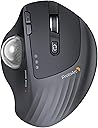
Desertcart purchases this item on your behalf and handles shipping, customs, and support to Hungary.
🎯 Own your workflow with precision and effortless multi-device control!
The ProtoArc EM01 NL Wireless Trackball Mouse combines ergonomic design with advanced multi-device Bluetooth and 2.4G wireless connectivity, allowing seamless switching between three devices. Featuring a customizable 0-20° adjustable angle, thumb-controlled trackball navigation, and a rechargeable battery with up to 1600 DPI sensitivity, it’s engineered to reduce wrist fatigue and boost productivity in any professional workspace.


| ASIN | B0CWTM9WSK |
| Additional Features | Adjustable Angle, Rechargeable, Multi-Device Connection, Wireless, Ergonomic, Quiet Click, Thumb Control |
| Best Sellers Rank | #136 in Computer Mice |
| Brand | ProtoArc |
| Button Quantity | 6 |
| Color | silver |
| Compatible Devices | PC, laptop, tablet, Mac |
| Connectivity Technology | Bluetooth, USB |
| Customer Reviews | 4.2 out of 5 stars 3,383 Reviews |
| Finish | Smooth |
| Hardware Platform | PC, Mac |
| Item Weight | 310 g |
| Manufacturer | ProtoArc |
| Mfr Part Number | Protoarc B0CWTM9WSK |
| Model Name | EM01 NL |
| Model Number | EM01 NL |
| Mouse Maximum Sensitivity | 1600 dots_per_inch |
| Movement Detection | Trackball |
| Movement Detection Technology | Trackball |
| Number of Batteries | 1 Lithium Ion batteries required. |
| Number of Buttons | 6 |
| Operating System | Windows;Mac |
| Power Source | Battery Powered |
| Range | 10.0 meters |
| Special Feature | Adjustable Angle, Rechargeable, Multi-Device Connection, Wireless, Ergonomic, Quiet Click, Thumb Control Special Feature Adjustable Angle, Rechargeable, Multi-Device Connection, Wireless, Ergonomic, Quiet Click, Thumb Control See more |
| Style Name | Modern |
| Unit Count | 1 Count |
J**E
Ergonomic game changer — three device connectivity makes it perfect for work from home
Been using traditional mice for years and the wrist fatigue that comes with extended desk sessions finally pushed me to make the trackball switch. The ProtoArc EM01 NL is the right entry point into thumb trackballs — ergonomic design, wireless Bluetooth, rechargeable, and multi-device connectivity that makes it the ideal work from home peripheral. The three device connectivity is the feature that separates this from a standard wireless mouse. Two Bluetooth device pairings plus a USB dongle receiver means you can have a work laptop, personal machine, and a third device all paired simultaneously and switch between them with a button press. For a work from home setup where you're bouncing between a company laptop and a personal machine throughout the day this is a complete workflow changer — one mouse, no re-pairing, instant switching. The thumb trackball placement is the ergonomic win that makes this style of mouse worth switching to. Wrist stays stationary while the thumb does the tracking work — after a few days of adjustment the precision is there and the wrist fatigue from constant mouse movement is completely gone. For anyone doing long desk sessions whether work or home lab, the difference is real and noticeable. Bluetooth connectivity is solid and stable across all paired devices — no lag, no dropout, no cursor jumping. Pairs quickly on initial setup and reconnects immediately when switching between devices without the delay that plagues some wireless peripherals. Rechargeable battery life is strong enough that charging is an occasional task rather than a constant concern. USB-C charging means one less proprietary cable to manage. For anyone working from home across multiple machines, the three device pairing plus trackball ergonomics makes this an easy recommendation. Highly recommended.
I**I
Best Trackball I have ever owned!
I love this trackball. I originally had a Logitech, which stopped making these kinds of trackballs. So I bought this to replace it, and I love it more than the Logitech, and it was about a third of the price. It has more features and has not failed me yet. It's comfortable; the ergonomics of it are great, especially the tilt. The scroll wheel is still going great and has multiple functions. The size is perfect. It is easy to use with plug-and-play. The material is great, especially the metal magnetic plate it tilts on. I also LOVE the purple trackball! I'd like it to work via Bluetooth or while plugged in. The Bluetooth on my laptop stopped working, so I would have liked to use this just with the wire. But other than that, this is the best trackball I have had. I would get it again, but it is still running strong!
A**R
Very Very Premium, Very Very Good
I have to say almost 6 days coming up on a year after buying this mouse, its perfect. Its funny cause when i bought this, i didn't really sift its specs thoroughly, didn't know physically moving the mouse didn't move the cursor, I just bought it because it looked good & it shipped fast. First off, the build quality is amazing, it feels and weighs very premium. love the fact that I can just recharge it with usb c. when I first got it, it took about 4 hours to get used to it because before it, the mouse i had was regular, so hand positioning was a bit awkward at first but after those hours i loved it. Never going back. Its very smooth and the scrolling is so good and easy to adjust. love that. One thing that's weird about it (or weird about me) is that u can use this while sitting in your chair (place it on the arms rest), standing up, on your lap, or laying down in your bed for tv (i use a projector). Its comfortable in every way. Although i said it took 4 hours to get used to, gaming took a bit longer, but over time it becomes way easier and honestly in my opinion, more convenient than a regular mouse. Reason why I say this is because for some people like me, our table may not have a lot of room to move the mouse, but with the rollerball, the ease of it is crazy. The battery lasts so long, I just charge it for the sake of seeing it charged, never for the sake of "its almost dead, or it died, lemme go charge it", if that makes sense. And the smooth connectivity is awesome, switches between devices like its nothing, the distance i can use it at is very good and I love the number-lights thing. Once you buy this mouse, you wont believe the quality you got for the price (compared to others). If the rollerball gets a bit slow or choppy, all I have to do is use my thumb and forcefully roll the ball until it feels smooth again, which i rarely have to do but its a quick fix, no extra steps. Overall, it feels awesome, performs awesome, and its aesthetic is awesome.
F**N
overall good, ergonomics didn't work for my hands
running Linux Mint i had some initial issues with the usb dongle not connecting, but after trying a different usb port, it worked. first few times i tried it, i had some jumpiness with the mouse cursor moving several pixels at a time, but that seemed to resolve on its own after i tried it again the following day. the optical tracking seems fine, though it might be a tad jumpy if you're particularly sensitive to sensor accuracy. the ball is extremely smooth and developed no stiction in my few hours of usage. the buttons seem consistent and reliable and are fairly quiet with a pleasantly soft sound, but are too light for my tastes - i accidentally hit them sometimes when resting or moving my hand. also, the scroll wheel moves a little too easily and doesn't click hard enough, and sometimes after using it, it'll end up close enough to the next click that when i accidentally brush it, it'll do so and scroll a single line randomly. removal of the trackball is slightly annoying, as my previous trackball has a hole in the bottom that is big enough for my finger to fit through, but this one i needed to get a pencil to push the ball out. overall, i had to stop using it because the angle was simply wrong for my hand and setup; it feels like the buttons are trying to angle my fingers in one direction, the scroll wheel a different direction, and the contouring and ball yet another direction, leading to constantly feeling the edges of buttons or the mouse brushing against the sides of my fingers, and the shape was making me overextend my wrist uncomfortable.
J**E
Effortless and Quality Mouse - A Definite Buy (Recommend Buying)
A definite buy if you are looking for a trackball mouse. Build quality is pretty good and it feels effortless to use the mouse. Trackball movements/motions are very very smooth. Very smooth scroll wheel. Left/Right click buttons require perfect amount of very light pressure to work, therefore the fingers wouldn't get tired after continuous use and same for the forward/back button. Click sounds while using the mouse are very subtle and just loud enough for you to hear the action. The DPI levels (the cursor speed) buttons have 5 levels that are perfectly spaced for varied needs. Size of the mouse and curves/arcs on the mouse are well designed and thought of for ergonomics and comfort and not to forget the 20 degree angle plate at the bottom of the mouse allows you to change the angle of the mouse, is a big plus. It can connect to 3 devices and I had no issues connecting it via Bluetooth. Only drawback is there is no storage for USB receiver/dongle on the mouse and it has to be stored separately, I would recommend ProtoArc to improve on this aspect. Another suggestion would be to provide the ability to customize the back/forward buttons to actions that user prefers. I also own a Logitech trackball mouse but after using ProtoArc's effortless mouse, I am NOT going back to Logitech.
M**A
Smoothness needs design work
I purchased this unknown to me brand over the trusted Logitech for several options that appealed to me. Working from home, I wanted a mouse I could use with my work laptop and also use with my personal laptop without having to switch USB dongles from one to the other. This mouse works flawlessly for that. Another feature that appealed to me was the tilt option. After many years of the standard trac ball configuration, this looked like it may help wrist function. At first I was unsure, but I quickly adjusted to the upward setting and now it seems strange to go to the standard downward location setting for the trac ball. Up to this point I would leave a 5 star rating. The smoothness of the trac ball leaves a lot to be desired. Working with cad drawings. Part of my efficiency and speed depend on precision selection points on screen. Not sure how to explain the issue with the smoothness of the ball other than jittery. When trying to home in on the endpoint of a line or move the cursor to a different location in a text document it becomes jumpy/jittery when you get close to the place you need to be. As a result, this slows down productivity and or causes errors. Hence the three start rating. When comparing the physical characteristics of this one to my former Logitech M575, I notice the 575 has some protruding dimples above the rollers that the tracball sits on whereas the EM01 does not have these and therefor the tracball rests on the rollers. Maybe this is the issue that should be looked at by the manufacturer. I am debating now if I need to look for a new mouse after using this one for 4-1/2 months.
J**S
Much better value than Logitech
I had been a Logitech trackball user for 15+ years. My travel mouse, a Logitech M570, started having left-click issues and would no longer drag and drop. I was excited to see there were a few new options in the trackball market from the last time I had shopped for one. This Protoarc mouse offered all but one feature of the Logitech MX Ergo, which is my home-use mouse, and has a few that my Logitech Ergo doesn't have. The Protoarc doesn't allow you to push left or right on the scroll wheel to switch between browser tabs, but that feature only worked half the time anyway on the Logitech. It does have Bluetooth and 2.4Ghz wireless, and lets you switch between 3 devices, which is nice since I use three computers. The Protoarc also uses a USB-C cable to charge, whereas the Logitech MX Ergo uses an outdated micro USB cable. It's nice that I now have one less cable to drag around, since everything else I have uses USB-C as well. I've had the mouse for a month, and I haven't needed to charge it yet. There is an MX Ergo S now that uses USB-C, but it is currently priced at $109 versus the Protoarc for $37.50. Another difference I've noticed is that the left and right click switches are of better quality with the Protoarc. The most annoying thing about both Logitech mice was that resting my hand on them would cause me to click accidentally about every 5-10 seconds. I also had problems with the Logitech mice double-clicking things when I only single-clicked, which would unintentionally open things or close windows I didn't want to close if there were multiple set to full-screen. The Protoarc doesn't suffer from these issues, which has been awesome. As far as comfort goes, the Protoarc is on par with the MX Ergo. I haven't noticed any discomfort after using it for hours. I've had three wrist surgeries, so this is important for me. The best part about the Protoarc is the price. It was less than half the price of the MX Ergo, which is why I took the risk of trying an unfamiliar brand. Overall, I'm glad I did; it seems to be higher quality than the MX Ergo, which was surprising to me. My home use Logitech mouse is also failing to drag and drop now, so I will be purchasing another one of these in the next few weeks to replace it.
J**D
It's a good trackball mouse
This brand is getting some hype for being value priced competition without being garbage. I'll agree with that. At work I use a Logitech MX Ergo that I've had for at least 7 years. I've had zero issues with it and it has been extremely reliable. It was also $75 when I bought it. I wanted one for home too and found this ProtoArc for half the price and some good reviews. Here's how the ProtoArc compares (and I'll use my MX Ergo as a comparison tool). The overall size and shape is very comparable to the Logitech. It's a bit different, of course, but it's an easy transition from one to the other. Both are excellent for ergonomics. Buttons on the ProtoArc are just fine. They're quiet and work well. Both it and the MX Ergo have different features. The Ergo has a customizable thumb button (default is 'precision mode') and a horizontal tilt/scroll feature on the wheel. Makes navigating spreadsheets and graphic arts documents really easy. The ProtoArc doesn't have either of those, but it does have two buttons in the thumb position that control sensitivity (so you still have a "precision mode" technically), and there is no tilt wheel for horizontal scrolling. Both have buttons right below the wheel to change input mode, and both have two small buttons to the left of the main left button. These are set on the ProtoArc for I believe forward and back (not at home so I can't verify), while all of the buttons on the MX Ergo are customizable with Logitech software. The ball on both mice are good and similar in size. The bearings on the Logitech are just better, the ProtoArc isn't as smooth, but it's not bad either. You can use the MX Ergo while charging, and if you use the Logitech software, you can get pop-ups notifying when the battery is low. The ProtoArc just dies and quits working, and will not work again until the battery reaches a certain charge level; I have never got it work with a cable immediately after it dies. The batteries on both mice are extremely long lasting. So...should you buy one? If you have never used a trackball and are interested...this is a great entry point to try one out, and it's a good product on top of that. It feels solid under the hand, and has had zero issues. I wouldn't trade my MX Ergo for it, but my MX died and someone gifted me a ProtoArc as a replacement...I'd rock it.
Z**6
bonne aide quotidienne
avec clavier virtuel car arthrite +++++ aux mains
G**O
In sostituzione di analogo mouse Logitech Ergo
Ho acquistato questo mouse come alternativa al Logitech Ergo che utilizzo ormai da molti anni. Dopo 3-4 mesi di utilizzo, sono totalmente soddisfatto. Se avete già usato Logitech Ergo, ecco alcune differenze e punti notevoli. a) la base è di plastica (anziché metallica) e si può regolare su due posizioni, quindi risulta più leggero, ma stabile b) il fondo della base è antiscivolo, discreta aderenza c) può essere collegato a 3 diversi apparati via Bluetooth, si cambia rapidamente col bottone selettore, molto comodo d) l'inclinazione della base è minore rispetto ad Ergo, ma ancora comfortevole e) la precisione del puntatore è più che soddisfacente f) si ricarica tramite USB-C, ci vogliono alcune ore - quando è in carica c'è un led rosso acceso, che si spegne a carica completa. Dato il costo significativamente minore, direi che è un ottima alternativa al prodotto Logitech
B**9
A really nice comfortable mouse replacement.
I've been using this daily now for almost a year and I find it much more comfortable to use and easier on the wrist than a regular mouse. I bought it to try because I was feeling strain from clicking and holding the middle mouse button whilst also moving the mouse which you have to do a fair bit in Blender and other 3D software. This type of mouse solved my problem as I'm no longer fighting my own grip. It's also a space saver as you no longer need to move the mouse around the desk. This is my first trackball mouse but I quickly adapted and within a couple of days I was just as accurate at moving the ball as I was pointing with a regular mouse. I don't have much to compare to but the build quality feels solid. I've not had any connectivity issues or issues with glide or smoothness, and it works well switching between different devices. The battery lasts a few months between charges and you can use it while charging too. The buttons are all nice to click in both orientations (flat or tilted) and the sensitivity is just set once and forget. You do have to pop the ball out to remove dust occasionally but it appears that's just expected maintenance with this kind of mouse. There's a handy hole you can push something through to help with popping it out. I'm really happy with this purchase and it has become part of my every day setup. I'm not sure how it weighs up against more expensive models but I'm happy enough and not looking to upgrade any time soon.
J**U
Wish I had bought sooner!
Such a game changer for working on my laptop at a small desk! I use this for my online assessments, Word, excel worksheets and it is nice not to have to move my hand all over the mouse pad. Easy with games that don't involve heavy combat and perfect for Baldur's Gate 3 and other turn based fighting. Two months and its still my favourite mouse.
N**N
Great trackball without LED lights
Nice stylish black trackball with (I choose) a red ball. Luckily no fancy LED lights, and connects to PC and MAC. Great!! What could be improved is a small storage area in the trackball for the dongle (wifi/bluetooth)
Trustpilot
2 weeks ago
2 weeks ago