Desertcart purchases this item on your behalf and handles shipping, customs, and support to Hungary.
🎯 Master your workflow with precision and comfort — the ProtoArc EM01 NL
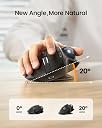
The ProtoArc Wireless Trackball EM01 NL is a rechargeable, ergonomic thumb mouse designed for professionals juggling multiple devices. Featuring adjustable tilt angles to minimize wrist strain, triple-device Bluetooth and 2.4G USB connectivity, and a silent click mechanism, it delivers precise 1600 DPI tracking across PC, Mac, and mobile platforms. Its sleek matte finish and easy-to-clean design make it a durable, stylish addition to any modern workspace.


| Antenna Location | Office |
| Are Batteries Included | No |
| Are Batteries Required | Yes |
| Asin | B0CWTY6Z99 |
| Battery Average Life | 12 Months |
| Best Sellers Rank | #36,387 in Computers & Accessories (See Top 100 in Computers & Accessories) #1,858 in Mice |
| Brand Name | ProtoArc |
| Button Quantity | 6 |
| Colour | Gray Ball |
| Compatible Devices | MacOS,iOS, iPadOS, Win,Android |
| Customer Reviews | 4.3 4.3 out of 5 stars (3,154) 4.3 out of 5 stars |
| Enclosure Material | Plastic |
| Hand Orientation | Right |
| Hardware Platform | Linux, Mac, PC |
| Included Components | A Type C Charging Cable, A USB Receiver, A User Manual, An Ergonomic Trackball Mouse |
| Item Dimensions L X W | 9L x 7W Centimeters |
| Item Type Name | Mouse |
| Item Weight Unit Of Measure | 0.35 Kilograms |
| Manufacturer | ProtoArc, ProtoArc |
| Manufacturer Contact Information | ProtoArc |
| Manufacturer Part Number | Protoarc B0CWTY6Z99 |
| Model Name | EM01 NL |
| Model Number | EM01 NL |
| Mouse Maximum Sensitivity | 1600 Dots per Inch |
| Movement Detection | Trackball |
| Network Connectivity Technology | Bluetooth |
| Number Of Batteries | 1 Lithium Ion batteries required. |
| Operating System | Linux, Windows 7, Windows XP |
| Packer Contact Information | ProtoArc |
| Power Source | Battery Powered |
| Product Features | Ergonomic Design |
| Product Finish Type | Matte |
| Range | 10 |
| Style Name | Modern |
| Theme | Video Game |
| Unit Count | 1 Piece |
| Warranty Description | 1 Year |
User
Perfect
A perfect mouse for multiple device use, and switching is easier within devices. Very comfortable to use.
User
Protoarc mouse
The trackball doesnt work
User
FRUSTATING SCROLL INPUT AND INTENTLY DEFECTIVE PRODUCT
Inherently defective scrolling input and scroll wheel and this directly leads to unusability, after few days the scroll become jittery than starts registering opposite scroll inputs to what you give than altogether becomes frustatingly unusable. I returned even though i got a better deal of 3650 instead of usual price of 4100
User
Scrolling is very bad
Initial 2 days working well after that scrolling is very bad and scrolling speed is very bad, it unstable.
User
bonne aide quotidienne
avec clavier virtuel car arthrite +++++ aux mains
User
In sostituzione di analogo mouse Logitech Ergo
Ho acquistato questo mouse come alternativa al Logitech Ergo che utilizzo ormai da molti anni.Dopo 3-4 mesi di utilizzo, sono totalmente soddisfatto. Se avete già usato Logitech Ergo, ecco alcune differenze e punti notevoli.a) la base è di plastica (anziché metallica) e si può regolare su due posizioni, quindi risulta più leggero, ma stabileb) il fondo della base è antiscivolo, discreta aderenzac) può essere collegato a 3 diversi apparati via Bluetooth, si cambia rapidamente col bottone selettore, molto comodod) l'inclinazione della base è minore rispetto ad Ergo, ma ancora comfortevolee) la precisione del puntatore è più che soddisfacentef) si ricarica tramite USB-C, ci vogliono alcune ore - quando è in carica c'è un led rosso acceso, che si spegne a carica completa.Dato il costo significativamente minore, direi che è un ottima alternativa al prodotto Logitech
User
A really nice comfortable mouse replacement.
I've been using this daily now for almost a year and I find it much more comfortable to use and easier on the wrist than a regular mouse. I bought it to try because I was feeling strain from clicking and holding the middle mouse button whilst also moving the mouse which you have to do a fair bit in Blender and other 3D software. This type of mouse solved my problem as I'm no longer fighting my own grip. It's also a space saver as you no longer need to move the mouse around the desk.This is my first trackball mouse but I quickly adapted and within a couple of days I was just as accurate at moving the ball as I was pointing with a regular mouse. I don't have much to compare to but the build quality feels solid. I've not had any connectivity issues or issues with glide or smoothness, and it works well switching between different devices. The battery lasts a few months between charges and you can use it while charging too. The buttons are all nice to click in both orientations (flat or tilted) and the sensitivity is just set once and forget.You do have to pop the ball out to remove dust occasionally but it appears that's just expected maintenance with this kind of mouse. There's a handy hole you can push something through to help with popping it out.I'm really happy with this purchase and it has become part of my every day setup. I'm not sure how it weighs up against more expensive models but I'm happy enough and not looking to upgrade any time soon.
User
Wish I had bought sooner!
Such a game changer for working on my laptop at a small desk! I use this for my online assessments, Word, excel worksheets and it is nice not to have to move my hand all over the mouse pad. Easy with games that don't involve heavy combat and perfect for Baldur's Gate 3 and other turn based fighting. Two months and its still my favourite mouse.
User
Great trackball without LED lights
Nice stylish black trackball with (I choose) a red ball. Luckily no fancy LED lights, and connects to PC and MAC. Great!! What could be improved is a small storage area in the trackball for the dongle (wifi/bluetooth)
Trustpilot
3 weeks ago
2 days ago