
Desertcart purchases this item on your behalf and handles shipping, customs, and support to Hungary.
🖱️ Keep your status active, your screen awake, and your productivity unstoppable!
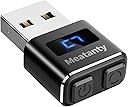
The Meatanty Metal Tiny Mouse Jiggler is a compact, USB-powered device designed to keep your computer awake by simulating mouse movement. Featuring a durable metal shell, dual control buttons for power and mode selection, and an LED screen displaying one of three customizable movement tracks, it operates undetectably as a USB optical mouse. Compatible across major operating systems with plug-and-play ease, it’s perfect for professionals who want to maintain active status on communication platforms and prevent screen lock without interrupting their workflow.
| ASIN | B09NVH8HVN |
| Additional Features | Durable Metal Covering, It Remembers Your Setting, Mode 3 Will Not Affect Mouse Use, Separate Mode and ON/OFF Buttons, Visualized Digital Display |
| Antenna Location | Gaming, Office |
| Best Sellers Rank | #87 in Computer Keyboards, Mice & Accessories |
| Brand | meatanty |
| Button Quantity | 2 |
| Color | Black |
| Compatible Devices | Desktop computer, Laptop |
| Connectivity Technology | USB |
| Customer Reviews | 4.7 out of 5 stars 9,478 Reviews |
| Embellishment Feature | LED |
| Enclosure Material | Metal |
| Hand Orientation | Ambidextrous |
| Hardware Platform | Computer, Laptop, PC |
| Item Dimensions L x W | 1.3"L x 0.79"W |
| Item Weight | 6 g |
| Manufacturer | Meatanty |
| Mfr Part Number | INPUT_MOUSE |
| Minimum Required Operating System Version | Windows 7 |
| Model Name | Tiny Mouse Jiggler |
| Model Number | INPUT_MOUSE |
| Movement Detection | Undetectable |
| Movement Detection Technology | Undetectable |
| Number of Batteries | 1 AA batteries required. |
| Number of Buttons | 2 |
| Operating System | Chrome OS, Linux, Mac OS, Unix, Windows |
| Power Source | Corded Electric |
| Range | 3.0 meters |
| Special Feature | Durable Metal Covering, It Remembers Your Setting, Mode 3 Will Not Affect Mouse Use, Separate Mode and ON/OFF Buttons, Visualized Digital Display Special Feature Durable Metal Covering, It Remembers Your Setting, Mode 3 Will Not Affect Mouse Use, Separate Mode and ON/OFF Buttons, Visualized Digital Display See more |
| Style Name | metal mouse jiggler |
| Theme | Minimalism |
| UPC | 774336958273 |
| Unit Count | 1 Count |
| Warranty Description | 2 years warranty |
R**L
Works great. Undetectable. Great for keeping active at work.
Hubby loves it! Works great for keeping your laptop screen active. No issues yet. Has two buttons, one is power and the other is mode. There is 3 modes. Each mode does a different series of movements so help keep it from being noticable if tracked. You will need to buy the attachment pieces which is a female USB to USBC. See photos.
J**!
No more away teams statues!
Teams saying you left the country when you just went to the bathroom? You NEED this! My husband bought one for his work computer and I was skeptical so I tried his and I will never go back! I’ve left my laptop up with this plugged in for hours while I was on calls and I never had a single status change or sleep mode activation. I love that this doesn’t need to install software, just plug it in and go. There’s three mouse patterns which are super helpful when you’re still using your mouse and there’s an off button on the side that’s easy to disable when you’re moving between applications. 100/10!!
C**R
Better Than a Desktop Mouse Jiggler
This thing is great! I had been using one of those mouse jigglers that you have to set the mouse on, which only works if you constantly remember to set your mouse on when you step away from your desk. Plus, it was kind of noisy. This one, you just plug it in to a usb port, and it makes these tiny little movements which doesn't interrupt your work flow at all, and you can use your mouse normally. Also, it is silent.I use this on my personal desktop at home, so I can't speak to whether or not it can be detected in a work environment, but it's great for what I use it for.
J**D
Works good for Microsoft Teams
I’ve been using this Meatanty metal mouse jiggler daily for a while now, and it’s been completely reliable. The build quality is better than I expected—the metal casing gives it a solid, durable feel compared to the cheaper plastic ones out there. It’s compact and doesn’t take up much space, so I just leave it plugged in and forget about it. Performance-wise, it does exactly what I need. I mainly use setting 3, and it’s been perfect. It keeps my system active consistently without interrupting anything I’m working on. More importantly, it keeps my Microsoft Teams status set to available, which has been a big reason I got it in the first place. I haven’t had any issues with it dropping or acting erratically. Setup is as simple as it gets—plug and play, no software or drivers required. It runs quietly and smoothly, and there’s no noticeable interference while I’m actually using my mouse. I also like that it’s hardware-based, so there’s nothing installed on the computer itself. It’s straightforward and works exactly as advertised without any extra hassle. Overall, this is one of those simple tools that just works. If you need something dependable to keep your system active throughout the day, this has been a great solution for me.
E**S
Out of office... or are we? Nobody knows.
I might get myself fired if I testify to the awesomeness that is this bite-sized device from Heaven. So let me just say that I know a totally anonymous girl who works from home for a company that secretly monitors idle time which, as you know because you're here, totally defeats the purpose of remote work. So she knew a girl who also WFH but that girl wasn't glued to a dang office chair 24/7 and actually got lunches and showers and happy hours and could leave several times a day to run errands and yeah anyway, that friend used one of these, and my goodness, it was like a caveman discovering FIRE when that friend revealed the magic of the mouse jiggler, and now all the cavemen in the cave called Work can go do s.hit on their own terms, and guess what - budgets are still respected, deadlines still get met, clients keep coming back. What a time to be alive when you can have freedom at the push of a button. It keeps the screen from timing out, keeps it out of sleep mode, highlights emails like you're messing with your inbox, & has a few settings to imitate natural movement.
S**N
I really like this thing.
I really like this thing. For me, it does its job perfectly. I use the mode were it moves the cursor very slightly. I thought that this mode would interfere with my work since I use some graphical applications which require precise mouse movement, but happily I never notice that this thing is on. If you let go of your mouse and watch a pointer cursor, you will see the small movement, but fortunately I do not notice that it causes any interference while using any program that I use.
A**M
A Compact and Versatile Mouse Mover
The Meatanty USB Mouse Jiggler is a small and discreet device designed to keep your computer active by simulating mouse movement. Its compact size and separate mode options make it a versatile tool for various scenarios. While it offers convenience and functionality, there are some limitations that may affect its overall appeal. One of the standout features of the Meatanty USB Mouse Jiggler is its compact size. The device is small and unobtrusive, allowing you to easily carry it with you or leave it connected to your computer without taking up much space. The discreet design ensures that it remains unnoticed while it performs its intended function of simulating mouse movement. The separate mode options add flexibility to the device's functionality. With the ability to switch between continuous movement mode and random movement mode, you can choose the mode that best suits your needs. Continuous movement mode provides consistent mouse movement, which can be useful for preventing screen lock or keeping computer sessions active. On the other hand, random movement mode offers more unpredictable mouse motions, creating a more natural simulation of user activity. Setting up the Meatanty USB Mouse Jiggler is straightforward and hassle-free. Simply plug it into a USB port, and it starts working immediately. The device is compatible with most operating systems, ensuring broad compatibility across various computers and laptops. However, it is important to note that the Meatanty USB Mouse Jiggler has some limitations that may affect its appeal to certain users. Firstly, while it effectively simulates mouse movement, it does not provide any additional functionality beyond that. It does not offer customization options or advanced features, which may be disappointing for those seeking more control or automation options. Furthermore, the device's effectiveness may be dependent on the specific software or security measures in place on the computer it is connected to. Some systems may have detection mechanisms that can identify the mouse jiggling activity as non-human, potentially flagging it as suspicious behavior. It is important to consider these factors and ensure that the device aligns with the intended usage and security policies in your environment. In conclusion, the Meatanty USB Mouse Jiggler offers convenience and versatility as a compact and discreet mouse mover. Its separate mode options and ease of use make it suitable for various scenarios where simulated mouse movement is desired. However, it lacks advanced features and customization options, and its effectiveness may be influenced by individual system settings and security measures. If you are in need of a simple and portable solution to keep your computer active, the Meatanty USB Mouse Jiggler could be a viable option, but it is important to consider its limitations and compatibility with your specific setup.
C**S
Easy. Buy this one
Simple to use. Works on my Mac or pc with the wireless or wired mouse. Plug it in, turn it on... no bulky devices and no wires.
L**O
Harika ürün.
Ürün harika. İş görüyor
A**R
良い!
非常に良い! 滅多に星5つは付けないんですが。思わず。 ちゃんと期待通りの動作をしてくれます。 モードが3つあり、どのモードで動作中かLEDで表示されます。オンの時は常にLEDの表示がクルクルしています。 動きが最小の「3」で使っています。微妙な動きを頻繁に行います。これによりスクリーンセーバーは発動しません。 デバイスはUSBの汎用マウスとして認識されるようです。 オンのまま矢印キーでメニュー項目を操作すると干渉するようです。これはマウスカーソルの位置によってと思います。微妙にボーダーライン上にあると、上下の動作で選択が変わってしまいます。 LogiのMX Master 3とは干渉はないようです。マウスで操作している間はマウスが優先されるような動作をしています。 LenovoのデスクトップとノートPCで試しました。 電源スイッチも操作し易いので、不要な時はクイックにオフにできます。スイッチのクリック感も押した事が判るのでいいです。 USBのインタフェースのキャップが付いています。 【追記】 勘違い。マウスでも干渉しますね。微妙に。でも、気を付ければ全く問題はないです。
A**.
Cumple con su funcionamiento
Increíblemente bueno, impide que el ordenador se vaya a reposo, y te hace permanecer siempre como activo en tus aplicaciones de mensajería. Cumple con su función perfectamente, es un producto 100% recomendable para evitar que aparezcas como desconectado aunque te ausentes temporalmente del equipo. Dispone de tres modos de movimiento, el tercero de todos ellos es 100% Compatible con el funcionamiento normal de trabajo dado que el movimiento de ratón es mínimo y te permite moverte con normalidad por los diferentes lugares sin llegar a ser molesto.
F**O
Ottimo acquisto
Tutto perfetto. Ottimo acquisto. Consiglio
J**N
Geen stoppende processen bij lock na zoveel minuten
3 standen, de lichtste stand is niet hinderlijk. Beeldscherm springt niet op zwart als je aan de telefoon zit
Trustpilot
2 days ago
5 days ago