Buy anything from 5,000+ international stores. One checkout price. No surprise fees. Join 2M+ shoppers on Desertcart.
Desertcart purchases this item on your behalf and handles shipping, customs, and support to Hungary.
๐ Elevate your eGPU game โ power, speed, and compatibility in one sleek bracket!
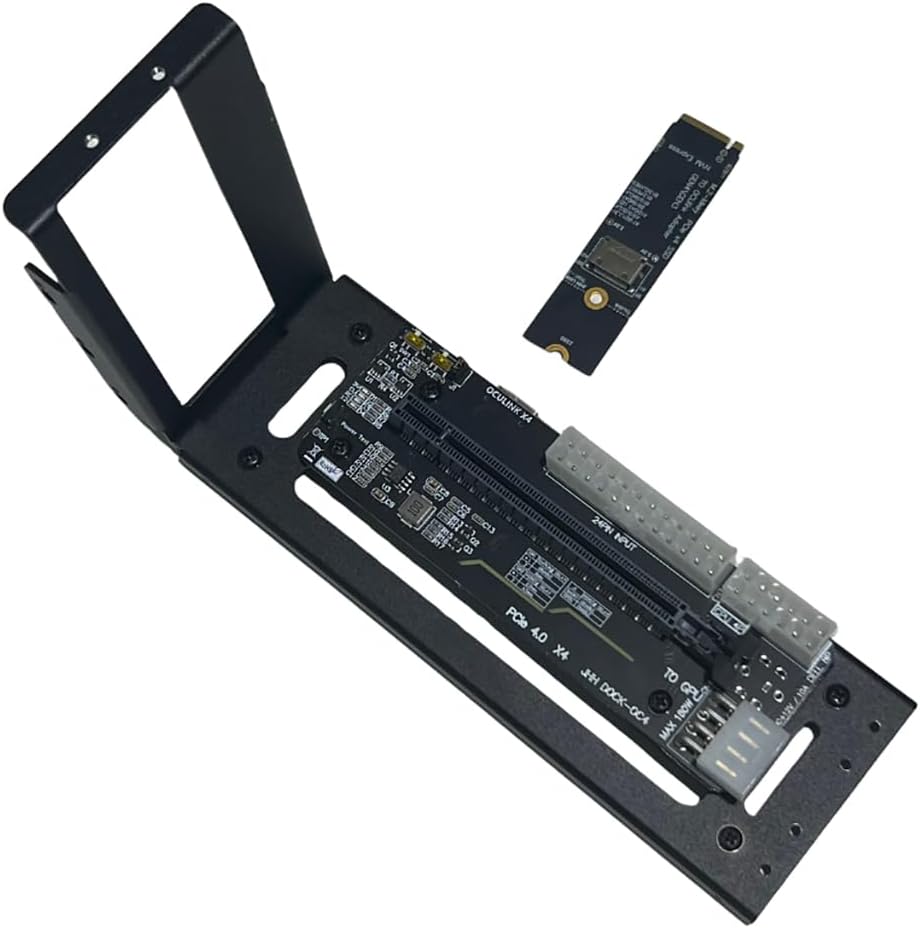
The JMT M.2 M-Key to PCIe 4.0 x4 External Graphics Card Stand Bracket is a cutting-edge adapter designed for Oculink and M.2 NVMe laptops and handhelds. It enables high-speed PCIe Gen4 x4 expansion for GPUs and other PCIe cards, supports flexible 24-pin power input from ATX/SFX power supplies (500W+ recommended), and offers smart synchronous start/stop functionality. Perfect for professionals seeking to supercharge their portable setups with desktop-grade graphics and I/O performance.
| ASIN | B0CRR7HMX5 |
| Additional Features | Unique Start/Stop Functionality |
| Best Sellers Rank | #399 in Computer Graphics Cards |
| Brand | JMT |
| Color | Black |
| Compatible Devices | Desktop, Laptops |
| Customer Reviews | 4.2 out of 5 stars 57 Reviews |
| Enclosure Material | Metal And Plastic |
| Global Trade Identification Number | 00783798005388 |
| Item Weight | 0.32 Kilograms |
| Manufacturer | JMT |
| Material | Metal And Plastic |
| Mfr Part Number | F51620 |
| Model Name | AMD Radeon RX 6800 XT |
| Model Number | F51620 |
| Mounting Type | Tabletop Mount |
| Special Feature | Unique Start/Stop Functionality |
| UPC | 783798005388 078379800538 |
| Unit Count | 1.0 Count |
| Warranty Description | 1 |
S**O
1 mxi670 working with 3 GPU with PCIE 4.0 4X
my 3rd GPU working fine with ollama and working perfectly
M**.
Inexpensive and works, I'm an Oculink believer now.
Works. Nice that includes the m.2 Oculink adapter. Be sure to buy an Oculink cable. I have a mini PC that only has (1) M.2 PCIE x4 4.0 slot, so I had to clone my MVME to SATA drive. Comparing FPS with games that struggled, it's apparent that Oculink > USB4/TB4. I wish this had a Power supply mount, and that the Oculink port was more accessible towards the bracket of the graphics card. The power switch on Auto didn't work, so I toggles it to On. Works like a charm. There's potential to 3d print an enclosure. Install notes: ONLY plug your power supply to the 24-pin connector (check/green). DO NOT connect power to the connectors circled in res (X/red). If your GPU requires PCI-E power, plug those power supply cables directly to the GPU power connectors (not dock).
E**N
A little sketchy, but it works
It worked more or less perfect. The only problem I had was the I couldnโt get it to turn on using the turn on with pc startup so I had to set it to be on 24/7, but that wasnโt exactly a problem for me since I intended for the pc to never turn off since it runs a whole bunch of servers
R**.
Fantastico
Works great. Magnetic bottom is a nice touch for setting on metal rack shelving. No issues at all been running a couple weeks now.
D**P
Needs better documentation
I was able to get it working, but it really could use some assembly instructions. There are multiple power connectors and it would be nice to know which ones are mandatory, and which ones are optional. There are also a few design issues. The occulink connector is on the right side where most people would probably put their power supply. It would be better to have the connector come out of the back of the dock. The retention bracket angles away from the card, you have to flex it into place to secure the GPU to the dock. It would be nice if it fit properly without having to force it.
C**S
Not happy with dock.
There is no instructions with the dock, nothing showing what GPU's are compatible with the dock. It work's, but only in test mode, it doesn't start up when laptop switches on, have to power it up before powering up the Laptop.
S**W
Works well, solid build
Works well, and constructed well. I would opt for the one with power supply along with it, but to save a few bucks, rock solid unit.
T**P
Excellent for the price, great quality.
Title says it all. The PCB doesn't feel cheap or flimsy. It comes with brackets and support to secure the PCB, GPU, and even remount mount the enclosure to something. (The mount also has magnetic feet which is really nice) The M.2 adapter included was also sturdy. It didn't feel flimsy. Compared to other cheaper options, this adapter picked up any GPU or PCIe expansion card installed over the others (including GPUs that ran solely off of PCIe lane power) where as competitors would fail detecting cards that didn't require external power. The added switches on the x16 part of the adapter is also a good touch, allowing you to force power the card or wait for PC detection before booting. Honestly, 10/10 adapter for the price.
A**I
Fa il suo mestiere
Fa il suo mestiere. Su schede modeste come 4060Ti non crea neppure particolari colli di bottiglia. 3dMark ottiene punteggi pari al bus gen4 8X nativo
G**K
It is actually far better than expected
Replaced a PCI-e 3.0 dock with this one to be able to run an RTX 3060 Ti. The other dock had a very cheap plastic main plate and only some extended screws for support. This one has far better build quality and is much more stable. The magnetic legs add the cherry on top. Put some metal plate underneath and it will stick there like being glued to the ground. The 3060 runs without issues reaching benchmark scores comparable or superior to desktop builds. The cabling of the 3.0 dock caused some WiFi intereference which yielded poor results (20-50Mbs on a 250Mbs WiFi card), the oculink cable doesn't cause anything like that. The only thing that I could mention as negative that the oculink cable's plastic cover is quite big and to be able to put it the backplate of the laptop back properly I had to remove it.
D**Y
Worked perfectly as described by others.
Buy the cable marked as people also bought and use m.2slot Might need 10mm motherboard stand-offs or longer threaded screws for the unit to fit graphics card, where screws connect the base plate to vertical plate, so you donโt need to bend the vertical plate. Other than that perfect.
D**S
bench van 4048 da net een desktoppresatie super tevreden ermee!
Waauw voor dat geld heb ik me die M.2 eGPU heb en compatiebel met mijn NOC 11 MINI PC i7 en op de eGPU een RTX3060 CUDA Ampere v2en bench score van 4048 da net een desktoppresatie super tevreden ermee!
P**.
All works ok
All works ok
Trustpilot
1 month ago
2 months ago