Desertcart purchases this item on your behalf and handles shipping, customs, and support to Hungary.
⚡ Stay ahead of the curve with the Wi-Fi 7 mesh that future-proofs your smart home!
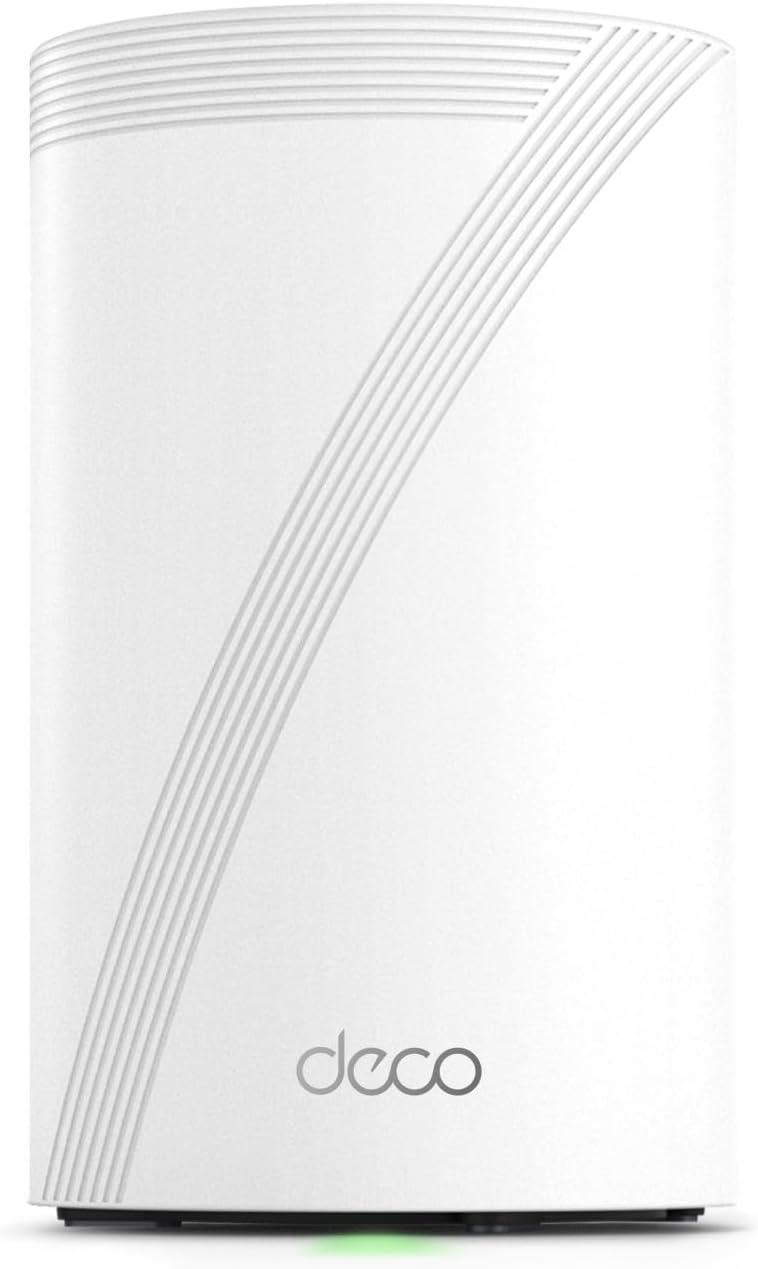
The TP-Link Deco 7 Pro BE63 is a cutting-edge Wi-Fi 7 tri-band mesh router designed to deliver ultra-fast speeds up to 10 Gbps and expansive coverage up to 3,000 sq.ft. Supporting over 200 devices simultaneously, it features four 2.5G multi-gig ports for wired backhaul, AI-driven seamless roaming, and robust security with HomeShield. Ideal for performance-focused users, it offers easy setup and management via the Deco app, making it a future-proof solution for demanding smart homes and high-bandwidth applications.


| ASIN | B0CN8WD86H |
| Antenna Location | Gaming, Home |
| Antenna Type | Internal |
| Best Sellers Rank | #3 in Computers & Accessories ( See Top 100 in Computers & Accessories ) #3 in Whole Home & Mesh Wi-Fi Systems |
| Brand | TP-Link |
| Built-In Media | 1 Deco BE63 unit, 1 Power adapters, 1 RJ45 Ethernet cable, Quick Installation Guide |
| Color | White |
| Compatible Devices | Smartphone |
| Connectivity Protocol | Wi-Fi |
| Connectivity Range | 3000 Square Feet |
| Connectivity Technology | Wi-Fi |
| Control Method | App, Voice |
| Controller Type | App Control |
| Coverage | 3000 sq.ft. |
| Customer Reviews | 4.2 out of 5 stars 277 Reviews |
| Data Transfer Rate | 10 Gigabits Per Second |
| Frequency | 6 GHz |
| Frequency Band Class | Tri-Band |
| Has Internet Connectivity | Yes |
| Has Security Updates | Yes |
| Is Modem Compatible | Yes |
| Item Dimensions L x W x H | 4.23"L x 4.23"W x 6.93"H |
| Item Weight | 1.66 Pounds |
| LAN Port Bandwidth | 2.5 Gbps |
| Manufacturer | TP-Link |
| Maximum Upstream Data Transfer Rate | 5188 Megabits Per Second |
| Mfr Part Number | Deco BE63(1-Pack) |
| Model Name | TP-Link Deco 7 Pro BE63 |
| Model Number | Deco BE63(1-Pack) |
| Number of Antennas | 4 |
| Number of Ports | 4 |
| Operating System | Linux |
| Other Special Features of the Product | Access Point Mode, Guest Mode, QoS, Remote Access, WPS |
| Router Network Type | hybrid |
| Security Protocol | WPA-PSK, WPA2-PSK, WPA3 |
| Smart Home Compatibility | Smart Home Compatible |
| Special Feature | Access Point Mode, Guest Mode, QoS, Remote Access, WPS |
| UPC | 840030712708 |
| Unit Count | 1.0 Count |
| Warranty Description | 2 year manufacturer |
| Wi-Fi Generation | Wi-Fi 7 |
| Wireless Communication Standard | 802.11.be, 802.11ac, 802.11ax, 802.11g, 802.11n |
| Wireless Compability | 802.11.be, 802.11ac, 802.11ax, 802.11g, 802.11n |
M**E
Fantastic WiFi7 router!
I’ll admit I’m a big fan of TP Link products in general having many of their smart products, from routers, to smart plugs, and even security cameras. I’ve owned this brand of Wi-Fi router in the past so I felt pretty confident in spending a bit and upgrading to their Wi-Fi 7 router. Now to be fair and perfectly honest, upgrading to a Wi-Fi 7 router at this point in time is way early to the game and for the large majority of people quite frankly unnecessary. I like to stay a little bit ahead of the curve so I thought I’d bite the bullet. On any given day, I have probably 70+ devices connected to the router. And out of that many only about three can even connect to the newest 6 GHz band on this router to take advantage of the fullest speed possible. And this is why I would suggest that most people hold off on buying Wi-Fi 7 at the moment, at least until smart devices catch up and can access the 6 GHz band. Even my Apple TV 4K cannot access the newest band! Now onto this router specifically, so far, I really love it! I’m using just a single router to cover an entire 3000 square-foot house and it’s doing a fantastic job without need to buy other mesh routers and increase the spend tremendously! I honestly can’t believe how small this thing is compared to most huge routers that can provide this same level of speed! As is typical with TP Link routers, the Wi-Fi speeds are as fast as I expected! The set up was super fast and easy using their Deco app. In fact, I can manage almost everything I need to within the app. This includes changing the DNS settings to either Cloudflare or Google. With prior routers from TPLink I was having to go to a website to manage deeper settings on the router, but not so with this one, and that makes things quite a bit easier. Another thing that makes this router very useful for me is the 2.4GHz IOT Band that is specifically set up for those devices. So basically, I set up all of my smart plugs, cameras, and everything else on that band to maintain better privacy. I really like that they included this feature on these routers! I have AT&T fiber with 1000Mbps service and as you can see with the included picture, I’m actually getting a nice chunk over that! But keep in mind I was right next to the router in getting this result. As you move further from the router, the speeds will move down in tandem. Overall, I’m very happy with the router and hope it will provide many years of service!
R**S
Great Wi-Fi 7 router
Review update 5/28/24 DO NOT BUY!!!! all wifi 7 Deco's are unstable or cause your other Deco's to be unstable and constantly crash your network. Not only that but TP links own engineers don't know how to fix it so do not buy!!!! worst deco routers I have ever bought and the most expensive and it's worthless cause it doesn't work. At first when I was setting it up I was having a hard time but Ive had so many deco products I pretty much know all their little quirks and so I just disconnected everything and reconnected it and then booted it back up and everything worked fine in the setup process. Also there's no need to create a new Wi-Fi name and password You can use the one you use recently just make sure that everything is letter for letter and word for word cuz if one thing is off it won't work but as long as everything's the same all your devices will reconnect when the deco powers up and you don't have to do anything else besides some setting things in deco app. But the other thing is? I saw a lot of bad reviews on this router people saying that it had bad connection I haven't had any of these problems but I immediately did a firmware update so that might be why I had a better experience and plus I already know all of tp link Deco's quirks.
W**M
Unleashed new speeds
I had some old Deco units (XE75) and decided to buy a single BE63 just to try it. Holy cow, I didn’t realize my fiber internet was this fast. I also didn’t realize the XE75 were limiting my speeds until I bought this BE63. Set up was simple. The results are amazing. I’m likely going to test out using the old XE75s as the mesh nodes for a bit, but will likely replace those with another XE75. My speeds increased to the actual max that my ISP claimed I would have- never reached those speeds before. Very happy with this router!
P**X
All TP-LINK WiFi 7 Stuff is pre-release garbage!
Where do I begin with the TP-Link Tri-Band WiFi 7 Mesh System? It's like buying a ticket to a comedy show but ending up in a horror movie—the kind where Wi-Fi nightmares come true! Let's start with the promises—oh, they're as grand as a unicorn parade! 6-Stream 10 Gbps, 4 × 2.5G Ports Wired Backhaul, 4× Smart Internal Antennas, VPN, AI-Roaming, MU-MIMO, HomeShield—sounds like a technological utopia, right? Wrong! The setup process—imagine trying to decipher an alien language. I followed the instructions religiously, but somehow ended up summoning a toaster instead of configuring the network. It's like a puzzle designed by a mad scientist who laughs maniacally as you struggle to connect a device that seems determined to stay offline. And speaking of connections, this mesh system plays hide-and-seek with your devices better than any magician. One minute your laptop is happily streaming, the next it's lost in a Wi-Fi Bermuda Triangle. It's the ultimate game of "Now you see it, now you don't!" Your internet signal becomes a ghost, haunting your hopes of a stable connection. The speed? It's like watching a snail race in slow motion. You'd think with all that "10 Gbps" hype, the internet would be faster than The Flash on caffeine. But nope, it moves at the speed of a turtle with a backpack full of bricks. But wait, there's more! Let's talk about AI-Roaming—it's like a robot chauffeur who keeps getting lost. Instead of smoothly transitioning between access points, it's more like a chaotic dance routine, with your devices hopping from one weak signal to another like a kangaroo on a pogo stick. And the customer support—well, it's a bit like asking a fish for climbing tips. You're more likely to get swimming advice than a solution to your connectivity woes. It's like they've attended a crash course in evading customer queries. In conclusion, the TP-Link Tri-Band WiFi 7 Mesh System is a tragic comedy, a technological misadventure that leaves you yearning for simpler times when dial-up connections seemed like a luxury. If you're considering this system, prepare yourself for a rollercoaster ride of frustration, disappointment, and an internet experience that's more fiction than fact.
A**E
Took a 4th to get the coverage I wanted, but now it’s great
I had the 3 pack of these decos and I was seeing slow speeds and drop outs in certain places in my house. I bought this to fill the gap, it was simple to add and with 3 minutes it was hook up and boosting my coverages. Now I can surf my full Gigabit speed through the entire house. I can also hook anything that I want to run faster directly to the 2.5G ports on the unit. The app is simple and powerful and they work well once setup. If it gave me the coverage it was supposed to with three I’d give 5 stars, so I deducted one.
T**A
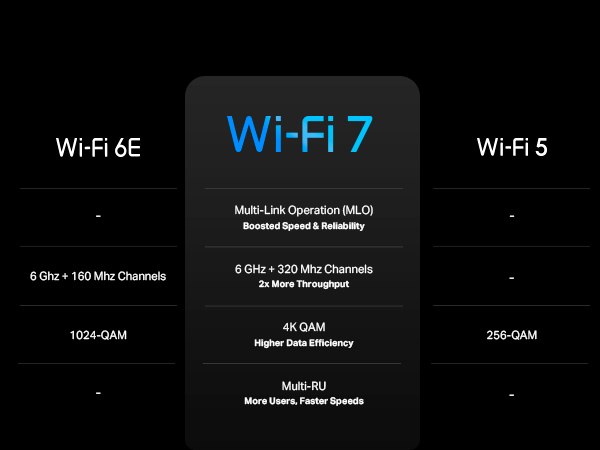
Best Overall TRUE (320MHz, 4K-QAM, MLO supported) WiFi 7 Router
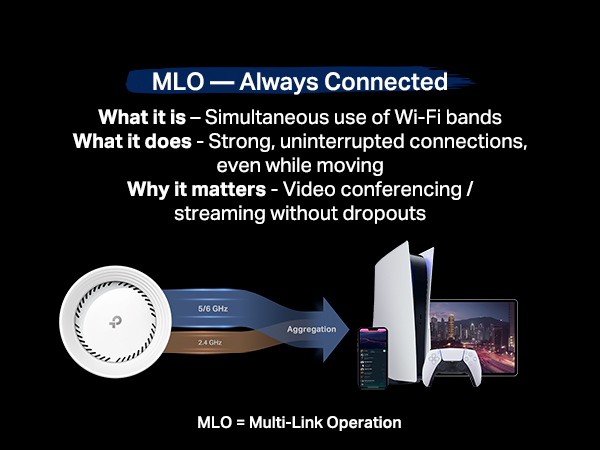
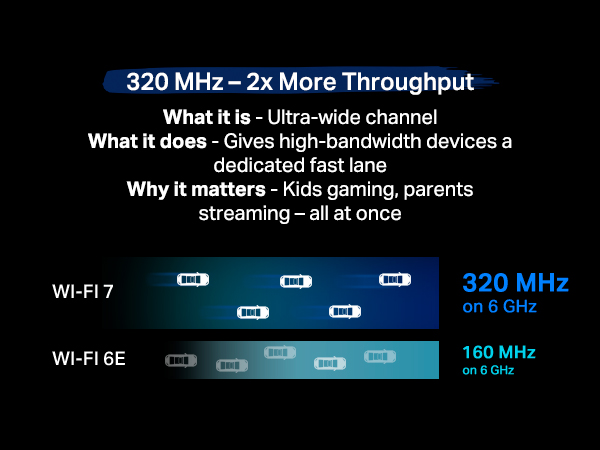
Excellent WiFi-7 router! My house is not large enough to have the need for mesh network, but using this BE63 device as a single router would give sufficient coverage for a typical small to mid size single story house. Connections on all bands (2.4GHz, 5GHz, 6GHz) are all solid and the best part is you can set them all apart with each having it's own network ID. This will give different devices in your home, such as IoTs, PC/laptops, mobile devices, their own bandwidth/lanes to avoid crashing into each other. Also, if you have WiFi 7 capable device(s), you will love its MLO feature as it tie together your 5GHz & 6GHz into one network ID in order to boost your connection range, latency speed, and overall stability, so you would experience a lot less frequent network drops and at the same time faster speed, depending on how far that device is away from the router. Overall, there's nothing but love for this TP-Link Deco 7 Pro (model BE63) and yes I've already returned my carrier's WiFi 7 router; it (really) sucks. Although WiFi 7 routers are still on the pricey side, given the current available choices (referring to the TRUE WiFi 7 routers with 320MHz & MLO feature) and after hours of homework, I personally believe this TP-Link model is the best overall bang for the buck unit. If you can wait, wait! If you cannot, get this one!
T**.
App UI is next level. Mesh is questionable.
My CR1000A Verizon router broke. I upgraded from G3100 for speed reasons but G3100 was so stable. Not a week after my friend 's CR1000A broke, mine did too. I was frustrated without Internet. Most routers are so ugly and distasteful with so many antenna looking like a UFO about to take off. All my furniture were white so I didn't have a whole lot of options. My initial choice was Google Nest but it was so basic even though it looks good. So I opted for this good rated one. It's half the size of my Verizon router. I love that white cylinderical look. The LED indicator of green saying connection to internet and red saying disconnected is just so helpful. Now, I'm happy with the purchase for my use. I have a small place so mesh is not necessary. In fact, I might return it if I needed mesh. My friend has Google Nest and it runs smoothly. Deco was causing issues because mesh was on. I read forums and found that it's a known issue so I went into all my devices and turned off mesh mode. It was trying to find the best signal for me and if I'm moving away from the router/node, it was dropping connection. I cannot say if this issue is no longer there if there's another node. For me, as only using a single node, it was necessary for me to turn off mesh mode individually in all my wifi devices. If you are having problems with this as a single node, try turning off mesh mode and 'fast roaming'. If you have hard wire switches throughout your house, make sure you power cycle them. I was scratching my head trying to troubleshoot why my wired speed were 1/3 of what it should be. Power cycling the switches fixed it. Wireless speed is amazing. There's no drop in speed. It's exactly the speed I subscribed from my ISP. Another upside to this router is that it has 2.5gbps LAN ports. My house is wired in CAT 6 and 7 so I can take advantage of this except I'll need to upgrade my switches, NAS and computer NIC, lol. For the premium price I paid, it should have been 10 gbps LAN because even the Verizon CR1000A has 10 gbps LAN. I don't get why 10 gbps LAN tp-link routers are above $500. Unbelievable. Wait a few years I guess. With Verizon, I used to have to use a desktop web browser to manage my network which I didn't know was so outdated. I can now do all of that from Deco app on my phone. It's so intuitive and didn't need a whole lot of learning or prior knowledge. I love this Deco app. I can see all my clients, separate IoT network for my wifi light switches, reserve DHCP address, block, isolate clients, etc. all on my phone. That's so convenient. I tried chat support with Deco support. I had a pleasant experience. Didn't have to wait too long. The support guy made sense and knew what he was saying. Bottom line: It looks good and it works great once the mesh mode is turned off in single-node configuration. It's $100 more expensive than what I wanted to spend on but I didn't have a lot of options for white routers that looks great, works great, and fast.
B**D
Interference? Optimization? No Internet Connectivity?
The tp-link Deco be63 should have been a great experience given all of the specs and potential. However, this was not to be the case. This is the third and last product from tp-link that I will purchase. Let's start from the beginning. X55 My first purchase from tp-link was the x55. The x55 or three satellites a mesh solution that were meant to provide whole house coverage. From the beginning there were problems. The level of interference experienced with the mesh system was immense. I was constantly needing to optimize the connectivity. In my opinion, optimizing is something that the mesh system should do automatically. I should not have to be notified that the system is experiencing high interference, log in to the console, and then click optimize. That seems an entire waste of my time. More X55s Well, a glutton for punishment, I decided that the solution to this was to ensure that I had more x55s to provide better coverage.. well, not the best approach. The solution did not improve my coverage situation. The solution only added to the overall cost of unsatisfactory wireless networking. BE63 I bought the be63 solution because I'm stupid. I clearly don't pay any attention to problems as they occur, I just ignore them, and add more pain to the situation. Clearly that is why I bought more products from tp-link. Not just more products, but more expensive products. So now I've upgraded to a more expensive, and marketedly better solution from tp-link. One might think I would have a better outcome. Silly you (silly ME.) This is tp-link after all. All I got was more pain. That is, more interference, more dropped Network coverage, more interrupted movies, more intermittent access, more brakes in videos, music, etc. It could just be me. It seems that ratings are still above four stars for tp-link. For me, well, I'm out!
C**O
Súper Velocidad
En verdad el Deco BE63 distribuye una velocidad igual a la contratada por tu proveedor de servicios de Internet, es un equipo increíble, la instalación muy fácil.
م**ي
راس الشاحن غير مطابق للمواصفات منطقتي ليس ثلاثي
راس الشاحن ليس ثلاثي !!
Trustpilot
1 week ago
2 weeks ago