


Desertcart purchases this item on your behalf and handles shipping, customs, and support to Hungary.
✨ Elevate your Samsung Tab experience—type, charge, and shine in style!
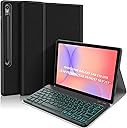
The Backlit Keyboard Case for Samsung Galaxy Tab S10 Lite/S10 FE/S9 FE/Tab S9 combines a detachable magnetic wireless keyboard with customizable 7-color RGB backlighting and built-in S Pen wireless charging. Designed with durable, scratch-proof PU leather and precision cutouts, it offers multi-angle viewing and all-around protection for your tablet and stylus. Perfect for professionals and students seeking laptop-like productivity on the go.


| ASIN | B0CGDNH96J |
| Additional Features | Backlit |
| Antenna Location | Business, Education, Everyday Use, Student |
| Best Sellers Rank | #830 in Tablet Keyboard Cases |
| Brand | PIMOFEE |
| Built-In Media | 1 x Manual, 1 x Smart Case, 1 x Wireless Backlit Keyboard, 2 x Type-C Charging Cords |
| Button Quantity | 78 |
| Color | black |
| Compatible Devices | Samsung Galaxy Tab S10 FE 10.9 inches, Samsung Galaxy Tab S10 Lite 10.9 inches, Samsung Galaxy Tab S9 11 inches, Samsung Galaxy Tab S9 FE 10.9 inches Compatible Devices Samsung Galaxy Tab S10 FE 10.9 inches, Samsung Galaxy Tab S10 Lite 10.9 inches, Samsung Galaxy Tab S9 11 inches, Samsung Galaxy Tab S9 FE 10.9 inches See more |
| Compatible Operating System Family | Android |
| Compatible Tablet Computer Models | Samsung Galaxy Tab S9 11" |
| Connectivity Technology | Bluetooth, USB-C |
| Customer Reviews | 4.1 out of 5 stars 268 Reviews |
| Enclosure Material | Polyurethane (PU) |
| Generation | 1st Generation |
| Hand Orientation | Ambidextrous |
| Item Highlight | 7 Colors Backlight Detachable Magnetic Wireless Keyboard Case, PU Leather Folio Case, Black |
| Item Weight | 0.64 kg |
| Keyboard Backlighting Color Support | RGB |
| Keyboard Description | Wireless |
| Keyboard Layout | QWERTY |
| Manufacturer | PIMOFEE |
| Mfr Part Number | S9 |
| Minimum Required Operating System Version | Android 13.0 |
| Model Name | Samsung Galaxy Tab |
| Model Number | S9 |
| Number of Items | 1 |
| Number of Keys | 79 |
| Number of Packs | 1 |
| Number of Sections | 1 |
| Recommended Uses For Product | Business, Education, Everyday Use, Student |
| Special Feature | Backlit |
| Style Name | S10Lite/S10FE/S9FE/S9 |
| Switch Type | Clicky |
| Unit Count | 1 Count |
| Warranty Description | 1 year |
| Water Resistance Level | Waterproof |
J**L
it works
very useful and good
B**E
For what i paid its Really nice!
for what it is, its really not bad, they keyboard can handle a good about of typing, i was worried at first that i would have to be really gentle with it, it fits just fine between the case and the tab and the magnets help keep it in to place once i get it lined it for either use or travel, the case its self is good no complaints on the case its self from me, for what i paid the quality is good, and it feels good in the hands. i do like it! i got what i paid for, but man i wish they added a little track pad to this KB, or a mini mouse, but that's just me, that has nothing on this product as it is
G**S
Great value, but needed a DIY fix for the keyboard magnets!
I’m really glad I purchased this case. It transforms my tablet into a mini laptop and offers great protection. Overall, it’s a wonderful value, but it does have one major flaw… The CONS: • Weak Magnets: The keyboard constantly slid off the case and hit the floor. Fortunately, the keyboard is incredibly durable and never broke from the falls, but I ultimately had to superglue extra magnets to the case to keep it secure. I took off one star because I shouldn't have to alter a product to make it perfect. • Backlight Battery Drain: The color-changing keyboard lights are beautiful, but using them drains the battery faster. The PROS: • Excellent Battery Life (without lights): If you don't use the pretty backlights (yes, those can be turned off, just press the little BULB button at the bottom), the battery lasts a long time. I use it for work in 15-minute intervals throughout a 6-hour shift, and I only have to charge it every couple of weeks. • Flawless Connectivity: It pairs with my tablet instantly and maintains a good connection while I work. • Perfect Fit: The folding case fits the tablet perfectly and feels secure. **Final Verdict: If you don't mind a little DIY magnet fix, this is an excellent, durable case!
X**S
Good quality, but has design flaws
The build quality is good, but I encountered two main issues. The keyboard doesn't stay securely attached to the case, and the tablet cover is very stiff, making it difficult to fold into a stand. Unfortunately, I decided to return it.
M**Y
Basic and usable, barely
Cheap case, awkward to use, doesn't hold the s pen or keyboard securely, feels like holding trash. Keyboard works well, backlighting is a big plus.
C**.
Poor keyboard battery, need to trim plastic to seat USB C cable...
Three things add to the cheapery behind this poorly designed product : 1) Keyboard battery doesn't hold a much of a charge; and takes forever to charge when low .. which is within an hour or two.... I DONT TRUST THIS. 2) Poorly designed tablet holder; not enough clearance to plug in a standard USB C cable, had to nip away plastic to get the cable to seat properly so tablet would charge. 3) Typically poor Chyneze instruction insert, you are pretty much on your own to clever this out ... Could be a better product with a decent keyboard battery and a purposely designed tablet holder. FAIL.
E**A
Well built and great functionality.
Looks great, fits nicely, it holds the tablet properly and it is very well built. I also love the lights on the keyboard.
L**J
Functional & fun
I loved this keyboard, it is easy to use, functional & has a a few color lighting options. It is lightweight and works well for the DEX mode. It is easy to connect & has a long battery life.
L**I
Não funciona com películas + pesada
A capa funciona, mas além de ser MUITO pesada (praticamente dobra o peso do tablet), assim que eu coloquei o aparelho nela, a minha película de tela simplesmente quebrou. Eu acho que isso acontece porque ela APERTA o tablet pelos lados. Fica aqui o aviso.
Trustpilot
1 month ago
1 month ago