Buy anything from 5,000+ international stores. One checkout price. No surprise fees. Join 2M+ shoppers on Desertcart.
Desertcart purchases this item on your behalf and handles shipping, customs, and support to Hungary.
๐ Scan smarter, faster, and wirelesslyโyour deskโs new MVP!
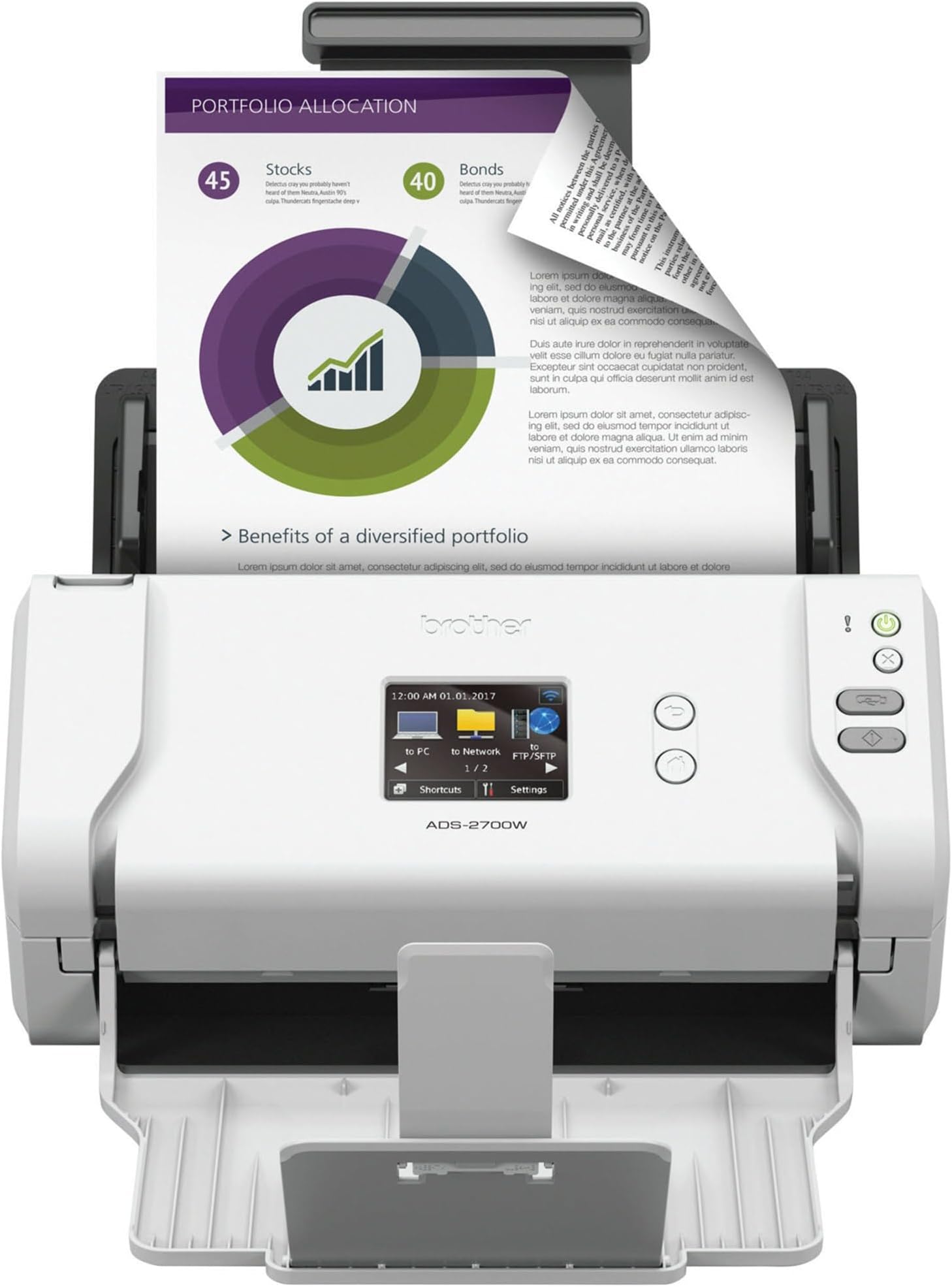
The Brother ADS-2700W is a compact, wireless desktop document scanner designed for busy professionals and small teams. It delivers high-speed duplex scanning at 35 pages per minute, features an 8-inch color touchscreen for easy one-touch operation, and offers versatile connectivity options including Wi-Fi, Ethernet, and USB 2.0. With advanced image optimization and robust security protocols, it supports multiple operating systems and handles diverse media types, making it a reliable powerhouse for digitizing documents efficiently.


| ASIN | B0757Z7NLC |
| Best Sellers Rank | #118,570 in Office Products ( See Top 100 in Office Products ) #122 in Document Scanners |
| Brand | Brother |
| Built-In Media | Brother ADS2700W Scanner, AC Adapter, quick set up guide, warranty sheet, product registration sheet |
| Color Depth | 48-bit |
| Connection Type | Wi-Fi |
| Connectivity Technology | Wi-Fi |
| Customer Reviews | 4.4 out of 5 stars 620 Reviews |
| Global Trade Identification Number | 00012502648758 |
| Greyscale Depth | 8-bit |
| Item Dimensions D x W x H | 5.8"D x 11.8"W x 7"H |
| Item Type Name | Brother Wireless Space Saving High Speed Color Duplex Desktop Document Scanner |
| Item Weight | 5.8 Pounds |
| Manufacturer | Brother Printer |
| Media Type | Glossy Paper, ID Card, Plain Paper, Plastic Card, Receipt |
| Minimum System Requirements | Windows 7 |
| Model Name | ADS2700W |
| Product Dimensions | 5.8"D x 11.8"W x 7"H |
| Resolution | 1200 |
| Scanner Type | Document |
| Standard Sheet Capacity | 50 |
| UPC | 012502648758 |
| Unit Count | 1.0 Count |
| Warranty Description | 1 year limited with free phone support for life of your scanner |
| Wattage | 2700 watts |
W**N
Outstanding product, quality, and value
This is an amazing product, and what I've become accustomed to from Brother. The machine is a workhorse - I bought this product 3+ years ago, as part of digitizing my world. I had boxes and boxes of documents, receipts, and photos to scan. The scan time is fast, scans both sides, great resolution, directly into PDF format or JPG for photos, as one continuous file or a separate file for each page being scanned, into your chosen folder location on your PC or on to a thumbdrive. Save profiles for diff doc settings (output format, resolution, Substantial duty cycle - I was scanning 2-3,000+ pages per day consistently without issue or jamming. Connects to wireless network easily. Machine is small and compact, which makes it convenient to access on the corner of my desk. My only issue is the LCD display options - could be better designed to make setting up and accessing profiles easier - but even on just this feature, I rate it 4 out of 5 stars. Finally, the price makes it an incredible value. Given the volume of scanning that I was doing, I fully anticipated that I would need to replace this in the first year... but it is still going strong. While my volume of scanning today is down to modest level of activity, the fact that it is so convenient means I scan everything the moment I touch it - no more paper stacks.
H**E
Easy to set-up and works good enough
Real small business owner writing this review...hoping to help others because the reviews are all over the place for scanners with a lot of 1 and 2 stars. I run a property management business and we need to scan receipts on a monthly basis. My HP laser printer/scanner finally stopped scanning from the ADF feeder (still prints fine) so I decided to purchase a dedicated scanner rather than trying to have my HP multipage scan feature fixed for $150+. My research came down to this ADS-2700 machine and the 1600 fujitsu. I choose the Brothers as it seemed like a simplified version of the Fujitsu which had more bells and whistles w/ their software (which I don't need). My scan needs are basic as I scan a few hundred 8 1/2 x 11 sheets at the end of every month. The Brothers machine was easy to set-up with my wifi and I was scanning within 25 mins. I didn't need the UBS cord like the instructions recommended...I simply connected the scanner to my wifi via my Dell laptop. It took a few extra steps inside the remote set-up feature to configure my preferred scan folder (way easier than initial HP set-up) but for anyone looking for a basic scanner, at a somewhat affordable price, this one seems to fit the bill. I didn't need tech support so I left that section of the review blank. The touchscreen is small but big enough for my needs. Once the machine is set-up I just click a quick scan button so the touchscreen size isn't the biggest deal. Machine is compact and sits nicely on a shelf behind by desk. I'll report back if the machine fails or gives me any headaches but at this point I'm satisfied with my purchase.
S**R
Fantastic scanner especially for working from home
I purchased this scanner to replace an old flatbed scanner I used for years. It's been great for home office use and has been useful for converting all our files to digital ones. The speed of the scanning and quality is exceptional. The blank sheet ignoring option is great to avoid extra pages. The saving of output allows for both picture or pdf format. One of my concerns was jamming and that hasn't been a concern. It takes all different size documents and pictures and you can even mix them together in the same scan. The area for improvement is that the interface and support site for it could be better but honestly you can figure it all out in a few minutes and haven't encounter any real issues especially with the latest software update.
M**S
Solid scanner with great networking
My wife and I work together in our own business and both had older Fujitsu models that had non-replaceable rollers go bad within a month of each other. I replaced both units with this one networked model. The scanner works well with standard scans from my Mac or her PC and the OCR is quick. Compared to the Fujitsu software I was using, the Fujitsu was a little better at auto-rotation of documents that go in at an angle, and a little better at removing background wrinkles if a document has any - but the different is minimal. The scan software is a little clunky, but sophisticated enough that you can create shortcuts for different document types. โContractsโ for instance get saved in a different location than โreceiptsโ. For a paperless office setup, the speed and quality is great and it handles large stacks of paper without problems. The stand alone networking features really make this model worthwhile. I have shortcuts on the scanner for emailing either of us or for saving documents to our user folders on a Synology NAS. Our teenager even uses it with her own shortcut so she can email schoolwork directly from the scanner to her school account. The networking protocols were robust enough to route email through our google (G suite) email relay - something Iโve had problems with on lower end networked equiptment that couldnโt jump through the security hoops. When I set it up in April, there was a bug in the scanner driver that prevented the networking from working after the scanner entered low power mode (network save and email wouldnโt work, but scans from the computer would). I worked around that by just having it turn off (rather than sleep) after a few hours. It doesnโt take long to fully power on so thatโs a fairly easy workaround. With some work on the software, this would be a five star scannerโฆ.but as it is, itโs a very solid buy.
J**N
Geat scanner, works well, easy to set-up.
Excellent scanner. Easy to set-up. I am a "paperwork hoarder" and tend to keep everything because you never know when you will need it. This scanner allows me to scan the documents and save them electronically so I always have them. This is especially helpful if you have children or have a serious chronic illness or someone in the family has one. I scan all of the paperwork I receive from my insurance company, doctors, etc... Having electronic copies helps to be able to sort and tag items. I had to file an appeal with my dental insurance recently and had all of the documents I needed at my fingertips because they were scanned and filed. The scanner has not jammed yet and works very, very well. The wireless feature is great. This allows me to place it in a convenient spot without needing USB or ethernet cables.
M**A
Impossible to configure, no useful information in manual
Do not buy this scanner. Despite advertising the ability to scan in color, if you try to create a shortcut that scans color, it converts it into a grey-scale 600dpi scan. It advertises being able to use SFTP to upload scans to a remote system, but it only supports older RSA keys. (i.e. - you can't connect it to a server following recent security guidance.) So sure, you can use SFTP, but you would need to punch a hole in your organizational security to support this use cae. The USB port for "scan to USB" is on the back of the unit where you have to fumble around to plug in your USB drive. The documentation for this product is extremely sub par. Did you know a default password is printed on the back of the scanner? I didn't until I did a google search. It's not in the manual. What the manual DID say was before you could complete configuring it, you have to download their app and give it permission to read all the images stored on your phone. WHAT!? I did eventually get into the web config app, but the "change password" function doesn't work. It just keeps the same old password. And I looked at the web page it was spitting out and sure enough, it's sending my SFTP password in the clear. So... if you know someone who has one of these, look at the back of the device for the password, then log in and you can get passwords / private keys for all devices it connects to. This product was made by amateurs and if I saw one of these in a SOX audit, I would flunk you. I also initially thought this wasn't a duplex scanner. I was expecting it to scan one side of the page, then re-feed the page back into the feeder and scan the other. No, it must have two scanner mechanisms on either side of the page. That's fine, but it would have been nice to know what to expect. That's another thing for the manual. Worst yet though... It can't send email through gmail. That's fine, I'll try it with GMX tomorrow, but it would have been nice if it worked with the largest free email service on the planet. It also just plain refuses to work with SMB/CIFS. And there's no way to get debug logs, so I wonder why? You know... a debugging section would be a great addition for a manual (instead of a blurb that says "download our bloatware!") So if you want a $300+ scanner that doesn't work to well, has useless documentation and no tech support, this may be the product for you. Also, turn off Wi-Fi and use it with a wired connection. That won't make it secure, but it will limit the number of people who can hack you five ways to Sunday. And it *is* fast. I'll give it that. This is a pretty pathetic excuse for a scanner. Which is weird, because my out-of-the-box experience for the low-end Brother laser printers I've worked with has been pretty good. This scanner was made by people who were either idiots or just didn't care.
S**F
Worth the money
When my Multi Function machine Scanner portion started to fail me, I decided to purchase a new stand alone scanner to avoid the frustration of the old one. Now, I'm sorry I waited so long. This machine may be compact in size but a giant in convenience. Cons - Poor instructions on set up. Manual not included. Easy Installation Guide instructed to download the driverfor easy install but did not say anything about having to use the machine's Wireless Wizard to set up the wifi first. Once I figured this out,installation and set up was a breeze. Once you download the instruction manual, be prepared as to how many pages it is if you decide to print it out. 204 pages long. Pros - Not only will this scan both sides on one pass but it will auto detect if document is single or printed on both sides. Have scanned different sizes of related documents on one pass with no document jams. Was so used to my MFC scanner that I had not realized how fast these new scanners are now. Automatically scans to a PDF file on your computer. You can set it up to scan to email or even to a flash drive but have not used those features yet. Bottom line. Yes, I recommend this machine. It is compact but very easy and efficient to use
S**I
Easy, reliable, high quality
I had a Fujitsu S1500 scannable that was bricked when Fujitsu decided not to keep updating its software to keep up with Mac OS updates... not good! I bought this Brother ADS-2700W scanner and I absolutely love it. It worked beautifully right out of the box. The install and setup was as simple as it gets. The only thing I would say is that the Quick Start Guide should put in bold that the drivers and the application for Macs should be downloaded from the Apple Mac store. I was lost for a while looking through Brother's website because the QS Guides says to download it from there. A few lines below it contradicts itself and says to download it from the Apple App Store.
D**K
Brother ADS-2700W Sheet-Fed Scanner - Excellent for home and Small Business!
In addition to its faultless Colour and Black and White duplex scanning of documents and photos, this Brother Scanner has the best file and scan management system one could ever hope for in PaperPort SE 14. DBK
S**E
Great product!
Super fast and easy to set up and use. Very happy with product.
Trustpilot
2 weeks ago
2 days ago