Desertcart purchases this item on your behalf and handles shipping, customs, and support to Hungary.
❄️ Elevate your CPU cooling game—because your rig deserves the chill factor!
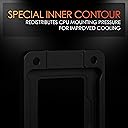
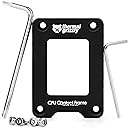
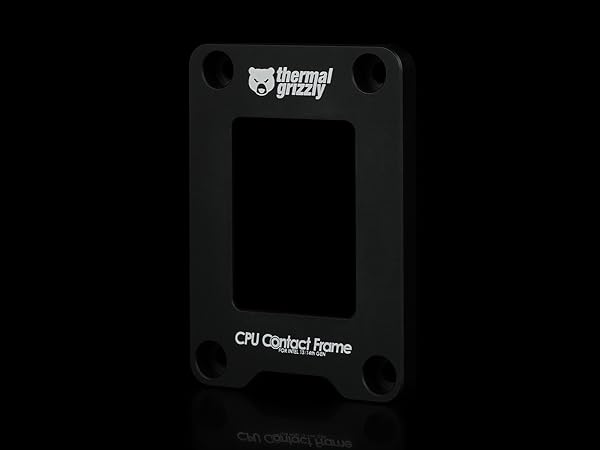
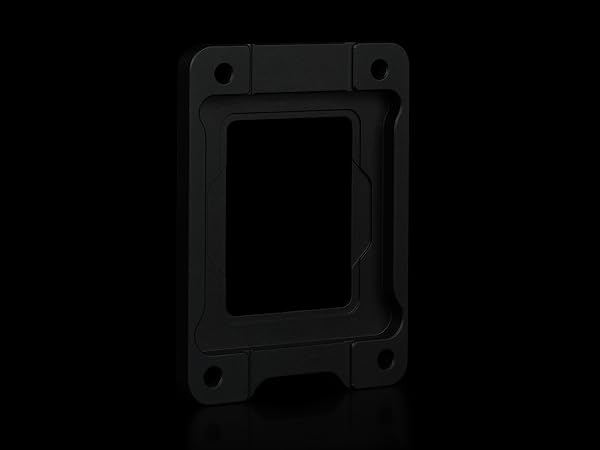
Thermal Grizzly’s CPU Contact Frame for Intel 13th & 14th Gen CPUs enhances cooling by optimizing contact pressure between the CPU and cooler. Crafted from durable anodized aluminum and designed in collaboration with renowned overclocker der8auer, it ensures superior heat dissipation and easy installation, making it a must-have upgrade for serious PC builders aiming for lower temperatures and improved performance.


| ASIN | B0C6B233J2 |
| Best Sellers Rank | #76 in Computer CPU Cooling Fans |
| Brand Name | Thermal Grizzly |
| Cooler Heatsink Compatibility | Intel 1700 |
| Cooler Heatsink Material | Aluminum |
| Customer Reviews | 4.8 4.8 out of 5 stars (871) |
| Global Trade Identification Number | 04260711990748 |
| Included Components | 1 package |
| Item Dimensions L x W x H | 2.76"L x 1.97"W x 0.24"H |
| Item Type Name | Contact Frame |
| Item Weight | 62 g |
| Manufacturer | Thermal Grizzly |
| Model | TG-CF-i13G |
| Mounting Type | Chassis Mount |
| Number of Items | 1 |
| Number of Packs | 1 |
| Part Number | TG-CF-i13G |
| Unit Count | 1 Count |
| Warranty Description | One year manufacturer |
D**B
Easy Install, helps cooling.
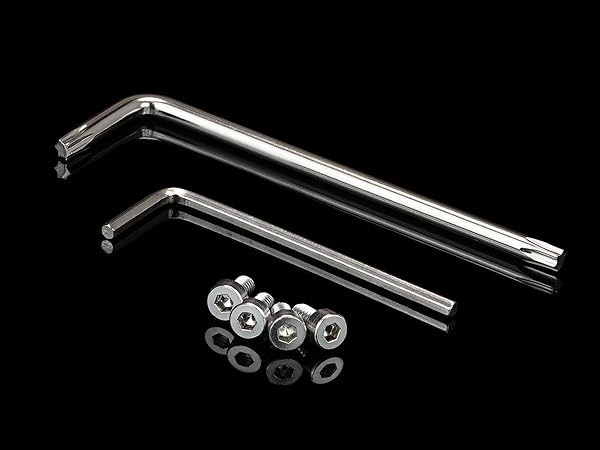
Bought this hoping to lower temps on CPU. It was easy to install as I had the AIO cooler back plate already installed so removing the ILM screws did not cause any issues. I am using the Asus Maximus Z790 Dark Hero board, which is fairly thick. This contact frame from Thermal Grizzly is the second gen. It comes with replacement screws which are a bit longer than the stock ILM screws. They were plenty long enough. If you look at the photos, you will notice the white markings at each screw hole are no longer there. And you don’t need to mark the screws with some kind of marker. This is because, the way Der8auer redesigned the contact frame, it no longer requires the precise mounting technique from his original tutorial video or the tutorial video on Gamers Nexus. Simply follow the directions on the included instruction sheet using the tools provided and hand tighten and you should have no issues. I turned everything alternating using an X pattern a few turns at a time until snug then gave a very slight final turn. This makes it snug to the motherboard without over tightening the screws. I used the Kryonaut Extreme thermal paste and snugged down my AIO using the same X pattern, only with the AIO I tightened it down pretty tight. System booted into BIOS where I had to redo my settings. BIOS went to defaults. Also had to tell the BIOS to ignore the CPU fan and had to reset the XMP. After it restarted and booted into windows, I used the Asus AI program to allow it to sense and auto set my settings in the BIOS. I am using an i9 13900k. System overclocked my CPU to 6.1Ghz on three of the P cores and 5.9 on the rest (actually, one P core was set at 5.8). Ran Cinebench 2024 for several runs of 10 mins each. Temps stayed in mid 80’s during the Cinebench runs. It has been running consistently at 6100Mhz with no crashes or blue screens and no overheating. Re-ran the Cinebench tests a couple of days later with identical results. Really impressed with this i9 13900k and the Lian Li AIO. What I noticed was cooler temps, but not by a lot like some other people. What it really did more than anything was make all the P cores and E cores run at the same temps (E cores obviously cooler). Prior to using the contact frame, temps on each P core were all over the place, with one at times hitting in the high 90’s while another one would run at 88 while stress testing. Now they are all staying within 1 to 2 degrees of each other. And it is running cooler. Prior to the contact frame I was hitting the 90’s and tapping 100 on a few cores when running the CPU test on Cinebench. Now they bump up against 98 when the test starts and then settle in at about 88. Idle temps drop to 26/27 when nothing is running and go to 33/34 when apps open and run. I would say average idle temp now is around 30. Prior to installing the contact frame, I was idling at around the mid to high 30’s and they were uneven. As I mentioned previously, all cores now stay close to the same temps. This contact frame definitely creates more even contact between the CPU and the AIO. So I’d say it works. I hit 2100~ in Cinebench 2024 on multi core and 35,500 on the GPU test. You cannot compare these scores to Cinebench 2023 and prior, as Maxon is using new rendering software. This was worth the $30 purchase and system tear down to install it. FYI, I also tried using the Thermal Grizzly Graphene cooling sheet (38X38) and it is too big for an i9 13900 and needs to be cut down. I gave up on it though as I could not keep it in place when trying to mount the AIO, kept sliding around. I heard others suggest using a little thermal paste to hold it in place, but I didn’t want to fool with that and just went to straight thermal paste. The Kryonaut Extreme seems to be working pretty well. My system: i9 13900k, Asus Maximus Z790 Dark Hero, Lian Li 011D Evo XL, Lian Li 120 SL-Uni fans, Lian Li Galahad II AIO, G. Skill Trident Z5 RGB 64Gb 6000, 2TB Crucial T700 Gen 5 NvME OS drive, 2TB Samsung 990 Pro Gen 4 NvME data drive, MSI 4090 Gaming X Slim, BeQuiet Dark Pro 13 1000w, Win 11 home (most recent update). This thing is running Alan Wake II at 68-70 degrees max temps. Both NvME drives running at 43 degrees, which is pretty remarkable considering how hard AWII hits the NvME drive (it is loaded on the Samsung 990 pro). Don’t have temp numbers for GPU but it is running pretty cool as well, fans only run occasionally. System fans do kick up though when everything hits full power. Crystal disk mark shows 12k read and 11.5k write speeds on Crucial drive and right around 7k read and 6.8 write on Samsung drive. Overall, I am pretty pleased with the performance on this build. My first build in over 10 years. Seems a lot easier to build a system now than it was 10 yrs ago. It’s a lot faster than my Corsair i8100 with a i9 13900KS, and that sucker is fast. One note: Using the Gen 5 NvME spilts the PCIe lanes into x8, so, the GPU does not get the full X16. However, it has almost no effect on the performance of the 4090. It still hit over 35,000 on Cinebench 2024. Checking multiple web sites that test 4090’s on Cinebench 2024 found them to score just under 35,000. Mine hit this score due to being a Gaming X card from MSI, so it is overclocked. I’ll give up the X16 lane to get the Gen 5 power on the NvME because it has no effect on the video card.
S**.
Excellent Product.
My Build Specs: Asus Tuf Gaming Z790 plus wifi motherboard, i7 14700k, Asus ROG Ryou III argb aio, Kingston fury 2x16Gb cl30 memory kit, be quiet 13M Power supply, ASUS TUF Gaming 5060Ti 16Gb GPU . Alltossed in an ASUS TUF GT502 case. I installed the Thermal Grizzly contact frame along with Thermal Grizzly PTM Phasesheet from the get go.At idle my CPU temp is 23 degrees Celsius. Using Cinebench r23 It hit a maximum of 90. The score I got was 32183. My thermals are good and the system is stable. I couldn't be happier, Installing the Phasesheet was a bit of a pain but installing the contact frame itself was a breeze. I got the contact frame in the Black Friday Sale for $15 and the Phasesheet for $10.00. Now that's value for money!
J**E
Great product!
I picked this item up in light of learning that the stock ILM of the LGA1700 chipset causes uneven pressure between the Intel CPU and the cooler which can result in bad thermals and warping over time. After installation of the contact frame, I noticed, at the very least, a 2–3-degree Celsius difference in temperature, sometimes even more. The setup and installation were a breeze. My advice when installing this contact frame is to make sure that you do not over-torque the screws. Take note of how tight the screws are when you are removing the stock ILM and try to match it the best you can. If you screw it down to tight, you run the risk of losing memory instructions and potentially clock speeds on your CPU. Also, keep your original ILM bracket hardware in case you need to RMA your motherboard or something else goes wrong, as this installation typically voids your motherboard warranty (totally not an issue as it is easy to switch back). For the money, I don't think you can ask for a better product to not only drop your thermals a bit on these beastly CPUs, but to also protect the longevity of your chip!
A**R
Must have for newer Intel CPU
I'm not someone who writes a lot of reviews but this product worked so well i felt compelled to. First off i recently built a PC using the i7 14700k and felt it was running a little on the hot side. I tested it with Prime95 and did some gaming on it and saw it creep over 200 degrees under load and was looking for a solution to reduce this heat and i stumbled upon contact frames. Now i posted my results but the real world results i think where much more in day to day use. First off when i installed the frame i ran a Prime95 Blend for about 2 hours, in the first hour alone i didn't see temperatures pass the 150 mark which before was like my base line for running this. After the test i was only able to get it to about 160 so i thought some more testing was in order so i played a 45 min game of Deadlock which from what ive been seeing is a more CPU intensive game. After this session i got it to 172 but after a long full system test and then a game session it was expected to reach higher temps like this. Seeing a 15-20 degree cut off the top was huge for this price this item is a must for every intel build. It might not be huge at first but the life of your CPU and hardware will surely be extended. Also get this Thermal Grizzly one its the highest quality one form what ive seen, comes with its own screws (which a lot of the cheaper ones dont) and its made in Germany so its quality. Hope this helps someone reach a cooler PC.
I**O
Beyond Expectations
Amazing product, I was able to reduce my temps by 12 dgs on a 12900k
J**J
I got what I paid for 100%!
Very easy to install and works like a charm especially with a push-pull AIO. I highly recommend! When I game my cpu ranges around 60C-30C and when I'm just web browsing or working it stays below 30C. I also have this paired with the Thermal Grizzly - KryoSheet (38x38x0,2mm) - Graphene Thermal Pad( fits PERFECTLY on the CPU contact frame and doesn't move when installing, although you could use thermal past on the edges to hold it still if you're unsure too) and a EK AIO. I also used " AJUER#0-80#2-56#4-40#6-32 UNC Stainless Steel Hex Socket Head Cap Screws " (the 6-32 x 3/8 screws) that I bought on amazon to have a more "wider" headed screw to hold the frame in place when screwed into my asus proart motherboard, and it works like a charm(better imo but not required). Thank you Thermal Grizzly!!!! Am a huge fan of your products!
G**E
Easy to install for peace of mind.
This replaces the Mickey Mouse CPU retention bracket used on Intel LGA 1700 motherboards. I highly recommend using this type of retention device instead of the standard Intel one. It fits perfectly and applies even pressure around all of the CPU. It is made of aluminum so it is very durable and looks great. I used this in combination with the Thermal Grizzly Kryosheet and feel like they complement each other’s functionality. My only complaint is that the product is only available in black. I would like to have the option of a bit of color.
S**E
Use the original screws from the Intel interlocking mechanism
I tried using the replacement screws but they did not fit. This contact frame was installed with a Intel Core-i9 14900K processor on an ASUS ROG Strix Z-790 e-gaming motherboard. Installation was easy but screw it in very carefully. Do NOT overtighten the screws. I had to use the orginal screws. Other than that, I would buy again and definitely recommend to a friend. The optimal temps are worth it.
M**M
Great
The best thing you can get for your CPU ,
A**T
Onmisbaar op de Raptor Lake generatie processors!
Dit was in een mum van tijd geïnstalleerd voor mijn 14700K, een kind kan de was doen. Echt waar niet moeilijk, gewoon de schroeven met de vinger en sleuteltje vast draaien en niet meer dan dat. En wees heel voorzichtig met de oude voet, steek best je CPU in het voetje vooraf als bescherming. Neem er gewoon je tijd voor en doe geen haastklus, dan komt het zeker goed. Er zijn tal van video's over op youtube, ga eerst eens kijken hoe het juist moet!
P**R
Its really nice to have one if you are on 14th gen
It is must needed product. For cheaper options you can go for alternatives as well
D**.
A must for i9 14900KF
Worked very well with my i9 14900KF and my Asus AOI 360 cooler. Idle temps are around 34 degrees. Was super easy to install, there are install videos out there and comes with instructions. Looks pretty clean for my all black install
W**Q
A need for I9-14900KF
I have a I9-14900KF it paired with amazingly. Temps dropped 10-12C.
Trustpilot
1 month ago
2 weeks ago