Buy anything from 5,000+ international stores. One checkout price. No surprise fees. Join 2M+ shoppers on Desertcart.
Desertcart purchases this item on your behalf and handles shipping, customs, and support to Hungary.
🚀 Elevate your office game with speed, style, and seamless workflow!
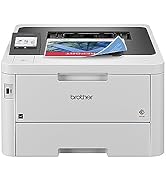
The Brother MFC-L3780CDW is a wireless all-in-one color laser printer designed for small businesses and professionals who demand speed, quality, and reliability. Offering up to 31 ppm print speed, single-pass duplex scanning and copying, and versatile connectivity options including dual-band Wi-Fi, Ethernet, and NFC, it streamlines office workflows. With eco-friendly certifications, advanced security, and a toner subscription trial, it’s engineered to keep your workspace efficient, secure, and always ready to impress.


| ASIN | B0CFCW8PGV |
| Additional Printer Functions | All In One |
| B&W Pages per Minute | 31 ppm |
| Best Sellers Rank | #3,271 in Office Products ( See Top 100 in Office Products ) #8 in Laser Computer Printers |
| Brand | Brother |
| Built-In Media | Toner Cartridges |
| Color | White |
| Color Depth | 24 Bits |
| Color Pages per Minute | 31 ppm |
| Compatible Cartridge | TN229BK; TN229M; TN229C; TN229Y; TN229XLBK; TN229XLM; TN229XLC; TN229XLY; TN229XXLBK; TN229XXLM; TN229XXLC; TN229XXLY; DR229CL |
| Compatible Devices | Laptops, PC, Smartphones, Tablets |
| Connectivity Technology | Ethernet, NFC , USB, Wi-Fi |
| Control Method | App, Touch, Voice |
| Controller Type | Android |
| Customer Reviews | 4.0 out of 5 stars 794 Reviews |
| Display Type | LED |
| Dual-sided printing | Yes |
| Duplex | Automatic |
| Hardware Interface | USB 2.0 |
| Initial Page Print Time | Less than 12.5 Seconds |
| Ink Color | Cyan, Magenta, Yellow, Black |
| Item Dimensions D x W x H | 16.1"D x 18.2"W x 15.8"H |
| Item Type Name | Multifunction Printer |
| Item Weight | 47.8 Pounds |
| Manufacturer | Brother |
| Maximum Copies Per Run | 250 |
| Maximum Copy Resolution Black and White | 600 x 600 dpi |
| Maximum Copy Resolution Color | 600 x 600 dpi |
| Maximum Copy Speed Black and White | 31 ppm |
| Maximum Media Size | 8.5 x 14 inch |
| Maximum Print Resolution Black and White | 2400 x 600 dpi Dots Per Inch |
| Maximum Sheet Capacity | 250 |
| Maximum print Resolution Color | 2400 x 600 dpi Dots Per Inch |
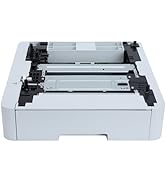
| Model Name | New MFCL3780CDW: Adds Optional Paper Tray |
| Model Number | MFCL3780CDW |
| Model Series | MFC-L3780CDW |
| Number of Ethernet Ports | 1 |
| Number of Trays | 2 |
| Other Special Features of the Product | Auto-Duplex, Network-Ready |
| Output sheet capacity | 250 |
| Paper Size | 8.5 x 11, 8.5 x 14, 4 x 6 Inches |
| Power Consumption | 660 Watts |
| Print media | Card stock, Envelopes, Glossy photo paper, Labels, Paper (plain) |
| Printer Connectivity Type | Ethernet, NFC, USB, Wi-Fi |
| Printer Output Type | Color |
| Printer Type | Laser |
| Printing Technology | Laser |
| Resolution | 300 x 300 |
| Scanner Type | Flatbed, Sheetfed |
| Special Feature | Auto-Duplex , Network-Ready |
| Specific Uses For Product | Home, Office, School |
| Total USB 2.0 Ports | 1 |
| Total Usb Ports | 1 |
| UPC | 012502666486 |
| Unit Count | 1.0 Count |
| Warranty Description | 1-year limited |
| Warranty Type | Limited |
R**O
Fast, high quality documents from this printer and easy setup
I replaced an old failing inkjet (HP OfficeJet Pro 8630) with the Brother MFC-L3780CDW, and the difference is night and day. Setup was straightforward: plugged in Ethernet, assigned a static IP, disabled WiFi, and I was up and running in minutes. The printer was immediately stable and responsive, with none of the quirks or guesswork I’d grown used to when setting up new printers. Print quality is excellent. Text is crisp and sharp, and documents look clean and professional. For my use (documents, PDFs, spreadsheets), it’s exactly what I want. What really stands out is the reliability and simplicity. No ink systems, no clogs, no maintenance cycles—just consistent performance. It feels like a proper piece of office equipment rather than something that constantly needs attention, which is exactly what my consulting office needs. If you value a clean, wired setup and want a printer that just works, this is a great choice. Highly recommended.
K**H
This printer doesn't suck!
I thought it was the holy grail -- to find a printer that doesn't suck. I found it here! Not only does it NOT suck, I actually hug it every time it prints. 1. Easy as hell to set up, you don't even have to use the mobile app (but I did set that up also and it was a few extra steps but also easy). Airprint works instantly. 2. So fast, so quiet. I had a Canon MX something that would take about a few minutes to think about printing, and then another minute to print, and the page would usually jam in the middle of the job. The Brother has NO such issues. The Canon could take two days to print a 60 page document (because I had to keep taking breaks from unjamming it and resetting the job so as not to throw it through the window). Those days are gone forever! 3. Color is not going to be like a photo printer -- it does not take photo printer, please note -- but color is fast and bright and perfectly acceptable for a document (vs. a photo). 4. My setup is a home office, my printing needs are relatively light, so I agonized over the cost vs. use but when a printer JUST WORKS these days, it's so miraculous that I decided the cost was worth it and used the Affirm payment plan to make the finances work. 5. I did not have to sign up for the ink program, my uses are so light it would be an unjustifiable expense. I spent about a month researching and comparing and reading all of you good people's reviews -- some of which are super funny -- of this printer and others, and finally the day came where I couldn't stand even the thought of trying to print on the Canon so I pulled the trigger. I know I'm not alone in the "I hate my printer" category but I might now be one of a dozen people in the "I love my printer" category. It arrived in a speedy timeframe and it was packaged so well that if it had been a baby, it would have slept without waking from a single bump. Brother is my brand and this printer is 5 stars!
D**G
Cloud Brother Refresh program is greedy and buggy
Mechanically, the printer is fine, but the business practices of the company is unacceptable. On Friday, Oct 31st, 2025, I had to print out a document for an urgent reason but the printer at my house did not work. Why? Because I was subscribed to Brother’s “Refresh” program. I’m a light user and Brother had gotten a lot of monthly payments from me over the past three years and I’ve printed perhaps 200 pages total. The printer is mostly for emergencies. However, since I recently lost my credit card, the old version had started getting declined. Brother could have prevented the issue for itself by accepting PayPal or another payment service which would have automatically transitioned its payments. They did not. They could’ve fixed their site so when I logged in to correct the problem last month, it would’ve offered me a chance to fix it rather than saying everything was fine. They didn’t. They could’ve given me a chance to pay on Oct 31, when they shut off my service and I needed to print. They didn’t because their site is down for “maintenance.” On a late weekend morning. I tried calling them to ask if they could take the card over the phone. They had shut down all their support lines, hanging up on customers instantly, because they are down for “maintenance.” If you’re going to create a lucrative monthly fee to exploit customers, at least have the decency to use some of the money to build the infrastructure that could support it.
C**S
Great printer!
I bought this printer a few months ago and it has worked out very well. It does everything it says it does very well. Mine replaces a 14 year old HP with the same capabilites. This one is faster, cheaper, and better. It is easy to understand and very nice quality. One big caution - beware their subscription service - even though it is "free" for 90 days. Unless you are a high volume user, then the economics might work. Otherwise, simply buy your toner refills when you need them and forget the subscription service. The subscription service can turn you against Brother unless you're very careful. The online user interface and software proved to be quite buggy and their customer service is more like customer disservice. I'm an old guy and have worked with many customer service departments. I even have managed one. This is by far the worst I've ever encountered....I will NEVER use their subscription service. VERY bad experiences with them.
R**M
Pain to set up, but good home stand-in to the big corp. office printer.
I'm only a week in on this printer. The setup was not very intuitive. I used our home WiFi for connection, but I couldn't get the scanning to work from the machine. After speaking with tech support, I was told that the drivers couldn't be installed given my version of Windows 11. Bummer. Ended up connecting via USB...now I got my quick scanning. This complication was my primary reason for the 4-star vs. 5. On the up side, the printer is cool looking. Once set up (again, a pain in the...), it is super easy to scan. The automatic bed feeder allows me to stack a bunch of papers in it and scan them quickly. The autoloading scanner scans both sides in one pass. Very clean! The bed scanner is very nice too. Software that came with is alright. Nothing to write home about, but does allow you to customize what your scan from machine options are. For example, I have my scan to OCR button produce a PDF that opens in Adobe. I have the image scan button send the file to Adobe Photoshop for editing. The general scan to file button is set up to send the file to a predetermined folder as a JPG. This as all super cool and pretty easy to set up. Printing is fine. Colors are duller than I was expecting, but I don't have anything to reference to other than the $1.00 per page color print from FedEx Office. Excited about the printer for my home. This is a downsized comparison to the fancy $1,200 a month leased super machines in most corporate offices that I'm used to.
T**C
Bought a Second One Because the First One Was That Good
This is my second Brother MFC-L3780CDW, and that probably says more than anything else I could write. I bought the first one, liked it so much that I purchased another, and now I have one for the home and one for the office. In my experience, it has been hard to beat. What stands out most is its overall reliability. It does what I need it to do without a lot of fuss, which is exactly what I want from a printer in both a work setting and at home. Print quality has been very good, the wireless function is convenient, and it has been dependable enough that I felt confident buying the same model again rather than shopping around for something different. I also like having the same machine in both locations because it keeps things simple. There is no need to learn a different setup, deal with different quirks, or wonder whether one printer will perform as well as the other. This model has proven itself to me, and that kind of consistency matters. If I had to sum it up in one sentence, it would be this: I bought a second one because the first one earned it. For anyone looking for a dependable color all-in-one printer for home or office use, this model has been an excellent choice in my experience. If you want, I can also make this sound even more like a top Amazon review by adding a slightly more detailed, buyer-focused tone.
A**J
so far - best printer I've owned
This is my first splurge for a printer. I was tired of the old InkJet printers that take 5 minutes to wake up and print a page. I am grown up who deserves tech that works, not frustrates me. I don't have time for that anymore. I don't want to find a cheap printer on Fb marketplace anymore. I did a lot of research. I wanted an efficient printer that didn't require ink or toner all the time. I wanted a color printer. I pored over reviews. I splurged in hopes that the toner will last a year or so. I just bought it, and installation was a breeze. I am able to print wirelessly from my phone and my laptop. I wanted to cry it was so easy. Scanning was easy. Colors look great. Compatible with my iphone and Macbook. I will come back to write a review in about a year. I didn't sign up for the free toner bs program. I am responsible to buy more on my own. I am hoping that I will continue to be happy with my purchase.
C**L
Love this machine!
I purchased this printer for personal home use. I replaced my good ol' black and white ink jet printer with this powerhouse. I am mildly tech savvy and had no problem with setup. And no problem declining the offered subscription for ink replacement. I thought this printer would be too much machine for me. I needed the ability to send faxes. But over time, I have used many of the options; copying from USB drive or PC, printing from my cell phone, scanning to printer or PC... I might have to check the user manual from time to time but have found that my answers are there. One exception - I haven't figured out how to keep the land line telephone and the fax option available at the same time. I rearrange lines when I need to fax then put them back for the home phone. If only I were moderately tech savvy instead of mildly!
V**.
Cliente satisfecho
Muy buena compra. El servicio de venta es muy bueno.
H**R
Quality product
Easy to set up Quiet Fast and great quality copies and scans
S**E
Good
Easy to set up. Good quality Prints.
R**K
Muy funcional y fácil de aprender a usar
Súper funcional, una excelente compra
A**O
Pésima compra.
Pésima compra. Poco uso, y al año y medio tuve que cambiar los tambores fotosensibles cuando reportaban una vida útil del 75%. Un par de meses después, el scanner tronó como ejote. La llevé con un técnico autorizado de Brother y dice que no hay disponibilidad de piezas. Me extraña porque ya había comprado otro modelo y duró varios años sin dar lata. Parece que los modelos recientes de estos equipos están hechos para convertirse en un pozo sin fondo. O me tocó muy mala suerte con este en particular.
Trustpilot
1 month ago
1 week ago