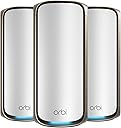
Desertcart purchases this item on your behalf and handles shipping, customs, and support to Hungary.
🚀 Elevate your home network to warp speed and total coverage!
The NETGEAR Orbi 970 Series is a cutting-edge WiFi 7 mesh system delivering up to 27Gbps speeds and expansive 10,000 sq.ft. coverage. Featuring patented quad-band technology with dedicated backhaul, it supports over 200 devices simultaneously while integrating advanced security with NETGEAR Armor. Designed for seamless 8K streaming, gaming, and smart home connectivity, it includes a 10 Gigabit port and backward compatibility, making it a future-ready powerhouse for demanding professional and home environments.


| ASIN | B0CGJGXFCS |
| Antenna Location | Business |
| Antenna Type | Fixed |
| Best Sellers Rank | #1,829 in Computers & Accessories ( See Top 100 in Computers & Accessories ) #56 in Whole Home & Mesh Wi-Fi Systems |
| Brand | NETGEAR |
| Built-In Media | One (1) 2m Ethernet cable, One (1) Orbi WiFi 7 Router (RBE971), Quick start guide, Three (3) power adapters, Two (2) Orbi WiFi 7 Satellites (RBE970) |
| Color | White |
| Compatible Devices | Personal Computer |
| Connectivity Protocol | Wi-Fi |
| Connectivity Range | 10000 square_feet |
| Connectivity Technology | Wi-Fi |
| Control Method | App |
| Controller Type | App Control |
| Coverage | Whole-home coverage |
| Customer Reviews | 3.6 out of 5 stars 400 Reviews |
| Data Transfer Rate | 10 gigabits_per_second |
| Frequency | 6 GHz |
| Frequency Band Class | Quad-Band |
| LAN Port Bandwidth | 10 Gbps |
| Manufacturer | Netgear |
| Maximum Upstream Data Transfer Rate | 27 gigabits_per_second |
| Mfr Part Number | RBE973S-100NAS |
| Model Name | RBE973S |
| Model Number | RBE973S-100NAS |
| Number of Antennas | 3 |
| Number of Ports | 6 |
| Operating System | Netgear OS |
| Other Special Features of the Product | WPS |
| RAM Memory Installed | 4 GB |
| Router Firewall Security Level | Medium |
| Router Network Type | Mesh |
| Security Protocol | WPA2 or WPA3 |
| Special Feature | WPS |
| UPC | 606449166507 |
| Unit Count | 3 Count |
| Voltage | 240 volts |
| Warranty Description | 90-day complimentary technical support, Limited manufacturer warranty |
| Wi-Fi Generation | WiFi 7 |
| Wireless Communication Standard | 802.11.be |
| Wireless Compability | 802.11.be |
T**N
Works great, easy setup
Super easy to set up. Very high speeds across my house with good signal. Also easy to set up a separate 2.4 GHz band that I needed for various home devices. Pricey system but worth it.
C**S
Infuriating!
Update 2: Replaced with the router in my first update and everything now works flawlessly. I can’t believe the difference. My system is completely stable now. The instability that I was getting with the Orbi 970 was extremely painful. When you buy a router system, what you should expect is that it just works. Even the app was bad. It frequently had errors causing me to not be able to see any devices. When I searched online, sure enough a lot of other people were also having these issues. Please, don’t put yourself through the trouble of this router. Update: This is the most frustrating router that I have ever used. I stopped buying from Netgear along time ago and for some reason forgot why. The router randomly restarts every couple of weeks (common issues with others that have this router as well). The real problem is, when it restarts my Hue and Nest cameras get very messed up. Lights won’t respond. Cameras going offline. It takes several restarts of the satellites and router, plus several hours to get everything running again. This mesh system is just pure garbage. I’ll be selling this trash and moving to an Eero Max 7. Had several frustrations so far. It was going very well for the first three weeks. I had no issues at all. Then, it randomly rebooted by itself. That random reboot led to some serious issues with my Philips Hue system. I had lights not responding and dimmer switches having connection issues. I started troubleshooting my Hue system because it seemed that was the likely issue. Then, I upgraded my Orbi firmware and magically everything was fine again. During the upgrade the Orbi satellites also upgraded and all of them rebooted. Several days later I needed to unplug a satellite. When I tried to replug it back in, it struggled to reconnect. I restarted the router thinking that might fix the issue. The satellite did eventually reconnect, but ALL of the Hue problems came back. It took me literally hours of troubleshooting Hue, restarting the router and satellites to get it working again. Finally, I restarted the router and all satellites (which I had already tried several times), and everything worked again. What a hassle this system is for $2,000. I contemplated between the 970 and the Eero 7 before settling on the 970. The only reason I chose the 970 was the dedicated 2.4 Iot channel. I regret not going with the Eero 7. What it does well is speed, range and keeps all of Nest cameras from disconnecting. My old Asus AXE16000 had issues with cameras going offline, the 970 fixed that completely. However, I’m sure the Eero 7 would have done that as well.
B**P
Amazing, Long Range, Simple Install System
Amazing... reduced my 10 x NetGear Nighthawk Satellites (+1 Router) with this system (2 x Satellites & 1 Router)... Blows everything out of the water i've ever used, my speeds I pay for from my ISP are now actually real with this system. Super expensive, but well worth it, especially if you WFH like myself.
B**R
expensive!
I installed this for my daughter and her family in their new 5,000 square foot home on 3 levels. They have excellent coverage in all areas of their house and even outdoors for about 75-100 yards. It wasn’t hard to set up but took careful reading of the instructions which are good. My only gripe is that it’s crazy expensive. I guess you "get what you pay for.” It’s very stable. I set it up 7 months ago and I don’t believe they’ve had a single outage.
E**D
Returned! Too many issues.
Barely works for what I need. Claims 10000ft coverage but struggles at 3k. Had issues setting up so I had to update the firmware, do factory resets on all of them and set them up next to each other which took quite a while because it's surprisingly slow. If it gets out of sync, it takes forever to get back into sync and come back online. Long time to boot too. DON'T USE THE APP although the web UI is STILL netgear trash from 20 years ago, it's still better to use. Not impressed at all for the cost. BIG issue that I didn't realize before buying is my previous satellites had 4 Ethernet connections, these only have 2 and one for a backhaul. Come on, for the price and SIZE it should still have 4. These things are HUGE. UPDATE 1/7/2025: After a MONTH struggling with netgear support sending packet captures, logs and config and getting updated firmware to try, I'm returning this over-priced set of trashcans. I had issues from day one with dropped connections and phantom connections (router said some devices were connected yet devices were un-reachable) So after doing all my investigating before contacting Netgear directly, I discovered it was set to CANADA as the region and they refuse to let you change it. Well, I'm nowhere near Canada so I tried to get them to let me change that hoping it would help but they refuse to let you control your own device so if you pick up and move somewhere else, these things are paper weights. That's not right. It's a software setting after all. This is just a way to force you to buy more. I placed the devices in the SAME locations as the devices these replaced and on the same channel and I had devices that would remain connected for at most a day before I had to reset either the device or the router. My network was generally unstable with these devices. I put the old devices back configured like they were previously and no dropped devices in 5 days. So Netgear hasn't really updated the UI in years and what the DEBUG gives you differs from the UI so which is it? In this case, I know part of the issue is software and I'm sure part of it is hardware. Wait for rev 3 before you try it! I've lost a lot of faith in netgear over the last few years, their devices are getting worse.
T**M
Netgear Orbi 970 Review: Blazing Fast WiFi, But at a Cost
I’ve been using the Netgear Orbi 970 for a few weeks now, and overall, it’s a solid mesh WiFi system, but it’s not perfect. The setup was pretty easy, even for someone who isn’t super tech-savvy. The app walks you through everything, and I had the whole thing up and running in about 20 minutes. The coverage is impressive. I have a three-story house with a lot of dead zones, and the Orbi 970 pretty much wiped those out. Speeds are fast and consistent, even when multiple people are streaming or gaming at the same time. I also like that it supports WiFi 7, so it feels future-proof. That said, the price is steep. It’s definitely on the higher end, and I’m not sure everyone needs this much power unless you have a big house or a lot of devices. Also, the units themselves are kind of bulky, so they’re not the easiest to hide. One thing that bugged me is that some advanced features are locked behind a subscription. For the price, I expected more included out of the box. The parental controls and security features are good, but having to pay extra for them feels a bit much. In short, the Orbi 970 is a great choice if you want top-tier performance and don’t mind spending extra. If you’re on a budget or have a smaller space, you might want to look at other options. But if you want fast, reliable WiFi everywhere in your home, it delivers.
M**O
My decade old Orbi has so many more features! Bait and switch.
I purchased this after our old orbi hit a decade of service. It has been a complete mixed bag. Does it work? yes. Does it work well for you? Maybe. Our home is a split level with 5 floors, and thick walls with lathe. That means mesh systems historically have a hard time with it, so after using an old orbi system for over a decade with two nodes, I figured this would be a worthy upgrade if I got 2 satellites rather than 1 to cover our current dead zones. I figured I could deploy it, turn the radio transmit power down slightly (a feature proudly presented in their user manual, which is apparently a complete lie, Netgear is just apparently too lazy to print different manuals for each product). Install was easy, unbox, plug it in to my cable modem, plug in the satellites, and you're off to the races. Setup via app took about 20 minutes, half of which was the WiFi handoffs failing during setup and having to wait for a timer to time out and then manually connecting to the wifi network. I used the same SSID as previously used, and all of our existing devices connected seamlessly. It then updated itself, "optimized" itself (whatever that means), and told me I was signed up for a 1 year trial of "Armor" which seems to do nothing but spam me every 30 seconds with a bunch of notifications. Speed tests were excellent, and a lot of the latency we had been seeing previously was resolved. Our playstation portal which was previously unusable was fully usable. That's the good. Now for the piles of bad. It turns out that netgear in its stupidity has decided that mesh systems have to be so "dumb" and "super simple" so that lay-person users don't get overwhelmed. The problem is, a lot of those features exist for a very good reason. A lot of those features are also clearly listed in the user manual, which apparently lies about the feature set. This is a huge problem to me. It shows Netgear is utterly clueless about their customer base - no "completely lay" user is going to be spending almost $2k on a mesh wifi system when they can get one for a tiny bump in their monthly ISP bill to rent one that is fully supported. Or, they're going to get some basic wifi router that can be purchased cheaply. The people who are willing to lay out this kind of money are most likely not your clueless end users. And the fact that they ship user guides that outright LIE about features is infuriating because it essentially is a bait and switch scenario - the guide claims the device has features that it doesn't. For example you have very, very few abilities to tweak anything related to the radios on these mesh nodes now. This is not an exotic feature. My Orbi from a decade ago had the ability to tweak transmit power for each radio so you could help encourage handoffs between the router and the satellite. As it stands the router and satellite are so "loud" compared to one another that I end up with constant problems with devices sticking to less than ideal access points. One router and one satellite left me with dead zones in our home due to its construction. One router and two satellites on this system are so loud that it is causing havok with some classes of device (for example, my cell phone). It could easily be fixed if I could just turn down the transmit power, but because Netgear has decided this device should only be used by braindead end users, I can't do that. So now I am left with the option of unplugging one of the satellites and hoping I don't have dead zones, and effectively having a satellite that acts as a very expensive paperweight. Another function the old orbi had that the new one doesn't? The ability to briefly turn off one type of radio. For example if the 5ghz radio is causing issues with a device that only supports 2.4ghz, you can't turn it off. That messes up some older arduino devices. Instead there is now a "IoT" guest network which only functions on 2.4Ghz, but that means reconfiguring several devices that aren't exactly easy to reconfigure. I'm sure there are other features they carelessly ripped out in their efforts to cater to a user segment who is not buying this product. The only reason I'm not returning it, is because I already threw out the packaging. I am so disappointed in this purchase and Netgear's complete lack of comprehension about who its customers are. Why does my decade old orbi have so much better functionality? this feels like an absolute bait and switch because the user guide is completely misleading about features that are and aren't available.
C**D
Huge Uprgrade
My wife and I both work from home and spend most of our days on video calls. We have four kids, which means lots of connected devices and gaming systems. And we have a lot of connected home tech including high end whole house audio systems, smart lights, etc. Our legacy Eero system was struggling to keep up and certainly not getting close to our 1 gigabit Fios speed. Enter the Netgear Orbi 970 with 4 satelites. This system is amazing. While we have limited WiFi 7 enabled tech at the moment, the wireless internet speed and coverage is a huge improvement. Speed tests around the house consistently show maximum WiFi speeds and everything is noticeably more responsive. No more poor video calls, no more laggy gaming, no more dropped audio streaming. The system is an investment, but one that I’m very happy I made. Set up was super easy and the satellites quickly filled our entire indoor (3 levels / very wide) and outdoor space with blazing fast internet. Highly recommended!
Trustpilot
2 days ago
1 month ago