


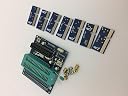


STC full range of programmers CH340G USB to TTL STC downloader
Product ID: 540908642
STC Downloader Introduce1、USB interface and PC USB directly by mini - USB cable connect to the entire downloader by the USB port power supply;2、External interface target board download extract signal can be directly with the target plate, GND, TXD, RXD, VCC, P1.1 and P1.0 connected (or P3.2 / P3.3: this series for STC15F), convenient to the target board download program;3、TX and RX data indicator light will keep flashing when download program.4、Power indicator lights to indicate on STC chip power supply is normal, also can be seen that whether in place when cold start button press, guarantee on STC microcontroller into cold start mode.5、Cold start button to restart on STC microcontroller, with computer button is the same, rather than the computer reset button. Computer reset button belongs to the warm start.6、PCI64 adapter plate slot used to plug a different adapter plate, according to the different pin series single-chip computer need to change a different adapter plate;Behind the adapter plate has a model, we can see the specific type.7、Red short circuit cap to choose 3.3 V / 5 V voltage, normal delivery is short .Short : 5 v voltage; Open: 3.3 V voltage. (5 V power supply, according to USB power limit, maximum current does not exceed 500 ma; 3.3 V power supply, the maximum of no more than 120 ma, so use, must pay attention to the scope of supply, so as not to overload use damaged downloader and computers.)8、ZIF40 Chip socket to hold various feet microcontrollers or SOP adapter .9、And chip one-to-one socket extension interface can be used as a simple development board, the interface is retained without welding, just for the sake of convenient some customers need to do a simple test (most customers don't need to use).
| ASIN | B07KT3T7BF |
| Brand | STC |
| Manufacturer | STC |
| Mfr Part Number | STC PRG |
| Model Number | STC PRG |
| UPC | 788537581222 |
Trustpilot
1 month ago
3 days ago