Desertcart purchases this item on your behalf and handles shipping, customs, and support to Hungary.
🌐 Elevate Every Meeting with 360° Clarity & AI Precision
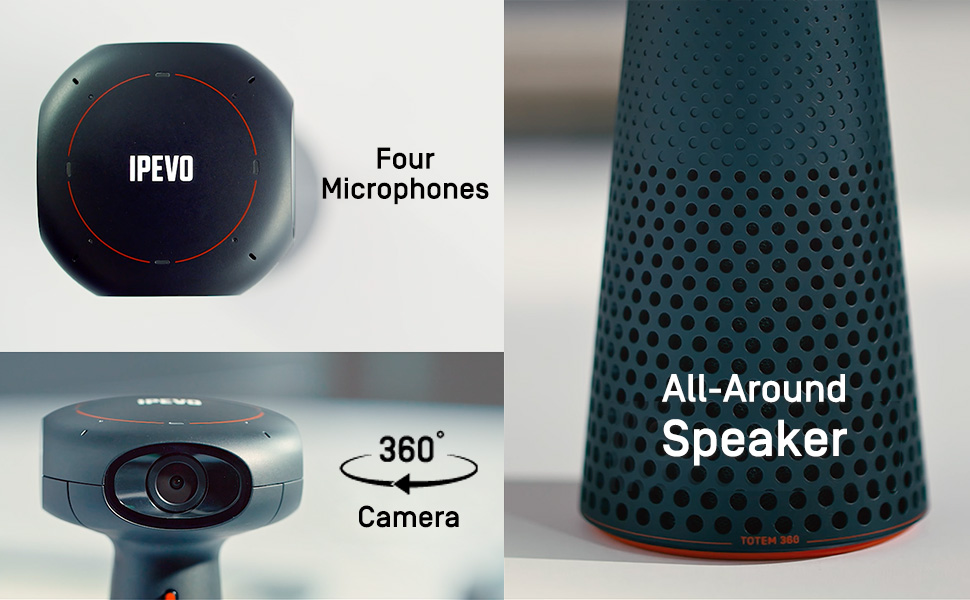
The IPEVO Totem 360 is a cutting-edge panoramic 5K conference camera featuring four AI-enhanced video modes and omnidirectional beamforming microphones with noise reduction. Designed for seamless hybrid collaboration, it offers plug-and-play USB-C compatibility across major platforms, delivering immersive 360° video and crystal-clear audio to transform any meeting room into a dynamic, interactive space.


| ASIN | B0C67XBN2L |
| Antenna Location | Hybrid conferencing, learning, and presentation |
| Are Batteries Included | No |
| Best Sellers Rank | #298,808 in Office Products ( See Top 100 in Office Products ) #188 in Telephone Audio Conferencing Products |
| Brand | IPEVO |
| Built-In Media | AC adapter, IPEVO TOTEM 360, QSG, USB-C cable |
| Camcorder Type | Webcam |
| Color | Black |
| Compatible Devices | Windows, Mac, and Chromebook computers |
| Connectivity Technology | USB |
| Customer Reviews | 3.9 out of 5 stars 45 Reviews |
| Display Resolution Maximum | 5K |
| Effective Video Resolution | 4 Kilopixels |
| Exposure Control Type | Automatic, Manual |
| Features | 360 Degree Capture, Face Detection, Lightweight, Low Light, Omnidirectional microphones, Panoramic 5K, Scene Modes |
| File Format | MP4 |
| Flash Memory Speed Class | C10 |
| Flash Memory Type | Micro SD |
| Flash Memory Video Speed Class | V60 |
| Focus Type | Fixed Focus |
| Form Factor | Compact |
| Global Trade Identification Number | 04712098412110 |
| Has Image Stabilization | Yes |
| Image Aspect Ratio | 16:9 |
| Image stabilization | Digital |
| Item Weight | 1.19 Kilograms |
| Lens Type | Macro |
| Manufacturer | IPEVO |
| Maximum Aperture | 2.8 f |
| Minimum Aperture | 0.36 Millimeters |
| Model Name | TOTEM |
| Model Number | 5-906-2-08-00 |
| Number of Speakers | 1 |
| Photo Sensor Technology | CMOS |
| Screen Size | 24 Inches |
| Sensor Type | CMOS |
| Shooting Modes | Conferencing Mode, Surround Mode, Hybrid Learning Mode, Presentation Mode |
| Style Name | 360 Immersive Conference Camera + Speakerphone |
| Supported Audio Format | AAC, MP3, PCM, FLAC, Dolby Digital/AC-3 |
| Unit Count | 1.0 Count |
| Upper Temperature Rating | 35 Degrees Celsius |
| Video Capture Format | MP4 |
| Video Capture Resolution | 5K |
| Video Resolution | 5K |
| Warranty Description | 2 year manufacturer |
| Water Resistance Level | Not Water Resistant |
| White Balance Settings | Auto |
| Zoom | Digital |
R**A
Great Camera. Much better than the 180o.
I first bought the 180o camera from the same brand. Good, but only if you use their software to use the advantages. But that causes a lot of friction, since you have to install the software in everyone's laptops and teach people how to set a virtual camera. Otherwise, you get only the buil-in software, that is very, very laggy. Not the case with the 360o model. All the important modes are built-in the camera, so all you have to do is tap a button. Very practical. The result is very professional. Totally worth it!
S**G
Not worth the headaches every 6 months sending in for repair.
This item has worked well when it is working. BUT we have had to send it in for repair evey six months. We use it in our office every other Tuesday for a stafff meeting that is it. It is stored in a locked IT closet when not in use and has never been anywhere but in our building. It will just stop working. It powers on but the computer cant see it. We tried new cables, new computers and nnothing worked but to have it replaced. While the past 2 times the support process was fairlu easy, this time they are requiring videos of all the troubleshooting items before they will even open an RMA. It literally is the exact same issue as before, and when I ask what was wrong with it they complettely ignore the question. I have been in thhe IT industry for 20 years and have delt with lots of tech products and lots of venders. This is by far one of the worst experiences I have had. I would recommend going with a differant option and saving yourself all the headaches.
A**R
Cool technology
I bought this for a conference room that had been poorly equipped by corporate IT. It’s very easy to use and people love it.
J**Z
Perfect conference camera solution
Easy to use and set up
J**A
Quality is video quality better then nothing and sound output is too low for group setting
I've purchased couple of these through another online merchant and I'm disappointed in the image quality but also in the sound output. The sound is too low to easily hear what virtual guests are saying. The speaker can go louder but software is limiting it and that's disappointing. I guess you get what you pay for.
B**C
Controls video mode with a touch of a button
This is much better than the Owl! And costs less
H**R
Excellent conference cam; bring your teams together on one screen
My team of co-workers is spread out, with a large group of us in one office and others located elsewhere. We've been able to use the Ipevo Totem 360 to help brings us together. The one group of us gets together at the office and uses the Totem, and then we all meet together online and it makes it feel a bit more like everyone is together. The video is clear, although I will admit it doesn't always feel like 4k quality (but this is likely down to Internet issues rather), and the audio is also nice and sharp. I found setup of the Totem 360 to be very easy. It is essentially plug-and-go, with settings you can tweak to best fit what you need for your setup. There are four cameras around the edge and four microphones. The Totem 360 software stitches the video together to make for a pleasing scene for the viewers. I do suggest making sure no one is siting on the edge between two cameras. And, there is some stitching visible where the video feeds meet, but all in all the stitched video looks good and makes sense to the eye. With regards to the physical unit, the Totem 360 is pretty compact. It is easy to pick up, pack away, and set up again. It is pretty unobtrusive sitting in the middle of a conference table, and fades into the background much like a Polycom or similar does. There is a tripod mount on the bottom if you'd like to set it up that way. Overall, I believe the Totem 360 is a good solution if you are looking for a low fuss way to conference in a group of people located in one room.
K**N
Great for hybrid inclusion of others into your meetings
VERY awesome piece of kit - I use it a ton with meetings and conferences. I love the functionality and simplicity of the interface. Use it with Teams, Zoom and GoogleM with no problems. Love how we can sit around a little table and get everyone onscreen. It is however most useful for the recipient since they are the one that feels included in a totally different way. This is not a me thing its a we thing. It's to get the person not in the room feeling that they are... included, be able to see what's going on and to hear. I think this product is remarkable
H**D
Très pratique pour des Visio pro
Je ne connaissais ni cette marque ni ce type de camera 360 4k dédiées aux entreprises et aux visio conférence. Je l'ai d'abord utilisé avec des amis afin de vraiment prendre en main la caméra avant de m'en servir avec des clients. Pas que ce soit compliqué, mais je voulais éviter toute mauvaise surprise devant un client. Il y a plusieurs modes d'utilisation selon les besoins, moi je lai utilisé pour afficher chaque personne comme si une webcam filmait chacun d'eux donc en mode conférence. La qualité de l'image est bien meilleure qu'une webcam classique. Un point très pratique la possibilité de couper le micro directement depuis le bouton sur la camera. Au niveau qualité du produit rien à redire, c'est vraiment un beau produit bien fini. Mais je trouve que c'est un peu cher ou en tout cas, c'est un budget à prendre en compte pour de petites entreprises. C'est idéal pour les entreprises qui font assez régulièrement des visio conférence.
M**O
Impressive Camera for Work
This 5K webcam offers exceptional video quality, with sharp resolution that’s perfect for professional video conferencing. The auto-focus is fast, and it handles low light well, ensuring you always look your best on work calls. The wide field of view is also great for capturing more of your space if needed. The built-in microphone is decent for casual use, but an external mic is better for important meetings. Setup is a breeze—plug and play! Highly recommend for anyone needing a top-quality webcam for conference calls or remote work.
Y**O
Espectacular para reuniones teams
Cámara 4k 360• con modo seguimiento y varios más. Diseñado para estar en vertica, aunque parezca que puede caer de lado tiene una base bastantes consistente En la caja se encuentra el Totem 360 con un cable USB-C a USB-C de 2 m de largo y una guía de usuario multilingüe que ofrece cuatro páginas de orientación para cada idioma. Para que la cámara esté operativa se requiere una PC con un puerto USB-C, ya que IPEVO no proporciona un adaptador a USB-A y ninguno aparece en la tienda en línea. Puede ser un problema ya que muchos clientes corporativos tendrán sistemas de escritorio y portátiles que carecen de USB-C, y no ser compatibles con USB-A supone un obstáculo adicional que deben superar. La cámara se activará inmediatamente una vez conectada a una computadora adecuada que ejecute Windows, Mac OS X o Chromebook, y obtendrá energía directamente de ese dispositivo. La falta de un interruptor de encendido no es una sorpresa, ya que el Totem ha sido diseñado como un dispositivo simplificado con los controles más limitados. En la sección inferior hay una ranura de seguridad Kensington y un puerto USB-C. Más arriba hay dos botones, uno se usa para silenciar el audio y el otro para cambiar los modos de la cámara. Hay luces LED de colores encima para indicar el estado del sonido y la cámara. La idea aquí es que la unidad está conectada a una computadora portátil que ejecuta Skype, Teams o lo que sea, configurada como cámara predeterminada, y el resto es prácticamente automático. Para aquellos que desean una experiencia más granular, IPEVO tiene un paquete de control de software EyeStage, que permite controlar la cámara desde la PC conectada. Este software es una descarga de 359 MB para Windows y se proporciona de forma gratuita a los usuarios de hardware IPEVO. El hardware de la Totem 180 es único y permite algunas opciones muy interesantes que otras cámaras para conferencias no pueden igualar. La mayoría tiene una cámara con capacidad 4K, pero el Totem 360 tiene 4, y están en ángulos ligeramente divergentes para proporcionar hasta 360 grados de visión. Para aquellos que no celebran reuniones en las que toda la mesa está llena, es posible indicarle al Totem que lo reduzca a un campo de visión de 120 grados. Como cada cámara es responsable de aproximadamente 90 grados, ese modo ignora los 30 grados a cada lado del marco de 360grados. Por su precio algo elevado, esta es una excelente solución y perfecta para reuniones de negocios pequeñas y grandes. En nuestra opinión, la capacidad de capturar a tantos asistentes con video y audio de tan alta calidad sin exceder el presupuesto es un punto de inflexión.
Trustpilot
1 day ago
1 month ago