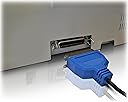
🔗 Bridge the gap between classic printers and modern tech—print smarter, not harder!
The ABC Products USB to Parallel Port Adapter Cable features a 36-pin IEEE1284 connector compatible with major printer brands like Canon, Epson, Brother, Lexmark, and HP. It supports a wide range of operating systems from Windows 98SE through Windows 7 and Mac OS V8.6 to 9.2 and higher. Its tangle-free design ensures durability and ease of use, making it the perfect solution for professionals needing reliable legacy printer connectivity.
T**R
Perfect connector for old Citizen Swift dot matrix printer to Windows 7 pc
We wanted to connect our trusty old Citizen Swift 24 dot matrix printer to a new Windows 7 pc. The challenge was to find and choose the correct cable to link the printer's centronic parallel port to the pc's usb port. This product worked beautifully. We followed the advice of other purchasers when connecting the cable: the pc recognised and installed it smoothly. The cable is a good length, quite long enough to reach from the printer on a table down and around to the pc on the floor. We clicked Start, Control Panel, Hardware, Printers and Add a Printer. The list that appeared did not include Citizen so we had to click on Show More to be offered Citizen, and this took many minutes. Clicked on Citizen and chose the Citizen Swift 240 ESC/P 2 option, which an Adobe Reader attachment from Citizen starred as being suitable for the Citizen Swift 24 with 80 columns. We installed this on a USB virtual port. The Test Page printed gobbledegook. We tried a couple of other Citizen Swift printer options without success. We dug out the manual and found a section about Emulation: that the printer could be installed as an Epson LQ. This worked a treat. We can now continue using this wonderfully economical printer: perfect for drafts and copies, if not for best quality. No hesitation recommending this cable.
K**S
Works Perfectly But Probably Expecting Too Much
At present I have a Sony FS 215S series laptop running XP docked on a docking station, (Sony Port Replicator) connected to an 18 year old Canon BJ 200ex printer by a conventional LPT1 Port Parallel Cable. (36 pin plug at printer end 25 at docking station) This I use for everyday cheap printing. In view of the upcoming non-support of Windows XP in April 2014 I searched on line for a USB product which would connect the printer (I refill the black cartridge for approx. 50p a time) to my second computer which has a Vista operating system. This cable seemed (and is) of good quality and appeared to fit my requirement. I connected my XP machine by the new ABC USB/Parallel cable as suggested by other reviewers (no instructions with the cable) and had no trouble installing as the correct Driver was already on my 8 year old laptop for the printer. Easy I thought! Not so for the Vista machine. I could not find a driver for a BJ 200ex. After trying different Canon Drivers and the Windows 'updated drivers' Canon UK support was contacted by e-mail. As I was beginning to suspect, no Drivers had actually been produced for Vista because of the age of the Printer. The cable is fine but it is worth checking before purchase that a Driver is available for your Operating System and your old Printer. Looks like the end of my trusty printer.Update:- Eureka!! After more experimenting I found a driver which worked. The Canon BJ30 driver was already available on my machine in the Windows Vista Printer list but on the first `test printing' several days ago it printed rubbish. It appears by shutting the computer down, reconnecting everything and selecting `Replace Existing Driver' in the Printer Wizard, the new BJ30 driver kicked my old BJ 200ex printer into life. Proves the cable is good but needs a bit of patience sometimes for it to work.
P**H
Acer Aspire 7720G running Vista 64bit, printing to an old Epson Stylus Color 460.
I had previously been using a different brand of this type of cable, but after a few months had found that my printing capabilities had become somewhat intermittent. Sometimes it worked and sometimes not. When I switched the printer or computer off then on again, or unplugged and replugged the USB printer cable it might work - or it might not!!! Then I noticed that the computer was giving a message about being "unable to connect to a device" or "the USB device is not recognized" or something along those lines. At first I thought that by 'USB device' it meant the PRINTER that was connected via USB, but then figured (and hoped) that it might mean the actual USB cable itself - since new cables are MUCH cheaper that new printers eh???Thought that this time I would get a slightly up-market one in its own blister-pack, rather than one of the cheaper variety that tend to arrive loose in a brown envelope, and this one seemed to fit the bill. The blurb states that it's good for any device that uses the 36pin (rather than 25pin) connector.I ordered on the 11th and received it on the 14th. It was well packed and the package fitted ok through the letter box, - so no 'Postie' messages about you not being in and having to travel 20 miles to the nearest PO depot to collect it!It's of a much more robust quality than the old 'cheapie' and connected immediately from the computer to the printer, then to the web for Epson drivers, and within about 30 seconds was ready for action!My verdict? - A good buy I think, though time will have to tell of course, but it just feels (and looks) better than the old one did from the outset!EDIT: 21MAY2014==============Still running fine after two years!
Trustpilot
3 weeks ago
2 weeks ago