Desertcart purchases this item on your behalf and handles shipping, customs, and support to Hungary.
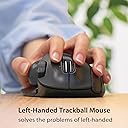
🎯 Elevate your workflow with precision and style—because lefties deserve the best!
The ELECOM EX-G Left-Handed Trackball Mouse combines high-performance optical tracking with a customizable DPI setting (750/1500) and 6 programmable buttons, all wrapped in an ergonomic design tailored for left-handed users. Featuring 2.4GHz wireless connectivity and a smooth, low-maintenance trackball with artificial ruby bearings, it offers up to 6 months of battery life and seamless multi-directional scrolling, making it a perfect blend of productivity and comfort for professionals and gamers alike.


| ASIN | B016QCPRBM |
| Antenna Location | Gaming, Office |
| Are Batteries Included? | Yes |
| Are Batteries Required | Yes |
| Battery Average Life | 6 months |
| Best Sellers Rank | 7,233 in Computers & Accessories ( See Top 100 in Computers & Accessories ) 201 in Mice |
| Brand | エレコム(ELECOM) |
| Brand Name | エレコム(ELECOM) |
| Button Quantity | 6 |
| Colour | Gray |
| Compatible Devices | Personal Computer |
| Connectivity technology | Radio Frequency |
| Country of Origin | China |
| Customer Reviews | 4.2 out of 5 stars 3,234 Reviews |
| Enclosure Material | Plastic |
| Global Trade Identification Number | 04953103473690 |
| Hand Orientation | Left |
| Hardware Platform | Laptop, PC |
| Included Components | AA battery, Japanese manual, Receiver, Trackball mouse |
| Item Dimensions L x W | 9.4L x 4.6W centimetres |
| Item Type Name | ELECOM Left-Handed 2.4GHz Wireless Thumb-operated Trackball Mouse, 6-Button Function with Smooth Tracking, Precision Optical Gaming Sensor (M-XT4DRBK) |
| Item Weight | 0.28 Pounds |
| Manufacturer | ELECOM |
| Manufacturer Part Number | M-XT4DRBK |
| Minimum Required Operating System Version | Windows Vista |
| Model Name | Track Ball EX-G Left Hand |
| Model Number | M-XT4DRBK |
| Mouse Maximum Sensitivity | 1500 Dots per Inch |
| Movement Detection | Optical |
| Movement detection technology | Optical |
| Network Connectivity Technology | Radio Frequency |
| Number of Batteries | 1 AAA batteries required. (included) |
| Number of buttons | 6 |
| Operating System | Mac OS X 10.7 Lion, Windows 10, Windows 7, Windows 8.1, Windows Vista |
| Power Source | Battery Powered |
| Product Features | 4 Way Scrolling, Ergonomic Design, Programmable Buttons, Wireless |
| Product Finish Type | Smooth Plastic |
| Range | 3 meters |
| Special feature | 4 Way Scrolling , Ergonomic Design, Programmable Buttons, Wireless |
| Style Name | Gray Ball |
| Theme | Video Game |
| Unit Count | 1.0 count |
B**S
Having profiles, makes this awesome.
If you are a left handed gamer, you should get one of these. I could never go back to using a mouse. The software you have to download to customise this with, allows you to have a different profile for each game/software. The profiles can be triggered when you start the game/software of choice. This is done by linking the exe file to the profile. I like this so much, I bought a second one to use with my laptop. Highly recommend.
K**R
Smooth and easy to use for a left hander
Very much like using this trackball. I used to use a track ball many hundreds of years ago. I got it due to space limitations and gaming. So I tend to usit quite a bit in war thunder for controlling the tanks and ships. It did not take long, just a few seconds to setup and i would say 45 minutes to get uset to. I using this with my work laptop now as the space is quite limited for mouse movement. All in all I am impressed. THough its a bit annoying to pay more just because I am left handed, but then again, it will annoy my right handed friends as they will have to adjust or use a different mouse!
G**N
Excellent left handed trackball
I need a left handed trackball due to an injury to my right wrist. I am normally right handed. One of the few left handed trackballs available, this became almost a default choice. One initial problem was a slight "stickiness" when you first try to scroll with the ball. That made accuracy difficult. A few hours of use has smoothed that out and the unit now functions very well, with a similar degree of accuracy to the Logitech trackballs I normally use. I am using the trackball with Linux (Debian 12) which is not noted as being supported but the OS had no trouble recognising and enabling the device.
A**R
left-handed mice(apart from gamers) are hard to come by and I'm so pleased I took a chance on buying this one
This is my first track ball mouse - a bit strange to start with but, after about half an hour, my hand finally stopped trying to move the mouse across my desk. Wireless, programmable, left-handed mice(apart from gamers) are hard to come by and I'm so pleased I took a chance on buying this one. I have large hands and this mouse is a perfect fit and feels comfortable to use. The programmable buttons are just what I wanted and makes using my mouse much easier. I can't comment on long-term use yet but, after two days, I am extremely pleased with the mouse and I would certainly recommend it to other lefties out there.
E**N
Super for a lefty!
Great for a wrist injury as hand and wrist dont have to move, programable buttons and a very nice fit to my hand - I am six ft tall for comparison. Takes a day or so to get used to the trackball if you are used to using a conventional mouse but after that you can get some very accurate movements. There is only one negative, the trackball invariable before stiff to move in a certain place. I believe this is because the ball is not perfectly spherical, it is only a minor annoyance as I just spin the ball quickly to get rid of it. I think this will lessen as it wears in slightly. M Overall, I am very please with my purchase!
D**H
Updated views after exteded use
I'm more or less ambidextrous. I have carpel tunnel syndrome in my favoured, my right, hand. I use a trackball, a Perixx, for my right hand but have been trying, and failing, to use it in my left for a while. The Elecom XT40R is one of the very few trackballs, with a wheel, suitable for left-handed use. I so wanted to like it. The instructions are in Japanese. The diagrams are poor and, in any case, do not cover the programmable keys. The website is also in Japanese and Google translate doesn’t help when trying to find the particular device. The name on the trackball, Ex-G does not produce any search result and one has to use the number on the bottom of the device, together with a magnifying glass to read it. I eventually found the pdf, and the brief English bit tells one to go to a URL on the Japanese site. So I put the Bluetooth USB device in, put the supplied battery in the trackball. No response. After a few minutes, I put in a new AA battery. Success. Then it's a case of downloading the driver and restarting. The device is comfortable to use, although I have large hands and the device is a bit small – the norm for me. Otherwise it’s promising, although it feels about as robust for the price as I’d expect. Default is right-click for left-click, if you see what I mean, which is a bit odd. On the good side: lots of programmable keys, three main buttons, a wheel that you can use to scroll horizontally and, superior to my Perixx, a smooth ball action. Kudos to Elecom for providing a left-handed device. I said I'd update my review after more use. I've got used to it, find it comfortable, which was the main thing I was looking for, but the ball is not as smooth as I'd hoped, and inferior to my Perixx. Allround, I'm reasonably satsified, and the price was keen.
A**R
Needed for arthritis in right hand.
My chiro suggested switching to a left hand mouse as my right was painful and not getting better. I am left handed but taught myself to mouse RH as there were no LH mice when I started in IT. I just can't get on with it. Nothing wrong with the product!
V**.
Scroll wheel broke after six months, not as good as Logitech
In short: This is NOT worth £45.99 I developed a repetitive strain injury in my right (dominant) arm from mouse use and switched to a left-handed vertical mouse. That was fine for a while, but I started to develop an RSI in the left arm, too. So decided to get two trackball mice, as I have become fairly adept at using both hands, so I could alternate and reduce fatigue. I bought a right-handed Logitech M570 and it's an absolute ergonomic dream. Annoyingly, Logitech does not do the same model in left-handed, so I resorted to this model, which was graded nearly as good but in reality, falls short in comfort and durability. Before the scroll wheel broke, it was okay. Not as comfortable as the Logitech one, and for the price, looked and felt cheap. Also, it would sometimes disconnect itself so I'd have to pull out the receiver and reinsert it. It also seemed to need more cleaning than the Logitech one, which might be down to the roller ball cup not being as secure a fit. However long I've had it, it's had half as much use because I alternate between hands during the day. So in real terms, it lasted three months of active use. I wish I would have got Logitech Trackman Marble (the ambidextrous one, which I'll now have to go out and buy, and is much cheaper) and can't believe I paid £34.49 for this (as the price was). Waste of money.
M**X
Tutto ok
Ottimo x i mancini
す**し
値段、性能、使いやすさ、すべてが高水準
まずコスパがいい。5000円未満の製品としては最も完成度が高いと感じる 専用アプリでボタン配置やショートカットを設定でき、アプリの使用感も良い 持ち運びにも便利な大きさで、電池持ちも良く、トラックボールもなめらかである この製品を買っておけば失敗しないと思う
N**T
Sidewise scrolling is not good.
Sidewise scrolling is not good. Which is main function we are buying this mouse for.
S**T
Feels great
First time I've worked with this type of static trackball mouse and it's great. Your hand stay still and you just move your thumb with the trackball, which I find makes it more accurate than the typical mouse where you move your whole hand. I thought there was going to be a learning curve of a few days but no, it's a pretty quick, same-day adaptation. I find that the wheel and back and forward buttons are easier to use and more functional than the Apple mouse. You don't get mixed up, they are clearly and intuitively separated and it flows. I've had it for a month, I didn't download the software that I understand could add some functionality but I may do so later. The unsual thing is that I'm using it with the USB adaptor in my M2 Mac Mini but it's not bluetooth nor wireless, so it must be another radio frequency that doesn't show up on the computer. Cool, in a way, so it doesn't load bluetooth or wireless channels. I really like it, a definite must-try for lefties.
J**O
Perfectly designed, versatile, full of features. Impressive for its price
I've been using Trackball mouses for more than 20 years, but on these last months I can't endure long sessions of PC usage or gaming anymore. Mi right hand and wrist end up stiff and hurting. That's why, even though I'm right handed, I decided to learn to use a Left handed trackball, so that I can alternate between both hands. I didn't look too much into the perks and features of this model. It just seemed nice and affordable (even with the addition of shipping costs to Spain). But boy was I in for some pleasant surprises. I was still using the old version of the Logitech M570 (standard left and right buttons, wheel + wheel button configuration plus 2 additional customizable buttons). Now, I don't know about the recent M570 v2, but this ELECOM, compared to the old M570 wins by a landslide, let me tell you... First of all, when you rest your hand on the mouse you get a feeling as if the shape of the hand was kind of sculpted into the mouse, as if you had slightly pressed your fingers on some clay and then it had dried. In addition to the usual left and right buttons (which you normally would press with your index and middle finger), there's one extra for your ring finger. It has also two additional buttons for the index finger (similar to those of my Logitech), and -the quirkiest- the wheel not only works as an up and down scroll and button, but has also a right and left tilting movement which function as TWO MORE buttons. The neat part is you can assign any key or keyboard functions (and even most combinations of keys except Ctrl+Alt+Del for safety reasons, or so it says) to each of the buttons. The configuration software is NOT provided on the eco-friendly sober packaging (nice touch). You just get the mouse, the small USB receiver (which you can attach to the back of the mouse for storage or transportation), the needed battery (another nice touch) and a brief quick start guide in japanese, but with enough annotations in English to succesfully start using the thing. Speakinf of the customizable buttons, I find REALLY useful to have CTRL+C and CTRL+V (Copy and Paste) on the left and right wheel tilt buttons. Also the SPACEBAR and ESC on the index extra buttons and right now I have "maximize window" on my ring finger one, which suits my current needs for one of my most used programs. By the range of functions assignable to the buttons, it's clear that this mouse is meant to be versatile not only as a gaming mouse but mostly as an office worker mouse. It must be great for Excel users, and maybe photo or video editors too. Also for enviroments using more than one screen. It has another function called "flying scrolling", in which you can use your mouse wheel not for manually scrolling but to start and stop scrolling. Not useful for me at the moment, but I understand it can save a lot of manual flicking in many scenarios. Since I'm not a hardcore gamer (mostly point and click adventures and puzzl-like games) I cannot say for sure how this mouse behaves as a gaming device, but I reckon that must be good. It has a DPI selector, which is also new for me, so that you can choose between covering about 60% of the screen (horizontally) with one movement of the thumb rolling the ball, or covering the whole screen in less than the full range of the ball. I'm sure that must be handy when trying to shoot zombies or whatever kids are doing nowadays On the bad side (but not really): Call me old schooler, but I miss the days of having a phisical copy of the drivers and software included with the periferials. That's the only "con", if any, that I've found on this mouse so far. But all in all I find it a great product, I am very satisfied with the purchase and I think I'll end up buying the right handed version also. I'm finding that controlling this mouse with my left hand is a lot easier than I anticipated. But I wonder if I'll be able to edit video with 2 mouses at once with SO MANY ASSIGNED BUTTONS (lol). Maybe I'm on to something here, who knows... You don't have any way to confirm this, but I assure you that ELECOM has not paid me anything for this review, I kid you know. I REPEAT: ELECOM didn't sponsor this review, nor did they promise me to send me the right handed one... yet. (But surely wouldn't hurt, either, wink, wink).
Trustpilot
2 weeks ago
2 weeks ago