Desertcart purchases this item on your behalf and handles shipping, customs, and support to Hungary.
🎬 Unlock cinematic power anywhere with ultra-fast, portable Blu-ray mastery!
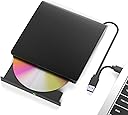
The Wintale External Blu-ray Drive is a sleek, portable optical drive supporting 6x Blu-ray read speeds and 5Gbps USB 3.0 Type-C connectivity. Compatible with Windows, Mac, and Linux, it offers plug-and-play ease for laptops and desktops. Perfect for professionals needing high-capacity media playback, data backup, and multimedia tasks on the go.


| ASIN | B0BX93ZRLK |
| Additional Features | Plug & Play |
| Best Sellers Rank | #26 in External Blu-ray Drives |
| Brand | wintale |
| Built-In Media | external dvd burner |
| Cache Memory Installed Size | 2 |
| Compatible Devices | Laptops, Desktops, Macbook |
| Connectivity Technology | USB |
| Customer Package Type | Box |
| Customer Reviews | 3.5 out of 5 stars 297 Reviews |
| Data Transfer Rate | 5 gigabits_per_second |
| Enclosure Material | Acrylonitrile Butadiene Styrene (ABS) |
| Form Factor | External/Slim |
| Hardware Interface | USB 3.0 Type C |
| Hardware Platform | PC |
| Item Dimensions L x W x H | 6.18"L x 5.74"W x 1"H |
| Manufacturer | wintale |
| Media Speed | 1.2 MB/s |
| Mfr Part Number | SZ_13CMKe |
| Model Number | External DVD Drive _0012 |
| Operating System | Windows 8 |
| Optical Storage Read Speed | 8x |
| Optical Storage Write Speed | 8x |
| Read Speed | 8 x |
| Special Feature | Plug & Play |
| Specific Uses For Product | Home entertainment, Office use, Travel, Multimedia playback, Data backup |
| UPC | 190726886146 190726885620 |
| Unit Count | 1 Count |
| Warranty Description | 2 yeras |
O**T
Burns Blu-Rays NOT DVDs !!!!!
This device does NOT read DVDs;
J**E
Worked with SOME difficulties... exactly one time. Helpful advice on getting the tray to open!
Had a bit of a snafu with this one at first. You know, wouldn't wanna open a bit, swapped USB ports around some, still wouldn't open. Hooked it up to an external battery bank to power it up and get it open, then no problems after that. Until the second time I wanted to use it. Plugged it in, put a disc in, and it immediately stopped working. Light would come on, some noises would be heard, and nothing. It would not open, it would not be detected by anything. I tried four different USB ports including ones directly connected to my motherboard, three different devices, a battery bank AND a battery bank with a computer connection to my motherboard, all of this accomplished nothing. So my disc was trapped inside of the device; which stopped functioning, and I couldn't get it open. Holding down the button of course, did nothing too. More noises, lights, would never open or do anything beyond making noises. I almost called Amazon customer support to ask what I could do about returning it, when I instead saw a tiny pinhole on the front. Then it struck me! GETTING THE TRAY TO OPEN MANUALLY Okay so if you're in my situation? Here's what you do! Grab yourself a Sim Card Tray Needle, if you have one lying around of course! If you've purchased a phone recently or held onto that pinhole needle that came with an old phone, you can use that pinhole needle for opening your disc tray too. If you DON'T have this, you can purchase some online for a cheap price. Shove that into the hole on the front of the disc drive by the button. You may need to go in deep or wiggle it some, but it SHOULD then open the disc drive. I recommend holding it at an angle so the tray will gently fall open while doing this. This way you won't accidentally close it shut again while using the pinhole needle, or keep it from opening and not realize it. If all goes well it'll release, and you can get your disc out of the device. Now, your mileage may vary, but please do try this before attempting drastic measures or losing a disc. Especially if you intend to return this device, like I do! In short? This drive is awful, despite the minor problems I liked it quite a bit at first; but this entire situation evaporated any goodwill I had towards it. I seldom leave reviews, but I wanted to provide assistance to anyone who may find themselves in the situation I did. If you are, I hope this helps you in some way. If you're looking to buy this? Don't.
A**R
This Blu-ray drives DVD player is great!
It works well on my computer,easy to set up. It's truly a plug-and-play device, connecting to my system in seconds. The blu-ray playback quality is perfectly. It plays my Blu-ray movies flawlessly, making movie nights a pure joy. I'm pleased to say that this drive meets allmy needs and performs superbly. Highly recommended!
M**T
Broke after barely using it / Customer service was fast
Used it about 3 times when I first got it, played dvds fine on my macbook air. Put it away for a few months, just plugged it in again and flashed a yellow light and clicked. Tried on a different computer and still with the clicking. Do not recommend. Waste of money. Update 10/29 Customer service reached out and refunded the product. Thank you.
J**O
Great Portable Player
I took it right out of the box and plugged it into my laptop and popped in my favorite DVD. My computer immediately recognized the player. The software started right up and I played my DVD. The playback was flawless. I like that the player has both a USB plug as well as a USB-C plug. I have tested it on three different laptops and it works great on all of them. I recommend this for anyone looking for a good portable player.
E**H
Low price, even lower quality.
Absolute garbage. I knew it was cheap before purchasing it, but if it works, I don't care about the brand. Big mistake. This burner works so erratically that I can't even put a percentage on it. I've used many, many burners, and this one had the most failures out if any burner I've used in 20+ years. Not even USB 3.0, as advertised. Multiple computers and multiple blank disc brands tried, all to no avail. This one's headed straight the dumpster. Avoid like the plague.
Y**Z
Grandioso producto
Funciona perfecto , gran compra, excelente dispositivo
L**A
Mac’s don’t like Blu-Rays
Mac users, you have to download an external app to be able to watch Blu-Ray movies. Even with a player, they won’t play with any built in apps. This device also randomly and frequently stops working. You have to unplug it from the computer and plug it back in to eject the disc. I returned it for that reason and it not being Mac compatible without adding in another app.
A**A
WRONG DESCRIPTION
⚠️⚠️⚠️ THIS DRIVE DOES NOT SUPPORT BLURAY DONT BUY IT ⚠️⚠️⚠️
P**T
Doesn’t play Blu-ray Disc
The description is completely misleading. Even though the name has Blu-ray mentioned this product is just a simple DVD writer. It does not play Blu-rays. Secondly the read speed is very slow and it takes a very long time to copy from the disc to pc. Don’t buy. Waste of money.
R**3
Good value for your $$
Works well reading my Blurays n Bluray discs from library as well.. haven't tried burning anything yet
L**R
NOT a BluRay Drive, and the DVD Drive doesn't even work!
This is an absolute scam product. While sold as a Blu Ray writer, with support for 50G blu ray discs, it is not. It is a cheap external SATA exclosure, with an old 2014 DVD drive installed in it. It wasn't even installed properly with screws, as the drive just slid out of the enclosure with almost zero force. The drive label on the enclosure seems to have been removed and replaced with one stuck on with superglue, and not a clean job either! The drive doesn't even appear to be "new old stock" but a drive pulled from an old laptop, and mine didn't even work with DVD's. The drive was jammed and wouldn't even open. I imagine they use multiple different sources for drives so some people may get lucky and get one with a working DVD, or even blu ray burner, but even then, I wouldn't trust it, given that they are clearly old, used drives. Overall, do not trust this seller/manufacturer.
M**C
Like this compact drive very much
Great drive at a great price. It works seamlessly. My laptop, using Windows 11, discovered it immediately when I first plugged it in using the USB-3 cable. As suggested by the seller, I installed PowerDVD for viewing blu-ray movies and Ashampoo Burning Studio for writing to blank blu-ray discs. It works flawlessly at doing both. Highly recommended.
Trustpilot
1 month ago
3 weeks ago