Buy anything from 5,000+ international stores. One checkout price. No surprise fees. Join 2M+ shoppers on Desertcart.
Desertcart purchases this item on your behalf and handles shipping, customs, and support to Hungary.
🚀 Upgrade to Archer AX55 Pro — Where speed meets smart security!
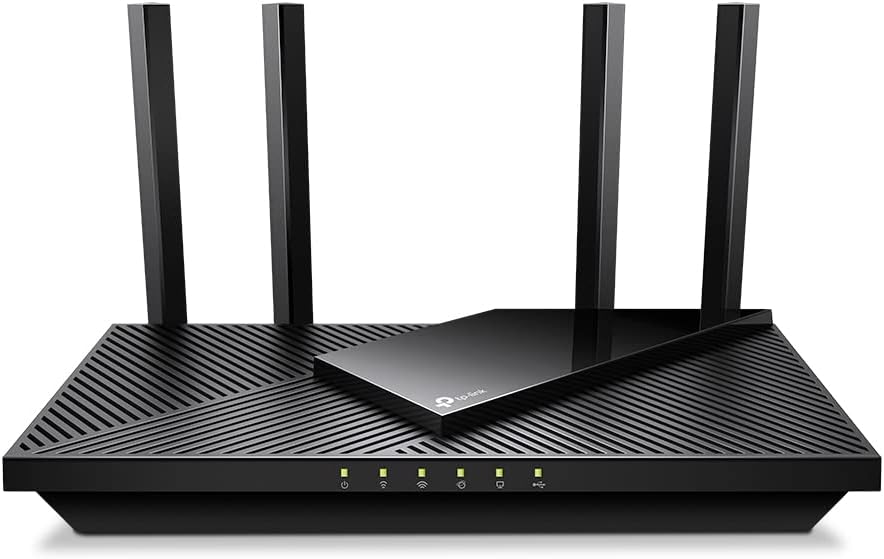
The TP-Link Archer AX55 Pro is a cutting-edge WiFi 6 router delivering up to 3 Gbps dual-band speeds and a 2.5 Gbps multi-gigabit port for ultra-fast internet. Equipped with 4 high-performance antennas and Beamforming technology, it ensures expansive, reliable coverage throughout your home. Advanced MU-MIMO and OFDMA technologies optimize network efficiency for multiple devices, while TP-Link's HomeShield provides robust security and parental controls. Compatible with Alexa and managed via the intuitive Tether app, this router is designed for seamless streaming, gaming, and smart home connectivity.


| Brand | TP-Link |
| Compatible devices | Amazon Echo devices |
| Frequency band class | Dual-Band |
| Model name | Archer AX55 Pro |
| Special features | WPS |
| Wireless communication standard | 802.11ac, 802.11ax, 802.11b, 802.11g, 802.11n |
V**F
Good
One
C**J
Good
Really Good Router Good Price as well
T**6
10/10
ممتاز خذه وانت مطمن
G**Y
Amazing User Interface
I bought this router because I wanted to content filter my families internet with OpenDNS. This router actually has its own support features like that (they might have a subscription fee? idk) called Parental Controls. None of us here are children, we just don't want pornography, gambling, gore, or malware bothering us anymore. Content filtering wasn't the only goal we had though, we also needed a stable interface for controlling port-forwarding, device IPs, NAT type for gaming, and also an easy way to attach storage for network use (it's very easy, just plug in a USB external hard-drive). The main reason I bought this was for the interface. I've been using Xfinity's modems for a long time (they're very finicky, ugly, poor functionality, and poor user control). I wanted something that hands over the reigns to the User and allows me to use all of my networking and IT skills freely. TP-Link's router interface is honestly gorgeous. I like the colors, everything is set up in a way that makes the most sense, there are tons of features and all information is very easily accessed. I have used other routers in the past (mostly Netgear), and I must say, I feel like this is a big step up. I chose TP-Link over Asus by recommendation of an IT friend, and after seeing the beautiful interface and comparing it to google images of Asus, I decided very easily to go with TP-Links more professional looking, easy going, non-bloated simple interface. There are also apps you can use with your phone for managing the router, TP-Link Tether is fantastic. A lot of the options I have available through the router are also available on this app, even when I'm not at home. This means I can help my family if someone wants to host a server and I'm not home, or somebody needs to transfer files but they can't remember a device ID or IP. Amazing router tbh, their 6000 model is probably even better. WiFi 6 works very well as well, I have had no connection issues since getting this router (weeks ago?) and I would highly recommend it over competing brands on account of the control, accessibility, and style of the user interface. The router itself doesn't look bad either!
J**R
This updated our LAN to WiFi6 support and more. Updated from Asus N300
I recently purchased this TP-Link AX3000 WiFi 6 Router (Archer AX55 Pro) to upgrade our LAN even though our Asus N300 has been working just fine with no drama for many years and still does. I can recommend both sold here on Amazon. The TP-Link Archer AX55 Pro takes things to the next level for WiFi 6 and the router' s many features and settings. I venture to say the Asus N300 will still do fine for most homes streaming and networking needs. It is easier to set up than the AX55 Pro. On to the AX55 Pro - - - So this is just my initial comments and set up so far. Will update if needed. Setup to the TP-Link Archer AX55 Pro is simple using the recommended app, but I chose to use the cable connected method to a spare laptop which provides easier access to detailed settings. It went ok, but advise to go slow and careful to assure what you want to enable and disable. Disable OFDMA if you want the best speeds. I was then able to get speeds off the wired ports usually higher than what Spectrum provides. Good on them. Going wireless . . It upped the speed to even our Roku devices 95 to 110 Mbps. Laptops fared generally better as well but a bit lower. All the dozen or more client devices benefited to one degree or another depending on their capabilities. So for now, the AX55 Pro is a go. It does take more time to power up or re-start. Also, unsure of whether it will pick up ok after an outage of main power or ISP loss? Seemed a like I may need to reset and then restart both modem and AX55 Pro if mains power goes out based on my initial setup, but it could just be me fussing with things. Previously, I was using the Asus N300 WiFi Router (RT-N12_D1) for several years and it served well and still would serve my purposes for 2 heavily used home laptops, a couple of tablets, 3 Roku, 2 internet radios total of about a dozen or so devices plus cell phone use while home. The Asus :https://www.amazon.com/Wireless-N300-Technology-streaming-performing-RT-N12/dp/B00DWFPDNO works very well, never dropped signal in our 1700 sq ft single story home (plus lower level), always recovered after any outages with no drama of having to reset it or Spectrum supplied modem. It is great if your needs are as mentioned above, simple to use, access setup on line for any changes, no muss and no fuss.
I**D
تجربه راوتر
الراوتر ممتاز واداءه جدا مناسب للاجهزه متعدده وتقنياته ممتازه
D**Y
Excellent!
Excellent router — fast speeds, wide coverage, and very easy setup. Perfect upgrade for stable Wi-Fi 6 performance.
Trustpilot
1 week ago
2 months ago