

🖨️ Print smart, save big, and stay effortlessly connected!
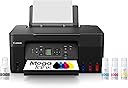
The Canon MegaTank G3270 is a wireless all-in-one inkjet printer designed for home and home office use. It delivers professional-quality prints with a high 4800 x 1200 dpi resolution and supports print, scan, and copy functions. Featuring a refillable ink tank system, it includes up to 2 years of ink capable of printing up to 7,700 color pages, drastically reducing ink costs by up to $1,000. Compatible with smartphones and tablets via app control, it offers a compact design with a 1.35” LCD display for easy operation.


| ASIN | B0BSMSYM9N |
| Additional Printer functions | Copy, Scan |
| Best Sellers Rank | #783 in Office Products ( See Top 100 in Office Products ) #2 in Ink Tank Printers |
| Color Depth | 16 Bits |
| Compatible Devices | Smartphones, Tablets |
| Control Method | App |
| Controller Type | iOS |
| Customer Reviews | 4.1 4.1 out of 5 stars (4,393) |
| Date First Available | February 8, 2023 |
| Dual-sided printing | No |
| Duplex | Manual |
| EU Spare Part Availability Duration | 5 Years |
| Global Trade Identification Number | 00013803351507 |
| Hardware Interface | USB |
| Included Components | PIXMA MegaTank G3270 Wireless All-in-One Printer, Set of Ink Bottles (GI-21: PGBK, C, M, Y), Print Heads, Documentation, Power Cord |
| Ink Color | Black |
| Item Weight | 13.2 pounds |
| Item model number | 5805C002 |
| Manufacturer | Canon |
| Max Input Sheet Capacity | 100 |
| Max copy resolution black-white | 4800 x 1200 |
| Max copy resolution color | 4800 x 1200 |
| Maximum Black and White Print Resolution | 4800 x 1200 Dots Per Inch |
| Maximum Color Print Resolution | 4800 x 1200 Dots Per Inch |
| Maximum Media Size | 8.5 x 14 inch |
| Maximum copies per run | 99 |
| Memory Storage Capacity | 64 MB |
| Model Series | PIXMA G3270 |
| Number of Trays | 1 |
| Number of USB 2 Ports | 1 |
| Output sheet capacity | 100 |
| Power Consumption | 16 Watts |
| Print media | Card stock, Envelopes, Glossy photo paper, High-resolution paper, Paper (plain) |
| Printer Ink Type | Dye-Based Ink, Pigment-Based Ink |
| Product Dimensions | 21.9"D x 16.4"W x 10.6"H |
| Scanner Type | Flatbed |
| Sheet Size | 3.5” x 3.5” (Square), 4” x 6”, 5” x 5” (Square), 5” x 7”, 7” x 10”, 8” x 10”, Letter (8.5” x 11”), A4, A5, A6, B5, Legal (8.5” x 14”), U.S. #10 Envelopes, Card Size (91 mm x 55 mm), Custom size (width 2.1–8.5 in, length 3.5–47.2 in) |
| Smart Home Compatibility | Smart Home Compatible |
| Specific Uses For Product | home, home office |
| Supported Media Sizes | 4 x 6 inches, 5 x 7 inches, Legal (8.5 x 14 inches), Letter (8.5 x 11 inches) |
| Total USB Ports | 1 |
| UPC | 013803351507 |
| Warranty Type | Limited |
| Wattage | 16 watts |
P**S
Great Investment
The Canon MegaTank printer has exceeded my expectations. Print quality is consistently sharp, with clear text and vibrant colours, making it ideal for both professional and everyday use. The refillable ink tank system is extremely cost-effective and significantly reduces the need for frequent ink replacements. Setup was straightforward, and the printer performs reliably with minimal maintenance. Overall, this is an excellent investment for anyone seeking high-quality printing with long-term savings and dependable performance.
S**O
Great printer.
Bought this for my partner for her artesanal cosmetics business and she absolutely loves it. I can't recall the exact GSM but she prints on card stock like business card thickness and it works well. We print the occasional photo on proper photo paper and they come out well. Obviously not lab quality but fine for a casual 6x9 mantelpiece frame or scrapbook. The selling point was its rechargeable cartridges. This is great for the wallet and the environment. Be kind to our earth 🌎
C**A
So disappointed:(
Terribly inefficient connection, unreliable color accuracy, and confusing support from Canon (or lack thereof) I thought I had found the perfect budget printer for starting my art business.. the glowing reviews online and the promise of longlasting inks compared to other companies. Suffice to say, after hours of frustration, bouts of rage and wasted paper, I am extremely disappointed. I think the ONLY net positive about this printer is the fact that the inks look like they will outlast any of the cartridges from other printers like Epson, while also being so much cheaper to refill. Which is WHY I am so angry and disappointed at this piece of junk. Unfortunately, I'm going to have to go back to Epson, which I DID NOT WANT! And here's why: 1. Excruciatingly slow and inefficient wifi: This printer's ability to connect to wifi and stay connected is ABYSMAL, it constantly goes offline between prints, it struggles to reconnect and you will spend up to 30+ minutes waiting for a single sheet to print while having the dreaded "Unable to Locate Printer" screen loading forever and ever. As a small business owner with deadlines, the constant connectivity issue is impossible to sustain. To top it off, it doesn't come with any ethernet port, and you're forced to buy a special printer/usb cable just so you can reliably use this printer. I don't want to have to pay an additional cost for something that should have been included with this printer, just to fix a problem that shouldn't even exist! I never had this issue with my Epson, or any other device! It makes no sense! 3. But this was the dealbreaker: DULL, WASHED OUT COLORS AND INCONSISTENT RESULTS ACROSS ALL SETTINGS AND PAPERS!! I have tried every single iCC that canon offers (which by the way, are not available in photoshop for some weird reason, despite all the epson paper settings being there without me having to do anything. I've installed the driver on my mac and even had to ask chatgbt for help to no avail) and different papers. My blacks are printing gray on cardstock, then brown on another paper, no matter what I did, it never prints black correctly!! I printed another design with the same exact paper on Epson, and compared that with Canon. The Epson print looks vibrant and matches the colors on my monitor perfectly, while the Canon print is COMPLETELY WASHED OUT AND DULL by comparison. Same exact settings, same exact print, tried all the other settings, NO IMPROVEMENT! There was like 1 print that came out where the blacks were close to accurate, yet with the same exact paper and settings it has never happened again! I've wasted so much paper for nothing!! 4. Lack of a physical manual or a link to an actual guide, you are forced to download their app and go through several hoops to find a visual setup procedure. There are no videos or troubleshooting steps I could find from the website. The printer automatically comes with a useless feature that tells you there is no paper loaded when there is, and you're forced to figure out how to turn it off on your own. Navigating the settings on the printer's tiny screen is equally confusing. Now, I can suffer through this thing's abysmal wifi by paying extra for that cable, I can suffer through the lack of a physical manual and useless/confusing setup guides from Canon's app, but the color inaccuracies and lack of steps to fixing them are a huge no for me. The only reason I returned my Epson was because it smears any paper with gloss in it, and there is no fixing that. The massive HEADACHE and mental turnoil I've suffered from having to DIY my way out of every endless caveat with canon's pixma g3270 is simply not worth it. I'm returning this thing ASAP
M**H
TROUBLESHOOTING TIPS
Disclaimer: I bought the 'Backlit LCD screen' model, so my review only applies to said printer. I've had my printer for about a month now and feel like I have a good low-down for all of y'all thinking about getting this one. The BIGGEST issue I've had with this printer is the exact same one everyone else here in the reviews have had issues with- color printing. This printer so conveniently has absolutely no color settings that one can tinker with: not through the "Canon PRINT" app OR the "Canon Easy-PhotoPrint Editor" app, not through paired laptop settings, and especially not within the settings of the printer itself. The ONLY way I have been able to print with well-saturated colors on standard letter paper is by changing the print settings from "letter paper" to "photo paper" just before I send my documents to be printed. The "Letter paper" print setting works wonderfully for black-and-white word documents, but thats all its useful for. Use "photo paper" settings for any and all prints you need in color. If you try to use "letter paper" settings for color, the result is incredibly unsaturated and upsetting. This printer does have incredible color output and resolution when you use the right settings. While you CAN set this printer up very easily without wifi, it is a pain to connect to. IT DOES NOT HAVE BLUETOOTH CAPABILITY. There are only 2 ways to connect to this printer without in-home wifi. The first is to connect to the printer through the printer's wifi band, but this means your device will not otherwise be able to connect to the internet while paired with the printer. If you need to print directly from files online, you will not be able to do so without connecting the printer and your device to an outside wifi network. The second option is to connect with a USB-B cable. This printer has NO STANDARD USB PORTS. It only has a USB-B port, and a USB-B cable is not a common household wire type. To get the most convenient connection to this printer, in-home wifi is a must. If you need to print double-sided documents, you must manually re-insert every page so that it may print on the back. With that long list of cons, I do have positives. The borderless printing works very well for photographs. The colors printed on photo paper are brilliant and very saturated, even without any manual editing of the photos. It prints just a tad bit slower than other printers, but it is not mind-numbingly slow. It is easily tolerable. This printer DOES have a scanner, so copies are a breeze. The initial set up of the whole printer was incredibly easy and rather quick; I was surprised I didn't have to fight with it at all! Best of all, the ink for this printer is relatively cheap and it lasts for a LONG time! No costly maintenance, and NO SUBSCRIPTIONS NEEDED to continue using your printer. ⚠️READ YOUR MANUAL!!!⚠️ Because this is a tank printer, you should enable 'moving mode' whenever you have to relocate the printer. I recommend doing so, even if its just from room to room. This precaution will keep your ink from destroying your printer. To sum it up, its got its issues, but its a great printer when you can work around them. I was pretty positive I was going to return this printer while I was troubleshooting it, but I got it figured out and I'm content. Hopefully this review will save someone else some grief when they get this printer.
J**R
Great printer.
The Canon MegaTank G3270 is hands-down the best printer I’ve owned. Setup was quick and easy; I had it connected to my Wi-Fi and printing from my phone in minutes. The real standout is the MegaTank system. The value of the included ink is incredible—it comes with a massive supply that lasts for thousands of pages, saving a fortune compared to expensive cartridges. It’s compact, efficient, and incredibly cost-effective. If you’re tired of constantly buying ink and want a reliable all-in-one that just works, this is the one to get!
A**Y
Sick of wasting money on ink for cheap inkjet printers. They're not a bargain. This unit will allow you to clean the print heads regularly without blowing ANOTHER cartridge! Pretty much solves the cost problems of inkjet printers.
Trustpilot
2 months ago
1 day ago