Desertcart purchases this item on your behalf and handles shipping, customs, and support to Hungary.
🚀 Unlock lightning-fast storage with zero hassle—because your data deserves the VIP treatment.
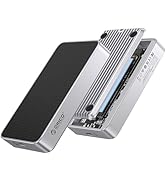
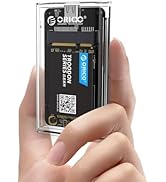
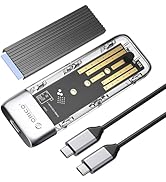
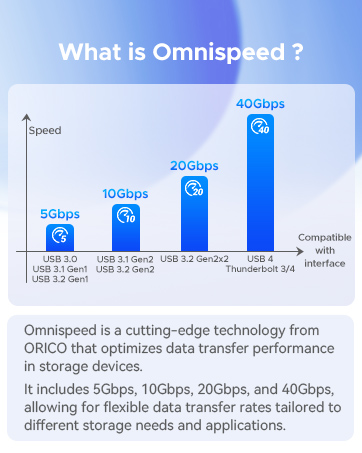
The ORICO PWDM2-BK is a premium M.2 NVMe/SATA SSD enclosure featuring USB-C 3.2 Gen 2 connectivity with blazing 10Gbps transfer speeds for NVMe drives and 5Gbps for SATA. Its tool-free design allows quick installation of M.2 SSDs (2230-2280 sizes) up to 4TB capacity. Built with an aluminum shell and thermal silicone pad, it ensures efficient heat dissipation during high-speed operations. Compatible across Windows, Mac, Linux, and Android, this compact, portable enclosure is ideal for professionals seeking fast, reliable external storage expansion.


| ASIN | B0BJ24GHC7 |
| Best Sellers Rank | #65 in Enclosures |
| Brand | ORICO |
| Built-In Media | 1*Cooling Vest(Heatsink), 1*Thermal Pad, 1*USB C to C cable, 1*m.2 ssd enclosure, 2*Rubber Fastener |
| Color | Black |
| Compatible Devices | Laptop |
| Connectivity Technology | USB-C |
| Customer Reviews | 4.4 out of 5 stars 1,358 Reviews |
| Data Transfer Rate | 10 gigabits_per_second |
| Enclosure Material | Silicone |
| Hardware Interface | PCI, USB Type C |
| Hardware Platform | Windows |
| Item Dimensions L x W x H | 1.38"L x 0.55"W x 4.88"H |
| Item Weight | 0.01 kg |
| Manufacturer | ORICO |
| Material | Silicone |
| Memory Storage Capacity | 4 TB |
| Mfr Part Number | ORICO-PWDM2-G2-BK-EP-US |
| Model Number | Black-C to C cable |
| Number of Items | 1 |
| Product Dimensions | 1.38"L x 0.55"W x 4.88"H |
| Supported Devices Quantity | 1 |
| Unit Count | 1 Count |
| Warranty Description | 12-month |
M**.
Nice adapter
Used this adapter to switch out an M2 on a laptop, worked as it should and I am typing from that same laptop as I write this review. Speed, connectivity, and accessories all worked as advertised making the transfer easy. Going to grab a big M2 for the enclosure and use it as a storage drive. Good value for the money.
C**E
super fast and easy to use
using this to copy brains to new laptop, and it's currently running about 500MB/s on Linux, with bursts over 970MB/s. yep, almost a gigabyte per second. extremely easy to change internal storage device - tool-free design. The outside of the case gets quite warm (hot) under load which shows that it's moving heat away from flash chips, which probably also avoids thermal throttling.
D**S
GREAT for occasional use.
PROS: Low Price Easy to install - Tool free Easy to follow instructions Plug -n - Play. No drivers required. CONS: Included USB-C cable is low quality Heat management/Dissipation is poor. Loses connection periodically I bought this enclosure to help me close another drive. The instructions on how to open the case were easy to follow, and (without tools) I had my NVMe M2 (M-Key only, 2280) drive installed and ready to go. At first, I used the included USB-C cable to connect it to my computer. My PC recognized the drive immediately, and I was easily able to format it. Using my cloning software, I started the process, but then it failed - TWICE. The culprit was the included USB cable. It is a low quality cable that is not good for that level of data transfer operation. It was an easy fix: just used another USB C cable I had on hand, and it was good to go. The other issue that I encountered is that the drive will get VERY, VERY warm with any moderate use, and sporadically become unrecognized by Windows 11. You'll notice that the Drive shows up, but it's content summary is blank (no capacity reported next to the drive letter). I know, in this case, that i is not the NVMe drive, as this was used as my OS drive previously with no such issues in another system, and it was recently tested to be in perfect condition. CONCLUSION: This is a fine enclosure for a drive you will use occasionally, as long as you bring your own USB-C cable. If you want a solution for a long term external enclosure, this is not that. Look for something like the SABRENT EC-SSD2, which has a built in cooling fan.
J**N
Excelente producto
Excelente producto
E**Y
Easy to Use M.2 SSD Enclosure
I needed this to fix the SSD in my desktop PC (corrupted file prevented Windows from booting up). It was really easy to install the SSD thanks to a tool-free design. I only needed to slide the bottom off, install the SSD into the slot, and secure the end with a clever rubber plug. It is a nice compact size, and came with heat sink materials (not needed for my SSD or for the amount of time I was using it), and feels durable with a good USB-C cable. File deletion speed felt quick, and I could also view files when I plugged it into my Chromebook as well as Windows PCs. Excellent for any need!
K**H
Great portable drive
Much better than a flash drive if you don't mind a little bit larger drive. Speeds and ease of use are decent. I paired with a 2tb Samsung nvme drive for photo back up so does more than needed for my needs
E**G
Great price and high performance
This is a repeat purchase for me. I had an extra M.2 drive. It takes less than 10 minutes to assemble, and all is done. There is no comparison between the speed of the M.2 and a flash drive. I have had no problem with the product.
B**.
Sturdy, snazzy enclosure for my 2TB WD Black SN770 - NOT -
Please see below update added December 8, 2025. This is a great combination for those who prefer to keep their backups of personal data close to home rather than floating in the cloud. A 2TB WD Black M.2 SN770 and an Orico M.2 NVMe SSD Enclosure. I use it for system backups and find the SN770's SLC buffering technology absorbs 100s of GBs at blinding speeds. My entire system is backed up in just over 10 minutes. And the Orico enclosure was truly a breeze to configure. What's not to like? 12/8/2025 I'll tell you what's not to like. Beware the "Device settings were not migrated" event in the RealTek firmware Properties. Looks like I'm not the first to deal with this and, so far, I see no fix posted anywhere. So, I hereby lower my rating to 1 star and issue this warning: Your perfectly good SSD can't be initialized because the Orico enclosure is sadly wanting. Don't even think of replacing the enclosure with another Orico because yours is likely not fried, it's just logically "impaired" as indicated by the event error above. There's a missing handshake somewhere in the chain of control from Windows to drivers to enclosure to SSD. To Windows, your SSD looks like it's READY, but it's NOT! It cannot be accessed, initialized, or formatted. I suggest trying a different enclosure MANUFACTURER! I'm waiting for mine to be delivered and hoping a better enclosure will force a "clean" install starting with Initialization of the attached 2TB SSD.
A**R
خامة ممتازة
يعمل بشكل رائع وممتاز جدا ، وحل لدي العديد من المشاكل
A**N
not bad
working good for me
R**O
Mais rápido
Maravilha de produto, ainda não testei, estou esperando chegar o ssd
H**G
Just works great.
Just works great. Been using for a while now and it has never let me down. Quick and easy for swapping out NVME drives.
S**I
Sweet working adapter
Works great, tested it with my SSD SATA drive, no problem.
Trustpilot
1 month ago
2 weeks ago