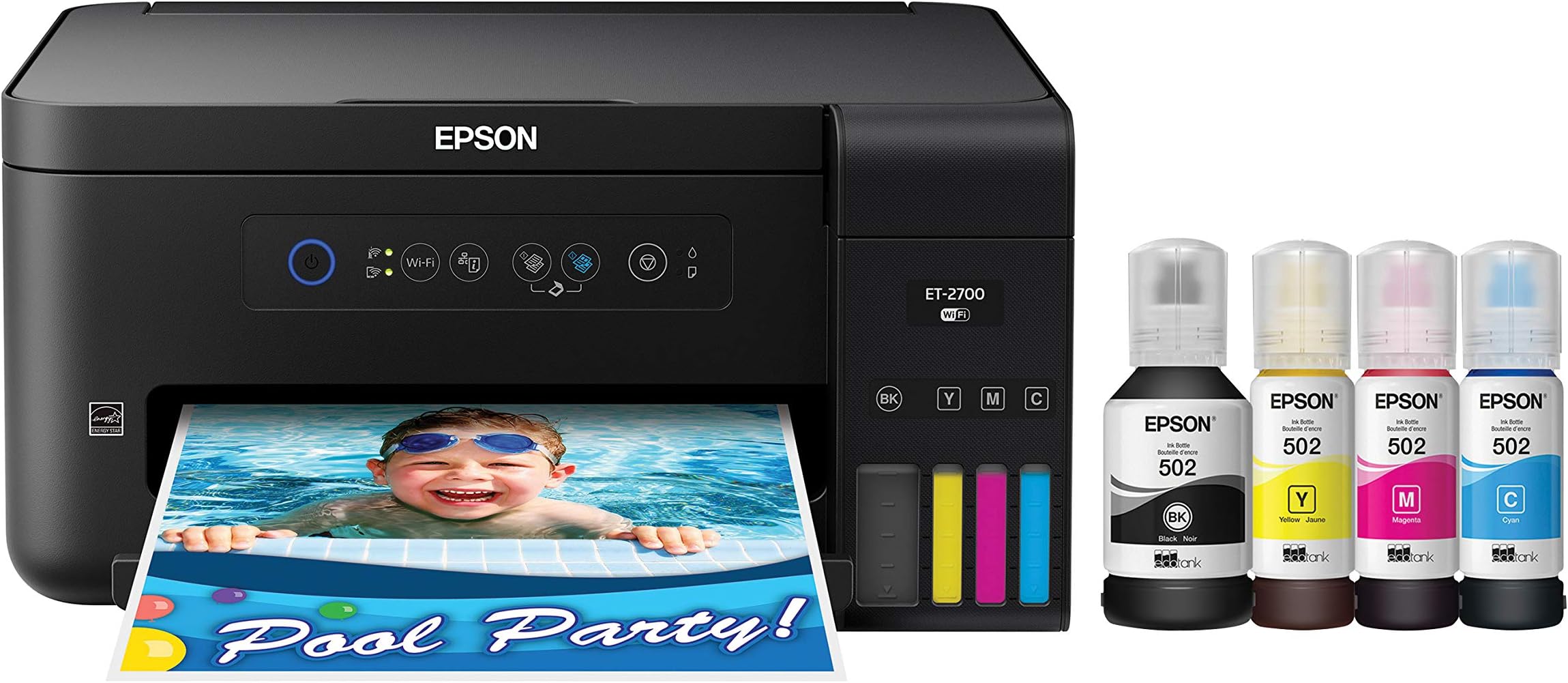
🖨️ Print smarter, save bigger, and stay effortlessly connected.
The Epson Expression ET-2700 EcoTank is a wireless all-in-one printer designed for professionals who demand high-volume, cartridge-free printing with exceptional color quality. Featuring up to 2 years of ink in the box, ultra-high 9600 dpi resolution, and seamless mobile device compatibility, it delivers cost-effective, eco-friendly printing with easy maintenance and intuitive controls.


| ASIN | B074V54TWR |
| Additional Printer functions | Copy |
| Best Sellers Rank | #505,449 in Office Products ( See Top 100 in Office Products ) #299 in Ink Tank Printers |
| Color Depth | 24 bpp |
| Compatible Devices | Laptops, PC, Smartphones |
| Control Method | App |
| Controller Type | Push Button |
| Customer Reviews | 3.7 3.7 out of 5 stars (362) |
| Date First Available | September 23, 2017 |
| Dual-sided printing | Yes |
| Duplex | Yes |
| Global Trade Identification Number | 00010343936300 |
| Hardware Interface | USB |
| Included Components | 1x bottle 502 Black (127 mL), 1x bottle each 502 Cyan, Magenta, Yellow (70 mL), CD-ROM for product setup, Expression ET-2700 EcoTank all-in-one, manual, power cord |
| Ink Color | Cyan, Magenta, Yellow, Black |
| Is Discontinued By Manufacturer | No |
| Item Weight | 11 pounds |
| Item model number | ET-2700 |
| Manufacturer | Epson |
| Max Input Sheet Capacity | 100 |
| Max copy resolution black-white | 1200 x 2400 dpi |
| Max copy resolution color | 1200 x 2400 dpi |
| Maximum Black and White Print Resolution | 1200 x 2400 dpi |
| Maximum Color Print Resolution | 9600 |
| Maximum Media Size | 8.5 x 14 inch |
| Maximum copies per run | 20 |
| Memory Storage Capacity | 64 MB |
| Model Series | Expression |
| Number of Trays | 1 |
| Number of USB 2 Ports | 1 |
| Output sheet capacity | 100 |
| Power Consumption | 12 Watts |
| Print media | Paper (plain) |
| Printer Ink Type | pigment-based ink |
| Product Dimensions | 22.3 x 14.8 x 10.2 inches |
| Scanner Type | Sheetfed |
| Sheet Size | 1 |
| Smart Home Compatibility | Smart Home Compatible |
| Supported Media Sizes | A4, Legal (8.5 x 14 inches), Letter (8.5 x 11 inches) |
| Total USB Ports | 1 |
| UPC | 010343936300 |
| Warranty Type | limited warranty |
| Wattage | 12 watts |
C**S
EXCELLENT QUALITY PRINTER, VERY EASY TO USE AND SERVICE
I am extremely happy with the quality and ease of use/maintenance with this printer. I was paying (on average) $25.00 for each black printer cartridge and up to $45.00 for a multi pack containing the color print cartridges for my previous inkjet printer/cartridges. The cartridges were small and prone to failure, necessitating constant replacement. This is no longer the case. This printer costs $15.00 per very large bottle to fill the tank. For a total of $60.00 I filled all of the tanks and had some left over. This was done a couple of months ago and I have barley made a dent in the capacity. The print quality is excellent and I have not had to do any sort of maintenance on the printer. It is an exceptional quality and value. I highly recommend it...
M**4
Terrible printer
I purchased this one to replace an Epson WF that was an ink drainer. However, this one doesn't print from devices as easily as it says...only from within the Epson app, can't print emails or anything else outside app on a device. It's not double sided print or uses thicker paper. It's to print regular single sided prints only. And the biggest disappointment is I can't return it even if you own 1 day, didn't see that anywhere when I bought it. Wouldn't have gotten it from Amazon. Stuck with something that isn't going to work for my needs and doesn't work as it describes it would. Update. I've had this printer for a year...I HATE IT!! Still can't print using wi-fi and now one of the ink won't print at all, so you can only use a black and white printer. Such a waste of money!! Now to purchase a real printer, that will be less than this money waster.
I**S
Experience a much neater easier printer!
Compared to other printers I've owned, it prints very nice, clear, clean and much faster. The unit is easy to maintain and take care of. I like the black color because after a few years with the bone colored models they start turning a sour yellow, lol, that's very hard if not impossible to clean up. I really like the refill ink bottles, first I've had. If you're the patient type it's a much neater task to perform. I haven't had to call tech support yet so I can't elaborate on that subject but considering it's the first canon that I've owned it can't be any worse than the other market dominating brands. It was delivered on time and undamaged, Very satisfied.
P**R
Looks like a great solution!
My ET 2700 arrived the other day and I quickly jumped in to set it up. A few things. Why can't these things just be SIMPLE??? Just getting the blue packing tape off of it was a pain. The part you would expect to be an issue-loading the ink-actually was pretty straightforward and pretty clever. Then the hook-up to my Mac computer. Put in the CD/DVD. Links to the Epson site. Why? What's the point? Anyway, download what looks like the package you need. Nope. Download another. Nope. Just download them all. One of them has to actually work. Then go through the steps. All of them. Oh, and by the way you need a USB cable or the whole exercise is in vain. One and a half hours later some of the things actually work. Why isn't Wi-Fi working? The computer sees the printer but..nothing. 2 hours later still nothing. iPhone and iPad can't get the printer. Then I read the fine print...Duh! No Air Print capability. Shouldn't have cheaped out and coughed up the extra cash and bought the ET 2750. Google search time. After finding, trying and discounting some third party solutions to print from a non Air Print printer I found HandyPrint and after a simple install and set-up Voila! It worked. Why 4 stars? Because after all the stupidity and idiocy to set it up when everything is working it does exactly what it is supposed to do. And yes, it could be called "bare bones" because there is no paper tray and no visual menu screen. So what? The paper sticks up and there's only one button to be concerned about..ON/OFF. No two sided printing? Flip the paper over and stick it back in! I think expectations versus cost have gotten a little messed up.
T**T
Lasted 2 years, then it gave up due to cheap plastic parts.
I have had this printer for 2 years and i have LOVED it. It was an amazing printer. i did notice that if you dont use it for a while you have to clean the heads out quite a bit to get it printing good quality again, but it eventually worked out with that. The thing that failed this printer after two year is the gears inside, the cheapo plastic ones, gave out and the printer will not feed paper anymore. Epson warranty only last 1 year for a reason, and they do not sell replacement parts, so no repair center will repair it because there are no parts to do so. Was a great printer for 2 years, never even had to fill it up more than the initial time with ink, and i print a lot. internal cheap parts failed after the warranty expired.
J**R
Adequate for home or two person office
The Epson ET-2700 was easy to load with the supplied inks. The setup with the network was easy compared to the HP products we have. Just remember to load the drivers on you computer and then allowing the driver update before connecting the ET-2700. If you are using a network router, use the WEP connection button on the router because it is easier than using your network password. The print quality is good. The scanner works well but is a bit slower at the high definition than others and not having a sheet feeder for scans or copies would make using this machine time consuming if you require multiple scanning feeds. Also, the limited capacity of the paper feed tray does not lend the machine to large print jobs. This machine is a good value for a home situation or a two-person office.
P**.
Amazing value, average quality for images
So far, I have printed over 1000 pages and have used less than one fourth of the total ink included with the printer. Refills are only about $20-40 so I’d say that’s well worth it. The only caveat is that the quality is average. After you print a couple hundred pages at once, you can get some lines on the paper if you are printing images. It does go away after “charging” whatever that means. I would highly recommend overall.
C**M
Unfortunately, the printer didn't last long as I expected it to be. Although I still believe Epson is a very good brand as the old one i was using still very good to this day which is 7 years old. Most of all ink saver. customer service is amazing! The company has integrity and 100% customer focus. When I ordered this printer 5 years ago and the delivery was delayed to the promised date. I got a call from the company and was offered a 50% discount. So grateful and unexpected. A company with good values and ethos. Highly recommend 👌
R**O
As other reviewers have said, the Wifi connection is difficult to set up and unstable. I have my desktop computer attached to the printer via usb and the wifi works through it, as long as the computer is not asleep. The printer is much faster than my previous C88 but really noisy. The print is clear and the colors good for my purposes. However, pages are already showing smudges of black ink on the edges, I will have to clean something inside the printer… This within the first ten pages of use. We will see what the future brings. It will be nice not to have to change cartridges all the time (when I can hear that there is still ink in them!). Also, the design pf the unit is brutalist. Revised one week later: I tried out the scanner which was very quiet! And also quick, compared to my Epson dedicated scanner. Also, I read the instructions about removing ink smudges inside the printer: I basically printed a few empty pages and that took care of the problem, at least for now. I tried a full page poster on ordinary paper and found there was barely a difference in the color saturation between normal and quality (and probablly the settings in between). But on glossy photo paper the colors were okay. I don't know enough to fiddle with the settings for better results, unfortunately.
L**I
I wanted a printer where I did not have to get refills of ink so often. I ended up returning this product only because I found a higher model at almost the same price as this during Black Friday deals, The one I won now has just a few extra features that are useful to me. So far I am loving this printer, I can print to my hearts content and it is always a nice crisp clear image. I can also check ink levels at a glance. Would highly recommend this product but beware there are sometimes a product that is the same but costs less
M**.
Amazing. Ink lasts FOREVER...been using it for home use for past year...both color and b/w. 300 copies the ink levels have barely moved. *note Try to copy 1 full color photo each week to keep heads from drying... then you'll be able to trust it when you need it. Love the reliablility of this printer. Highly recommend.
J**N
Good value when working. Be prepared for it to stop working. I purchased 5 units from multiple locations, but every unit failed between 6 months to one year. Customer service was ok, but did as little as possible to assist you on replacement. In my case, every replacement unit was not new but remanufacture replacement, and they do not last. Big problem with this printer is the ink pad reset feature, once so many copies are reached, it’s programmed to read as a failure. Hidden feature that makes this good printer crappy.
Trustpilot
2 weeks ago
2 months ago