📸 Capture the moment, even when you're not behind the camera!
The Canon BR-E1 Wireless Remote Control offers effortless Bluetooth operation up to 5 meters, with tactile zoom and shutter buttons designed for precision photography. Compatible with numerous Canon EOS and PowerShot cameras, it prevents camera shake for superior image quality and boasts a remarkable one-year battery life, making it an essential tool for professional and enthusiast photographers alike.


| ASIN | B06X92TNR3 |
| Batteries | 1 Lithium Ion batteries required. (included) |
| Best Sellers Rank | 10 in Camera Remote Controls |
| Brand | Canon |
| Colour | Black |
| Customer Reviews | 4.5 4.5 out of 5 stars (349) |
| Date First Available | 16 Feb. 2017 |
| Delivery information | We cannot deliver certain products outside mainland UK ( Details ). We will only be able to confirm if this product can be delivered to your chosen address when you enter your delivery address at checkout. |
| Guaranteed software updates until | unknown |
| Included components | BR-E1 Wireless Remote Control |
| Item Weight | 40 Grams |
| Item model number | BR-E1 |
| Model year | 2017 |
| Package Dimensions L x W x H | 10.4 x 6.2 x 3.5 centimetres |
| Package Weight | 0.04 Kilograms |
| Part number | BR-E1 |
| Product Dimensions L x W x H | 27 x 92 x 12 millimetres |
| Style | Remote Control |
| Warranty description | 2 Year Manufacturer |
J**S
Simple to use and fast to connect
Been using self timer but took the plunge and got this lovely small remote. Simple to connect with camera. Button for focus and another to trigger the shot. Not much more to it. It works.
D**L
Connecting...Connecting.. Do this first.....
Bluetooth paired first time but then didn't take pictures, kept saying connecting.... I was ready to return, then thought I would have another try. I discovered my M50 has an option for 10sec/remote. And now the remote works perfectly. On the 'Q' menu, where I usually select the 2sec timer function is where my 10sec/remote option is. It also has a tiny icon for a remote controller. Select this option and the remote now works with instant shots and 2secs if I use the slider on the remote. (Not 10 secs). Your camera may be different, but might be worth a try. It's probably all in the camera manual, but that was too small to read! Great remote if you are happy with the price.
M**M
Works well
Works well on my R6 could possibly be a little larger as mine as a habit of going AWOL but thats possibly a me problem. A little pricey as are most canon products but useful when you want minimise the risk of camera vibration
W**S
Works great
Purchased for use with Canon mirrorless camera. Works perfectly fine, with one button to capture the photo and another to activate auto focus. Would have been great if there was a pad where I could move the auto-focus point remotely. But the control does not offer this, probably due to support for older cameras which didn't have support for moveable focus point. Interaction with the camera is not ideal either, if you enable automatic image review (to see the captured image) the displayed image is flipped horizontally compared to what the actual photo is (I couldn't find an option to change this on the camera) you then must use the auto-focus button to back-out of the preview, if you use the shutter button it takes another photo immediately. However, if you bring up the preview by hand then the image is correct on the horizontal axis but you now can only back-out with the controller using the shutter button. This can get confusing when reviewing/testing new images and can result in quite a few 'accidental' images. It would be nice to be able to use the other buttons to cycle forward/backward when in image-preview but they seem dedicated to video and don't really do anything else. Also, it doesn't appear you can tether to the camera whilst at the same time using the remote to take photos. When you connect to the computer via the tether cable, you can no longer use bluetooth (though, I do wonder if I could connect the controller to the computer rather than the camera which I haven't tried yet). Overall, for taking photos on the camera it works great. There are some usability improvements I can see immediately and wish they were available. But getting up and running and taking photos it does what I needed.
S**Y
Camera remote control
Awsome bit of kit to remote trigger the camera
I**N
simples
Easy to use..
M**B
Works perfectly with the EOS 250D (aka SL3)
Resist the temptation to launch the camera or phone across the room and just buy the BR-E1. Much less of a faff than connecting the Canon 250D via WiFi. WiFi was great on the old app but the Canon CC app never really connected well with my current Android phone. Selected Bluetooth remote control in the connection menu and held down the two buttons on the remote control for at least three seconds to pair the devices. Did a few test shots, including one in Bulb mode, and it works perfectly.
M**D
Certainly not easy to set up.
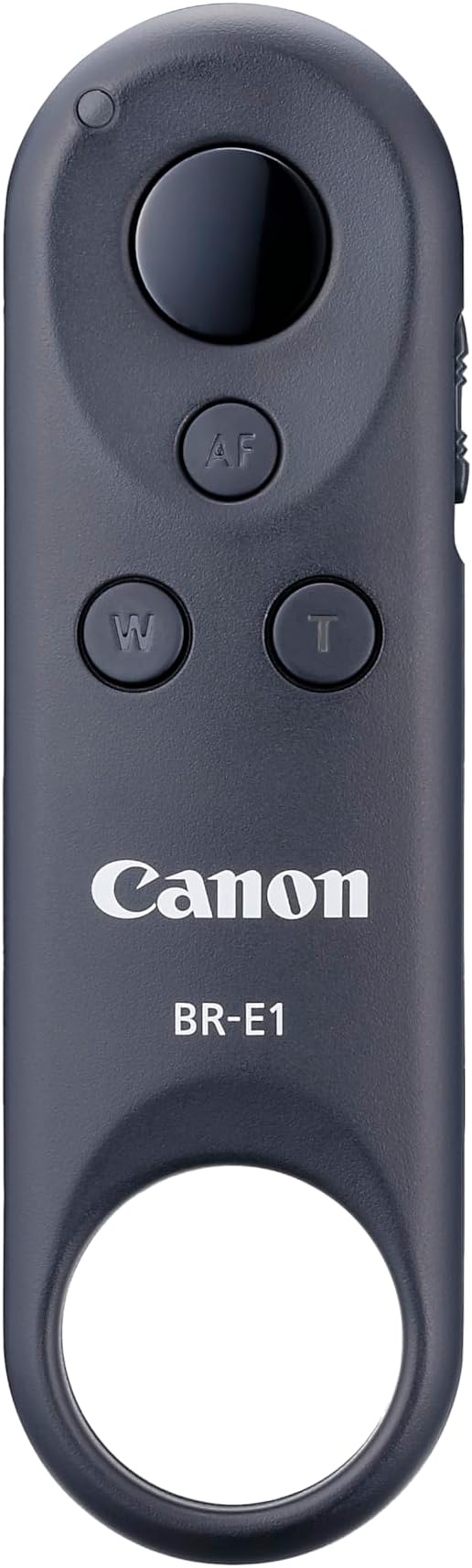
I own two Canon wired remotes, but Canon have managed to invent yet another connector for the EOS R6 so neither of them fit my new camera. That left me with two options. An official piece of wire to allow one of my old remotes to connect to the R6 or a wireless remote. Canon were charging pretty much the same price for the piece of wire as they were for the bluetooth remote so I opted for that. These things are scarce. I’ve waited months for them to come into stock, but I finally got one just before they went out of stock again. The Remote itself is small and slippery. It has a big ring on the bottom that looks like it would be great for attaching a wrist strap, but no wrist strap is supplied. There are four controls visible on the front. A big button and three small ones labelled AF, W, & T. The AF is if you want to focus without half-pressing the shutter release. If you want to use W & T (Wide & Telephoto) to drive the zoom function of your lens you have to buy a power zoom adapter. Unfortunately, at least according to Canon’s website, there is only one Power Zoom Adapter, the PZ-E1, which is only compatible with one lens - the EF-S 18-135mm. For those of us wanting to use this bluetooth remote with full-frame cameras that’s all a waste of time and gives this product unusable features that we have to pay for. Again according to their website, this is “Easy to set up…”. I would disagree. I had to download first the manual for the BR-E1 which then tells me to refer to the camera’s manual in order to find out exactly how to pair this remote with the camera. So I then had to download my camera’s full manual from Canon’s website. Eventually I discovered that I have to turn on Bluetooth (but this drains the battery even when the camera is turned off so I have to remember to turn it off again) and then go to another non-self-explanatory menu option, scroll through to the icon of the remote, tell it I want to pair, then simultaneously press both the W & T buttons on the remote until pairing is accomplished. At least that happened first time once I’d spent three-quarters of an hour messing about and downloading manuals. At least you only have to do that once. Just remember to turn Bluetooth on before use and off when you’ve finished. Once I’d got all this figured out pressing the button did indeed take pictures. Great. Switched to movie mode, pressed go on the remote and again nothing. More manual reading and it seems there’s a ‘secret’ slidey switch on the side. You have to pull this down to movie mode, and you have to, via the menu system, also tell the camera you want to remote control movies and then the go button will indeed turn on and turn off recording in movie mode on the R6. I remember when I used to plug a wire into the side of the camera and it simply became the Shutter Button. This BR-E1 has features you can’t use, is a pain to set up, and needs menu input every time you want to use it. It’s a bit of a pain, and the fact that it works 5m from the camera does not endear it to me. I like simplicity. I’m okay with the one-off pairing palaver, but having to go into the menus to try to find the bluetooth on/off every time is a step too far. Next time, Canon, stick a Bluetooth button on the body.
Trustpilot
5 days ago
1 day ago