🚀 Elevate your home WiFi game—fast, secure, and effortlessly smart!
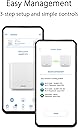
The ASUS ZenWiFi XT9 is a powerful AX7800 tri-band mesh WiFi 6 system designed to deliver ultra-fast speeds up to 7800Mbps and seamless whole-home coverage. Featuring OFDMA and MU-MIMO for efficient multi-device connectivity, it includes lifetime free AiProtection security and easy management via the ASUS Router app, making it ideal for professionals seeking reliable, secure, and high-performance home networking.


| ASIN | B0BD8K9ZLX |
| Antenna Location | Home |
| Antenna Type | Fixed |
| Best Sellers Rank | 47,439 in Computers & Accessories ( See Top 100 in Computers & Accessories ) 144 in Whole Home & Mesh Wi-Fi Systems |
| Box Contents | ASUS ZenWiFi XT9 WiFi 6 Mesh System - 1 Pack |
| Brand | ASUS |
| Brand Name | ASUS |
| Colour | Black |
| Compatible Devices | Laptop, Personal Computer, Smart Television, Tablet |
| Compatible devices | Laptop, Personal Computer, Smart Television, Tablet |
| Connectivity Protocol | WiFi |
| Connectivity Technology | Ethernet, Wi-Fi |
| Control Method | App |
| Controller Type | App Control |
| Coverage | 260 m² |
| Customer Reviews | 4.4 out of 5 stars 230 Reviews |
| Frequency | 5 GHz |
| Frequency Band Class | Tri-Band |
| Frequency band class | Tri-Band |
| Has Internet Connectivity | Yes |
| Has Security Updates | Yes |
| Is Modem Compatible | No |
| Item Dimensions L x W x H | 24.7L x 13.8W x 21.4H centimetres |
| Item Type Name | wifi system |
| Item Weight | 1 Grams |
| LAN Port Bandwidth | 2500 Mbps |
| Manufacturer | ASUS |
| Manufacturer Part Number | 90IG0740-MO3B50 |
| Model Name | ZenWiFi XT9 |
| Model Number | 90IG0740-MO3B50 |
| Model name | ZenWiFi XT9 |
| Number of Ports | 6 |
| Operating System | RouterOS |
| Other Special Features of the Product | Parental Control,Internet Security,Aimesh |
| Router Firewall Security Level | Max |
| Router Network Type | Hybrid |
| Security Protocol | WPA2 |
| Smart Home Compatibility | Smart Home Compatible |
| Special feature | Parental Control,Internet Security,Aimesh |
| Unit Count | 1.0 count |
| Wi-Fi Generation | Wi-Fi 6 |
| Wireless Compability | 2.4 GHz Radio Frequency, 5 GHz Radio Frequency, 802.11ax |
| Wireless communication standard | 2.4 GHz Radio Frequency , 5 GHz Radio Frequency , 802.11ax |
N**R
Huge upgrade on Netgear system
So I swapped out a troublesome Netgear Mesh system I had been fighting with for 2 years with limited success, dropped satellite connections, constant reboots etc. So, I bought this ASUS XT9 system in the hope I would get some peace. Let me tell you it’s a whole new world. Setting up was an absolute doddle, the router and satellite connected first time and have stayed connected, my WiFi speeds are incredible even in my garden, the app is intuitive and very useful giving me feedback on just about everything I need to know. Honestly I can’t recommend this enough and will never touch anything Netgear makes ever again
R**H
Good solid router
I'm reviewing this after long term ownership. It was a good upgrade to my older Netgear Nighthawk. The ASUS wifi router is reasonably easy to set up and manage, it really gives excellent whole home coverage, and it's extremely stable. I rebooted it only once in the long time I have had this setup. Recommended.
A**Z
Feature rich stable internet
Positives: +UNII4 dedicated Backhaul which is superior to normal 5ghz backhaul. +Security included without having to pay a subscription. +VPN options - lots of them including a very easy-to-use "Instant Guard" option which makes it easy to tunnel traffic through my home internet in a few clicks. +App is decent and works well in and out of the house. +web interface for advanced options, unlike some providers. Negatives: -ethernet speed to my main PC is not reaching a maximum for some reason, which may be due to the options I am using. (hence the 4 stars instead of 5) -Only 1 2.5gig port which means if I were to upgrade to a higher package in the future, my ethernet speed would be limited to 1gig only. -ASUS firmware can be buggy at launch. Have to research before updating - not safe to allow auto-update. OK for intermediate/advanced users but not beginners. After trying quite a few wifi routers with mixed results - including the Eero Pro 6 3-pack and TP-Link X95, I have finally settled on the ASUS XT9. It has so far given me a stable wifi connection with excellent coverage from the front of the house all the way to most of my medium-sized garden. The backhaul UNII4 "5.9ghz" channel is working really well and gives an impressive signal despite there being 3 thick brick walls and many metal appliances between the main router and the node. No other router managed the same speed without dropping the connection. The Asus app/webpage says that the connection is "OK" - the TP Links could only manage a Poor in the exact same locations, and the Eeros worked but gave me a fraction of the speed. There are too many features to list here, but the main highlights are the included security features (Eero and TP-Link make you pay for this), Many VPN options including easy and more advanced ones. There is also a decent app alongside a very in-depth web page option to configure and fiddle with the router. However, there are some negative points as well. Namely, only one 2.5 gb port on each node, and also the ethernet speed while connecting my PC to the router is not even reaching the max of 1 gb for some odd reason. This may be due to a config option, but I am not sure yet. I will have to learn to live with this and would rather have a stable connection over a super fast one. Also, ASUS firmware is famously buggy so I have had to disable auto-update. I would recommend everyone to do this as soon as they get it and research the update before applying it to avoid major issues. Other than this, I am very happy with my XT9 set. Hope to get many more years of use out of it. TLDR: an excellent feature-packed router that has finally given me a stable wifi connection throughout the house.
T**Y
very happy
I’ve been using the ASUS ZenWiFi XT9 for a few weeks, and it’s made a huge difference at home. No more dead spots when form mesh with my other two xt8 —my bedroom and garden both now have strong WiFi. Setup was simple, and the app makes it easy to see what’s connected. Streaming and video calls are smoother, and even with several devices online at once, I haven’t noticed any slowdowns. It feels reliable and fast, and I finally don’t have to argue over who’s using too much bandwidth. Definitely worth it if you want stress-free home WiFi.
L**B
Fast, brilliant coverage and solid
This replaces 5 old google Wi-Fi devices, coverage in the house is astonishing for this old Victorian 4 bed with only two units. I thought I would need 3 devices, and possible a wired back haul but no, with just two and not wired back haul these are blazingly fast in every room. My gym, for example, used to get 5mbps (I have 700mbps broadband), with this I get 250Mbps! Every room is 10 times faster than google or better. I tried a TP-link competitor device set, that was just as fast as these bit fiddly to set up and glitches a lot. This ASUs set is solid as a rock, I am truest astonished at how good they are, 100% recommend.
M**L
Shame on Asus
At the start I was very impressed. Had one XT9 and one XT8. The mesh worked wonderfully and having the extra network port at the other end was very helpful for my work. Sadly 10 months later, I came home to a smell of electrical burning and found that the XT9 was not powering on. I checked on the Asus support site and the product has 2 more years of warranty. I filled out the Support request on Amazon and it tells me to speak with Asus. Have phoned Asus and they tell me it is Amazon. I am now stuck in the middle with a non-working product. I would of expected much better from an Asus and from Amazon. Sadly this will have to be one product from Asus that I will not now recommend, Plus I will have to rethink if I buy Asus products if they are not going to provide warranty.
M**.
Excellent performance and stability
Did a lot of research before buying these. Don't normally do reviews, but found others feedback very helpful so wanted to add my thoughts. Been running a month now. Excellent performance and speed. Constantly getting over 600Mbps across the house on 5Ghz network, with over 700Mbps in the same room as the nodes (see attached pic of Speedtest). Have added two RP-AX58 Aimesh extenders, not sure really needed but helps to distribute to load over the network, especially for smart home that do not require raw speed (2.4Ghz devices). Am using second 5Ghz network as dedicated backhaul. Kids noticed a stark difference for their gaming, massive reduction in ping and latency over Sky Router and Sky extenders. I chose to rename the 2.4Ghz network and dedicate this to smart home devices with other tech/gear using the much faster 5Ghz network. My main node is connected to Sky Router via Ethernet with Sky WiFi disabled. Works very well with Sky Q and Mini boxes. Can’t really comment on comparison to other brands, but a friend has an Netgear Orbi setup, he says he gets 500Mbps over WiFi “on a good day”. So I am really pleased with the Zenwifi XT9. Final tip, I renamed the Zenwifi Network to the same SSID and password as the old Sky WiFi to save changing the passwords on all devices, everything immediately worked.
N**E
Does not like walls
Even for a modest 1890's terraced house, with internal single brick walls, two units are nowhere near enough.
J**T
plug
Didn't come with Australian plug
M**B
تجربة 6 أشهر
تعليقي بعد تجربة 6 أشهر: الجهاز مخصص لتوزيع إشارة الإنترنت في جميع أرجاء المنزل، يعني جربته لفترة طويلة، لذلك حكمي مبني على تجربة فعلية وعميقة. - الأداء ممتاز في تقوية الإشارة وتوزيعها بشكل متوازن داخل البيت. - إذا كان المنزل يحتوي على عدة أدوار، الأفضل توصيل الجهاز بسلك (Ethernet) بدلًا من الاعتماد على الواي فاي، للحصول على السرعة الكاملة. - عند توزيع الأجهزة، يجب أن تكون في خطوط متوازية بحيث يلتقط كل جهاز الإشارة من الآخر بشكل مباشر (مثلاً: في الغرفة المجاورة للموزع الرئيسي ، أو في الدور العلوي/السفلي بشكل موازي للموزع الرئيسي). - يُفضل أن تكون الأجهزة متقاربة قدر الإمكان، مع عدد قليل من الجدران بينهم. وجود جدار واحد لا يؤثر كثيرًا، لكن أكثر من جدار يضعف السرعة. - أنا شخصيًا اشتريت 4 أجهزة ووزعتها بهذه الطريقة فقط الجهاز الموزع الرئيسي شبكته بكيبل في المودم وبقية الاجهزه تاخذ الاشاره من الرئيسي عن طريق واي فاي، والنتيجة أن السرعة أصبحت كاملة في جميع أنحاء المنزل. - ملاحظة: تقريبًا كل شهر تحتاج الأجهزة إلى إعادة تشغيل لأنها تعلق وتضعف الإشارة، لكن إعادة التشغيل مره واحده في الشهر بسيطة ولا تُعتبر مشكلة مزعجة.
V**R
Well worth it if you’re looking for a wireguard vpn config (and not only)
Wanted a mesh that supports WireGuard setup for VPN, i tried XD5 with 3 points before this (2-floor house) but that one had some strange issues, like switching itself off so I returned it. Looked at this one, and was worried this might have issues with meshing from different floors and I can say I am pleasantly surprised, all works very well. Now, Asus’s phone app is quite rubbish but for simple setup it does the trick. If you want to do more medium to advanced settings to it, the classic way of accessing a router (ie via IP address) works a treat! You could do it via the app as well, and I tried with the XD5 but I wanted yo throw the phone out the window. All in all very happy with this one
F**O
881 Mbps....Wifi 6
¡He estado buscando el dispositivo perfecto para mi red doméstica durante mucho tiempo y ASUS ZenWiFi XT9 es un verdadero hallazgo! 🎉 Durante 10 años he estado experimentando con diferentes enrutadores de diferentes compañías para obtener la mejor velocidad inalámbrica, este enrutador me impresionó por su confiabilidad y velocidad. Funciona sin un solo reinicio, proporcionando una conexión Wi-Fi estable y rápida. 👍 La facilidad de instalación me sorprendió. Todo resultó ser tan intuitivo que ni siquiera tuve que profundizar en la configuración durante horas. También se puede configurar de forma remota. Me gustó especialmente que este enrutador proporcione una velocidad de Internet increíble. La captura de pantalla adjunta habla por sí sola: esta es una conexión inalámbrica Wifi 6, ¡ni siquiera una con cable! 💻📶 Cuando necesite un segundo dispositivo para ampliar el área de cobertura, con gusto elegiré otro ASUS ZenWiFi XT9. Por cierto, son muy fáciles de conectar entre sí. Su potencia es increíble y todos mis dispositivos funcionan de manera estable y sin fallas No estoy seguro de que cubra el área que han indicado los fabricantes, tal vez esto se aplique al espacio abierto. Pero para un apartamento de 50-80 cuadrados, seguramente será suficiente si lo coloca en algún punto intermedio. Por cierto, cuando estaba eligiendo un enrutador, noté algunas críticas no tan buenas para este modelo. ¡Pero decidí arriesgarme y no me arrepiento! Ahora tengo un dispositivo confiable y ni siquiera considero otras opciones. 🔝 En general, estoy muy contento con mi elección y recomendaría el ASUS ZenWiFi XT9 a cualquiera que busque un enrutador confiable, rápido y fácil de configurar. 🏡📡
U**R
Trash
These things refuse to do as they are told, had one completely brick and is not responding to rescue mode or reset button or anything. All the others seem to insist on joining a mesh network without explicitly being told to do so. Nightmare to manage and deal with. Do not buy
Trustpilot
1 week ago
4 days ago