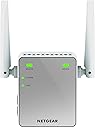
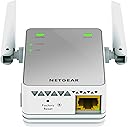

🚀 Boost Your Signal, Boost Your Life!
The NETGEAR N300 EX2700 WiFi Booster is a compact, easy-to-install range extender that enhances your wireless network by covering up to 600 sq ft and connecting up to 10 devices at speeds up to 300 Mbps. Compatible with any router, it features a wired Ethernet port for stable connections and supports advanced security protocols, making it the perfect solution for eliminating dead zones and improving internet reliability in small to medium spaces.


| ASIN | B00NIUHAG6 |
| Are Batteries Included | No |
| Best Sellers Rank | 1,535 in Computers & Accessories ( See Top 100 in Computers & Accessories ) 15 in Network Repeaters |
| Brand | NETGEAR |
| Colour | berry |
| Connectivity Type | Yes |
| Customer Reviews | 4.1 4.1 out of 5 stars (33,450) |
| Date First Available | 1 Sept. 2014 |
| Guaranteed software updates until | unknown |
| Item Weight | 97.8 g |
| Item model number | EX2700-100UKS |
| Manufacturer | NETGEAR |
| Product Dimensions | 5.5 x 3.4 x 6.7 cm; 98 g |
| Series | EX2700 |
| Wireless Type | 802.11b, 802.11g, 802.11n |
A**R
Very good, changed my life
I live in a small flat so I can't say how this works for houses, but right now the extender is 10 metres from the router and the lights are always green, which means the signal is excellent. Supposedly, this thing doesn't improve the speed of the connection and that's probably true but once my signal jumped from 1-2 bars to 5, I connect much faster and I don't have to constantly troubleshoot the connection. My laptop always struggled to connect in this flat, my flatmates' too, so we thought it's a problem with the router, but now it looks like it was the signal. Of course, the speed during the day depends on very many factors and this box isn't a cure for all of them, don't even think that it is, but now in my flat we can stream movies without a problem with just standard broadband (not fibre), at only 8 mega. Fibre might give you 30 mega and that might not even work as well as it should, but before you change the router or your internet provider, try this little box. I was SO frustrated these past several years with my crappy connection, many times I wanted to throw my laptop out the window because it was configured properly but just wouldn't work as it should, but now I don't have this problem anymore. Hallelujah. The instructions say that this box should be relatively close to the router but mine is at 10 metres away, separated from the router by a fridge and a wall and furniture, and it still works perfect. I've had it for several months now and never had any issues. It's easy to install, just follow the simple instructions. Just make sure you do have the kind of connection that is required, read the description of this product before you buy it and check your connection specifications in your computer, because if you don't, you might not be able to use this extender or the installation will be more difficult. I found a manual for my router, also Netgear, and double-checked with an illustration that I do indeed have the WPS button on the router. From then on everything was a piece of cake - and I'm a woman who knows nothing about technology so that tells you something. I can't recommend it enough. It's a life saver, definitely worth the price.
A**A
NETGEAR EX2700-100UKS 300 Mbps Wi-Fi Range Extender (Wi-Fi Booster) Silver- EXCELLENT!
NETGEAR EX2700-100UKS 300 Mbps Wi-Fi Range Extender (Wi-Fi Booster) Silver Sold and Dispatched by Amazon I live in a big house with ground floor, floor 1 and floor 2. The original internet router given by my Internet Service Provider, was too far away from my devices (laptop, smartphone) when I was on the top floor. I was getting 1 bar internet signal and many of the times no signal/internet at all! Then, I knew I had to get a Wi-Fi extender and found this!- The "#1 Best Seller in Wireless Access Points" on Amazon and I agree. The item was delivered quick and packed adequately. It's a good size and fits a UK 3-pin socket. Installation was easy-peasy. All I had to do was plug it close to my current router, switch it on, and press the "WPS" on the Wi-Fi extender and then press the "WPS" on the router (you can also connect via browser. Instructions given). Waited a minute and it was connected. Then, I unplugged the Wi-Fi extender and moved it to a location where the Wi-Fi signal is weak (top floor). Then, I had to connect my devices (smartphone, laptop...) by searching for the Wi-Fi device and connecting to it... The Wi-Fi-Extender would be named [***Your existing Wi-Fi network name***_EXT]. For example, "TalkTalk1234_EXT". You'll be asked to enter password your current Wi-Fi password. All of this (the name and the password to access the Extender can be changed via [www. mywifiext.net]. Username: admin, Password: password. This can be changed to. Note, you must be connected to the extender to change these settings. All of these instructions are included. So, I connected the extender on the top floor (where it was 0-1 bar signal with the previous router) and the internet was good for a few minutes. I then realise that although I had excellent/highest signal, Internet was not working. Many others experienced this problem and returned it. I then plugged the extender on the 1st floor, where the signal would normally be 2-3 bars with the router. Then, it worked. No internet problem or loss of connection for more than a month. I RECOMMEND PLACING THE EXTENDER IN AN AREA WHERE YOU WOULD NORMALLY GET 2-3 SIGNAL BAR STRENGTH IF YOU WERE USING YOUR ROUTER PROVIDED BY YOUR INTERNET SERVICE PROVIDER. If you place the extender in an area where you normally get NO Wi-Fi signal or only 1 bar (weak) signal, it will not work. You can check this by using your smartphone- move to a location where you get 'medium signal' when connect to your main router, and then place the extender there. So I placed mine on the 1st floor instead of the top floor. Works brilliantly. No problems. If your device does not support Wi-Fi but can have internet on it, then you can get an Ethernet cable and plug it into the Ethernet port located at the bottom of the extender and connect it to your device. When I go to sleep, I sometimes switch the extender off. Next morning, put it back on, No problem (no setting the extender all over again or anything. Turns on within a minute.) 100% recommend this Wi-Fi Extender. I will give an update after a year. And remember, when buying electrical devices (and even other expensive items) such as smartphones, laptops, network adapters, DVD players, even USBs, etc... Always buy from "Sold and Dispatched by Amazon". - avoid third party sellers and even "fulfilled" sellers as it would reduce the chance of you getting a defect, less hassle if a problem was to occur and getting a genuine product. -----------UPDATE-------------(After 1 year) Nothing to report other than it's work absolutely fine. I'm getting the same Internet speed as if I was connected to the main router. I have changed the log-in password for the Extender and the main router- which I recommend everyone doing to increase security. : If you let ANYONE use your Wifi (i.e. your friend), they can use the default log-in info and change the router settings and mess things up- then you have to call out a network engineer to fix it= incur costs. Also, anyone would be able to block you from the Wifi using the device's Media Access Control (MAC) address, which is a unique identifier for a network device. This Extender has the ability to do this via an Access Control List (ACL). Sounds complicated but it can be done. All good so far. Internet connection never went down. Still recommend. ------------------------------------- Any questions regarding about this item, please leave a comment and I'll get back to you ASAP. I really hope this helps you :)
M**O
Good at the price, but not perfect
Been using this for a few days to extend an Asus RTN66U at the furthest corner of our house. Firstly its easy to setup with WPS and started working immediately within 2 mins out of box. Its got a decent web interface like a router which auto-updated my firmware seamlessly. Its really compact and gives good (but not amazing) signal strength as a client on the router side and access point on the device side and is ideal for overlapping reception areas in our average sized chalet bungalow. Now there is a BUT, its currently in our loft after trying a few locations but the issue is not coverage, its speed and to a lesser extent reliability, I wonder if all extenders suffer this too, reading reviews of other brands. So its had one reboot in 4 days, and the speeds are roughly half what you get with a direct connection to the router, mine will not switch to 300mbps mode. It can occasionally hang and take a while to connect a client device. For the price I paid, it does the job and is good value, if I'd paid full price it would have lost a star. P.S. I just factory reset and it now connects at a full 300Mbps and runs quicker overall.
M**S
Simple and effective
Took it out of box, followed clear instructions, connected laptop to extender and watch 1 bar shoot up to 5 full bars. Am I impressed, I should say so. It took me longer to find the WPS button on my Sky router than it did to complete setup.
V**K
I still face minor issues
R**O
Es un poco complicado configurar con el router
P**G
I needed something to extend my wifi coverage to a bedroom at the far end of the house. I managed to set this up in less than 5 mins from unboxing the netgear. I plugged it into a wall socket close to my main router (in the kitchen), switch it on till the power light stopped blinking, press the WPS switch on the netgear and the WPS button on my router to get the two talking. Once the WPS light turn green and stopped blinking it's all set up. It has the wifi name the same as my home wifi plus the _EXT to it. Share the same password too. I took the "set-up ready" netgear to a socket close to my bedroom, plugged it in and it worked!. Perfect. No more wifi blindspot.
R**B
Qui si vede in azione il formidabile lavoro che svolge Netgear, qualità/prezzo imbattibile.. La mia casa è una casa a due piani, e il povero router non riusciva a gestire bene tutti e due i piani, installando questo piccolo dispositiva in casa mia, sono riuscito a potenziare il segnale del 80%, arriva perfino in soffitta ora! La configurazione è molto semplice, purtroppo nella confezione non è presente un libretto delle istruzioni in italiano, comunque installando nel proprio pc il programma apposito(compreso nella confezione) configurarlo sarà un gioco da ragazzi. Inoltre è disponibile un opzione attraverso il tasto 'WPS' che permette di configurare meccanicamente il prodotto con il router. Si! lo consiglio a chiunque voglia potenziare il prorpio segnale WI-FI con ottimi risultati.
H**K
Pathetic speed when connected on this extender.I regret buying this.
Trustpilot
2 months ago
1 month ago