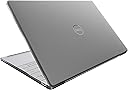
🛡️ Protect your powerhouse in style—because your Dell deserves the best!
The Gumdrop ProTech Hard Shell Laptop Case is a precision-engineered, lightweight polycarbonate cover designed exclusively for the Dell XPS 13 Plus 9320. Offering full 8-sided protection with a scratch-resistant frosted finish, ergonomic rubber feet for stability, and enhanced cooling vents, it combines sleek minimalism with robust defense. Easy to install and carry, it’s the ultimate accessory for professionals who demand style and durability on the go.
| Standing screen display size | 13 Inches |
| Brand | Gumdrop Cases |
| Item model number | 11D004E01 |
| Item Weight | 9.8 ounces |
| Product Dimensions | 0.95 x 11.82 x 8 inches |
| Item Dimensions LxWxH | 0.95 x 11.82 x 8 inches |
| Color | Black |
| Department | Unisex Adult |
| Manufacturer | Gumdrop Cases |
| ASIN | B0B94M9GB4 |
| Date First Available | April 29, 2022 |
T**A
Fits my XPS 15 9530 perfectly
Fits like a glove. This is an exceptional laptop and this'll surely help keeping it safe from scuffs and soda can stains when docked. Ventilation won't be an issue at all with the openings.For those complaining about the cheap sticker, it's nothing a minute of your time, a blowdryer, and a slow pull couldn't fix. No adhesive left.Although this model is albeit older in Moore's years, it's a very strong laptop and this shell will preserve its structural integrity for years to come.
L**L
Fits and protects my expensive computer
Great product. Made well and fits my computer. Easy to put on. I installed both piece with no problem in under a minute. Fast shipping. If I need another case, I would buy this again. The look of this is very nice. Light grey see through so the dell is still showing up. Has vent cut outs on the bottom to allow my computer to breath.
L**N
Decent Hard Case
Would actually rate 4.5 stars.Overall, fits my Dell XPS 15 9500 well. Keyboard section pops on pretty easily. The screen section a little finagling to pop that last corner on. I’ve opened and closed at a handful of times and the pieces seem to stay together.. Overall, I think it’ll keep my computer protected from scratches.
M**S
Made me nervous to install... but fits very snugly and will protect my silver finish!
I cringed and held my breath as I snapped the hard plastic case around my delicate and expensive XPS 9500! But once it's on, its nice and snug. I have the silver and white shell so it scratches very easily and gets dirty quickly. I'm hoping this cover will protect it for years to come and it's a hard one to find... I've been looking for a solution for months. Glad to have it - you will be too.I don't love the tab for opening, I'd rather have that not there so it's easier to open. Once it's closed, you have to lift it to open the top. Other than that, I am very happy with it!
E**M
Great case XPS15
First time buyer of a Gumdrop case. Got it for my XPS 15. Fitment is great, it does take a little patience to get it on. On a scale of 1-10 of difficulty I’d say it’s a 6-7. You have to finesse the sides a little bit to get it into place. It feels very durable too!
G**S
Case damages Dell 9315 laptop. Do not buy.
I spent what I perceived to be a premium price on the gumdrop case for my new dell XPS13 9315 business laptop, as it is supposed to be a perfect, custom fit. Unfortunately it is not a perfect, custom fit. In fact, the case itself is damaging my lap too because of its design. The case is catching on my laptop screen when you try to push the screen back beyond a 90 degree angle. If it weren’t for the design flaw I’d rate 4-5 stars. However, it’s damaging my computer so I cannot recommend this case to any dell 9315 owners.
D**L
Provides a comfortable grip and good protection against scratches and other minor damage
Having spent nearly $3K for my Dell XPS 9520, I was concerned about it being dropped, scratched and/or otherwise physically damaged as I carried it to and from my office/home daily and into the field (such as concert and festival photography gigs).Now that I've used this case for several weeks, I'm quite pleased with it. It does tend to make the laptop bulkier and an already heavy laptop (at 4.5 lbs+ with the touchscreen) somewhat heavier, but I've never been a proponent of the "thinner is always better" philosophy when it comes to laptops. What it does do is provide a much better and more secure grip on the laptop, which the stock, very smooth aluminum frame did not provide.The case does not seem to cause any problem with cooling, as the back panel of the XPS 9520, where most of the airflow occurs, is not covered. Installation was literally a snap. As for appearance, it's really quite nice; the translucent, pebbled, slightly amber, "smoke grey" finish over the laptop's bright aluminum frame and lid results in an impression of sintered bronze.Note that the case covers the opening for a wedge-style cable lock on the left hand side of the XPS 9520, so if you need or intend to use a cable lock regularly, this cover will not work for you without modification (which may compromise the cover's secure fit). So far, I have no issues with the cover blocking access to USB-C or other ports, or interfering with the touch screen or built-in cameras (Web and infrared) despite the 9520's very thin (InfinityEdge) bezel.It will take some time for me to know how well this case survives daily use and transport, and/or whether the polycarbonate will discolor or darken over time. I'm also not going to conduct any drop testing of the laptop; this case doesn't include any flexible, shock-absorbing components as some other Gumdrop cases do. But so far, other than the long lead time and admittedly high price, I'm quite happy with this laptop case.
O**.
Fits the Dell XPS 13 Plus 9320
This case fits the Dell XPS 13 Plus 9320 just fine. The fit is not loose. The cutouts at the bottom align perfectly with the vents of the laptop. The cutouts corresponding to the USB-C/Thunderbolt ports are wide enough and do not interfere with plugging-in USB-C/Thunderbolt cables. The lid/screen of the laptop opens at the the full range of angle per the design of the laptop when the top case is installed.Installation: It takes a little bit of time to figure out which end of the top case and which end of the bottom case to install first in order to not scratch or damage the laptop. For both the top case and bottom case, install first at the front end of the laptop, then carefully work on the sides, and then work on the back end last. Once the top and bottom case are fully installed, the fit is snug and not loose. No issues opening and closing the lid of the laptop.
Trustpilot
1 month ago
1 month ago