🎯 Master your multi-PC setup with precision and style!
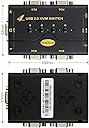
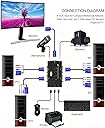
The JideTech 2 Port USB 2.0 VGA KVM Switch is a compact, plug-and-play device that enables professionals to control two computers using a single keyboard, mouse, and VGA monitor. Supporting high-definition resolutions up to 2048x1536 and integrated audio/mic switching, it enhances workspace efficiency while maintaining broad OS compatibility and reliable performance.


| ASIN | B071Y6C516 |
| Actuator Type | Push Button |
| Best Sellers Rank | #480 in KVM Switches |
| Brand | JideTech |
| Brand Name | JideTech |
| Circuit Type | 1-way |
| Color | 41UA |
| Compatible Devices | Windows, Unix, Linux, Mac, Computers, Servers |
| Connectivity Protocol | Usb |
| Connector Type | Usb,wireless |
| Contact Material | Metal |
| Contact Type | Normally Open |
| Control Method | Push Button |
| Control Type | Manual |
| Controller Type | Push Button |
| Current Rating | 2 A |
| Customer Reviews | 4.4 out of 5 stars 983 Reviews |
| International Protection Rating | IP60 |
| Item Dimensions | 1.96 x 3.15 x 3.15 inches |
| Item Weight | 9.6 ounces |
| Manufacturer | JideTech |
| Material Type | Plastic |
| Model | 1 |
| Mounting Type | Plug-In Mount |
| Number of Items | 1 |
| Number of Positions | 4 |
| Operating Voltage | 5 volts |
| Operation Mode | Automatic,Push Button |
| Part Number | JD-41UA |
| Switch Type | Push Button |
| Terminal | Button |
| UPC | 716045930188 |
| Unit Count | 1 Count |
S**N
Fantastic Little 4-Port Divice!
I have been struggling working from home on my work laptop. I have bear paws for hands, and poor eyesight, so using a laptop keyboard and small screen made me uncomfortable, for many hours every day. My home setup has a nice keyboard and a huge screen. If only I could use the same keyboard and screen with my laptop? Enter this handy little gizmo! I just purchased a new desktop, but still have some use left for my old desktop, so needed more than a 2-port KVM. I ordered the 4-Port VGA switch and it arrived quickly and well packaged. The Instruction booklet covered many different models, the 4-Port VGA was just one of them (covered in two pages). Set-up was super easy. Plug in the "One" monitor, keyboard and mouse. Then using the INCLUDED special cables, connect those to the various computer systems. I started with my newest desktop, and my work laptop. Powered up the two computers, and BAM! I was looking at my "formerly tiny" laptop screen on my BIG home monitor. Pressed the little selection button on top and BAM! I was looking at my new Windows 10 desktop. A day later, I got around to connecting my old desktop, and now when I pressed the third selector button, you guessed it ... BAM! I was looking at my old Windows 7 desktop. It is SO easy to switch between them. There is maybe a 2 second lag between pressing the button, and seeing the new desktop appear. Could not be happier! Okay ... upon reflection, I could be a tad happier. The cables that they provide are a little on the short side. Only 4' long. I got them to work with my three computer set-up, but another foot of cable would have made things easier. Only other complaint/issue is just one of design. The box itself is small (smaller than my ordinary cell phone) and that means you will have something plugged into every single side. Makes the cables a bit messy. If the box were longer, so that the main ports were all on the "back" and the single monitor, keyboard and mouse were on one end or the other, I could tuck the box a little further under the monitor, and no big, black cable would be running across the desktop. But for this price, I am not taking a star away from the review. And in fact, I knew this going in, and bought it anyway, because my expectation is that I will soon get everything off the old and onto the new desktop, and then that cable can be removed. I bought the 4-port so that eventually, I would have just two computers plugged in on one side, and NOTHING plugged into the two front ports. Anyway ... to sum it all up. It has only been three days, but working from home, using a nice keyboard, and big monitor, has made my life so much more pleasant. I only wish I had known about KVM switches back in February! EDIT: It's been 45 days now, and this device is still fantastic. No issues. I can switch between the three devices without any issues
A**R
Great KVM switch
My old KVM switch would not work with my logitech K750 solar keyboard and MX Anywhere2 wireless mouse. They both use the Logitech unifying dongle, as a result I had to use an old Logitech BlueTooth mouse and keyboard with my old KVM switch to operate my 4 PC's. From the reviews I was hesitant about whether the JideTech KVM switch would work with my K750 and MX Anywhere, but its working like a charm. Pros: 1) Very compact, use less space than my old KVM 2) Cables are also less intrusive, this is due to the USB design. 3) Works with Logitech Unifying Dongles and Software 4) Very economical, other KVM switches I looked were costlier and larger! Cons: 1) Instruction Manual was vague as to how to connect wireless Keyboard and Mouse. After experimenting, I determined that you had to insert the Logitech dongle into the USB Hub outlet instead of either the keyboard or mouse usb outlets. Once I did this every PC I switched to recognized my Logitech unifying mouse and keyboard. 2) Has 4 buttons to switch up to 4 PC's instead of 1 button, but this is a very minor concern in my opinion. Overall, in summary, this a great little KVM switch for those looking to reduce clutter around their PC area from older oversized kvm switches with their older larger accompanying cables!
M**Y
Best little KVM Switch
Great little KVM switch for small environments. I run a small home lab with 3 machines, and for years I would plug/unplug the sole monitor between machines when I couldn't access them remotely or when one of them locked up. I finally purchased this KVM switch based on price and reviews. Pretty easy to install and runs off the USB power of connected machines. KVM switch recognized my Centos and Xen machines right away. My windows machine had to be rebooted before it worked with it. Dont know why, it should be plug and play. But after spending 10 minutes trying everything to get it to fire up, I went ahead and followed the instructions and spent the 2 minutes rebooting the windows machine and it came right up. Bottom line: It does what it says. Has 4 ports with mic and sound (which I won't use). We'll see how long it lasts. If I have any issues with it I'll update this post. ... MP
A**N
great value for money
Works flawlessly as described. The device itself is pretty small -- not so large as it appears in image, so good. The only "con" I can think of is that the wires are pretty sturdy and so lots of wires will clutter up the space -- so have plenty space behind the monitor to tuck the wires away. Other than that this is very good product and works as advertised. It arrived well in time. Even if you do not need to connect monitor -- still it is a good solution to connect 4 computers to share keyboard/mice and external Hard-disk. or printer. In fact I am planning to use the 3rd USB port (there are 3) to connect a 4 port USB and thus share several hard disks. I just ordered one -- will see how it goes. Bottom line -- with just $30 price tag, and so much functionality, you just can't lose on this deal.
T**F
good deal for the money, good balance of functionality for the price
Quite pleased with the JideTech 4 Port KVM switch purchased about Mid May 2019 for about $30 which I consider to be a very good balance of functionality for the price. I have it connected to one Linux (Intel) box and one XP (Intel) box video feeding via DB-15F 15-pin type VGA connectors, KM feeding via a single USB, and a single TS type speaker connector, all integrated on one KVM cable per machine. All machines share one speaker set which is most convenient and the KVM unit provides a common USB connection which I use for an external hard disk thus providing common storage directly accessed. I tested various KVM connections and machine boots finding that the switch did not exhibit any peculiarities . The fully connected footprint is about 8x8 inches and the switch derives its power from the connected machines USB port thus there is no additional power device. It would be nice if the documentation provided the cable pin assignments and connector specifications. Overall I do recommend this KVM switch as a good deal for the money.
J**L
Functional with issues
I bought this KVM switch almost a year ago. I needed a KVM that would handle three computers. The first thing I noticed is that my monitor would shift into blue (tint) screen mode. I thought the monitor was the issue. Tried a different monitor, and it did the same thing. When monitor is connected directly to PC, there was no blue tint issue. The Mouse sporadically freezes when connected to the KVM, and the keyboard will act like I'm holding down a key for an excessive period of time, even though I'm not.... particularly with the letters e, i, and n.... so then I have to correct what I'm typing after the KVM decides it's had enough fun with those letters repeated a bazillion times. Thankfully this was not a super expensive produce.
S**R
4 Port VGA KVM Switch with USB Hub
Works as advertised, only negative is that the cables are 46" long (measured), which means I had to buy extension cables to be able to hook up computers in a cabinet. Orginally I rated it as 4 stars because I had to buy an extension cable, however a review of the competition revealed that they all have slightly short cables, so I changed it to 5 stars, since it is an excellent product. Note their design makes use of unused pins in the VGA connector. This is clever, but it also means you have to be sure an use the included cables to hook up to the PC and use the extension on the other end of the VGA cable. It also means that you only need one extension cable, the other designs require a separate USB extension cable as well as a VGA extension cable. It also means that you CANNOT use a standard VGA extension cable. This is because a "Standard" cable grounds the unused pins, which blocks the keyboard and mouse. You have to use an HD-15 D-SUB extension cable. Make sure the cable spec says all pins are passed through. (Note a DB-15 cable has the wrong form factor and will not fit.) The one I used and that worked is: Amphenol CS-DSDHD15MF0-005 15-Pin HD15 Deluxe D-Sub Cable, Shielded, Male/Female, 5'
G**S
Simple Plug n Play w/good value!
The JideTech 4 port VGA KVM Switch is one of the easiest solutions to linking multiple computers to a single display. The Switch feels well made with a metal casing and does not require an external power source nor any software, a true plug and play device! Pro's: Purchase comes with 4 VGA/Audio/Mic combo cables making it really good value for what you get. The switch has LED light indicator so you know which device is currently connected. No external power supply required No software or drivers required 3 USB 2.0 Output Ports (Keyboard, Mouse, Auxiliary for printer or other device) 3.5mm Output Jacks for MIC & Speaker 2K Video resolution (2048*1536) Con's: Does not support multi-media keyboards Does not support wireless peripherals (but most VGA switches don't) Overall, the switch functions well, and Plug n Play is as easy as it gets. For the price, you get some nice features and the included VGA Cables add value. The wireless peripheral support is a bit of a bummer and there really isn't a work around for it (I was not able to find a way to shut off the emulator). If you're set on using a wireless keyboard and mouse, you will need to go for a HDMI or Display Port KVM switch. The other alternative would be to invest in a Bluetooth Keyboard and Mouse that can pair to multiple devices, but then that would require that all devices hooked up to the switch support Bluetooth as well. Note: In an attempt to get wireless peripherals to function, I did reach out to Customer Service via Amazon's 'Contact the Seller' service. The response time was very quick--within 24 hours (including Sundays!) Unfortunately, I was informed that there is no way to turn the emulator off on this model switch. Perhaps they'll incorporate a emulator switch or button sequence in a updated future model.
A**N
Very easy to set up
All the cables needed were supplied and tidy. Very easy and straight forward to set up. Worked no problem.
R**O
Todo en uno
Fácil de usar y reconocer en equipos Windows Mac y Linux. Excelente definición para monitores buena calidad en transferencia de sonido
L**O
Prodotto completo e di qualità
D**N
Bon fonctionnement
Bon fonctionnement pour l'instant.
J**.
Buena relación precio-calidad
Buena salida de video y audio, le pongo 4 estrellas ya que no conmuta automáticamente (al usar solamente la PC 2, otros kvms si cambian en automático) también los cables son un poco cortos aunque si están bien blindados aunque se ven algo delgados.
Trustpilot
1 month ago
1 month ago