Desertcart purchases this item on your behalf and handles shipping, customs, and support to Hungary.
⌨️ Elevate your workspace with the ultra-slim keyboard that keeps you connected and in control.
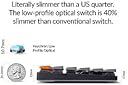
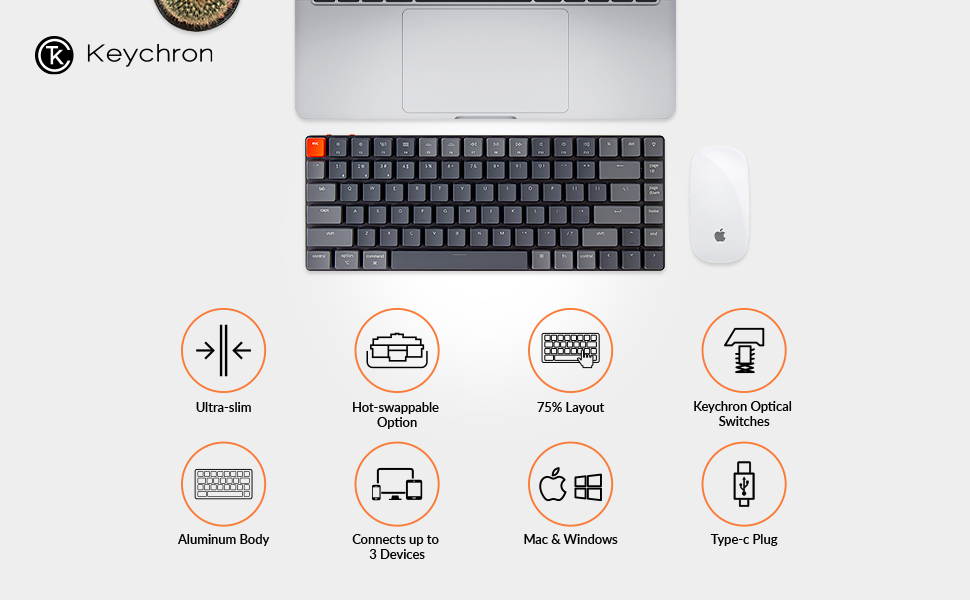
The Keychron K3 is a sleek, ultra-slim 75% mechanical keyboard featuring 84 low-profile optical red switches that are hot-swappable for easy customization. It supports Bluetooth 5.1 multi-device pairing and USB-C wired connection, compatible with both Mac and Windows. Built with a reinforced aluminum frame and white LED backlighting, it offers a premium typing experience designed for professionals who demand portability, durability, and seamless multitasking.


| ASIN | B09GG2YXX3 |
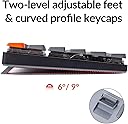
| Additional Features | Reinforced body structure, Two level adjustable rubber feet |
| Antenna Location | Office |
| Best Sellers Rank | #27,038 in Video Games ( See Top 100 in Video Games ) #133 in Mac Gaming Keyboards #1,436 in PC Gaming Keyboards #2,699 in Computer Keyboards |
| Brand | Keychron |
| Built-In Media | 1 x Keyboard, 1 x USB-A to USB Type-C Cable, 1 x Keycap Puller, 1 x Switch Puller (For Optical version only), 1 x Dust Cover |
| Button Quantity | 84 |
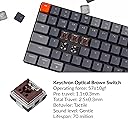
| Color | Low-profile Keychron optical red switch |
| Compatible Devices | PC |
| Compatible Operating System Family | MacOS, Windows |
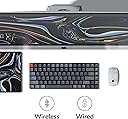
| Connectivity Technology | Bluetooth and Type-C cable |
| Customer Reviews | 4.0 out of 5 stars 94 Reviews |
| Enclosure Material | Aluminum |
| External Testing Certification | Não aplicável |
| Generation | 2nd |
| Hand Orientation | Ambidextrous |
| Item Dimensions L x W x H | 12.05"L x 4.57"W x 0.87"H |
| Keyboard Backlighting Color Support | Single Color |
| Keyboard Description | Mechanical,Multimedia |
| Keyboard Layout | QWERTY |
| Keyboard Plate Material | Aluminum |
| Manufacturer | Keychron |
| Mechanical Keyboard Switch Model | Low-profile Keychron Optical Red Switch |
| Mfr Part Number | K3-D1 |
| Model Name | K3 Ultra-slim Wireless Mechanical Keyboard |
| Model Number | K3-D1 |
| Number of Batteries Required | 1 |
| Number of Items | 1 |
| Number of Keys | 84 |
| Number of Packs | 1 |
| Number of Sections | 5 |
| Power Source | Built-in rechargeable battery |
| Recommended Uses For Product | Office |
| Series Number | 1 |
| Special Feature | Reinforced body structure, Two level adjustable rubber feet |
| Style Name | Contemporary |
| Switch Type | Low Profile Keychron Optical (Hot-swappable) |
| Theme | Customizable Productivity |
| Unit Count | 1 Count |
| Water Resistance Level | Not Water Resistant |
R**D
Great keyboard, but not for beginners
TL;DR: I REALLY like this keyboard, especially once you add different switches and keycaps, but it didn't work out because my accuracy sucks. Definitely not for beginners. Long review: I got the optical reds with this keyboard and it's definitely not for me since I'm a heavy typist. It's just too sensitive so I got the orange and bananas (yellow) optical switches to try them out. I do like the oranges but the ping on some of the switches is too dang loud and annoying so I settled with the bananas (yellow). Once I got them to my liking, it's time to test drive the keyboard. I'm not a typist per day but I can type. Not 100% accurate though, and that's where my problems arose. When I do make a mistake, I will almost 50% of the time would hit the "page up" instead of the backspace.. I do use "del" a lot as well and would hit the light switch instead.. If you're competent and have 99% accuracy when you type, it may work for you. Otherwise, get the K1 DE (what I did instead).
T**Y
Disappointed Returned after 50 days
Likes - it looks good, it's a beautiful keyboard - the key cap light patterns are very pleasing visually Dislikes - only consistently functional using a wired connection - the bluetooth takes at least 20 seconds to connect to my M1 Mac Mini which is a big breaker for me as it delays my workflow - the red switches are a nightmare to type on, alot of errors - I would exactly call this a low profile keyboard Overall - Youtube got me again - Not what I expected at all - This is my first mechanical keyboard - Cherry Red switches - I decided to try it out, buying it during cyber monday - After 50 days or so I can definitely say this model is not for me - Not very comfortable for my wrists - I switched from using MX Keys Mini the previous 10 months - I purchased my son the SteelSeries Apex 100 Gaming Keyboard with blue switches for $27 and even thought it's wired, it's gives me a much better typing experience - I may try another "low profile" keychron with blue switches but I am worried about the bluetooth connection
F**®
Well Made quality keyboard
Had Logitech MX Keys that started to develop some sticky keys. Tried the Logitech Mechanical Mini but didn't love the feel. Got this keyboard with the linear reds and it feels awesome. Will experiment with some of the other switch profiles since these are hot-swappable which is a big plus. This keyboard is more than 50% cheaper than the comparable logitech and just as well made.
M**T
Wanted to like it, but the lights stay on when the computer is off
I have trouble sleeping if there is a lot of light in the room, especially flashing lights. I bought the Keychron K3 with white LEDs because it's helpful typing in a dark room. The K3 was set to cable mode, with the solid light pattern. Expected the K3's lights to turn off when I put my computer to sleep or shut it down, but instead, it starts putting on a light show across the keyboard! Pushing fn + light key did not turn it off, nor did fn + S + O (turn off sleep mode). The only way to turn off the light show is to turn off the keyboard itself via it's switch, or unplug it completely. This is a deal breaker for me coming from a cheap non-LED wired USB keyboard. Aside from that, the keyboard has a good weight to it and feels solid. It would be nice of the included USB-C cable was longer. The linear switches felt a bit too firm at first coming from a cheap membrane keyboard, because the pressure felt constant pushing down each key. Started to get used to it before the light show issue. It's a shame but it's getting returned.
K**C
The bluetooth is not great
A nice keyboard except for the bluetooth. It can be really slow to reconnect when coming out of it's bluetooth suspend, sometimes 5-10 seconds. Other keyboards and my bluetooth mouse come back close to immediately. It can also be pretty slow to connect when switching the bluetooth connection to another host. Battery life isn't great but it's liveable.
R**.
Love it.
For my first keychron keyboard I was very excited to try it out. The K3 version 2 did not disappoint one bit. Love the design and low profile look of it. The optical switch version is hot swappable but the other is not so please read carefully. Even tho the frame is a bit flimsy for some but I don’t see a problem when it comes to how I’ll be using it. Overall I love this keyboard and I am very impressed with the price.
M**.
Great, but prone to typos
Because of the very short travel, any accidental touches even barely any weight will trigger a press. Keep this in mind, it'll make a bunch more typos than usual. Annoying for programming.
B**T
Quiet, comfortable choice for a Bluetooth keyboard
I bought this keyboard because the clicking noise of most keyboards gets under my skin. After a few days of use for school and gaming, I find that the noise level (on the red switches that is) is minimal, but not absolutely silent. The low profile keys I also enjoy. The backlit keys have several different light settings; however the static works just fine for me. As far as the Bluetooth feature for this keyboard, I find it works well. My only complaint is that after a period of inactivity, the keyboard will disconnect, forcing me to "wake it up" with a few spacebar mashes to get it to reconnect. I assume this is to save battery life. I could also cut out this hassle by simply wiring it to my computer. Overall, I recommend this keyboard for anyone wanting a sleek and quiet keyboard.
X**Z
Teclado de calidad sólida
Esta Perfecto, no hace tanto escándalo al escribir y tiene buen tacto. Su tecnología de Bluetooth es muy estable y no se percibe la latencia. El cable es de buena calidad y mejor que sea tipo C. Tiene sus ángulos para la inclinación buena. Sin ningún pero que reportar después de 6 meses de uso.
Trustpilot
2 weeks ago
1 week ago