

🔥 Keep Your Cool, Game On!
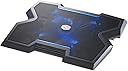
The Cooler Master NotePal X3 is a high-performance laptop cooling pad designed for gamers and professionals alike. Featuring a powerful 200mm fan with blue LED lighting, it effectively dissipates heat while providing a sturdy base for laptops ranging from 15 to 17 inches. With adjustable height settings and a built-in fan speed controller, it ensures optimal comfort and performance during extended use.


| ASIN | B0079T2KHG |
| Best Sellers Rank | #78,472 in Computers & Accessories ( See Top 100 in Computers & Accessories ) #346 in Laptop Cooling Pads |
| Brand | Cooler Master |
| Color | Notepal X3 |
| Cooling Method | Air |
| Customer Reviews | 4.1 out of 5 stars 2,204 Reviews |
| Enclosure Material | Metal |
| Global Trade Identification Number | 00360701894408, 00884102014765 |
| Item Part Number | R9-NBC-NPX3-GP |
| Item Weight | 2 pounds |
| Manufacturer | Coolermaster |
| Material | Metal |
| Mfr Part Number | R9-NBC-NPX3-GP |
| Model Number | R9-NBC-NPX3-GP |
| Number of Fans | 1 |
| Number of Items | 1 |
| UPC | 031112766522 078667291529 012951631929 021112374759 079531796737 012951691602 168141537301 080000404213 600005023068 014444728338 072090535854 211131850765 745449844135 884102014765 112040013534 012301991833 115970728585 151902932613 360701894408 021112252224 719040107289 041113894285 191120103525 071030575974 |
| Unit Count | 1 Count |
| Warranty Description | 2 year manufacturer |
T**5
so far, so good
It's only been a few days since I received my Cooler Master NotePal X3 but it's been great so far. It cools my laptop down significantly. It was getting to the point where whenever I had my laptop on for more than an hour, it was burning up. Using the cooler master, I don't feel much heat at all. I do sometimes re-position the laptop so that it directly over the Cooler Master fan. The fan is directly in the center of the board, which is good, but my computer gets the hottest on the left side. It's no biggie - I may run it slightly askew for a few minutes and it's back to normal. I'm not really sure why they chose to go with the X shape - if it's just a visual thing, then I wish they hadn't done that. If it were rectangular, it would cover the whole computer and I probably wouldn't have to do the askew thing every once in awhile. (It cuts in about 2.5 inches in line with the tab key placement if you use an HP Pavilion dv6.) The case design is decent. It's plastic, but it seems solid enough for its purpose and the edges are smooth. I have made sure to only run it on a hard surface so that the blades don't get damaged. For the price, I want to keep this in good condition for as long as possible. This is designed to be run on a desktop - if you want to use it on your lap, just put a separate board or a lapdesk on your lap first (that's what I've done). The rubber feet hold firm so that there is no slippage. The front opening is nice that it blows cooler air up underneath the trackpad. Not cold air - just cool enough to feel good on your wrists. I keep the blue LED light off. It doesn't really serve a purpose. When it is in use, the computer completely blocks it, so what's the point? The only reason that I can see is that it does make it stand out from other cooling pads that you see when you're scanning down the list on Amazon. If that's the reason, then it certainly serves its purpose. The speed is adjustable on the fan, but I always keep it at full blast. You can turn it completely off if you want, but I don't know why you'd want to do that. The noise is barely noticeable.I guess it's convenient that you can do that, but if you wanted to use it without having the fan running, you could just unplug it. So far, I really like it and I wish I had gotten it sooner. I'm glad I have it now, though. ------ Unrelated to the product functionality, I really like the package that it came in. (I appreciate good packaging design.) It could also be useful if you wanted to travel with it - there is a handle. I'll probably keep it just in case, (heh), I have need to use it.
C**H
Works Great
I would have given this product a 5 star rating if it wasn't for the fact that I had to take the thing apart and fix a problem with the item. When I plugged the product into my laptop and turned the fan on it starting making an ungodly racket and it was quite obvious that the fan was striking something on the inside of the product as it rotated (very loud knocking/grinding noise) so I quickly turned off the product and decided to open/fix the product myself rather than go through the hassle of returning and waiting for a new one. Product was very easy to open (10) screws (4 located under the removable feet) and then it simply came apart. Once it was open the problem was easily solved as a wire had come loose from its holder and the fan was striking it as it spun. Once I secured the loose wire and put the item back together it now runs perfectly... They just need to have better quality control as there is no way this unit was tested. I love the unit now its doing a great job keeping my laptop cool, but if your not the tech type and don't want to risk having this type of problem then you might want to go with another companies product. I've ordered a 2nd unit for another laptop I have, we will see if it comes with any problems. I'll update the review and let people know if the 2nd unit was any better or if same type of problem was encountered. 2nd one arrived and it worked perfectly right out of the box, so the 1st one was just either not tested properly or wire came loose during shipping. Either way I'm very pleased with the products and once I fixed the 1st one they are both working perfectly and it's bee a few weeks now. My 15" and 17" laptops are running cool as a fridge.
G**.
Cold, not Powerful.
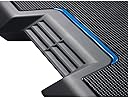
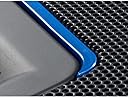
I've had a Logitech n200 cooling pad for at least 3 years now, and it has been cooling a handful of different laptops I've used since then. Despite that it's been used constantly since its purchase, it still looks and runs brand new. However, I started looking for a more effective and permanent solution to external cooling than a lap fan, so I researched and pulled the Amazon trigger on this CoolerMaster Notepal X3. Although the products isn't entirely what I had expected. I'm very satisfied with it and would like to offer my quick overview of this cooling solution. First and foremost, this really isn't a "portable" cooling pad; it's too bulky & thick to carry around a college campus, but light enough that it can be moved around the house or to an occasional LAN party. The base has 2 different wrapping points for wires, as well as cable channels. Wire management is a breeze, and, although I don't use the included (and branded!) USB to Micro USB cable, it's made fairly well and should last a few years of use. The bottom also sports 2 thick feet, which elevate the back far end of the pad. The manual recommends that these are always out to allow more air to enter the fan base. The micro USB (power in) and USB (power/hub out) are on the front left corner of the unit, as is the fan speed knob, and the 2 buttons which power the 4 blue LEDs surrounding the fan as the fan motor itself. The too of the unit is black steel mesh (as pictured) and is surprisingly well finished. My laptop rarely slides on the surface, but keep in mind that when a laptop is on the base, no hint of the LEDs are visible. It's best to keep them off when anything is using the fan; they draw a noticeable amount of power from the source. I personally don't plug the fan into my laptop as a power source, I use a 4-port USB wall-powered hub. I see no difference in fan speed when plugged into either a 2.4 ampere or 1 amp outlet, but a significant decrease when powered by my laptop. As mentioned, the fan is also a bit slower when the blue LEDs are on. As the product was shipping, I didn't even know that it was a "silent" unit; it produces a solid flow of chilled air across the base and into the intakes of your PC, while maintaining a relatively low speed and making nearly no noise at all. It can only be heard when your laptop is off and there is no other source of sound in the room. The Logitech cooling pad was much louder and, while the speed of the air it pumped felt greater, it was at room temperature and was very noisy. What's more is that due to the size of this fan, you don't need to position your computer over it so that more air is directed to your PCs intake. The front of the unit also has a few slats which exhaust cool air over where your wrists would be if you were typing on your laptop's keyboard, a nice added touch. PROS: -Inaudibly quiet -Pumps truly "cooled" air -Massive fan diameter -High airflow -USB out hub -LEDs & Fan activated separately -Sturdy Base -Easy wire management -Large enough for 17' laptops CONS: -It really isn't that portable -I think that the fan could be faster -LEDs take noticeable amount of power -Fan speed control changes close to nothing -Sharp angles on front and tall, if you plan to use your laptop's integrated keyboard & touchpad -included USB cable is short Overall, if your laptop is just a little too warm for your liking or comfort, or if you are a gamer who has a laptop with a dedicated setup (desk, keyboard, mouse or trackball), I would totally reccomend this cooling base for you. It may not be as "powerful" as you think it would be, but it will bathe your PC with the cold air it needs to run over it's proccessors and drives.
M**A
It's no wonder why these keep getting out of stock!
First off let me begin by how beautifully designed this product was, not to mention it keeps it's inspiration of jet plans as the product itself is visually, EXTREMELY attractive and appealing. The functions of this cooling pad are simply outstanding, a button for the fan, a button for the lights, and a speed setting for the fan itself? This was simply just marvelous! (By my personal experience it was still EXTREMELY quiet on any speeds! And I mean fastest and slowest) The rubber paddings are great, big enough to keep itself stable along with the height settings included to suit your comforted needs of position. Another thing though to mention is how obviously this product could vary in terms of a model compared to the images depicted in sorts for advertisement, the product for my case had the fan rimmed with a welded big plastic ring I believe, which means the ends of the blades were covered but that gave me less worry of anything that would try to break one of the blades off, unfortunately this, I believe, denied my feature of keeping my palms cool from the front vents, but that's not much to worry since I often keep my place chilled anyway. (And due to the laptop covering the top unsurprisingly the air does though still managed to flow through, and onto my hands) I wish I could say much more to compliment this amazing product but CM has just left me speechless with this item alone, but besides that and to give a short summary for those who couldn't spend much time, aka: "tl;dr", this product is definitely WORTH the buy, not just because it has one of the biggest fans either, but just because of how great this model itself is, and worry not potential consumers, with a fine product such as this, your laptop would be kept happy, and your wallet left with no regrets.
D**D
Works great... after I had to fix it.
I ended up giving this product a three star review. The sub-standard rating can be attributed to the fact that, when I took it out of the box, it did not work properly. Upon plugging it in, an awful metal-on-metal sound (it was EXTREMELY loud) caused me to quickly unplug it and assess what was wrong with it. Upon further inspection, I narrowed down that it was either a small plastic tab getting in the way of the blades or the cord running from the fan, that was getting hit by the blades. I decided that I wasn't going wait for it to get shipped back to China, or deal with obtaining a refund, and decided to take the screws out and deal with it myself (fun fact: the rubber pads come off to reveal four more screws). Upon taking the screws out, the device easily pulled apart. I left the two screws in (under the rubber mats) on the front of the unit, since I figured out that the sound was emanating from the back of the unit. I noticed that one small cord was not in the harness (and by harness, I mean a tiny plastic hole, sort of like what you would see on a bread clip). I promptly put the cord back in the harness, and used a piece of scotch tape to ensure that it wouldn't slip back out. After that, the unit worked as it should, and actually does a great job at cooling down my computer. The entire experience of having to fix it first was absolutely irritating however, and warranted a deduction in its rating. Also, the blue LED lights are completely unnoticeable when your computer is on top of the cooling pad, which also was rather disappointing. Overall, the product does what it was designed to do; effectively cool down a computer. The fact that I had to go in and "fix" it should however be a sign of caution, pointing towards rather cheap build quality. I suppose that the cord could have become dislodged on transport, but the fact that the gap in the holder is large enough for it to easily slip out is rather alarming in and of itself.
N**.
A Lenovo Saver
I was having issues with my Lenovo Y500 overheating and crashing, so I started looking at laptop coolers, and came to one decision, I needed one that blows air onto my laptop, since the intake is on the bottom, and that I didnt care about manoverability, since my laptop sits on my desk all day and I never take it anywhere. Well this Cooler Master NotePal x3 fit those discriptions, and I am happy. This keeps my laptop aproxamitly 20 degrees cooler while playing Battlefield 4, which is great because my outtake is just left of the wasd keys, so my hand no longer starts to burn from the heat. I will say that the cord to plug this in is rather short, persumably because you are supposed to plug it into your laptop, but since its sitting on my desk, I just put it into my powercord, so as not to create extra heat from my laptop. I should also note that if you are charging something using the built in USB port, the rate at which the fan blows is significantly effected, so I do not recomend charging from it while doing something such as gaming. Finnaly, the blue LED, I am not a person who cares what things look like, just that they function properly. That being said the LED is absolutly useless, my 15.4 inch laptop completely covers it, therefore you cant see it when its on, and I have opted to never turn it on for that reason. Pro's Cooled my laptop significantly Comes with USB port Moves a large volume of air Blows air(could be a con if your outtakes are under your laptop) Con's USB port use slows fan Cant see LED while in use Large(this raises my laptop up about two inches, and thats without the feet up) Very short cord Overall I am very happy with this product it does exactly what I wanted, However if you truly care about manuverability, while this isnt heavy, it is large so thats an issue.
L**3
Designed to sell, not work well
Pros Moves a good amount of air. My temps have come down across the board while playing games like Rift, Saints Row 3 and GTA 4 which is notorious for overheating not just laptops but also desktops. With this running it doesn't just lower temps overall it also keeps my laptop from getting too hot in general. The speed control is not only really nice it works well too. The one thing that I don't like is that at max speed it has some vibration to it which you can feel through the laptop. Considering the size of the fan this isn't surprising. The plastic itself is a bare finish that scuffs up very easily but at least it's not painted so you don't have to worry about it flaking everywhere on you. Cons Design is terrible. It is super uncomfortable not only for on your lap but also in general. The edges are sharp and awkward. When I say sharp I mean pointy plastic that jab into your hand and wrist if you don't have it at the right angle. There is no padding or cushioning anywhere aside for 4 small pads on the bottom for when you have it on a desk. This does absolutely nothing for you if plan to use it on your lap. Also my laptop trackpad is further left than most laptops which are more centered in comparison to the screen and I can see that being even more uncomfortable. No laptop grip. I used to use a Targus Chill Mat which held the laptop in place extremely well (but didn't move much air). This is the complete opposite. You shouldn't have to add your own grip to a laptop pad. You should be able to have confidence that the thing you put your laptop on will at least have a little grab to it if you bump it, tilt it a little bit to one side or even just move the two together. Hand vent is gimmicky. I have a 17.3" Acer Aspire and to have the hand vent accessible I have to push the laptop back to the very edge of the pad. Normally this wouldn't be a big deal but as you just read about the lack of grip on the pad itself it is an issue to not have the laptop completely centered on the pad. On top of that there is very very little air that is pushed through it. It would have been nicer to have the edge follow all the way through for support instead of having the space for the almost useless hand vent. Four little pads. The four tiny rubber pads on the bottom are not permanently attached and actually cause you issues if you try to move the fan on a hard surface like a desk or table or a soft one like a bed, pillow, carpet or sofa cushion. They immediately pop off when they encounter resistance of any kind and the real issue with that is that the top of the pad offers zero grip for your laptop. I can see where someone could easily get it snagged, have a grip pop off, go under the pad and then have the laptop slide off while all of this is going on. USB and LED. The USB/micro cable that comes with the pad to too short to plug in anywhere other than the left side of your laptop. The LED is also gimmicky and isn't visible unless you are in a completely dark room (no TV on or street lights shining in). Final thoughts If you asked me to recommend you a laptop pad I would say for the price it works well strictly as far as moving air goes but that's it and if you can wait for a newer better functioning model I would do that. The problem right now with pads that you are facing is that there are ones like this one which isn't exactly expensive and works well enough but could be improved upon in so many ways. Then there are the "higher end" pads which approach triple digits in price and not a lot of people, myself included, are willing to spend that much on a laptop pad when most of them don't get great reviews either. Grade If you asked me for a letter grade I would give it a D. Giving it a F would be too harsh for how well it works to move air but anything higher than a D might give people the illusion that it is a well designed pad, which it is not. If you look at my pros two of then have small cons to them so my grade would be more like a D minus minus but you get the point. To not rush to judgement I have used the pad for 45 days before I wrote this review. I hope my 2 cents helps you make your decision one way or the other.
R**H
Cooled my laptop down considerably, numbers in review.
I have a Lenovo Y500 laptop that I have hooked up to my TV and use primarily as a media center hub for movies and gaming, which I leave on basically 24/7. I was getting a little uncomfortable with how hot it was idling at so I decided to try this out. I got the X3 model for the added clearance and larger fan. This does come with a short (18" or so) USB to mini USB cable for powering the fan, and the cooling pad itself has a seperate USB port so you don't lose a precious USB slot. On the side of the pad there are also 2 buttons, 1 for toggling the blue LED light on/off, and the other for toggling the fan on/off, as well as a wheel slider for adjusting the fan speed. The fan noise at max speed is not that loud, I will be keeping it at max speed if that says anything. The cooling pad is on a slight incline when laid flat, and there are 2 fold-able legs which can increase the incline further. My laptop has a 15.6 screen and is almost exactly the same width as this pad, anything larger probably would be too big. Now to the numbers. Using Hardware Monitor my laptop, while idle, showed the following WITHOUT the cooling pad: CPU1: 57°C | CPU2: 60°C | CPU3: 58°C | CPU4: 54°C GPU: 50°C HDD: 35°C | SSD: 46°C WITH the cooling pad and fan at max speed after 1 hour: CPU1: 41°C | CPU2: 43°C | CPU3: 42°C | CPU4: 42°C GPU: 36°C HDD: 30°C | SSD: 34°C All in all I am very pleased with this product so far, it is doing exactly what I had hoped it would.
R**K
Very cool and quiet
Beefy and works well.
J**N
A gem of a cooling pad !!!
I dont know about people saying that cooling pads are not that necessary and your laptop’s thermal design is sufficient to get rid of all the heat but not every laptop has a dual fan and a very good heat dissipation setup. So if you have an entry level entertainment laptop or even a gaming laptop which is thermal throttling while gaming or even reaching that 60-70 degree mark on idling. This cooling pad is a must have. The design is incredible. Fan is silent. And cooling is fantastic. Gaming is hastle free now as i can play games without placing my laptop near a fan or an ac. My pc used to underclock before i used this while gaming because of too much heat. Its pretty much portable as well. I’m able to get it in my laptop bag along with my laptop and charger. A job well done by cooler master.
P**Y
Zu hoher Anstellwinkel
Auf den ersten Blick ein super Laptopständer. Perfekt verarbeitet, sehr kompakt und gut zu transportieren. Leider ist selbst die niedrigste Stufe schon ein viel zu steiler Winkel um noch bequem auf dem Laptop tippen zu können. Sollte man mit einer extra Tastatur arbeiten ist das jedoch kein Problem.
K**N
Worth the money
My order came earlier than estimated and the product works as listed. It has successfully eliminated the overheating issues that I suffered in the past and made me very happy.
E**N
A beaut
Does everything i require and allows gaming while playing things like the witcher and crisis to be possible without severe overheating issues :) Recomend to all for a good price
Trustpilot
3 days ago
1 month ago