🚀 Upgrade your connection, upgrade your life!
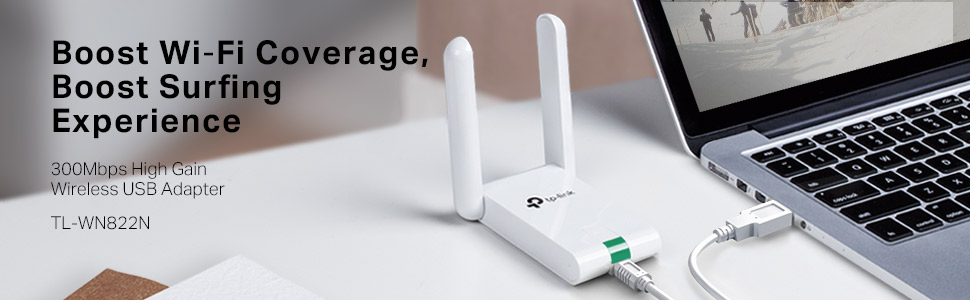
The TP-Link TL-WN822N USB WiFi Dongle delivers up to 300Mbps wireless speed with dual high-gain antennas for enhanced range and stable connectivity. Compatible across Windows, Mac, and Linux platforms, it features a one-touch security setup button for quick WPA/WPA2 encryption and comes backed by 24/7 technical support and a 2-year warranty.


| ASIN | B00416Q5KI |
| Batteries | 1 AAAA batteries required. |
| Best Sellers Rank | #1,066 in USB Computer Network Adapters |
| Brand | TP-Link |
| Color | Old Version |
| Computer Memory Type | DDR3 SDRAM |
| Customer Reviews | 4.2 4.2 out of 5 stars (11,232) |
| Date First Available | September 2, 2010 |
| Is Discontinued By Manufacturer | No |
| Item Dimensions LxWxH | 3.54 x 2.68 x 0.69 inches |
| Item Weight | 7 ounces |
| Item model number | TL-WN822N |
| Language | English |
| Manufacturer | TP-LINK |
| Number of Processors | 1 |
| Operating System | 8 . 1,Linux,Mac,Win10,Windows |
| Product Dimensions | 3.54 x 2.68 x 0.69 inches |
| Series | N300 |
| Voltage | 28 Volts |
| Wireless Type | 802.11b, 802.11g, 802.11n |
D**F
An absolutely amazing product!!! See Update at the end.
This thing is amazing! I honestly hadn't expected much, but was VERY pleasantly surprised. We have a wifi network in our house. It works well, except for my wife's computer which is only about 60 feet from our router, but with three walls between the router and her computer. It would hang up when loading websites, and sometimes would never load the page at all. I blamed the problem on the computer or browser; probably the computer, as I was not having a problem with mine, nor did she if she moved it much closer to the router. This antenna arrived about a week ago, so we've had plenty of time to test it. Installation was simple. Plug the unit in, run the enclosed CD, click on to the network, enter the pass code, and that was it. My wife's computer problems are gone! All websites snap right up. Not one problem with any of them. We have a custom program on her computer that we use to run our business. Running it on my computer from hers, over the network was always slower than running it on her computer. That was to be expected. Now it runs about 50% faster across the network. I installed this antenna on my computer (Windows 8.1) just to see what would happen. Amazingly, it sped page loads up dramatically, even though I'm within about 30 feet of the router (albeit the signal still has to go through two walls), and did not have nearly as many problems as she did. I have just ordered a second one to go on my computer for that reason, and because I expect our in-house program will run even faster across the network using one on each computer. I will update this review after I find out. Given the results with this antenna on our two computers, I enthusiastically recommend it so anyone who suspects a internet connection problem, even if it's only a small one. I simply cannot believe the results, especially at this price. Amazing! 01/15/15: I received my second antenna about a week ago. As expected (hopes for!), it did speed interaction across the network between our computers. No more hung pages on the internet. I can't wait to see how it works in hotels when we travel.
J**O
Wow. . .it really WORKS!
I'm always a little skeptical of claims made by inexpensive wireless devices but the TP-Link really did exceed my expectations. Here's the whole story... We recently upgraded to FiOS Quantum internet service but the wireless router supplied by Verizon didn't come close to supporting the transfer speeds the new connection was capable of. I added a TrendNet dual-N access point, TEW-637AP (highly recommended, BTW, and also purchased from Amazon TRENDnet 300 Mbps Wireless Easy-N-Upgrader (TEW-637AP) ), and doubled the wireless speed. However, signal strength was so low that speed often dropped by 50% or more and the 58Mbps maximum wasn't close to the best. Now it appeared that the wireless USB adapter, a single antenna TrendNet TEW-644UB, may have been part of the problem. I was intrigued by the dual antennas on the TL-WN822N, thought it could be a better match for the dual antenna wireless access point and, given the low price, was certainly worth a try. The adapter arrived quickly and installed easily. (Be sure to follow the instructions to cancel Windows offer to search for or install the driver and run the TP-Link driver and setup utility **after** plugging in the adapter.) The adapter activated as soon as the software installation completed and opened the configuration utility. After selecting the TrendNet access point and entering the WPA security code, the TL-WN822N connected immediately. The first thing I noticed was the signal strength - Windows 7 wireless network connection status now shows signal quality of 80%. Even more impressive was the speed, now at a steady 130Mbps, a 225% increase. Don't hesitate if you're looking for higher wireless speeds but keep in mind that you will also need a dual antenna, dual-N (300Mbps) wireless access point to make the most of the TP-Link TL-WN822N. This was undoubtedly the best $20.00 I've ever spent on a computer.
R**J
This product is very good and working fine. Speed is very fast. Wifi range is good
W**E
I am in the building next to my landlord. Prior to getting this device I could only rarely see the wi-fi signal. Now I get a reliable signal. I did have to hang it from my ceiling and made sure the pair of antennae point toward his router.
C**E
Muito bom, funciona muito bem!
J**Y
This little white box is a god send! First off I can make my PC in my room wireless, and since my router's on the other side of the house, I can't exactly wire an ethernet cable around the house. I get full 5 bars when connected, although oddly enough, when I'm not connected and it shows the list of networks, it usually marks it as 3 bars. Before I got the PC I was using it on my laptop, the onboard WiFi with my laptop was lucky to get 3 bars, usually 2 which resulted in slow internet speeds. I got full 5 bars too! My average ping times (done by running ping www.google.com in command prompt) usually gets me about 39-50ms. Not bad considering I'd be lucky to get 80 on my laptop. There is the odd glitch where it does not connect and can't find my home router, but will find other peoples. Usually a reboot fixes this. Also it sometimes fails to connect to the internet but stays fully connected to the router, the old yellow triangle on signal bars problem. A router reboot fixes this, I suspect that's Sky's problem, not the adapters though as my phone loses internet as well. People say there are problems on Win 7 64. Can't say I've noticed any on my Win 7 Ultimate 64 bit laptop. I do have the V3 version. Works fine in Windows 7 Home Premium 32, 7 Ultimate 64, 8.1 32 bit and 8.1 64 bit doesn't need any drivers installing, Windows just recognises it as a WiFi card. Does not work in Windows XP (I assume you need the drivers and utility, I only plugged it in in an old laptop to see if anything happened, couldn't be bothered to put the drivers/utility on a memory stick) All in all, solid buy! Can't really go wrong with it at all, still holding up strong and I've had it about 6 months.
D**.
Al principio tenía dudas sobre este producto, pues temía que la conexión a internet se interrumpiera constantemente, o que la velocidad del internet fuera muy baja. Todo lo contrario, es el mejor dispositivo para WiFi que he tenido!! La conexión a internet está siempre estable, nunca sufro interrupciones o caídas de velocidad (como sí me pasaba con el adaptador integrado de mi iMac). La velocidad de internet es la correspondiente al servicio que contraté, sin ninguna reducción, y además puedo mover la antena para buscar un lugar donde tenga mejor recepción. La utilizo para jugar en línea (DOTA2, Starcraft 2, Diablo 3, Warframe, TF2, y otros) y funciona absolutamente perfecto. Lo recomiendo al 100%!!!
Trustpilot
3 weeks ago
5 days ago