🚀 Elevate your PC speed game—because slow is so last decade!
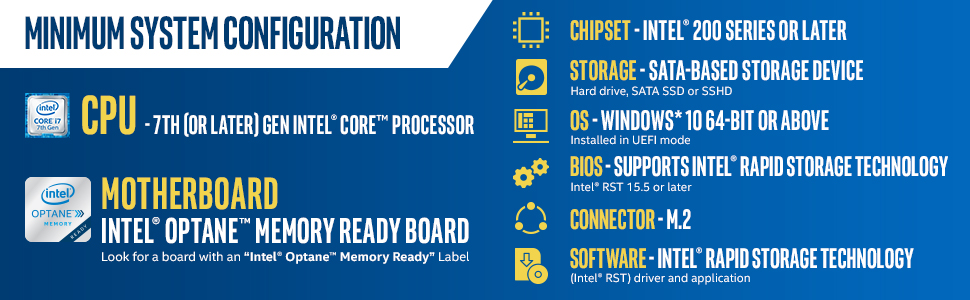
Intel Optane Memory M10 16 GB PCIe M.2 80mm turbocharges your PC by pairing ultra-fast 16 GB cache with your existing HDD or SSD, delivering up to 900 MB/s read speeds via PCIe x4. Designed for 7th Gen Intel Core i3 and above with Optane-ready motherboards, it adapts to your usage patterns to boost boot times, app launches, gaming, and browsing responsiveness—perfect for professionals and gamers craving a snappy, efficient computing experience.


| Installation Type | External Hard Drive |
| Connectivity Technology | Bluetooth |
| Read Speed | 900 Megabytes Per Second |
| Data Transfer Rate | 900 Megabits Per Second |
| Hard Disk Interface | PCIE x 4 |
| Package Type | Standard Packaging |
| Digital Storage Capacity | 16 GB |
| Compatible Devices | Desktop |
| Hardware Connectivity | PCI Express x4 |
| Specific Uses For Product | personal, gaming, business |
| Cache Memory Installed Size | 1 |
| Form Factor | 1.8-inch |
| Media Speed | 150.0 megabytes_per_second |
| Additional Features | High-performance |
| Item Weight | 1.6 ounces |
| Number of Items | 1 |
| Hard-Drive Size | 32 GB |
I**C
Optane is a nice caching drive for HDD (and only HDD -- don't use with SSD! )
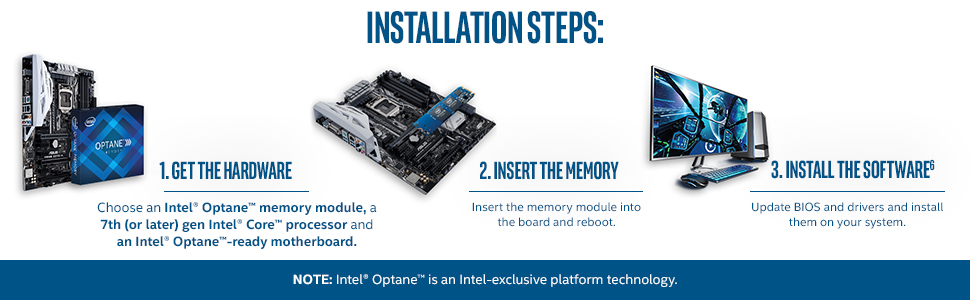
I recently built a new computer for my nephew to run his virtual reality games. I had heard of Optane on the tech channels but never used it. The product acts as a fast, low-latency caching drive that uses a combination of hardware and software to intelligently cache frequently accessed data. In essence, it allows you to run a (much) cheaper HDD but get storage speeds comparable to an SSD. The advantages are 1. price, since Optane + a 1TB HDD is still considerably cheaper than a 1TB SSD, and 2. storage density, since HDD come in sizes way larger than SSD.There are serious limitations you should understand going in. First, it won't work great in all cases, such as when you are working with very large files. Second, you need to match the Optane product to a newer Intel chipset motherboard specifically designed to use Optane. And third, you can only use Optane with your primary HDD; it won't work with drive arrays that I'm aware of.Still, installation wasn't too involved and on the computer I built it reduced boot times to something like 4 seconds; not bad at all in my book. If you are looking to build a basic-ish computer and want a decent amount of storage but have a limited budget, I would seriously consider Optane.
F**S
My brother is fifteen. He got it to work and loves what it does for him.
Alright, so, I got this for my brother as he wanted it for Christmas. His computer is built with a hybrid drive that stores all of his data and after configuring the drivers in the BIOS, the Intel Optane produced a noticeable difference in loading things. For one, he was able to launch games and applications faster. For two, on large map games like PUBG, Fortnite, DayZ, H1Z1, and a few others, the map's "chunks" loaded in much faster than without. The device seems to be most compatible with DDR3 and up boards, but it will not improve your performance much if you have a performance hard drive like a WD Black or an SSD as your storage medium. If your board runs something higher than DDR3 RAM, then the Optane will produce less noticeable results. It should also be noted that every board is different and every bios configuration is different. Some people do not have the experience or skills to setup this device correctly, although you can learn how. Said people are often the ones who leave bad reviews and answer questions with "I couldn't get this to work." As another side note, the Intel Optane is not a replacement for RAM or more permanent storage mediums. You still need the hard drive(s) and/or SSD(s) in your computer. Actually just used this to answer a question, but thought you all should see it.
A**N
Cache drives in a Synology NAS
I'm using a pair of these small but fast SSDs as cache drives for my Synology NAS. The Synology OS uses one for write caching and one for read caching. This makes transferring lots of small files much faster than before. While these drives are not on Synology's official compatibility list, I've heard from other Synology users who have also had success with these drives. At their current price, it is worth it!Edit: Upon update to the latest Synology software, one of the cache drives was either unsupported or died. This caused a major issue that required a complete reinstall of the Synology software on my NAS. Fortunately, this did not lose any of my data but did require that I re-install all my packages and re-configure everything. It could have been worse.
J**W
Cheap upgrade with questionable gains
A cheap simple upgrade to my Dell mini PC that had an open M.2 slot. These Optane modules only work with certain CPUs and motherboards, so check your computer to make sure it will be recognized by the BIOS and the OS. You also have to use the Intel Optane driver package which can be finicky to install. I had to install and reinstall a couple of times before the software recognized the Optane. I also had to go into the BIOS and select the correct HDD settings for Optane (it's kind of like a RAID setup, but not). Once configured, everything seems to be working great. There's no noticeable difference in PC performance so the gains are questionable. But for less than $20 it's a fun PC hardware upgrade.
Trustpilot
1 month ago
4 days ago
3 days ago
1 month ago