Buy anything from 5,000+ international stores. One checkout price. No surprise fees. Join 2M+ shoppers on Desertcart.
Desertcart purchases this item on your behalf and handles shipping, customs, and support to Hungary.
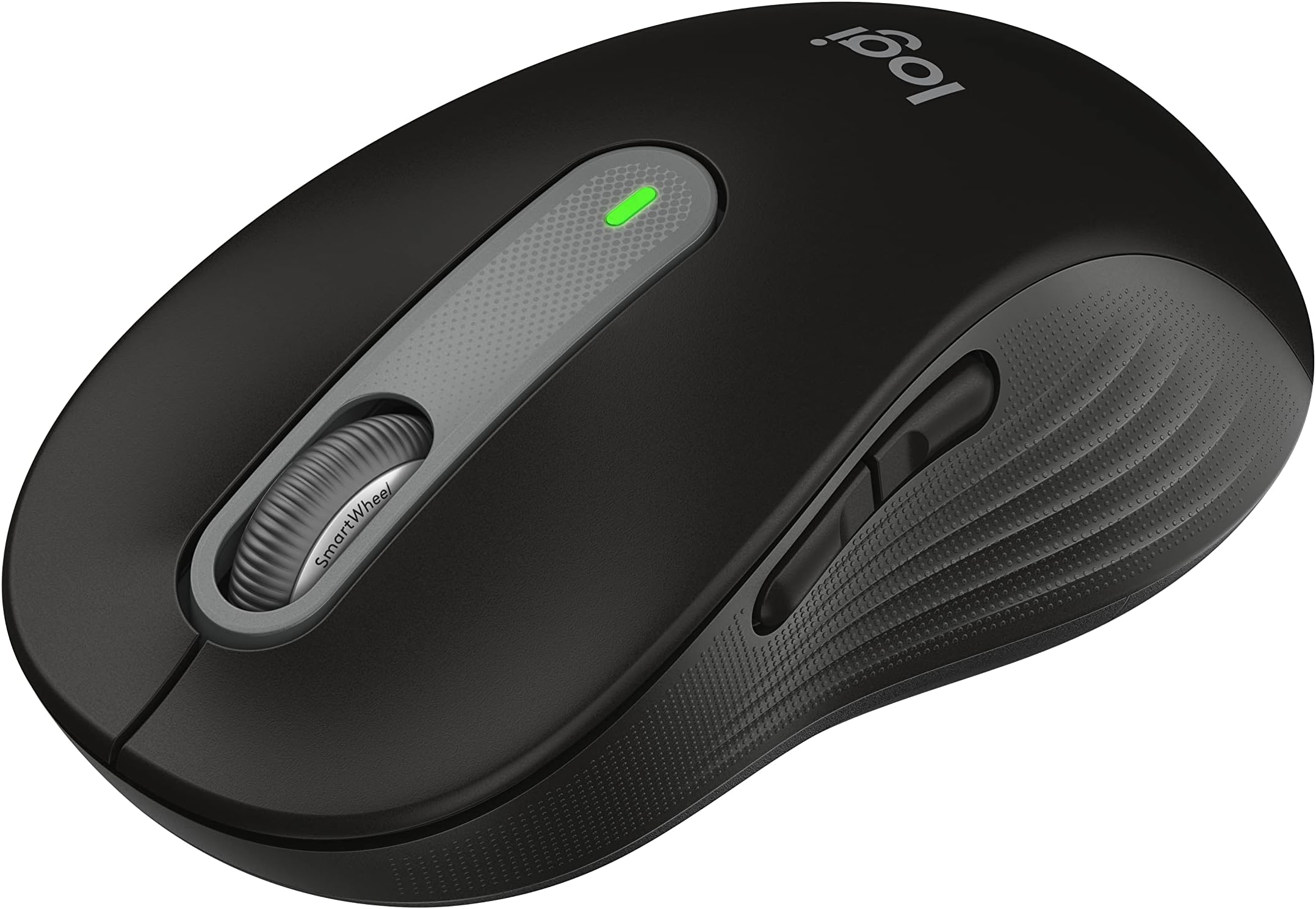
🖱️ Elevate your workspace with silent precision and all-day comfort — because your hand deserves the best.
The Logitech Signature M650 L is a premium wireless mouse tailored for large hands, featuring a 24-month battery life, ultra-quiet SilentTouch clicks, and an adaptive SmartWheel for precise scrolling. Compatible across multiple platforms and customizable via Logitech Options+, it combines ergonomic design with seamless Bluetooth and USB connectivity to enhance productivity and comfort in professional environments.


| ASIN | B09KX9P829 |
| Additional Features | Lightweight, Portable, Soundless, Wireless |
| Antenna Location | Gaming, Office |
| Are Batteries Included | Yes |
| Are Batteries Required | Yes |
| Battery Average Life | 24 months |
| Best Sellers Rank | #19 in Computer Mice |
| Brand | Logitech |
| Button Quantity | 3 |
| Color | Black |
| Compatible Devices | Personal Computer |
| Connectivity Technology | Bluetooth, Wi-Fi |
| Customer Reviews | 4.5 out of 5 stars 14,065 Reviews |
| EU Spare Part Availability Duration | 2 Years |
| Enclosure Material | Rubber |
| Hand Orientation | Right |
| Hardware Platform | Linux, Mac, PC |
| Item Dimensions L x W | 4.65"L x 2.58"W |
| Item Weight | 111.2 Grams |
| Manufacturer | Logitech |
| Mfr Part Number | 910-006265 |
| Minimum Required Operating System Version | ChromeOS 137 |
| Model Name | M650 L |
| Model Number | 910-006265 |
| Mouse Maximum Sensitivity | 4000 Dots per Inch |
| Movement Detection | Optical |
| Movement Detection Technology | Optical |
| Number of Batteries | 1 AA batteries required. (included) |
| Number of Buttons | 3 |
| Operating System | Chrome OS, Linux |
| Pattern | Large Size | Right Handed |
| Power Source | Battery Powered |
| Range | 30.0 feet |
| Special Feature | Lightweight, Portable, Soundless, Wireless |
| Style Name | Right Handed |
| UPC | 097855167941 |
| Unit Count | 1.0 Count |
| Warranty Description | Manufacturer’s warranty can be requested from customer service. |
C**L
Silent mouse - this is a dream come true in a quiet office with coworkers! They all need one!
I LOVE this mouse so much. It glides and is completely silent with each click. It makes office time with coworkers and myself very bearable now. I can't stand how many clicks photo editing and browser scrolling takes. I bought this because it was white and Logitech is one of the best mouse brands ever. The size is perfect in my female palm so I don't get any hand fatigue and can work on a computer alll day long. The scroll wheel is also silent, what a dream! This is a really great mouse and I highly recommend. I'm going to replace all my wireless mouse with this one.
E**L
Great Mouse, but I Should Have Bought the Smaller Size
This is a very comfortable and responsive wireless mouse. It works smoothly, the buttons feel great, and the battery life is excellent. My only issue is that I accidentally bought the large version. It still works perfectly, but the smaller size would have been a better fit for my hand. Overall, it’s an excellent mouse, and I would highly recommend it—just make sure to choose the size that fits you best.
B**D
The Quietest Mouse
I have tried SEVERAL silent mouses. This one and the logitech LIFT which I think has the same switches, are the quietest by far. The MX Master 4 is significantly louder than this mouse and also much heavier which you wouldnt think matters but it does if youre used to moving your mouse quickly. I have used a M650 regular size for a couple years and have had no issues with it apart from the rubber on the sides wearing down a bit but not to the extent that it causes any issues. The build quality of the M650 is very high and the logitech usb dongle is great because you can reprogram it to other logitech mouses or get a new one if you ever lose it for like 15$ (happened to me once). I decided to try the M650L because I have a somewhat large hand it it is a noticeable improvement for me as far as ergonomics go. Battery lasts super long on the M650 (over a year of near daily use). It is a great value and edges out the MX Master 4 in my opinion mainly due to the sound difference which is the main feature I care about. Overall, its a great mouse, feels good in the hand, click quietly, and scrolls well. Solid value for the price.
B**E
Premium feel and function, great price!
This and the Lenovo Yoga Bluetooth mouse tied for 1st place out of 7 total mice I bought for my girlfriend's new home office. Top tier quality feel and function. Logitech is one of my favorite brands! They open sourced Logitech Media Server many years ago and that buys a lot of good will from someone like me. It's a rare good-guy move by a Corporation and I want to reward them. This mouse has everything most people need or want from one. The scroll wheel is sweet. The clicks are quiet and satisfying. The materials feel premium. And, there is Logitech software available for Linux so that's the final win. The small/medium was perfect for my girlfriend. Personally, I would choose the large but this one didn't feel excessively small and I could have lived with it. Overall, this is one of the very best and highest value mice available right now.
B**S
Mouse works great, but hate the side grips large ridges - feel horrible to my fingertips.
I bought this to replace my M510, which I've been using pretty much since they came out. Every and then buying a new one. Importantly, the M650 immediately seems to have fixed (at least so far) the issue I've recently been having where left clicking even with a recently opened M510 has been losing and (sometimes) regaining click hold without my lifting of the button at all. With the effect that items I click and drag sometimes didn't make it where I want them to go, or even worse, were dropped in the wrong place and another item (such as a folder) was grabbed and moved to a second wrong place. I really like the overall feel of the M650L. It is sized and shaped so close to the 510 that it fits my hand just as well. I've also really quickly gotten used to how much lighter it is, which is a clear advantage but definitely made it feel different at first. I also like the feel of the side and top buttons, as well as the wheel. (Edit - Updated from to 4 stars) The reason for the low initial star rating was that I truly hate the new ridged side grips. I quite literally despise them. They are much to big/high, giving horrible tactile feel. Basically making my fingertips feel like I'd been in the water all day, but worse. I never had an issue with losing grip on the m510 style grips with there scattered light indents, so I still can't understand the reason for the extreme change. I was able to sand the ridges down not quite all the way, and having used it for a while now it is quite comfortable, so the quality of the device now comes to the front. I do wish that Logitech (or Logi, whatever) would either make a second set of models with a side grip style more similar to the M510, or sell alternate/replacement side grips in that style that as an accessory option. I'd happily pay for them. This would be a 5 star review if it weren't for the grips feeling so awful to me. But the mouse itself is great.
J**E
Not Bad At All
Pretty nice little mouse. I work a computer job from home so a comfortable mouse is pretty important. I normally use a wired steel series mouse for gaming and work because I love how comfortable it is, the speed and the responsiveness. However it’s not great for when I have to go to the office occasionally and attend conference room meetings. It’s loud and the wire is annoying. Hence why I ordered this wireless mouse. Right off the bat, feels pretty solid. Looks decent and tracks pretty well. It’s also very comfortable as it has a higher arch. I can tell it’s not as quick as my wired steel series but that’s obviously to be expected. Still very good. The clicks are super quiet, you can still feel it but very slightly. Not a huge fan of that but that’s just personal preference and also me coming from a very clicky steel series gaming mouse. I can’t speak to this logitechs long term reliability but if it lasts as long as my last one (5 years) then I’ll be happy. Also…to those complaining how they dropped it and it quit working, that doesn’t say anything about it build quality. Drinking glasses are going to break if you drop them on the floor. They’re not made for that and neither are computer mice or computer hardware in general. So far, I recommend it!
R**O
Great feeling mouse, but had difficulty changing connection type
When choosing a mouse there are hundreds of options available, but Logitech is known in the industry as the strongest and best mice out there which is why I selected this one although it is a little more expensive than the knock-off Chinese mice, and don't have some of the added features like RGB. This is a wireless mouse and has two types of connecting wirelessly: (1) Using the included Logi Bolt connector; and (2) using generic Bluetooth if your computer has that. The advantage of using Bluetooth is you spare the extra USB port which, otherwise, would be occupied by the Logi Bolt dongle. The disadvantage of using Bluetooth is if you want to use mouse functions while making BIOS settings, that's not available, since Bluetooth is established after the operating system (Windows) is booted up. I didn't find this out until I tried it and noticed to my disappointment the mouse didn't work which making adjustments in BIOS. This may not be a problem for most people if you don't go into your BIOS settings, but for me I'm setting up a new computer and need the mouse to work in BIOS. The problem I ran into is this: I had no difficulty setting up the Bluetooth connection for this mouse, although there's just a tiny bit of latency (lag) which is hardly noticeable. After I decided to connect with the Logi Bolt receiver, however, and disconnected the Bluetooth, the mice wouldn't recognize the dongle. I tried updating the firmware but the Logi Options software couldn't find the mouse, saying it was "inactive". I rebooted the PC several times, unplugged and re-plugged the dongle, removed and re-inserted the mouse battery, etc, with no change. The action which finally fixed the problem was to REMOVE the mouse from the Logi Options software (click on the image of the trash can below the mouse image on the main page), then click "Add a Device" upper right of the same page, and it takes you through the set up finally recognizing both the Logi Bolt receiver and the M650 mouse. There is a support page I had gone to which gives a list of steps, but it did not mention deleting and adding the mouse as one of the steps. So now I'm good. Here are some PROS and CONS, although my experience is just a few hours old: PROS: - The mouse feels really good. It has rubberized sides with a "wave" design as one reviewer described it. The weight it good so it feels substantial. It is well made. - I chose this mouse partly because I wanted a white mouse, which matches my keyboard and PC, it is an off-white with gray accents so good looking. - It works great (now that I got it working), is very responsive, and adjustable either through the Logi Options software or through Windows Mouse Settings (note in CONS about "smooth scrolling" option). - Battery life is rated at 2 years (good Duracell AA battery is included) which is phenomenal! This is one great advantage of NOT having RGB. I'm also glad I don't have to charge the mouse all the time. - Firmware update is quick and easy though the Logi Options software, so any future problems can be addressed by Logitech using firmware updates. - It's also a plus that Logitech provides software (Logi Options) although you have to download it (just google it). CONS: - As described above, changing connection type was a painful learning curve. - Using Bluetooth means mouse use isn't available in BIOS (although this would be true with any mouse) - More expensive than no-name brands, but to some extent you get what you pay for. - There is a setup option in the Logi Options software to set the vertical scroll wheel for "Smooth Scrolling", but the result is there is a distracting lag whenever you use the scroll wheel; it is much better in my experience to set this off. Bottom line, I really like this mouse and hope to keep using it for many years to come. It feels good, looks good, and works wonderfully. Good luck in your mouse hunting adventures!
E**S
Southpaws Unite
As a lifelong left-hander, I can confidently say that no matter how hard the nuns in Catholic school tried, they never succeeded in getting me to use my right hand. Decades later, I'm still proudly left-handed, and the Logitech Signature M650 Left Wireless Mouse feels like it was designed specifically for people like me. The ergonomic shape fits my hand perfectly and is far more comfortable than trying to adapt to a right-handed mouse. Setup took only a few minutes, and the wireless connection has been flawless ever since. The buttons have a satisfying feel, the scroll wheel is smooth and precise, and the battery life seems to go on forever. What impressed me most is that Logitech didn't just make a generic mouse and call it "left-handed." The M650 Left genuinely feels thoughtfully designed, with all the controls exactly where they should be. After years of settling for right-handed mice that were never quite comfortable, this one is a game changer. If you're a fellow southpaw who's spent a lifetime adapting to products made for everyone else, do yourself a favor and pick up the Logitech Signature M650 Left. It's comfortable, reliable, well-built, and proof that being left-handed isn't something that needs fixing—despite what those nuns may have thought.
J**E
Confortável e Silencioso
Mouse bom, boa pegada, macio e silencioso. Único porém é que ele é bem maior do que eu esperava, fora isso é perfeito para longas jornadas de trabalho.
H**A
Superb Mouse
It's a genuine Logitech mouse. Great for daily office use. Can be stored in your laptop bag with ease. Two connectivity modes (Bluetooth and Logi Bolt USB). It came with DokkanTech warranty.
G**N
Totally silent, works great, fits small hand perfectly.
Wife reviewing : What a great mouse. Fits my small hand very well. It is truly silent scroll and silent click. It glides so nicely and accurately. I really like it a lot. Easy set up.
A**E
Funk-Maus
Die Funk-Maus ist prima und wurde auch sehr schnell eingerichtet
J**O
Silencioso e de ótima qualidade
Muito confortável pra usar, cliques silenciosos, qualidade excelente.
Trustpilot
1 week ago
1 month ago