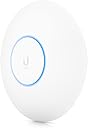
๐ Elevate your network game with WiFi 6 power and pro-level control!
The Ubiquiti UniFi 6 Pro Access Point is a high-performance indoor WiFi 6 device designed for professional and home environments. It delivers up to 5.3 Gbps aggregate throughput across dual bands, supports over 300 concurrent clients, and features advanced security with Guest Traffic Isolation. Managed via the UniFi Network app, it offers seamless setup and robust wireless coverage, making it ideal for demanding network environments. PoE adapter sold separately.
| ASIN | B09MGCJT5Z |
| Antenna Location | Home, Business, Outdoor |
| Best Sellers Rank | #68 in Computer Networking Wireless Access Points |
| Brand | Ubiquiti Networks |
| Built-In Media | AP, Wall/ceiling mount |
| Color | X2925 |
| Compatible Devices | Personal Computer |
| Connectivity Protocol | Ethernet, Wi-Fi |
| Connectivity Technology | Wireless |
| Control Method | App |
| Controller Type | Switch |
| Coverage | Five-year extended coverage |
| Customer Reviews | 4.6 out of 5 stars 604 Reviews |
| Data Transfer Rate | 5373.5 megabits_per_second |
| Frequency | 5 GHz |
| Frequency Band Class | Dual-Band |
| Global Trade Identification Number | 00810010074256 |
| Item Weight | 600 g |
| LAN Port Bandwidth | 1000 Mbps |
| Manufacturer | Ubiquiti Networks |
| Maximum Upstream Data Transfer Rate | 4800 megabits_per_second |
| Mfr Part Number | U6-Pro-US |
| Model Name | U6-Pro-US |
| Model Number | U6-Pro-US |
| Number of Antennas | 8 |
| Number of Ports | 3 |
| Operating System | UniFi Network |
| Other Special Features of the Product | Fast Charging |
| Router Network Type | Wireless |
| Security Protocol | WPA-PSK, WPA-Enterprise (WPA/WPA2/WPA3) |
| Special Feature | Fast Charging |
| UPC | 810010074256 |
| Unit Count | 1 Count |
| Voltage | 48 volts_of_direct_current |
| Warranty Description | 1 year manufacturer |
| Wi-Fi Generation | WiFi 6 |
| Wireless Communication Standard | 802.11ax |
| Wireless Compability | 802.11ax |
M**O
Excellent AP, but placement matters
The U6 Pro has been extremely stable and provides excellent speed and coverage. I run multiple UniFi access points, and roaming between them has been seamless. Helpful TIP: don't just put the AP wherever it's easiest to run Ethernet. Ceiling mounting it in a central, open location gave me much better coverage than trying to hide it near a wall or corner. Also, this listing does not include a PoE adapter, so make sure you already have a compatible PoE switch or injector before installing it. If you're running multiple UniFi APs, resist the temptation to crank transmit power to maximum. Proper placement and tuning the power between APs can produce much better roaming and fewer devices hanging onto a distant access point. Fast, stable and basically something I never have to think about.
S**.
Shelf-placed U6-Pro covers a 1400sq ft concrete apartment, 30+ devices, no reboots in 6 months
I replaced the WiFi on my Netgear Nighthawk with this and the difference was larger than I expected. My apartment is roughly 1400 square feet with concrete construction, which is normally the worst case for wireless, and this single access point covers the entire place with no dead spots. Worth knowing: I am not even ceiling mounting it. It is sitting on a shelf and coverage is still complete. Every listing photo shows a ceiling install, so if you are renting or otherwise cannot drill, that is less of an obstacle than it looks. This was my first time using UniFi. I run the controller self-hosted on a Proxmox server rather than buying a Cloud Key, which works fine and saves the extra hardware. If you are moving up from a consumer router, the interface is a genuine step forward. It is a clean GUI with real visibility into what is happening on your network, and VLAN control in particular is excellent and far easier to manage than anything I had before. If you want to learn more advanced networking without reading a manual first, this is a good on-ramp. If all you want is WiFi that works and you have no interest in the stats, you are paying for capability you will not touch. The listing does clearly say the PoE adapter is not included, and I read that before ordering, but I did not have a suitable injector on hand when it arrived. I picked up a Tenda 30W 802.3af/at injector separately and it powers the AP without issue. Budget for that if you do not already have a PoE switch. I replaced the WiFi on my Netgear Nighthawk with this and the difference was larger than I expected. My apartment is roughly 1400 square feet with concrete construction, which is normally the worst case for wireless, and this single access point covers the entire place with no dead spots while handling over 30 connected devices. Worth knowing: I am not even ceiling mounting it. It is sitting on a shelf and coverage is still complete. Every listing photo shows a ceiling install, so if you are renting or otherwise cannot drill, that is less of an obstacle than it looks. This was my first time using UniFi. I run the controller self-hosted on a Proxmox server rather than buying a Cloud Key, which works fine and saves the extra hardware. If you are moving up from a consumer router, the interface is a genuine step forward. It is a clean GUI with real visibility into what is happening on your network, and VLAN control in particular is excellent and far easier to manage than anything I had before. If you want to learn more advanced networking without reading a manual first, this is a good on-ramp. If all you want is WiFi that works and you have no interest in the stats, you are paying for capability you will not touch. The listing does clearly say the PoE adapter is not included, and I read that before ordering, but I did not have a suitable injector on hand when it arrived. I picked up a Tenda 30W 802.3af/at injector separately and it powers the AP without issue. Budget for that if you do not already have a PoE switch. I bought the US model and use it in Germany. I left channel selection on auto and did nothing special for the regulatory domain. Six months in: no random reboots, no dropped clients, firmware updates apply automatically. It has simply run.
R**E
Access point Works great
Works great, increased my wifi range to use outside the house by a large footprint. I recommend this Access point.
R**A
Quite a nice boost in speed over the older HD Nano
I've been running the Nano HD for years and while it's been great, speeds have topped out around 350-400 Mbps typically. Recently upgraded to the U6 Pro and now speeds are up in the 650 Mbps ranges. Quite impressive. I had previously tried both the U6 LR as well as the U6+ without seeing any appreciable improvements. This U6 Pro really boosted everything and provides excellent coverage. Very happy with it and can highly recommend.
R**E
PROFESSIONAL AP!!!
So I had a Ubiquiti AP and it had been rock solid and stable for years. Wanted to extend coverage and get another AP and bought an EXPENSIVE OTHER BRAND AP. Was "beguiled" by the exotic and flashy looks (like some Star Wars battle cruiser) and specs "looked" awesome. When I set it up was shocked to find out how CRUDE the software and features were, total amateur hour (had been spoiled by the wealth and depth of professional features that were available on my Ubiquity). Then actual use was a COMPLETE JOKE. Buggy, connections flakey, needing constant resets, constant downloading the latest firmware for fixes. WHAT ON EARTH WAS I THINKING, BUYING A CONSUMER GRADE AP??!! Returned it and bought this Ubiquity and couldn't be happier. I don't mind investing time up front to configure and tweak. BUT!!! I want to do that once and then never think about it, not having to play network engineer every week on some consumer grade junk. This an enterprise type of AP, designed to be rock solid AND IT IS. Set and forget, never worrying about having angry mobs with pitchfork's and torches showing up at my door because there is some problem with the house WIFI.
J**.
Great product. iPhone download speeds greater than 480mbps. No software support.
I had an internet service which provided 400 mbps download speeds and my Ubiquiti Lite access point worked fine. I recently upgraded to a 1 Gig internet and the Lite wasn't able to take advantage of that speed, so I upgraded to the Ubiquiti U6 Pro. After quite a bit of software shenanigans I was able to install it and I'm now seeing download speeds in excess of 480 mbps. That is a big improvement from the Lite access point. When I said shenanigans it is because I was having difficulty adopting the new unit and using the myriad of configuration switches the software offers. After spending quite a bit of time with ChatGPT, I was able to get it working smoothly and with reliable speeds. If I had one criticism it would be that the company does not offer any support. They send you to a website that doesn't help.
C**N
Really really solid unit
Setup with WAPs is quite a lot different than just a router extender, so if you're not used to it, definitely watch how it all goes with Ubiquiti. That said, compared to the higher end Cisco Systems and what not, this holds up just as well for a fraction of the price. Setup is pretty good with the Unifi system. I noticed I did need an ER X router if I used a non-Ubiquiti switch (thankfully they've brought their prices into somewhat reasonable in recent times but still). Speeds are great, signal is super strong (I only use 2 of these in a 4000 sqft home + one in the garage). I've just had zero problems whatsoever with these new Pros. Huge upgrade from the Lite IMO too (lots of videos out there on why but tl;dr I found it well worth the price bump)
X**R
Great AP but you can't get full feature standalone
I am an IT expert, my main network is all manually managed Mikrotik products including multiple POE switches, >3 access points, and multiple routers. I decided to see what the fuss was about for Ubiquiti and purchased this to setup at a remote location, in order to truly use all of the features you need deploy their controller software to manage the device...perhaps the controller doesn't need to be running 24/7 to operate, but it really is needed to manage or diagnose the network. This is a bit of a bummer and definitely makes this for more advanced users only, at least Mikrotik can be configured 100% of every feature with a web browser, an iOS app, or a Windows based app (that works perfectly in Wine on Mac/Linux). It wouldn't be as bad if you could actually build a full network with Mikrotik and use the controller to manage the firewall/router, and perhaps some day you can...but today most all Ubiquiti hardware isn't even available to purchase unless you pay scalper prices. This AP is "WiFi 6", and it does offer some improvement in performance over my very old Mikrotik hardware...but not hardly enough to truly justify the nearly 3X price tag over my WAP AC (RBWAPG-5HACT2HND). I won't be replacing my completely reliable Mikrotik network anytime soon, and the 2nd location has this Unifi 6 Pro paired with a Mikrotik router since Ubiquiti doesn't offer full solutions at any reasonable price point.
S**A
Good quality, wonderful product
Long distance, distance working connectivity
A**A
Bie
Muy bien
M**S
Acess Point Ubiquiti U6 Pro
Produto de uso profissional, muito bom.
F**I
Best
Excellent product Original 100%
L**N
Legitimate Ubiquiti equipment!
Genuine Ubiquiti equipment, faster shipping and less expensive than their own website!
Trustpilot
1 month ago
1 week ago